Paperform vs Typeform: Which Is Better in 2026?
Typeform is the better choice for short, engagement-led surveys and for anyone who needs HIPAA compliance with a signed BAA. Paperform is the better choice for almost everything else, because Typeform meters responses and seats on every plan while Paperform Pro at $49/month billed annually leaves both unlimited within fair use.
These two products disagree about what you should pay for. Typeform sells access to a conversational form experience and then prices the plan by how much that experience gets used: 100 responses and one seat at the bottom, 10,000 responses and five seats at the top, with a sales call waiting past that. Paperform sells a platform and charges for the platform. Submissions and seats are not billing levers, and the same subscription carries eSignatures and workflow automation, so the three-vendor stack that a real process usually requires collapses into one account.
Both products are good at what they set out to do, and the honest summary is that Typeform is cheaper to start and further ahead on certifications. The question is what happens in month eight, when the form is working, the team has grown, and the invoice has grown with it.
Quick Verdict
Choose Typeform if:
- You need HIPAA compliance and a signed BAA
- Your procurement checklist requires ISO 27001 or ISO 42001
- Response volume is genuinely low and predictable
- One or two people build all the forms
- Short, engagement-led surveys are the entire use case
- You want the lowest paid entry price, at $28/month annually
Choose Paperform if:
- You expect volume to grow and don't want the bill to track it
- More than a handful of people need to build forms
- You take payments through anything other than Stripe
- You need eSignatures and multi-step workflows, not just forms
- Pricing, scoring or quoting has to be calculated in the form
- You want long scrollable forms and guided ones from one builder
The Five Numbers That Decide This
Pricing
Typeform starts at $39/month ($28 annually) for 100 responses and 1 seat. Paperform Pro is $59/month ($49 annually) with unlimited submissions and seats within fair use.
Integrations and API
Paperform connects 4,000+ integrations and exposes an API on all paid plans, with a separate Business API on the $124/month annual tier. Typeform offers 120+ native integrations plus a Zapier ecosystem.
Conditional logic
Both branch on answers. Paperform's Excel-style calculations drive question and page visibility, conditional emails, integration triggers and success page content. Typeform's advanced logic and calculations start on Plus at $79/month ($56 annually).
Payments
Paperform supports 5 gateways: Stripe, PayPal, Square, Braintree and Google Pay. Typeform supports 1: Stripe.
Compliance
Typeform is HIPAA, GDPR, CCPA, SOC 2, PCI DSS, ISO 27001, ISO 27017, ISO 27018 and ISO/IEC 42001 compliant, and signs BAAs. Paperform is SOC 2 Type II, GDPR and CCPA compliant, and is not HIPAA compliant and does not sign BAAs. On regulated healthcare data, Typeform wins outright.
Feature Comparison
The feature gap is narrower than the pricing gap, and it runs in both directions. Typeform is stronger on certifications, AI response analysis and brand recognition. Paperform is stronger on payments, calculations, eCommerce, and everything that happens after a submission lands.
| Feature | Paperform | Typeform |
|---|---|---|
| Form Building | ||
| Document-style editor | Yes | No |
| AI form creation | Yes | Yes |
| Field types | 26+ | 20+ |
| File uploads | Yes | Yes basic |
| Multi-page forms | Yes | Yes basic |
| Guided mode (one question at a time) | Yes | Yes |
| Conditional logic | Yes | Yes basic |
| Calculations field | Yes pro | Yes plus |
| AI calculations assistant | Yes pro | No |
| Scoring | Yes pro | Yes plus |
| Answer piping | Yes | Yes basic |
| Pre-filling and hidden fields | Yes pro | Yes basic |
| Save and resume | Yes | No |
| Auto-close by number | Yes pro | Yes basic |
| Auto-close by date | Yes pro | Yes basic |
| Appointment/booking field | Yes | Yes basic |
| Signature field | Yes | Yes basic |
| Color picker field | Yes | No |
| API-powered dropdowns | Yes business | No |
| Google address search | Yes business | No |
| Question display logic | No | Yes basic |
| AI follow-up questions | No | Yes business |
| AI extended thinking & memory | No | Yes growth |
| Typeform AI connectors | No | Yes growth |
| Workflow / automation builder | No | Yes growth |
| AI-moderated research (Research Flow) | No | Yes enterprise |
| Video questions | No | Yes basic |
| Payments | ||
| Stripe payments | Yes | Yes basic |
| PayPal payments | Yes | No |
| Square payments | Yes | No |
| Braintree payments | Yes | No |
| Google Pay | Yes | No |
| Product sales (eCommerce) | Yes pro | No |
| Subscriptions | Yes pro | Yes basic |
| Coupons and discounts | Yes pro | No |
| Custom pricing rules | Yes pro | No |
| Tax calculations | Yes | No |
| Quotes/invoices | Yes | No |
| Refunds | Yes | No |
| 3D Secure | Yes | Yes basic |
| Design & Customization | ||
| Template gallery | 30,000+ | 1,500+ |
| Rich media (images, GIFs, videos) | Yes | Yes |
| Unsplash and Giphy integration | Yes | Yes |
| Image editor | Yes | No |
| Adobe Creative Cloud | Yes | No |
| Language translation | Yes | Yes basic |
| Advanced theming | Yes pro | Yes plus |
| Custom form URL | Yes pro | Yes plus |
| Custom domains | Yes pro | Yes enterprise |
| Custom HTML & CSS | Yes pro | Yes business |
| Remove branding | Yes pro | Yes plus |
| Custom email domains | Yes business | No |
| Analytics | ||
| Submission results and reports | Yes | Yes |
| AI report insights | Yes pro | Yes business |
| Paperform analytics | Yes pro | No |
| Drop-off analysis | Yes pro | Yes business |
| Google Analytics & Facebook Pixel | Yes pro | Yes basic |
| Custom analytics scripts | Yes pro | Yes basic |
| Partial submissions | Yes pro | Yes plus |
| Cross-form Insights dashboard | No | Yes business |
| Collaboration | ||
| Multi-user accounts | Yes pro | Yes plus |
| User permissions and management | Yes pro | Yes plus |
| Advanced permissions & admin | Yes enterprise | Yes enterprise |
| Form sharing (templates) | Yes | Yes |
| Spaces and tag management | Yes | No |
| Workspace organization | No | Yes |
| Security | ||
| SOC 2 Type II | Yes | Yes |
| GDPR compliant | Yes | Yes |
| SSL encryption | Yes | Yes |
| Two-factor authentication | Yes | Yes |
| Enforce 2FA for all users | Yes business | No |
| SSO (SAML) | Yes business | Yes enterprise |
| reCAPTCHA | Yes | Yes business |
| Local data residency | Yes enterprise | No |
| Custom S3 storage (BYO) | Yes business | No |
| HIPAA compliant | No | Yes enterprise |
| ISO 27001 | No | Yes |
| PCI DSS | No | Yes |
| Integrations & API | ||
| Native integrations | 4,000+ | 120+ (basic) |
| Zapier | Yes | Yes basic |
| Make (Integromat) | Yes | Yes basic |
| Webhooks | Yes pro | Yes basic |
| Standard API | Yes pro | No |
| Business API | Yes business | No |
| WordPress plugin | Yes | Yes |
| oEmbed support | Yes | No |
| API | No | Yes basic |
| Embed options | No | Yes |
| Claude / MCP server | No | Yes basic |
| AI data enrichment | No | Yes growth |
| Automations integrations (Contacts & Automations) | No | Yes growth |
Where Typeform Wins

The conversational format, done better than anyone
Typeform invented the one-question-at-a-time form and still sets the standard for it. The company claims 3.5x higher completion rates than standard forms and says 96% of customers report a better brand experience. For a six-question NPS survey or a lead qualifier at the end of an ad campaign, that format is the right tool and the polish is real. Paperform's Guided Mode covers the same ground competently, but Typeform has had twelve years to refine the transitions, the keyboard handling and the mobile behaviour.
Compliance certifications Paperform does not hold
Typeform is HIPAA compliant and will sign a BAA; Paperform will not. Typeform also holds ISO 27001, ISO 27017 and ISO 27018, and became ISO/IEC 42001 certified for AI management systems in June 2026. Enterprise customers get a choice of US or EU data residency. If a clinic, a hospital system or a procurement team with an ISO line item is reading this, that is the deciding fact and no amount of pricing argument changes it.
Review volume and brand trust
Typeform carries roughly ten times Paperform's review footprint: about 1,002 reviews on G2 at 4.5, and 979 on both Capterra and GetApp at 4.7. It reports $141M in revenue for 2024 and says 95% of the Fortune 500 use it. Buying software that 150,000 businesses already use is a defensible decision, and nobody gets fired for it.
A lower entry price
Typeform Basic is $39/month, or $28 billed annually. Paperform sells nothing below Pro at $59/month, or $49 annually. If your form takes 40 responses a month and one person maintains it, Typeform is $21/month cheaper and that is the end of the analysis. We would rather concede that plainly than pretend the ladder starts in the same place.
Where Paperform Wins

The bill stops tracking your success
Paperform Pro costs $49/month billed annually with unlimited submissions and unlimited seats within fair use; Typeform's cheapest unlimited-anything plan does not exist. Work the ladder through. A campaign that lands 150 responses pushes Basic to Plus at $56. A quarter that lands 1,200 pushes Plus to Business at $91. A sixth colleague who needs edit access pushes Business into Enterprise and a negotiation. None of those steps buys better software. Each one is a charge for the fact that the form worked, which is a strange thing to penalise. The $21/month premium Paperform asks at the start is the price of getting off that ladder before you are on it.
One subscription instead of three vendors
A real process rarely ends at the submission. Collect the intake, route it for approval, get the contract signed, file it, notify the account manager. On Typeform that means Typeform, plus an eSignature vendor, plus an automation tool: three contracts, three admin consoles, three places for it to break, and your team owning every join. Typeform's own answer is Growth Flow at $266/month annually, which buys workflow automation without raising the 10,000-response or five-seat ceiling, with contact automations still sold separately at $25 or $75/month. Paperform includes Papersign and Stepper on every plan, with 25 signed documents/month and 20,000 automation credits on Pro, and 100 signed documents on Business. Automation credits are the one thing Paperform meters, at $10/month per additional 10,000, and it is worth naming that rather than burying it.
Excel-style calculations that drive the whole form
Paperform's calculation engine is not a scoring widget. Formulas written in familiar spreadsheet syntax decide which questions and pages a respondent sees, what a quote totals after discounts and tax, which conditional email fires, what data an integration receives and what the success page displays. A configurator that prices by square metre, a registration form that applies an early-bird rate until a date, an assessment that routes by band: these are configuration, not development work. Typeform's advanced logic and calculations are capable within a survey, and they start on Plus at $56/month annually, but the maths stays inside the answer flow rather than reaching commerce and post-submission behaviour.
Payments that behave like orders
Five gateways against one is the headline, and the shape of the feature matters more. Typeform sends a Stripe charge. Paperform runs the order: a product catalogue with inventory, subscriptions, coupons and discount rules, tax calculation, quoting and refunds, with pricing computed live as the respondent chooses options. Typeform has no eCommerce layer at all, so anyone selling through a Typeform maintains the commerce logic somewhere else and reconciles the two afterwards.
Support in the price, and a vendor that will still be here
Paperform has been building forms since 2016, is bootstrapped, and is profitable. Support is part of the seat price rather than a separate enablement fee. Typeform has raised $193M across a Series C, and venture capital eventually needs its revenue curve; the direction pricing pressure travels under that condition is not a mystery. Ten years of accumulated handling for compliance edge cases, permissioning and data retention is also not something a newer vendor shortcuts. A platform choice is a bet on the vendor still being there in the same shape in five years.
Where Typeform Falls Short
- Responses metered on every plan: 10/month free, 100 on Basic, 1,000 on Plus, 10,000 on Business, and still 10,000 on Growth Flow at $266/month annually.
- Seats metered too: 1, 3, 5 and 5. A sixth editor requires Enterprise.
- Stripe only: no PayPal, Square, Braintree or Google Pay, and no product, inventory, coupon or tax handling.
- reCAPTCHA gated to Business: spam protection costs $91/month annually, and junk submissions spend the quota you already paid for.
- Analytics gated to Business: drop-off analysis, conversion tracking and Smart Insights need the $91/month annual tier or above.
- Custom domains on Enterprise only: lower tiers get a subdomain, so basic branding pulls in a contact-sales cycle.
- No standalone eSignature product: the Signature question is an in-form field, not an executed document with verification and audit trail.
- Missing field types: no native colour picker and no booking field, so appointments mean adding Calendly.
- Performance complaints: reviewers on G2 and Capterra report lag and slow form loading.
- Consumer sentiment gap: Trustpilot sits at 2.6/5 across 775 reviews, driven by billing, plan limits and unexpected paywalls.
Where Paperform Falls Short
- No HIPAA compliance and no BAAs: a hard stop for protected health information.
- No ISO 27001: Paperform holds SOC 2 Type II, GDPR and CCPA but not the ISO family Typeform has assembled.
- Higher entry price: $49/month annually against Typeform's $28, with nothing sold in between.
- Smaller review footprint: around 78 G2 reviews and 104 on Capterra, against Typeform's four figures.
- Automation credits are metered: 20,000/month on Pro, then $10 per additional 10,000.
- Custom domains cost extra: $20/month per domain from Pro, with one included on Business.
- Not the tool for a one-off simple form: for three questions and a thank-you page, use the simple tool. Paperform is built for the workflow behind the form.
- No mobile form editor: forms are fully responsive for respondents, but building happens on a desktop.
See Typeform in Action
Independent walkthroughs are useful for judging the builder before you commit a card.
Pricing Comparison
Typeform's four public tiers all cap responses and seats; Paperform's two paid tiers cap neither. That single structural difference is what the table below is really showing.
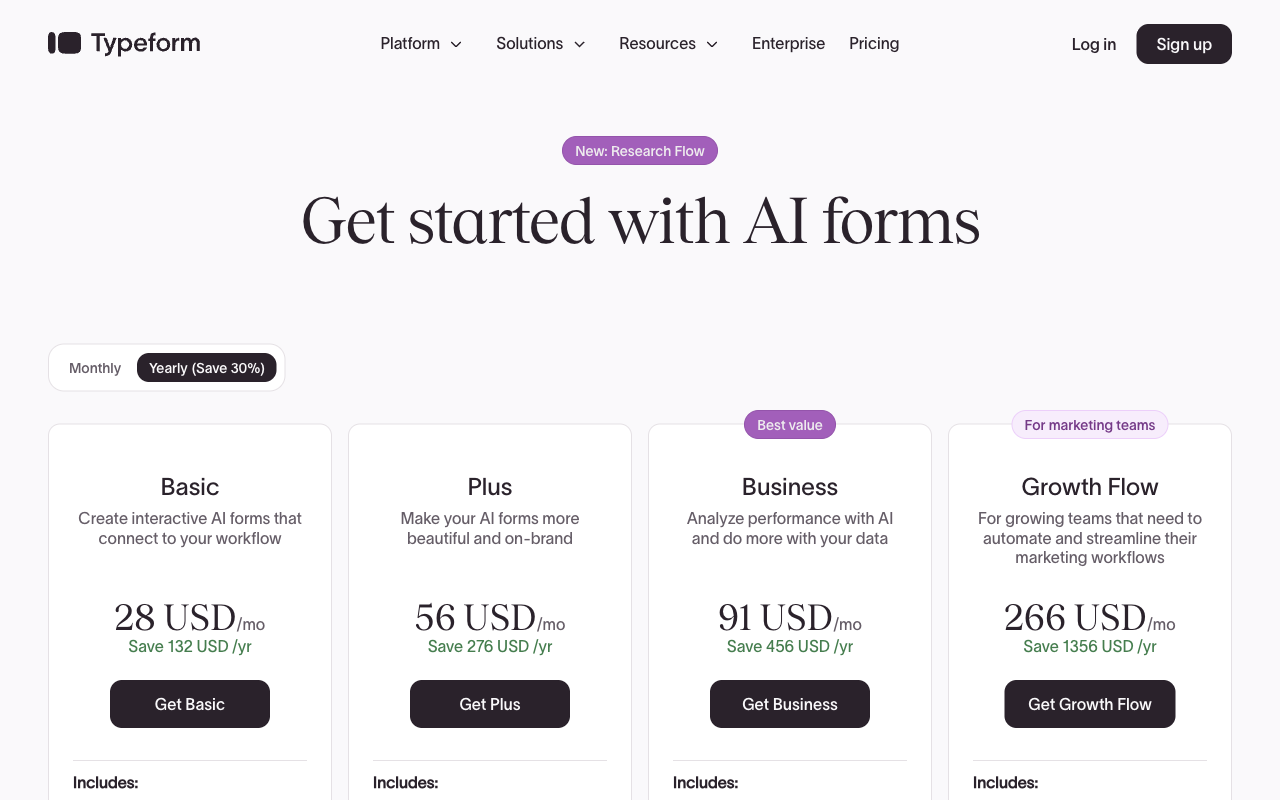
| Tier | Paperform | Typeform | What actually differs |
|---|---|---|---|
| Entry | Pro: $59/mo, $49 annually. Unlimited submissions and seats | Basic: $39/mo, $28 annually. 100 responses, 1 seat | Typeform is $21 cheaper until the 101st response arrives |
| Mid | Pro, unchanged | Plus: $79/mo, $56 annually. 1,000 responses, 3 seats | Typeform now costs more for a capped plan |
| Business | Business: $149/mo, $124 annually. 10 workspaces, SSO, Business API, 100 signed docs/mo | Business: $129/mo, $91 annually. 10,000 responses, 5 seats | Paperform costs more and removes the ceilings; Typeform keeps them |
| Above that | Enterprise: custom quote | Growth Flow: $379/mo, $266 annually. Still 10,000 responses and 5 seats | Growth Flow buys enrichment and automation, not headroom |
Paperform
Typeform
| Product | Plan | Monthly Price | Annual Price (per month) | Free Plan | Free Trial | Limits |
|---|---|---|---|---|---|---|
| Paperform | Free | Free | Free | Yes | 7 days | forms: Unlimited, submissions: 30/month, storage: Unlimited, users: Unlimited, file uploads: 100 MB |
| Paperform | Pro | $59/mo | $49/mo billed annually | forms: Unlimited, submissions: Unlimited, storage: Unlimited, users: Unlimited, file uploads: 10 GB | ||
| Paperform | Business | $149/mo | $124/mo billed annually | forms: Unlimited, submissions: Unlimited, storage: Unlimited, users: Unlimited, file uploads: 100 GB | ||
| Typeform | Free | Free | Free | Yes | No | forms: 10, submissions: 10/month, users: 1 |
| Typeform | Basic | $39/mo | $28/mo billed annually | forms: Unlimited, submissions: 100/month, users: 1 | ||
| Typeform | Plus | $79/mo | $56/mo billed annually | forms: Unlimited, submissions: 1,000/month, users: 3 | ||
| Typeform | Business | $129/mo | $91/mo billed annually | forms: Unlimited, submissions: 10,000/month, users: 5 | ||
| Typeform | Growth Flow | $379/mo | $266/mo billed annually | forms: Unlimited, submissions: 10,000/month, users: 5 | ||
| Typeform | Talent | $169/mo | $119/mo billed annually | forms: Unlimited, users: HR teams |
One more line item worth knowing: Typeform's contact automations are an add-on at $25/month for 2,400 actions or $75/month for 12,000, and they are unavailable on Free and Basic. Paperform's eSignature and workflow products are included rather than bolted on. Paperform's 7-day trial needs no credit card; Typeform's Growth Flow trial runs 14 days and does require one.
What Users Say
Typeform rates 4.5 on G2 across roughly 1,002 reviews and 4.7 on Capterra and GetApp across 979. Praise concentrates on the interface, the templates and completion rates. Criticism concentrates on cost: 46% of reviewers mention pricing negatively, and Trustpilot sits at 2.6 across 775 reviews, where the recurring themes are plan limits and paywalls encountered mid-use rather than defects in the product. Paperform's footprint is far smaller at 78 G2 reviews and 104 on Capterra, with ratings of 4.8 and 4.8, and 4.8 across 212 Trustpilot reviews. Smaller sample, consistently higher scores, and a complaint profile that does not centre on billing.
The Verdict
Choose Typeform when the constraint is compliance or when the use case is genuinely a short survey. HIPAA with a BAA, ISO 27001, ISO 42001 and EU data residency are real advantages that Paperform cannot answer today. A marketing team running a handful of low-volume surveys from one seat will also spend less on Basic, and that is a sensible decision.
Choose Paperform when the form is part of a process rather than the whole of it. The moment submissions climb, a third person needs edit access, money moves through anything that is not Stripe, or a signature and an approval chain follow the submission, Typeform's plan ladder starts charging you for outcomes while Paperform's price stays where it is. That is the argument in one sentence: a metered, forms-only product is the wrong shape for an operator running real multi-step work with a team.
If you want a wider field before deciding, see our full list of Typeform alternatives or the overall form builder ranking. Teams weighing Typeform against a database-backed option should read Airtable Forms vs Typeform.
Frequently Asked Questions
What happens to my Typeform bill if my form gets more responses than I expected?
You change plans. Typeform meters responses on every tier: 100/month on Basic ($39, or $28 billed annually), 1,000/month on Plus ($79/$56), and 10,000/month on Business ($129/$91). Crossing a threshold moves you up the ladder even though the software has not changed. Growth Flow at $379/$266 does not raise the ceiling either; it still caps at 10,000 responses. Paperform Pro is $59/month, or $49 billed annually, with unlimited submissions within fair use, so a good campaign month costs the same as a quiet one.
Can Paperform match Typeform's one-question-at-a-time experience?
Yes. Paperform's Guided Mode presents one question per screen with transitions between them. The difference is that Paperform also builds a single scrollable page, and you choose per form rather than per account. Typeform added multi-question pages to its builder in July 2026, which softens the constraint, but respondents still move through a sequence of screens and cannot see a whole form at once. For a 40-field intake form or a procurement questionnaire, that format works against you.
Is Typeform HIPAA compliant, and is Paperform?
Typeform is HIPAA compliant and signs Business Associate Agreements. Paperform is not HIPAA compliant and does not sign BAAs. Typeform also holds ISO 27001, ISO 27017, ISO 27018 and ISO/IEC 42001, certified in June 2026. Paperform holds SOC 2 Type II and is GDPR and CCPA compliant, but is not ISO 27001 certified. If protected health information passes through your forms, Typeform is the correct answer between these two, and we would rather say so than lose your trust on the rest of the page.
Why is payment collection so limited on Typeform?
Typeform supports Stripe and nothing else, and payments start on the Basic plan. Native recurring payments through Stripe arrived in August 2026. There is no product catalogue, inventory, coupon engine, tax calculation or quoting, so the commerce logic has to live in another system and someone reconciles the two. Paperform connects five gateways (Stripe, PayPal, Square, Braintree and Google Pay), takes no transaction fee of its own, and computes pricing, discounts and tax inside the form with Excel-style calculations.
How many people can edit forms on each plan?
Typeform meters seats alongside responses: 1 user on Basic, 3 on Plus, 5 on Business, and 5 on Growth Flow despite the $266/month annual price. A sixth editor means Enterprise and a sales call. Paperform includes unlimited seats on every paid plan, so the recruiter, the events coordinator and the ops lead each build their own forms from the 30,000+ template library without anyone filing a request.
Do I need a separate eSignature or automation tool alongside Typeform?
Usually, yes. Typeform's Signature question type captures a scribble inside a form; it is not a document signing product with bulk sending, signer verification and an audit trail. Workflow automation sits in Growth Flow at $379/month ($266 annually), and contact automations are a further add-on at $25/month for 2,400 actions or $75/month for 12,000. A single Paperform subscription covers all three products: Paperform for forms, Papersign for eSignatures (25 signed documents/month on Pro, 100 on Business) and Stepper for workflow automation, with 20,000 automation credits on Pro.
Sources & References
- Typeform Pricing — Typeform, 2026
- Typeform Achieves ISO/IEC 42001 Certification for Responsible AI Management — Typeform, June 2026
- Typeform Review 2026: We Tested Everything (Features, Pricing, Integrations & Real Results) — Hackceleration, 2026
- Typeform 2026 Winter Release: Workflows, AI, Payments — Create With, 2026
- Typeform Reviews — Trustpilot, September 2026
- Best Online Form Builder to Use in 2026: Top 20 Tools — EmailToolTester, 2026
Updates
We re-audit the form builders we compare on a regular cadence and log every change here — a public record of what changed and when.
- Updated September 22, 2026 — Full rewrite against the September 2026 data re-audit. Paperform pricing updated to the current Free/Pro/Business/Enterprise lineup (Pro $59/$49, Business $149/$124, unlimited submissions and seats); the retired mid-tier plan removed. Typeform pricing updated to Basic $39/$28, Plus $79/$56, Business $129/$91 and Growth Flow $379/$266, with the Contacts & Automations add-ons noted. Added Typeform's ISO/IEC 42001 certification, HIPAA/BAA advantage and Trustpilot 2.6/775 rating, and corrected the Paperform integration count to 4,000+.
Last updated September 22, 2026
Ready to try Paperform?
Create beautiful forms, payment pages, and workflows — no code required.