 By Dean McPherson, Co-founder & CTO, Paperform · Updated
Best Jotform alternatives for 2026: we built the same 5 forms in Jotform and Paperform
Leave Jotform for Paperform if your forms now carry logic, payments, bookings and signatures and you want them in one account with unlimited seats (within fair use). If free is all you need, Google Forms will do the job. Need HIPAA or 30+ payment options? Stay on Jotform: it wins on both.
We make Paperform, so read this page with that in mind. To keep ourselves honest, the Paperform team built the same five forms in Jotform and in Paperform on 16 November 2026 and wrote down what happened, including where Jotform came out ahead. The other five alternatives weren't part of that hands-on test; their sections use our published competitor data and name the date it was checked.
Five forms, five verdicts
Here's the short version. The detail, with screenshots from both builders, is in how we tested.
| Use case | Verdict | Why |
|---|---|---|
| 1. Lead form with conditional logic | Even | Paperform's And/Or toggle needs one rule; Jotform's AI wrote a condition from plain English |
| 2. Order form with payment | Even | Jotform takes 34 payment options; Paperform's product catalogue (stock, min/max quantities) took fewer steps to set up |
| 3. Booking form | Jotform win | Outlook and Calendly sync, group slots and reminders |
| 4. Client intake with signature | Even | Both have an in-form signature pad and send separate signed documents (Jotform Sign, Papersign) |
| 5. Quote calculator | Paperform win | Excel-style formulas and an AI assistant, against a one-digit-per-token keypad |
If you only need free
If cost is the only reason you're leaving Jotform, use Google Forms. It's free with unlimited forms and up to 500,000 responses per form, and it's the right tool for internal surveys that end in a spreadsheet, though Forms itself takes no payments, and signatures and bookings live in other Google apps. If your forms need to do more than collect answers, the rest of this page is about which tool does that job better.
Paperform's free plan handles real work: unlimited forms, unlimited seats within fair use, conditional logic, bookings, and payments through Stripe, PayPal, Square, Braintree and Google Pay with no Paperform transaction fees. It allows 30 submissions a month and doesn't count payments or bookings separately, so all 30 can be paid orders or appointments. Jotform's free Starter plan allows 100 submissions a month, of which 10 can be payments, across 5 forms (Jotform pricing page, checked 16 Nov 2026).
How we tested
On 16 November 2026 the Paperform team built five forms that cover what most people use Jotform for. We built each one twice, once in each tool, to the same brief:
- A lead enquiry form with conditional logic: show a website URL question for Web design or SEO, a budget question for Branding, and send the notification email to a different team by service.
- An order form with three products, quantities and card payment.
- A booking form with 30-minute appointments on weekdays.
- A client intake form with contact details, a file upload and an e-signature.
- A cleaning quote calculator: $40 per bedroom, $30 per bathroom, $80 for a deep clean, plus 10% tax.
In Jotform we worked in guest mode, which is what a new user sees before signing up, and read the free Starter plan's published limits on Jotform's pricing page the same day. Guest mode allowed five forms, the same as Starter. In Paperform we used the Classic editor, then checked each feature against Paperform's pricing page to see which plan it needs. Three of the five briefs, as built, need Paperform Pro: the order form, the quote calculator and the email routing in the lead form.
Jotform needs an account before you can connect Stripe, so its order form stopped with no gateway connected. Paperform's ran to its order summary on a Stripe test-mode account. Neither took a real payment. Every Jotform detail in this section was seen in its builder or live forms on 16 November 2026; every Jotform limit comes from its pricing page that day.
The first thing a new Jotform user will meet is the sign-up prompts. A "Sign Up Now" modal opened each time we started a new form, and a full-screen "Please sign up to start collecting data" overlay covered the builder twice while we were editing (Jotform builder, guest mode, 16 Nov 2026). Expect it.
1. Lead enquiry form with conditional logic
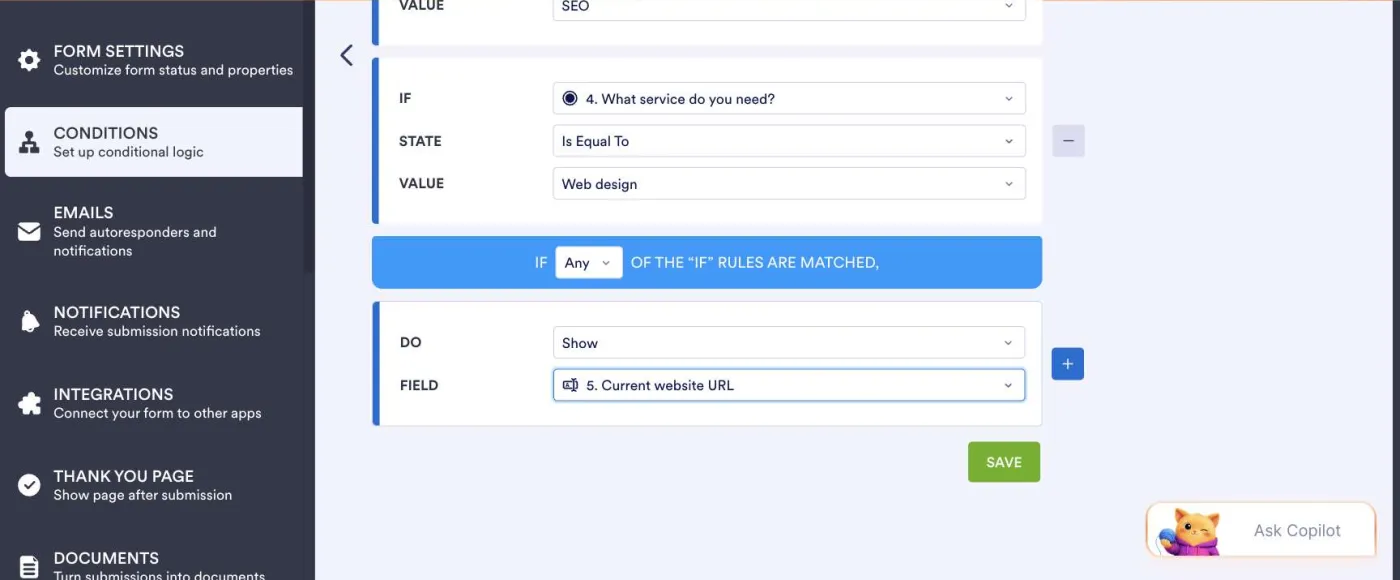
Jotform. Jotform's logic is mature, and its Conditions menu covers everything from page skips to changing an email's recipient. The gap we hit was the operators. A single-choice question offers Is Equal To, Is Not Equal To, Is Empty and Is Filled, with no "is one of", so showing the URL question for Web design or SEO took two IF rules plus an "Any of the IF rules are matched" switch.
Credit where it's due: Jotform's AI box wrote the Branding rule correctly from a plain-English sentence on the first try. A Change Email Recipient condition then sets Branding enquiries to go to a separate address. Once a notification has a recipient condition, though, Jotform warns that emails won't send unless their conditions are met, so keeping a default recipient for everything else takes extra rules (Jotform builder, 16 Nov 2026).
Paperform. Paperform's visibility logic reads like a sentence: show this question if service is Web design or SEO. The Configure Logic dialog has an explicit And/Or toggle, so that's one rule with two conditions. You can nest condition groups, and email routing uses the same builder: we added a custom email to the web team with the same condition.
Routing works differently. Paperform sends one custom email per destination, each with its own logic, where Jotform changes the recipient on a single notification. Custom emails are on Pro.
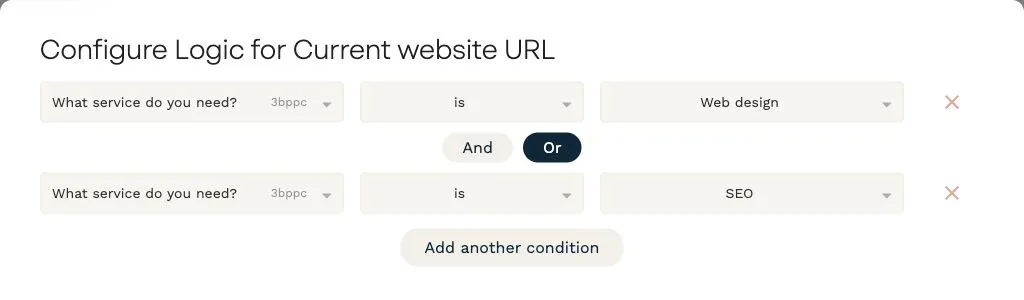
Verdict: even. Paperform's And/Or toggle turned the two-answer rule into one rule instead of two plus a switch. Jotform's AI condition writer built a rule from plain English on the first try, and its routing changes the recipient on one notification.
2. Order form with payment
Jotform. Jotform's Payments tab listed 34 options, from Stripe, PayPal and Square to Mollie, GoCardless, Afterpay and Purchase Order. Its product list has tabs for coupons, shipping, tax and invoices.
Setting up products took longer. Typing a price into the inline product row didn't stick for us, so each price went through the inline row, a side panel and an unsaved-changes prompt. Products added from the panel had no quantity selector until we added one to each (Jotform builder, 16 Nov 2026). The live form totalled correctly.
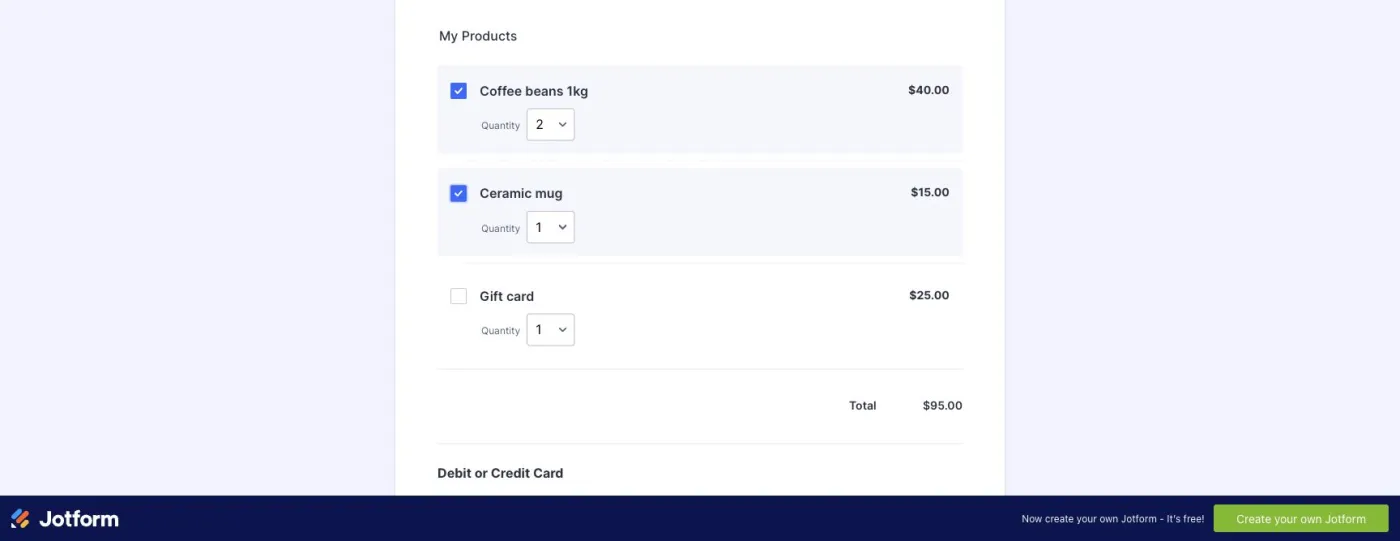
Paperform. Paperform's Products field is a catalogue. Each product has a price, SKU, stock level, minimum and maximum quantity per submission, and images, and the product list imports and exports. On the live form, picking a product shows a quantity box, the submit button carries the running total, and respondents see an itemised order summary before checkout. Paperform charges no transaction fees.
One drawback: products don't show on the editor canvas, only in the Manage Products dialog and on the live form. The Products field is on Pro; on Free you'd build the order with Price fields, which take the same payment methods.
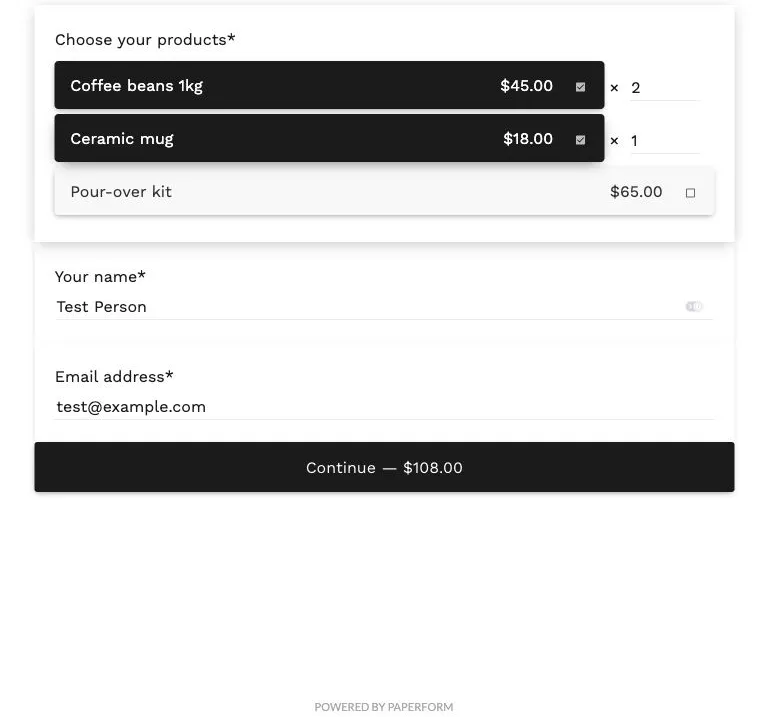
Verdict: even. Jotform takes far more payment methods (34 options in its builder, against Paperform's Stripe, PayPal, Square, Braintree and Google Pay) and its product list has a shipping tab. Paperform's catalogue took fewer steps to set up, with stock, minimum and maximum quantities, SKUs and images per product, an itemised summary before checkout, and no Paperform transaction fees. Both handle tax and coupons.
3. Booking form
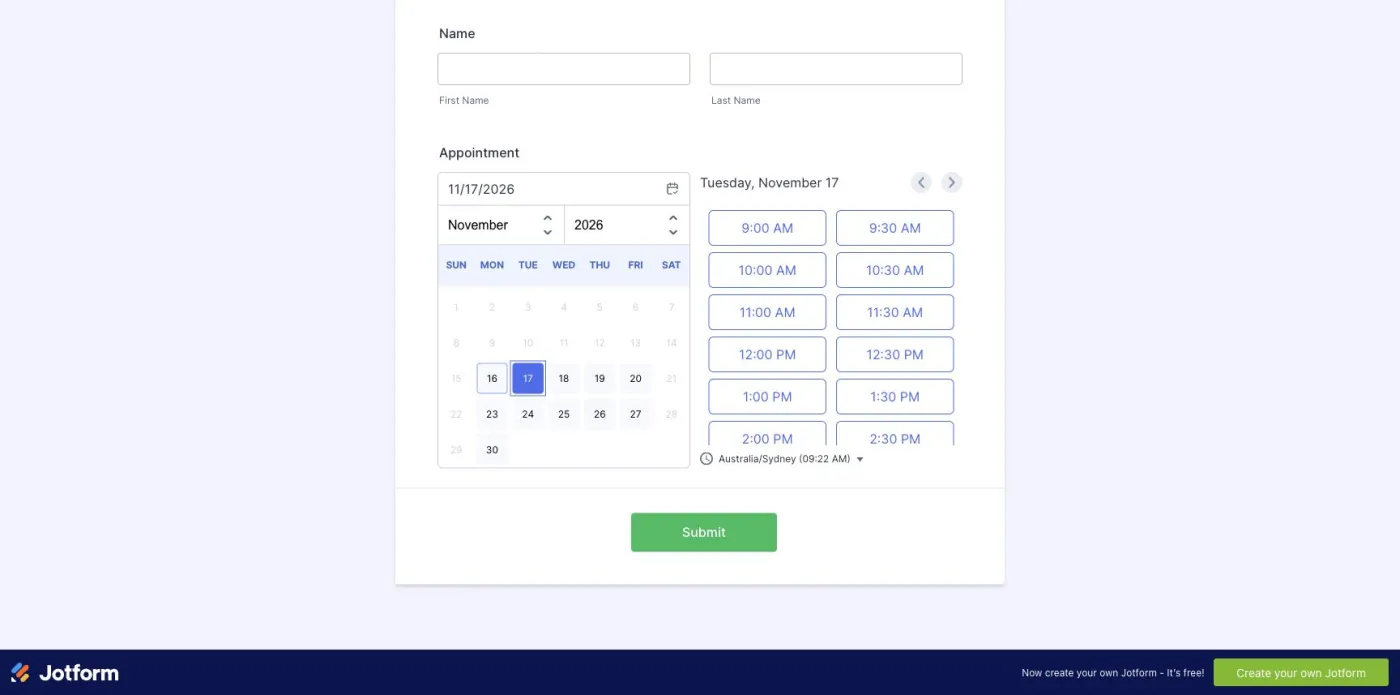
Jotform. Jotform's Appointment field is a full scheduler inside a form. It syncs with Google Calendar, Outlook Calendar and Calendly, handles group bookings with a cap on attendees per slot, sends reminders, lets attendees cancel or reschedule from their confirmation email, and shows availability in the respondent's time zone.
One gotcha: a lunchtime block from 12:00 to 14:00 is on by default, so a new user loses two hours of slots unless they spot it and switch it off (Jotform builder, 16 Nov 2026). The settings are also spread across four tabs.
Paperform. Paperform's Appointment question is on every plan. Availability already defaulted to Monday to Friday, 9am to 5pm, so 30-minute slots only needed the interval and length set. Respondents can change time zone. You can also set notice, a daily cap, buffers and blockout dates.
The limits we found: calendar sync offered Google Calendar only, and double-booking protection depends on connecting one. Without a calendar, the Availability tab tells you to connect one if you want to prevent double bookings.
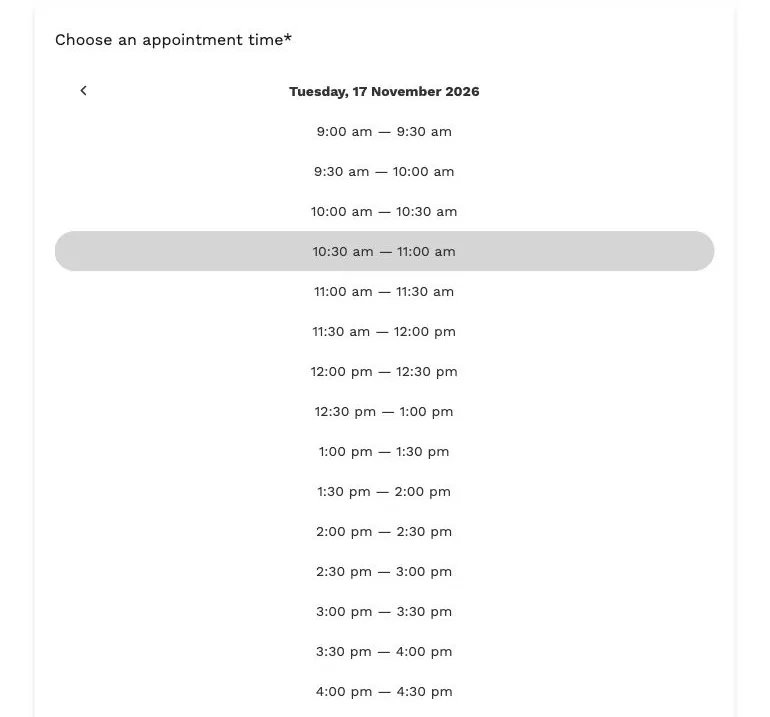
Verdict: Jotform win. Outlook and Calendly sync, group slots and reminders make Jotform's the deeper scheduler. Paperform's defaults needed fewer changes, and the booking sits in the same form as its logic and payments.
4. Client intake with file upload and signature
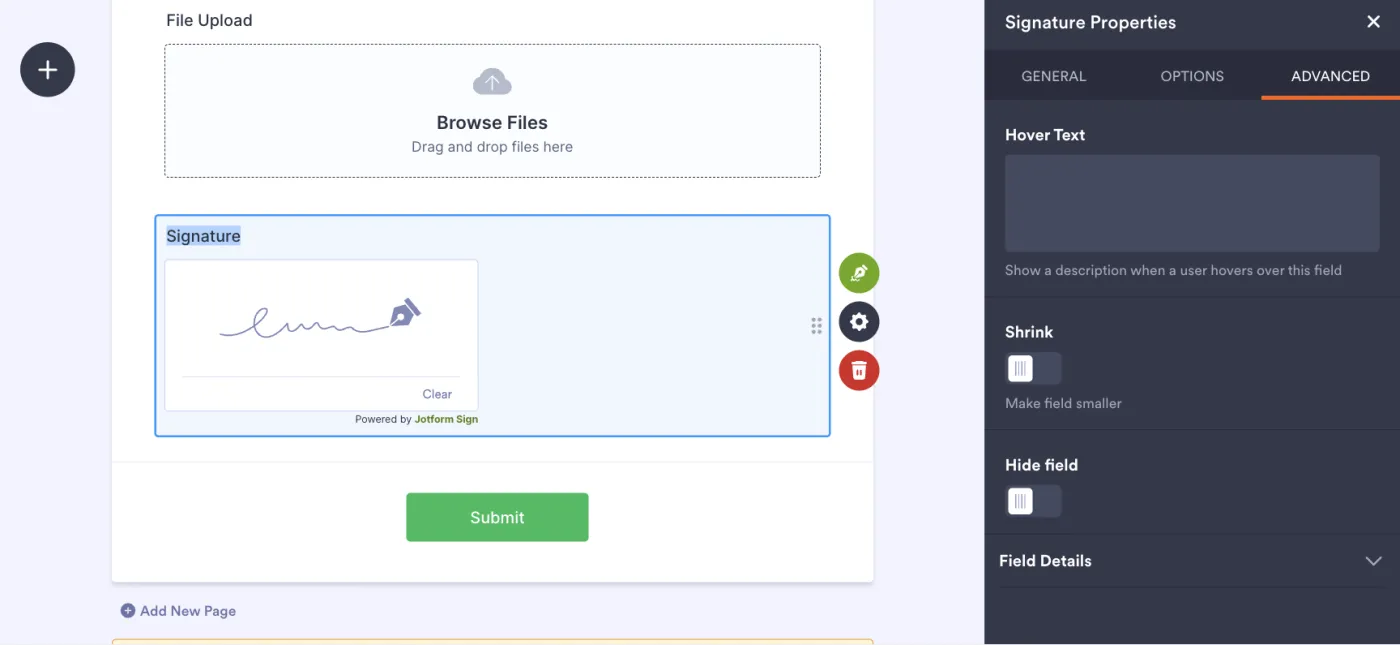
Jotform. Full Name, Email, Phone, File Upload and Signature each went in with one click, and the upload field has limits for file size, file type and number of files.
Turning a signature into a signed PDF with an audit trail, consent and a locked submission means switching on Jotform Sign automation. It lives under Settings and is branded as its own product (Jotform builder, 16 Nov 2026). Signed documents are metered by plan: 10 a month on Starter, 100 on Bronze, 250 on Silver and 1,000 on Gold (Jotform pricing page, 16 Nov 2026). With the automation on, the submit button changed to Continue. In guest mode nothing visible happened when we clicked it, so we can't say what the signer sees next.
Paperform. Paperform's Signature field is a form field, and it's unlimited on every plan. Clients draw their signature, confirm it, and it lands in the submission next to their file upload. When you need a separate signed document, the Papersign tab under After Submission sends one automatically from new submissions, with its own conditional logic.
Papersign documents are counted: 3 a month on Free, 25 on Pro, 100 on Business and unlimited on Enterprise. The file upload question had options for multiple files and allowed file extensions; we didn't see a maximum file size setting on it.
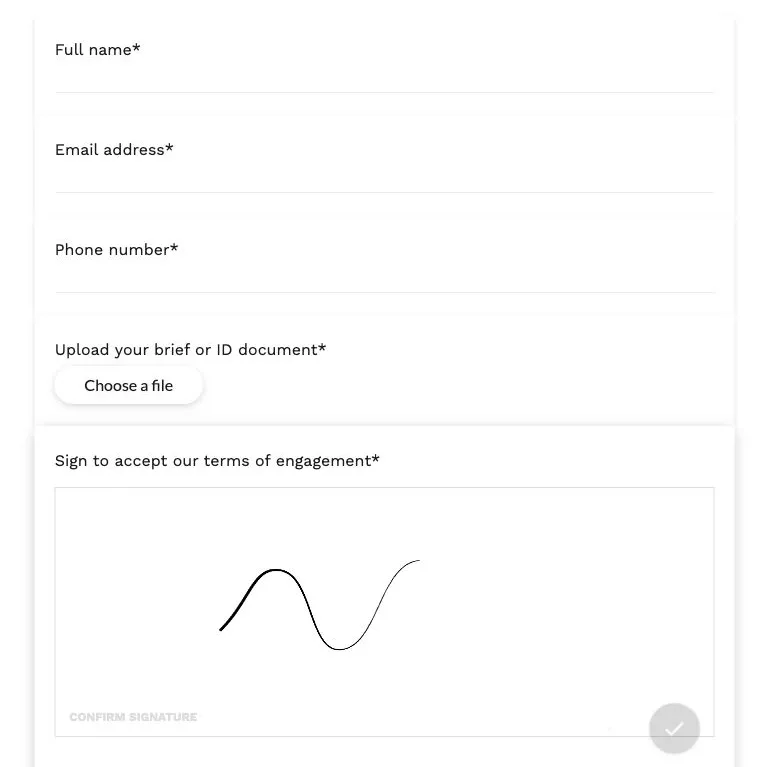
Verdict: even. Both put a signature pad in the form, and both can send a separate signed document: Jotform through its Jotform Sign automation, with an audit trail, and Paperform through Papersign, with an activity trail and a signed document certificate.
5. Quote calculator
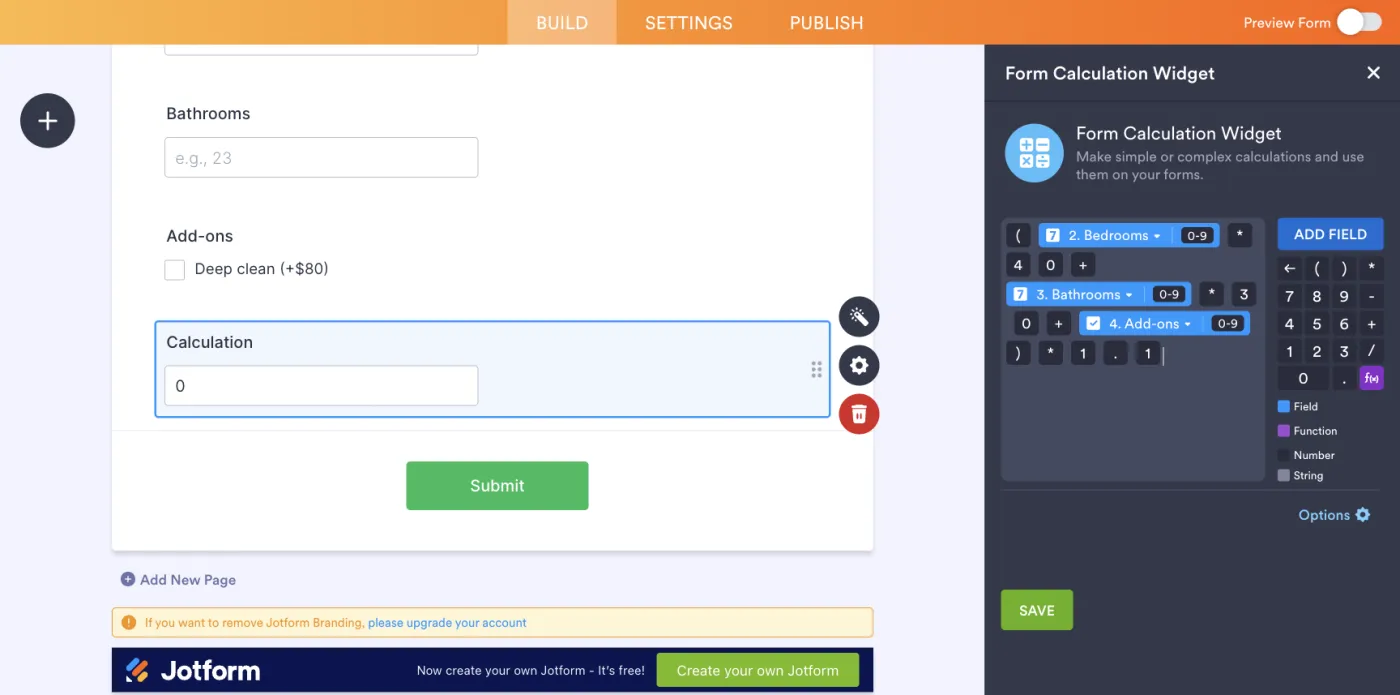
Jotform. Jotform's calculator is the Form Calculation widget, which you find by searching the Widgets tab. You build the formula on an on-screen keypad, and each digit becomes its own token, so 40 is two chips. Add-on prices are hidden calculation values set on each option.
It got the maths right. Three bedrooms, two bathrooms and a deep clean gave 286, updating live, and we piped the total into the thank-you page. Two defaults to watch: respondents can edit the result field unless you tick "Result field is read only", and the total shows as 286 rather than $286.00. All of this works on Jotform's free plan (Jotform builder, 16 Nov 2026).
Paperform. Paperform's Calculation field opens an editor with Excel-style syntax: variables, comments, and functions such as IF and ROUND. We gave its AI assistant one sentence ("bedrooms x $40 plus bathrooms x $30, plus $80 if they chose Yes to deep clean, then add 10% tax"), and it wrote a commented formula that worked first time. The live total was 286, and the success page read "Your cleaning quote is $286".
Our gripes: a new calculation field is hidden by default, so you have to switch it on to show a live total, and it also displays as a bare 286. The Calculation field and the AI assistant need Pro.
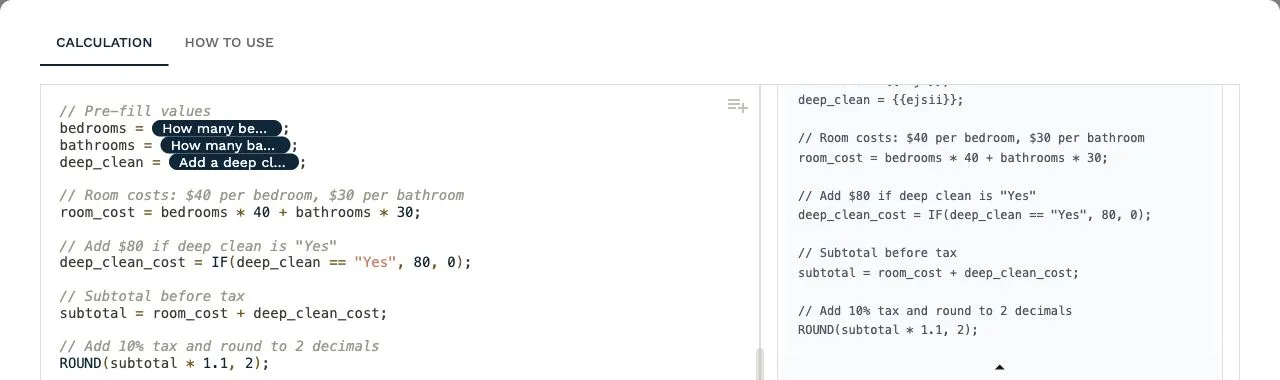
Verdict: Paperform win. Writing the formula as text, or describing it to the AI assistant, beat building it one digit at a time. Paperform's calculations are on Pro.
What the test doesn't cover
Five forms in one day is a snapshot. We didn't test integrations, reporting, mobile apps or performance at volume, or a paid Jotform plan. If one of those decides it for you, build your hardest form in both and see which you'd rather maintain.
The best Jotform alternatives, ranked
We built forms only in Jotform and Paperform. The other five sections use our competitor data, with the date it was checked. The order reflects who most often has a good reason to leave Jotform.
 #1 Paperform: best when your forms start a process
Paperform makes sense when a form is the first step of something longer: a booking that takes a payment, an intake that needs a signed engagement letter, an enquiry that has to reach the right person and then your CRM. Every plan, including Free, includes Paperform for forms, Papersign for e-signatures and Stepper for workflow automation, under one account and one subscription. Seats are unlimited on every plan within fair use, and Pro adds unlimited submissions within fair use. There are 30,000+ templates and 9,800+ integrations, supported directly and through Stepper, Zapier and Make. Paperform is SOC 2 Type II, GDPR and CCPA compliant, and has spent ten years building forms: bootstrapped, profitable and still founder-run.
Paperform also has gaps worth knowing before you switch. Payments run through Stripe, PayPal, Square, Braintree and Google Pay, against Jotform's 34 options. Bookings sync with Google Calendar only. Calculations, products, coupons, subscriptions and custom emails are on Pro. EU and AU data residency is Enterprise only. And on HIPAA, in our own words:
Note that Paperform is not HIPAA compliant and doesn't sign Business Associate Agreements today. HIPAA support is planned for the first half of 2027. If you're handling protected health information, talk to us at support@paperform.co before you commit.
- Best for: teams whose forms lead into payments, signatures and approvals, with several people who need access.
- Where it beats Jotform: one-rule And/Or logic, an Excel-style calculation editor with an AI assistant, a product catalogue that took fewer steps to set up in our test, and seats for the whole team without an Enterprise contract.
- Where it doesn't: fewer payment gateways, Google-only calendar sync, 30 submissions a month on Free, no HIPAA today, and options and products that don't show on the editor canvas.
- Pricing (Paperform pricing page, checked 16 Nov 2026): Free; Pro $49/month billed annually ($59 month-to-month); Business $124/month billed annually ($149 month-to-month); Enterprise custom. Paying annually saves roughly 17%. The free plan needs no credit card.
For a feature-by-feature head-to-head, see Paperform vs Jotform.
 #2 Tally: best for simple public forms
Tally's free plan has unlimited forms and submissions within a fair use policy, conditional logic, a formula editor, Stripe payments, e-signatures and file uploads up to 10 MB each. If your only complaint about Jotform is its form and submission limits, this is the cleanest swap.
- Best for: teams whose forms end at submit, who need no security questionnaire signed off.
- Where it beats Jotform: no form or submission caps on any plan (within fair use), and unlimited team members on Pro and Business.
- Where it doesn't: Stripe is the only payment option, there's no appointment field, no SOC 2, SSO or HIPAA, no roles beyond equal team members, and no approval or workflow steps after submit.
- Pricing (Tally pricing page, checked 17 Nov 2026): Free; Pro $24/month billed annually ($29 monthly); Business $74/month billed annually ($89 monthly). No enterprise plan.
Our Tally alternatives page covers where it runs out.
 #3 Google Forms: best for internal forms
If your Jotform account mostly collects internal requests and feeds a spreadsheet, Google Forms does that for nothing. Forms are unlimited, each takes up to 500,000 responses, several people can edit a form at once, and responses land in Google Sheets.
- Best for: internal requests, quizzes and quick surveys inside an organisation on Google Workspace.
- Where it beats Jotform: free, with no form cap and up to 500,000 responses per form.
- Where it doesn't: no payments of any kind, logic limited to jumping between sections, no signature or appointment field, Google branding that stays on, and integrations that mostly stay inside Google's own apps.
- Pricing (Google Workspace pricing page, checked 17 Nov 2026): free with a Google account. Workspace Business Starter is $7 per user per month on an annual plan ($8.40 flexible), Standard $14 and Plus $22.
See how it stacks up against Jotform and Typeform in Google Forms vs Jotform vs Typeform.
 #4 Cognito Forms: best for line-item quotes and repeating sections
Cognito Forms has been building around calculations since 2013. Repeating sections let a respondent add as many line items as they need, and lookup fields pull data from other forms, which suits quotes and order forms where the number of rows changes.
- Best for: priced quotes and order forms with a variable number of rows.
- Where it beats Jotform: five users on Team and ten on Business where Jotform's self-serve plans have one, and a lower entry price.
- Where it doesn't: entries, users, storage and guests are each capped, extra users cost $5 each a month, HIPAA is Enterprise only, there are no recurring payments, and design control is limited.
- Pricing (Cognito Forms pricing page, checked 17 Nov 2026): Individual free (100 entries a month); Pro $19/month billed annually ($24 monthly) for 2,000 entries and 1 user; Team $49 ($62) for 10,000 entries and 5 users; Business $99 ($129) for 25,000 entries and 10 users; Enterprise $149 ($199), which includes HIPAA.
More options in our Cognito Forms alternatives guide.
 #5 Typeform: best for one-question-at-a-time forms
Typeform's one-question-at-a-time format is still the reference for conversational forms, and it uses AI for building forms, adaptive follow-up questions and response analysis. Watch the response caps, which are tighter than Jotform's at similar prices.
- Best for: marketing teams running low-volume lead and feedback forms.
- Where it beats Jotform: more seats on its middle plans (three on Plus, five on Business).
- Where it doesn't: responses are capped on every plan (100 a month on Basic), payments run through Stripe or PayPal only, its native Google Calendar scheduler starts on Business, HIPAA is Enterprise only, and workflow automation is included only on Growth Flow ($266/month billed annually) or bought as an add-on from $25 a month.
- Pricing (Typeform pricing page, checked 17 Nov 2026): Basic $28/month billed annually ($39 monthly); Plus $56 ($79); Business $91 ($129).
See our Typeform alternatives for the wider picture.
 #6 Formstack: best for teams that run on Salesforce
Formstack, now part of Intellistack, builds around Salesforce, with native Salesforce forms, document generation and e-signature products.
- Best for: organisations whose operation runs through Salesforce.
- Where it beats Jotform: deeper Salesforce products.
- Where it doesn't: no free plan, an $83/month entry plan that buys one builder user, 25 forms and 1,000 submissions per form, HIPAA only as a paid add-on below its Salesforce and Enterprise plans, and three payment gateways (Stripe, PayPal, Authorize.net).
- Pricing (Formstack pricing page, checked 17 Nov 2026): no free plan, 14-day free trial; Forms $83/month billed annually ($99 monthly); Suite $250 ($299); Salesforce and Enterprise plans on quote.
Compare it with others in our Formstack alternatives page.
Full feature comparison
Every feature across Jotform and the six alternatives, grouped by category, from our competitor data. The ranked sections carry the date we checked each figure; the tables use our competitor data, last checked between 22 September and 16 November 2026.
| Feature | Jotform | Paperform | Tally | Google Forms | Typeform | Cognito Forms | Formstack |
|---|---|---|---|---|---|---|---|
| Form Building | |||||||
| AI form builder . Describe the form you need in plain language and the tool drafts the questions for you. | Yes starter | Yes | Yes | Yes Business Standard | Yes | Yes | Yes forms |
| Templates . The number of ready-made form templates in the tool’s template gallery. | 20,000+ (starter) | 30,000+ | 100+ | 20+ | 3,000+ | Yes | Yes forms |
| Field types . How many kinds of question or input field the form builder offers, such as text, dropdown, date, file upload and signature. | 30+ (starter) | 26+ | 20+ | 12 | 20+ | 20+ | 20+ (forms) |
| Conditional logic . Show, hide or skip questions and pages based on how someone has answered earlier questions. | Yes starter | Yes | Yes | Yes | Yes | Yes | Yes forms |
| Calculations . Compute totals, scores, prices or dates from answers while the form is being filled in. | Yes starter | Yes pro | Yes | No | Yes | Yes | Yes forms |
| Multi-page forms . Split a long form across several pages that respondents move through in order. | Yes starter | Yes | Yes | Yes | Yes | Yes | Yes forms |
| One question at a time . A conversational layout that shows a single question per screen, popular for surveys on mobile. | Yes starter | Yes | Yes | Not recorded | Yes | Yes | Yes forms |
| Answer piping . Insert a respondent’s earlier answer, such as their name, into later questions or text on the form. | Yes starter | Yes | Yes | Not recorded | Yes | Yes | Yes forms |
| Pre-filling and hidden fields . Fill in answers ahead of time from a link or existing data, and pass along values the respondent never sees. | Yes starter | Yes | Yes | Yes | Yes | Yes | Yes forms |
| File uploads . Let respondents attach files such as documents and photos to their submission. | Yes starter | Yes | Yes | Yes | Yes basic | Yes | Yes forms |
| E-signatures . Collect a signature, either with a signature field on the form or by sending a document out to be signed. | Yes starter | Yes | Yes | Yes Business Standard | Yes growth flow | Yes pro | Yes forms |
| Appointment booking . Let respondents pick and book a time slot directly in the form, with availability managed by the tool. | Yes starter | Yes | No | Yes | Yes business | Yes team | Not recorded |
| Quiz scoring . Give answers point values so the form can score quizzes and assessments automatically. | Yes starter | Yes pro | Yes | Yes | Yes | Yes | Yes forms |
| Save and resume . Respondents can leave a form part-way through and come back later to finish it. | Yes starter | Yes | Yes | Yes | Yes | Yes pro | Yes forms |
| Close forms by date or response limit . Stop accepting submissions automatically on a set date or once a set number of responses has arrived. | Yes starter | Yes pro | Yes | Yes | Yes business | Yes | Yes forms |
| Payments | |||||||
| Payment gateways . The number of payment processors a form can take payments through. Where a vendor’s full count isn’t recorded, the cell lists the gateways we confirmed. | 34 (starter) options in its builder, incl. Stripe, PayPal, Square, Braintree | 5 Stripe, PayPal, Square, Braintree, Google Pay | 1 Stripe | No | 2 (basic) Stripe, PayPal | 5 Cognito Pay, Stripe, PayPal, Square, Google Pay | 3 (forms) Stripe, Authorize.net, PayPal |
| Subscriptions and recurring payments . Charge respondents on a repeating schedule, such as monthly or annually, from a form. | Yes starter | Yes pro | No | No | Yes basic | No | Yes forms |
| Product sales . Sell products from a form, with product listings, quantities and an order total. | Yes starter | Yes pro | Yes | No | Yes basic | Yes | Yes forms |
| Conditional pricing . Change the price or add fees automatically based on the answers given in the form. | Yes starter | Yes pro | Yes | No | Yes basic | Yes | Yes forms |
| Coupons and discounts . Offer discount codes that respondents can apply to a payment or subscription on the form. | Yes starter | Yes pro | Yes | No | Yes basic | Yes | Yes forms |
| Tax calculations . Add sales tax to payments on the form automatically. | Yes starter | Yes | Yes | No | Not recorded | Yes | Not recorded |
| Refunds . Refund a payment from inside the form tool rather than going to the payment processor. | No | Yes | Not recorded | No | No | Yes | Not recorded |
| Design & Customization | |||||||
| Custom themes . Set your own logo, colours and fonts on forms and save them as reusable themes. | Yes starter | Yes pro | Yes | Yes | Yes basic | Yes pro | Yes forms |
| Custom CSS . Add your own CSS (and in some tools HTML) for styling beyond the built-in theme options. | Yes starter | Yes pro | Yes pro | No | No | Yes pro | Yes forms |
| Remove vendor branding . Remove the form builder’s own logo or badge so forms carry only your branding. | Yes bronze | Yes pro | Yes pro | No | Yes plus | Yes pro | Yes forms |
| Custom domain . Host forms on your own domain, such as forms.yourcompany.com, instead of the vendor’s. | Yes enterprise | Yes business | Yes pro | No | Yes enterprise | No | Yes |
| Custom form URL . Choose a readable link for a form instead of a random string. | Yes starter | Yes pro | Yes pro | No | Yes plus | Yes | Yes forms |
| Emails from your own domain . Send notification and confirmation emails from your own email domain instead of the vendor’s. | Yes starter | Yes business | Yes pro | Yes Business Starter | Yes plus | Yes team | Yes |
| Multi-language forms . Show a form’s questions, buttons and messages in languages other than English. | Yes starter | Yes | Yes | Not recorded | Yes business | Yes pro | Yes forms |
| Analytics | |||||||
| Response reports . Built-in summaries and charts of the answers a form has collected. | Yes starter | Yes | Yes | Yes | Yes | Yes | Yes forms |
| Form analytics (views and drop-off) . Track how many people view, start and finish a form, and where they abandon it. | Yes starter | Yes pro | Yes pro | No | Yes business | Not recorded | Yes forms |
| Partial submissions . See the answers people entered before leaving a form without submitting it. | No | Yes pro | Yes pro | No | Yes basic | Not recorded | No |
| Google Analytics and Meta Pixel . Connect a form to Google Analytics or the Meta (Facebook) Pixel to track visits and conversions. | Yes starter | Yes pro | Yes pro | Not recorded | Yes business | Yes pro | No |
| Custom tracking scripts . Add your own analytics or conversion-tracking scripts to a form. | No | Yes pro | Yes pro | Not recorded | Yes business | No | Not recorded |
| AI response insights . AI-written summaries and insights generated from the responses a form has collected. | Yes starter | Yes pro | No | Yes Business Standard | Yes growth flow | Not recorded | Not recorded |
| Collaboration | |||||||
| Team members . Invite colleagues into the same account to build forms and work with responses together. | Yes enterprise | Unlimited | Yes pro | Yes | Yes plus | Yes pro | Yes forms |
| Roles and permissions . Give team members different levels of access, such as admin, editor or viewer. | Yes enterprise | Yes business | No | Yes | Yes plus | Yes pro | Yes forms |
| Advanced permissions and admin controls . Fine-grained, organisation-wide controls over who can access what, usually on enterprise plans. | Yes enterprise | Yes enterprise | No | Yes Business Starter | Yes enterprise | Yes business | Yes enterprise |
| Workspaces . Separate spaces or folders for organising forms by team, client or project. | Yes enterprise | Yes | Yes pro | Yes | Yes | Yes pro | Yes forms |
| Security | |||||||
| Two-factor authentication . Users can protect their login with a second step, such as a code from an authenticator app. | Yes starter | Yes | Yes | Yes | Yes | Yes | Yes forms |
| Require 2FA for the whole team . Admins can make two-factor authentication mandatory for everyone in the account. | Yes enterprise | Yes business | No | Yes Business Starter | Not recorded | Yes enterprise | Yes forms |
| SSO (SAML) . Team members sign in through your company’s identity provider, such as Okta or Microsoft Entra ID, using SAML single sign-on. | Yes enterprise | Yes business | No | Yes Business Starter | Yes enterprise | Yes enterprise | Yes enterprise |
| HIPAA compliance . Whether the vendor supports collecting US protected health information under HIPAA, typically by signing a business associate agreement on an eligible plan. | Yes gold | No | No | Yes Business Starter | Yes enterprise | Yes enterprise | Yes enterprise |
| SOC 2 . Whether the vendor holds a SOC 2 audit report covering its security controls. | Yes enterprise | Yes | No | Yes Business Starter | Yes | Yes | Yes |
| GDPR . Whether the vendor states that it complies with the EU General Data Protection Regulation. | Yes starter | Yes | Yes | Yes Business Starter | Yes | Yes | Yes forms |
| Data residency . Choose the region, such as the EU, where your form data is stored. | Yes starter | Yes enterprise | No | Yes Business Standard | Yes enterprise | No | No |
| Store files in your own S3 bucket . Send uploaded files and exports to your own Amazon S3 storage instead of the vendor’s. | Not recorded | Yes business | Not recorded | No | Not recorded | No | Yes forms |
| Spam protection (CAPTCHA) . Block bot and spam submissions with reCAPTCHA or a similar challenge. | Yes starter | Yes | Yes | Not recorded | Yes plus | Yes | Yes forms |
| Integrations & API | |||||||
| Native integrations . Apps the tool connects to directly, without going through a third-party connector such as Zapier or Make. | 150+ (starter) | 500+ | 13 | Yes | 300+ | 28 | Not recorded |
| Zapier . Connect forms to thousands of other apps through Zapier. | Yes starter | Yes | Yes | Yes | Yes | Yes pro | Yes forms |
| Make . Connect forms to other apps through Make (formerly Integromat). | Yes starter | Yes | Yes | Yes | Yes | Yes pro | Not recorded |
| Workflow automation . A built-in builder for multi-step automations that act on submissions, such as approvals, routing and syncing data to other systems. | Yes starter | Yes | No | Yes Business Starter | Yes growth flow | Yes team | Yes suite |
| Webhooks . Send each new submission to a URL of your choice as soon as it arrives. | Yes starter | Yes pro | Yes | No | Yes basic | Yes pro | Yes forms |
| API access . A developer API for reading forms and submissions, or managing them, from your own code. | Yes starter | Yes pro | Yes | Yes | Yes | Yes pro | Yes enterprise |
| MCP server / AI assistant connector . An official connector, such as an MCP server, that lets AI assistants like Claude or ChatGPT work with your forms and responses. | Yes starter | Yes | Yes | Not recorded | Yes | Yes pro | Not recorded |
| WordPress plugin . A plugin for adding forms to a WordPress site. | Yes starter | Yes | No | No | No | Yes | Yes forms |
— means we haven't recorded it for that tool.
Pricing comparison
Jotform's entry price is lower than Paperform's: Bronze is $34/month billed annually against Paperform Pro at $49. The difference is in what moves the bill. Jotform counts forms, submissions, payment submissions and signed documents on each plan, and every self-serve plan is for one user (Jotform pricing page, checked 16 Nov 2026). Paperform Pro has unlimited forms, and unlimited submissions and seats within fair use; Papersign documents (25 a month on Pro) and Stepper automation credits are what's counted.
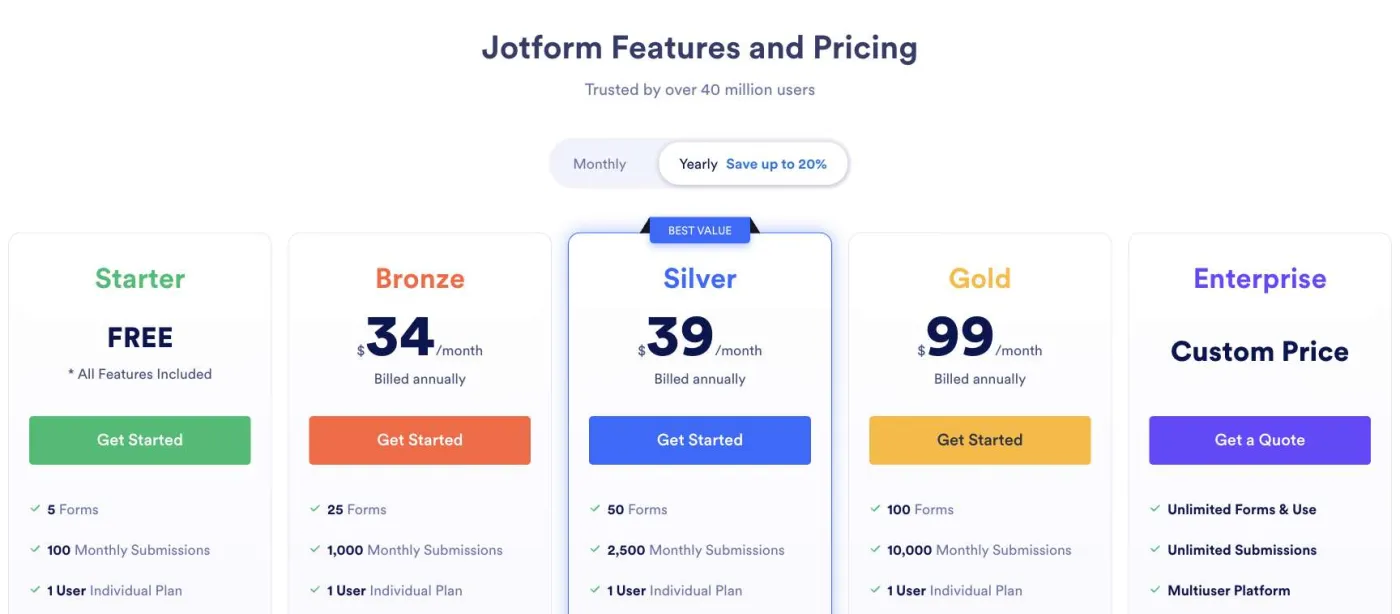
Billed monthly, Jotform Bronze is $39, Silver $49 and Gold $129. Removing Jotform branding needs a paid plan, and nonprofits and education get up to 50% off (Jotform pricing page, checked 16 Nov 2026).
What will it cost you?
Paperform plans
- FreeFreeForms Unlimited, Submissions 30/month, Team Unlimited, Storage Unlimited
- ProMatches$49/moForms Unlimited, Submissions Unlimited, Team Unlimited, Storage Unlimited
- Business$124/moForms Unlimited, Submissions Unlimited, Team Unlimited, Storage Unlimited
| Plan | Price | Forms | Submissions | Team | Storage |
|---|---|---|---|---|---|
| Free | Free | Unlimited | 30/month | Unlimited | Unlimited |
| ProMatches | $49/mo | Unlimited | Unlimited | Unlimited | Unlimited |
| Business | $124/mo | Unlimited | Unlimited | Unlimited | Unlimited |
Jotform plans
- StarterFreeForms 5, Submissions 100/month, Team 1, Storage 100 MB
- Bronze$34/moForms 25, Submissions 1,000/month, Team 1, Storage 1 GB
- Silver$39/moForms 50, Submissions 2,500/month, Team 1, Storage 10 GB
- Gold$99/moForms 100, Submissions 10,000/month, Team 1, Storage 100 GB
| Plan | Price | Forms | Submissions | Team | Storage |
|---|---|---|---|---|---|
| Starter | Free | 5 | 100/month | 1 | 100 MB |
| Bronze | $34/mo | 25 | 1,000/month | 1 | 1 GB |
| Silver | $39/mo | 50 | 2,500/month | 1 | 10 GB |
| Gold | $99/mo | 100 | 10,000/month | 1 | 100 GB |
| Product | Plan | Monthly Price | Annual Price (per month) | Free Plan | Free Trial | Limits |
|---|---|---|---|---|---|---|
| Jotform | Starter | Free | Free | Yes | No | forms: 5, submissions: 100/month, storage: 100 MB, users: 1 |
| Jotform | Bronze | $39/mo | $34/mo billed annually | forms: 25, submissions: 1,000/month, storage: 1 GB, users: 1 | ||
| Jotform | Silver | $49/mo | $39/mo billed annually | forms: 50, submissions: 2,500/month, storage: 10 GB, users: 1 | ||
| Jotform | Gold | $129/mo | $99/mo billed annually | forms: 100, submissions: 10,000/month, storage: 100 GB, users: 1 | ||
| Paperform | Free | Free | Free | Yes | 7 days | forms: Unlimited, submissions: 30/month, storage: Unlimited, users: Unlimited, file uploads: 100 MB |
| Paperform | Pro | $59/mo | $49/mo billed annually | forms: Unlimited, submissions: Unlimited, storage: Unlimited, users: Unlimited, file uploads: 10 GB | ||
| Paperform | Business | $149/mo | $124/mo billed annually | forms: Unlimited, submissions: Unlimited, storage: Unlimited, users: Unlimited, file uploads: 100 GB | ||
| Tally | Free | Free | Free | Yes | No | forms: Unlimited, submissions: Unlimited, storage: N/A, users: 1, file uploads: 10 MB per file |
| Tally | Pro | $29/mo | $24/mo billed annually | forms: Unlimited, submissions: Unlimited, storage: N/A, users: Unlimited, file uploads: Unlimited | ||
| Tally | Business | $89/mo | $74/mo billed annually | forms: Unlimited, submissions: Unlimited, storage: N/A, users: Unlimited | ||
| Google Forms | Free (Personal) | Free | Free | Yes | 14 days | forms: Unlimited, submissions: 500,000 per form, storage: 15 GB (shared across Google Drive), users: 1, file uploads: Count against the owner's 15 GB Google Account storage |
| Google Forms | Business Starter | $8.4/mo | $7/mo billed annually | forms: Unlimited, submissions: 500,000 per form, storage: 30 GB per user, users: Up to 300, file uploads: Count against the owner's pooled Drive storage | ||
| Google Forms | Business Standard | $16.8/mo | $14/mo billed annually | forms: Unlimited, submissions: 500,000 per form, storage: 2 TB per user, users: Up to 300, file uploads: Count against the owner's pooled Drive storage | ||
| Google Forms | Business Plus | $26.4/mo | $22/mo billed annually | forms: Unlimited, submissions: 500,000 per form, storage: 5 TB per user, users: Up to 300, file uploads: Count against the owner's pooled Drive storage | ||
| Typeform | Free | Free | Free | Yes | 14 days | forms: Unlimited, submissions: 10/month, users: 1 |
| Typeform | Basic | $39/mo | $28/mo billed annually | forms: Unlimited, submissions: 100/month, storage: 1 GB, users: 1 | ||
| Typeform | Plus | $79/mo | $56/mo billed annually | forms: Unlimited, submissions: 1,000/month, storage: 2 GB, users: 3 | ||
| Typeform | Business | $129/mo | $91/mo billed annually | forms: Unlimited, submissions: 10,000/month, storage: 4 GB, users: 5 | ||
| Typeform | Growth Flow | $379/mo | $266/mo billed annually | forms: Unlimited, submissions: 10,000/month, storage: 4 GB, users: 5 | ||
| Typeform | Talent | $169/mo | $119/mo billed annually | forms: Unlimited, submissions: 3,000/month, users: 3 | ||
| Cognito Forms | Individual (Free) | Free | Free | Yes | 14 days | forms: Unlimited, submissions: 100 entries/month, storage: 100 MB, users: 1 |
| Cognito Forms | Pro | $24/mo | $19/mo billed annually | forms: Unlimited, submissions: 2,000 entries/month, storage: 1 GB, users: 1 | ||
| Cognito Forms | Team | $62/mo | $49/mo billed annually | forms: Unlimited, submissions: 10,000 entries/month, storage: 10 GB, users: 5 | ||
| Cognito Forms | Business | $129/mo | $99/mo billed annually | forms: Unlimited, submissions: 25,000 entries/month, storage: 50 GB, users: 10 | ||
| Cognito Forms | Enterprise | $199/mo | $149/mo billed annually | forms: Unlimited, submissions: Unlimited, storage: 100 GB, users: 20 | ||
| Formstack | Forms | $99/mo | $83/mo billed annually | No | 14 days | forms: 25, submissions: 1,000/form, storage: 2 GB, users: 1, file uploads: 2 GB |
| Formstack | Suite | $299/mo | $250/mo billed annually | forms: 100, submissions: 5,000/form, storage: 10 GB, users: 3, file uploads: 10 GB |
Review ratings across platforms
Third-party review scores from G2, Capterra and other sites, from our competitor data.
Verdict: who should switch, and who should stay
Stay on Jotform if you need HIPAA (Gold or Enterprise), a payment gateway beyond Stripe, PayPal, Square and Braintree, or Outlook or Calendly sync on bookings. In our test Jotform won the booking form outright, on depth.
Switch to Paperform if several people work on your forms, your forms lead into signatures and workflows, or you keep hitting Jotform's caps. You'll need Pro for calculations, products and routed emails, and the team, signatures and automation then sit in one subscription.
For free internal forms, use Google Forms; for simple public forms, Tally; for line-item quotes, Cognito Forms; for conversational lead forms, Typeform; on Salesforce, Formstack. For the wider field, see our best form builders roundup.
Frequently Asked Questions
Is there a free Jotform alternative?
Yes. If free is all that matters, use Google Forms: it's free with unlimited forms and up to 500,000 responses per form, and suits internal requests and surveys that feed a spreadsheet, though it takes no payments. Paperform's free plan covers real work, with unlimited forms, unlimited seats within fair use, conditional logic, bookings and payments. Its 30 monthly submissions aren't split by type, so every one can be a paid order or a booking. Jotform's free Starter plan allows 100 submissions a month but 10 payment submissions and 5 forms (Jotform pricing page, checked 16 Nov 2026).
Which Jotform alternative is HIPAA compliant?
Jotform itself offers HIPAA-enabled features on its Gold plan ($99/month billed annually) and Enterprise (Jotform pricing page, checked 16 Nov 2026). Among the alternatives, Google Forms is HIPAA-eligible on paid Google Workspace plans under a BAA, Typeform and Cognito Forms offer HIPAA on their Enterprise plans, and Formstack sells HIPAA as an add-on to its Forms and Suite plans and includes it on its Salesforce and Enterprise plans (vendor pages, checked 17 Nov 2026). Tally doesn't offer HIPAA. On Paperform: "Note that Paperform is not HIPAA compliant and doesn't sign Business Associate Agreements today. HIPAA support is planned for the first half of 2027. If you're handling protected health information, talk to us at support@paperform.co before you commit."
How do I move my Jotform forms to Paperform?
Plan to rebuild them. Start with the forms that are live, since most accounts hold more than they use. You can start each one from Paperform's 30,000+ templates, or describe the form in a sentence and let Paperform's AI build a first draft you then edit; AI form creation is on the free plan. Download the Jotform submissions you want to keep before you close that account, and run both forms side by side for a billing cycle while you switch links and embeds. Rebuild your hardest form first and check it before you move the rest.
Which form builder takes the most payment methods?
Jotform, by a wide margin. Its builder's Payments tab listed 34 options when we tested it, including Stripe, PayPal, Square, Braintree, Authorize.Net, Mollie, GoCardless, Afterpay and Purchase Order (Jotform builder, 16 Nov 2026). Paperform supports Stripe, PayPal, Square, Braintree and Google Pay on every plan and charges no transaction fees. Its Products field (on Pro) is a full catalogue with prices, stock, minimum and maximum quantities and images, and Pro adds coupons, custom pricing rules and subscriptions. If you need a regional gateway outside that list, Jotform is the better fit.
What is the cheapest Jotform alternative for a team?
It depends on how many people build forms. For one person, Jotform Bronze ($34/month billed annually) costs less than Paperform Pro ($49/month billed annually). But every Jotform self-serve plan is a one-user plan. Multi-user access is part of Enterprise at a custom price (Jotform pricing page, checked 16 Nov 2026). Paperform seats are unlimited on every plan within fair use, so a team of five pays the same $49 as a team of one. Tally Pro ($24/month billed annually) also includes unlimited team members, and Cognito Forms Team ($49/month billed annually) includes five users (competitor data, checked 22 Sep 2026). Tally has no appointment field, no SOC 2 and no payment gateway beyond Stripe, so check what your team needs before choosing on price.
Sources & References
- Paperform pricing and plan comparison — Paperform, checked 16 Nov 2026
- Jotform reviews and ratings — G2, 2026
Updates
We re-audit the form builders we compare on a regular cadence and log every change here — a public record of what changed and when.
- Updated November 17, 2026 — Re-checked every competitor's features and prices against their own pages. Updated Cognito Forms' plans, Google Forms' 500,000-responses-per-form limit, Typeform's PayPal and scheduler support, Tally's 2FA and team roles, and Formstack's e-signature plan.
- Updated November 16, 2026 — Rewrote the page around a first-hand test: the Paperform team built the same five forms (lead form with logic, order form, booking form, client intake with signature, quote calculator) in Jotform's guest mode and Paperform's Classic editor, with screenshots and a verdict for each. Added a short section for anyone who only needs free, refreshed Jotform's pricing and limits from its pricing page, replaced SurveyMonkey with Formstack in the ranked list, removed unsourced claims and third-party video embeds, and corrected Paperform's free trial to 7 days.
Unlimited plans are subject to each vendor's fair use policy.
Ready to try Paperform?
Create beautiful forms, payment pages, and workflows — no code required.