Paperform vs 123FormBuilder: Which Is Better in 2026?
Choose 123FormBuilder if you handle protected health information, because its Enterprise tier carries certified HIPAA compliance and Paperform does not. For everyone else, Paperform wins: 123FormBuilder's Platinum plan costs the same $49/month and still caps forms, fields, submissions and user licences, all four of which Paperform leaves unlimited.
123FormBuilder has been building forms since 2008 and now sits inside Kiteworks, a secure file transfer company that bought it for the compliance story. That history shows in what the product is good at: ISO 27001, ISO 9001, encrypted storage, US or EU data residency and a Salesforce connector that healthcare, manufacturing and financial services teams genuinely rely on. Airbus, LG and the University of Oxford are on the customer list for a reason.
It also shows in how the product charges. There are four separate meters running at once, and each of them bills you for getting busier: how many forms you have published, how many fields are in each one, how many submissions arrive this month, and how many colleagues hold a licence. Paperform's whole commercial argument is the absence of those meters. That is the tension worth thinking about before you sign anything, because a plan that fits today is not the same thing as a plan that fits after the form starts working.
Quick Verdict
Choose 123FormBuilder if:
- You collect protected health information and need a BAA
- Procurement requires ISO 27001 or ISO 9001 on the vendor record
- Salesforce is the system every submission has to land in
- Form count, field count, volume and headcount are all stable
- You want the cheapest paid rung, at $37/month for Gold
- You need a wide gateway list including Authorize.Net, PayU or PayFast
Choose Paperform if:
- You do not want a bill that rises every time something works
- More than one person needs to build and edit forms
- Your pricing, quoting or scoring logic belongs inside the form
- Signatures and multi-step approvals follow the submission
- Long forms would run past a 250 or 500 field ceiling
- You want AI form generation and response summaries
Five Numbers That Settle Most of This
Pricing
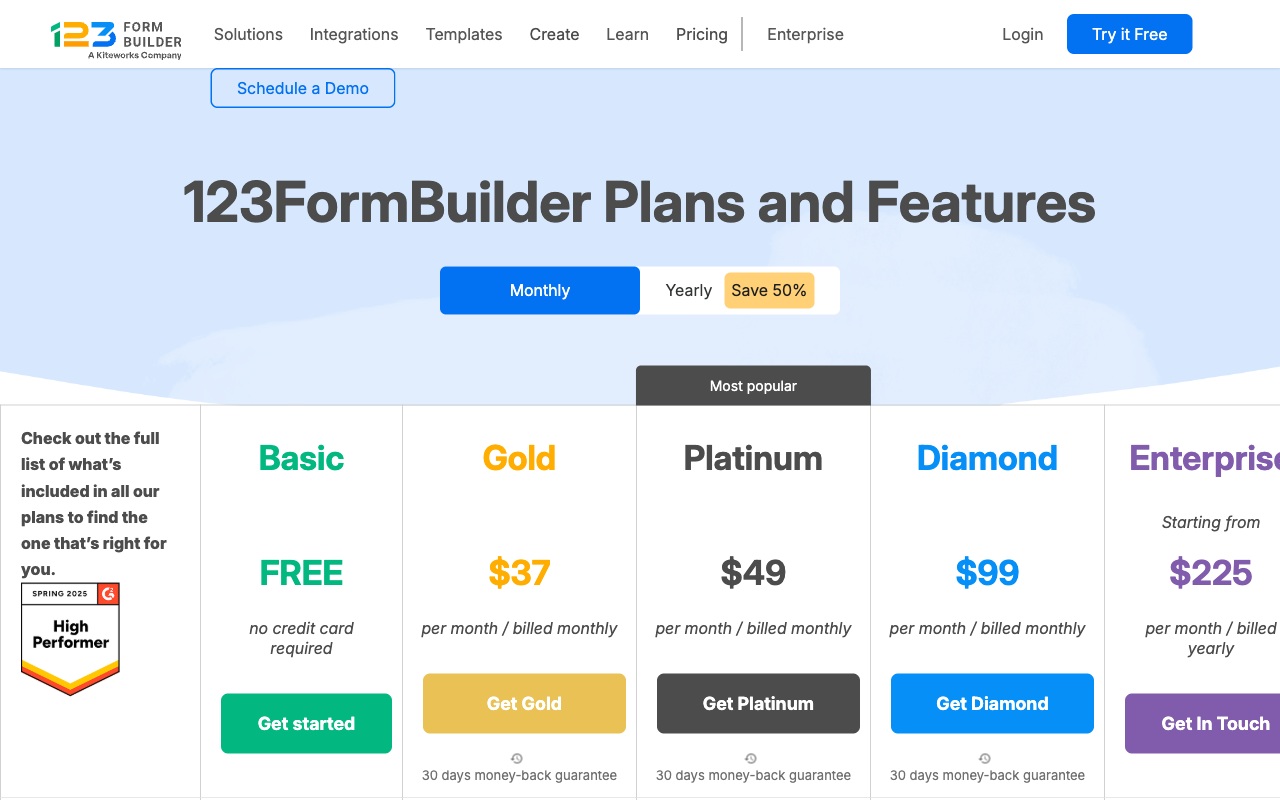
123FormBuilder runs Gold at $37/month, Platinum at $49/month, Diamond at $99/month and Enterprise from $225/month billed yearly. Paperform runs Pro at $59/month ($49 billed annually) and Business at $149/month ($124 annually).
Integrations and API
Both advertise 4,000+ integrations, but the shape differs. 123FormBuilder ships 3 native connectors on Free, 23+ on Gold, 42+ on Platinum and 45+ on Enterprise, with the rest arriving through Zapier; there is no Make support. Paperform's 4,000+ run through native connectors, Stepper, Zapier, Make, webhooks and a REST API, with a separate Business API on the $124/month annual tier.
Conditional logic
Both branch on answers at every tier. 123FormBuilder adds a calculation field that returns a number. Paperform's calculations are Excel-style and drive question and page visibility, conditional emails, what integrations receive and what the success page shows.
Payments
123FormBuilder offers 15+ gateways but only from Platinum at $49/month, with nothing on Free or Gold. Paperform offers 5 gateways (Stripe, PayPal, Square, Braintree, Google Pay) on every paid plan, with no transaction fee of its own.
Compliance
123FormBuilder is GDPR, CCPA, ISO 27001 and ISO 9001 compliant, and offers certified HIPAA compliance on Enterprise only. It holds no SOC 2 certification at any tier, and SSO is a paid add-on on top of Enterprise. Paperform is SOC 2 Type II, GDPR and CCPA compliant with SSO included on Business, and is not HIPAA compliant and does not sign BAAs.
Feature Comparison
On a feature checklist these two overlap heavily: conditional logic, calculations, payments, templates, multi-page forms, webhooks and an API all appear on both sides. The gaps sit in two places. 123FormBuilder is ahead on certifications and on the sheer number of payment processors it will talk to. Paperform is ahead on everything that turns a form into a process, and on the design layer that decides whether a customer-facing form looks like a page or a field stack.
| Feature | Paperform | 123FormBuilder |
|---|---|---|
| Form Building | ||
| Document-style editor | Yes | No |
| AI form creation | Yes | No |
| Field types | 26+ | Yes |
| File uploads | Yes | No |
| Multi-page forms | Yes | Yes |
| Guided mode (one question at a time) | Yes | No |
| Conditional logic | Yes | Yes |
| Calculations field | Yes pro | Yes basic |
| AI calculations assistant | Yes pro | No |
| Scoring | Yes pro | No |
| Answer piping | Yes | Yes basic |
| Pre-filling and hidden fields | Yes pro | Yes |
| Save and resume | Yes | Yes basic |
| Auto-close by number | Yes pro | Yes |
| Auto-close by date | Yes pro | Yes |
| Appointment/booking field | Yes | No |
| Signature field | Yes | Yes basic |
| Color picker field | Yes | No |
| API-powered dropdowns | Yes business | No |
| Google address search | Yes business | No |
| Payments | ||
| Stripe payments | Yes | Yes basic |
| PayPal payments | Yes | Yes basic |
| Square payments | Yes | Yes professional |
| Braintree payments | Yes | Yes professional |
| Google Pay | Yes | No |
| Product sales (eCommerce) | Yes pro | Yes basic |
| Subscriptions | Yes pro | No |
| Coupons and discounts | Yes pro | No |
| Custom pricing rules | Yes pro | Yes basic |
| Tax calculations | Yes | No |
| Quotes/invoices | Yes | Yes basic |
| Refunds | Yes | No |
| 3D Secure | Yes | No |
| Design & Customization | ||
| Template gallery | 30,000+ | Yes |
| Rich media (images, GIFs, videos) | Yes | Yes |
| Unsplash and Giphy integration | Yes | No |
| Image editor | Yes | No |
| Adobe Creative Cloud | Yes | No |
| Language translation | Yes | Yes basic |
| Advanced theming | Yes pro | Yes basic |
| Custom form URL | Yes pro | No |
| Custom domains | Yes pro | Yes professional |
| Custom HTML & CSS | Yes pro | Yes basic |
| Remove branding | Yes pro | Yes basic |
| Custom email domains | Yes business | No |
| Unsplash/Giphy | No | No |
| Adobe CC | No | No |
| Analytics | ||
| Submission results and reports | Yes | No |
| AI report insights | Yes pro | No |
| Paperform analytics | Yes pro | No |
| Drop-off analysis | Yes pro | No |
| Google Analytics & Facebook Pixel | Yes pro | No |
| Custom analytics scripts | Yes pro | No |
| Partial submissions | Yes pro | No |
| Submission results | No | Yes |
| AI insights | No | No |
| Form analytics | No | Yes basic |
| Google Analytics / Facebook Pixel | No | Yes |
| Custom scripts | No | No |
| Collaboration | ||
| Multi-user accounts | Yes pro | Yes basic |
| User permissions and management | Yes pro | Yes basic |
| Advanced permissions & admin | Yes enterprise | Yes enterprise |
| Form sharing (templates) | Yes | No |
| Spaces and tag management | Yes | No |
| Form sharing | No | Yes |
| Spaces/tags | No | No |
| Security | ||
| SOC 2 Type II | Yes | No |
| GDPR compliant | Yes | Yes |
| SSL encryption | Yes | Yes |
| Two-factor authentication | Yes | Yes |
| Enforce 2FA for all users | Yes business | No |
| SSO (SAML) | Yes business | Yes enterprise |
| reCAPTCHA | Yes | Yes |
| Local data residency | Yes enterprise | No |
| Custom S3 storage (BYO) | Yes business | No |
| Enforce 2FA | No | No |
| Data residency | No | Yes enterprise |
| Custom S3 | No | No |
| Integrations & API | ||
| Native integrations | 4,000+ | No |
| Zapier | Yes | Yes |
| Make (Integromat) | Yes | No |
| Webhooks | Yes pro | Yes basic |
| Standard API | Yes pro | No |
| Business API | Yes business | No |
| WordPress plugin | Yes | Yes |
| oEmbed support | Yes | No |
| Native integrations (2000+) | No | Yes |
| API | No | Yes basic |
| oEmbed | No | Yes |
Where 123FormBuilder Wins
Certified HIPAA compliance, which Paperform cannot offer
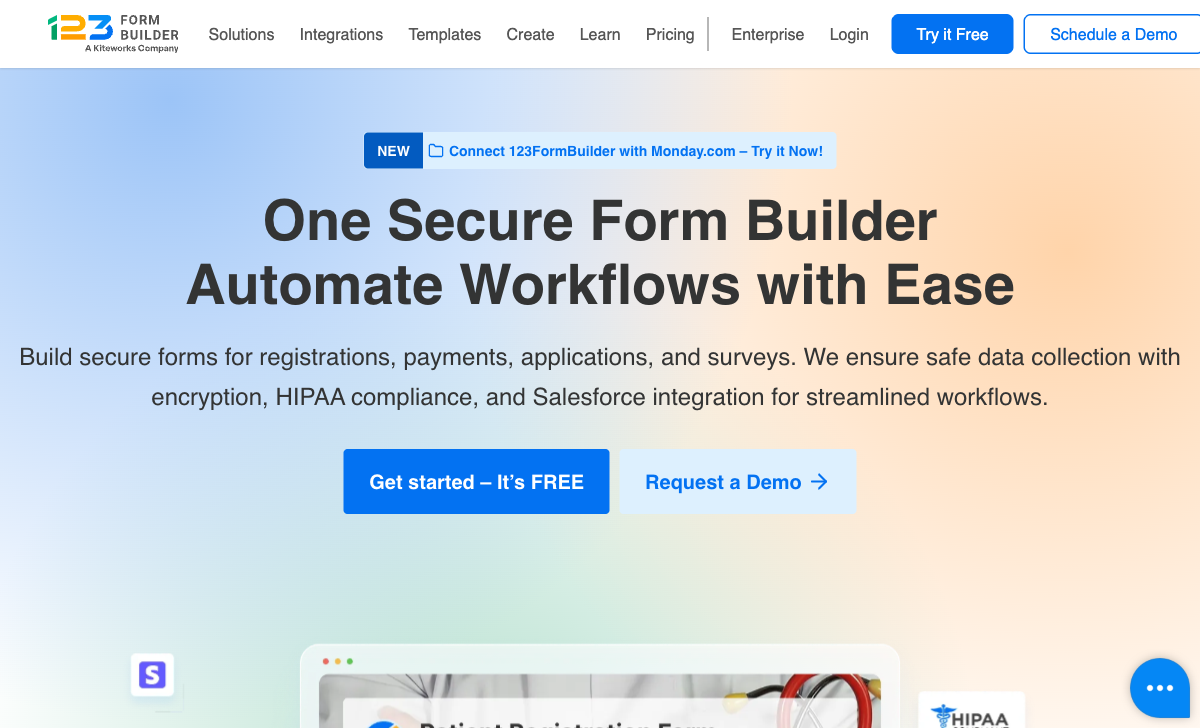
123FormBuilder offers certified HIPAA compliance; Paperform does not and signs no Business Associate Agreements. For a clinic taking patient intake, a lab collecting results or anyone else touching PHI, that ends the comparison and we would rather say so in the third sentence than the thirtieth. Two caveats belong with it. The certification lives on Enterprise, which starts at $225/month billed yearly and goes through sales, so it is not something you can self-serve onto Diamond. And the security story has a hole: there is no SOC 2 Type II certification at any tier, only ISO 27001 and ISO 9001, which matters if your reviewer's questionnaire asks for SOC 2 by name.
A cheaper first paid rung
Gold is $37/month against Paperform's $49/month annual floor, and the site has been running a 50% annual promotion that takes Gold to $18.50 and Platinum to $24.50 a month. If your requirement is a handful of forms at modest volume maintained by one person, 123FormBuilder is cheaper and Paperform has no answer below $49.
Gateway breadth and the Salesforce connector
Fifteen-plus payment gateways is more than Paperform's five, and the long tail is where that counts: Authorize.Net, PayU and PayFast reach markets that Stripe and PayPal do not always cover well. The native Salesforce integration is similarly a genuine strength, pushing and pulling records rather than dumping rows, and for an organisation that runs on Salesforce it removes a middleware layer. Both capabilities sit on Platinum or above.
Eighteen years of operating history
Founded in 2008, 123FormBuilder is eight years older than Paperform and has 35,000+ customers, 172 G2 reviews and 175 on Capterra, which is more directory evidence than Paperform's 78 and 104. Longevity is worth something in a vendor assessment. The counterweight is who owns the roadmap now, which we come to below.
Where Paperform Wins

Four meters against none
Paperform Pro at $49/month billed annually has no cap on forms, fields, submissions or seats; 123FormBuilder's Platinum at the same $49/month caps all four. Read the ladder as a sequence of things that go wrong when the product does well. Gold gives you 25 forms, 250 fields per form and 5,000 submissions a month. Publish a twenty-sixth form and you move up. Build one long application form and the field ceiling arrives before the submission ceiling does. Platinum lifts those to 100 forms, 500 fields and 20,000 submissions, Diamond to 200, 800 and 100,000, and each step costs more without changing the software you are using.
The licence meter is the one that surprises people. Every paid tier is described as one user plus extra licences purchased, so a second person who needs to edit a form is a line item, not a setting. In a five-person marketing team that is four purchases stacked on top of the plan before anyone has collected a response. Paperform includes unlimited team members on every paid plan, and one seat covers forms, signatures and workflows together, so a person who uses all three counts once. This is the difference the page is really about: 123FormBuilder's commercial model is built on charging you more as you succeed, and Paperform has deliberately removed every lever that would let it do the same.
Paperform is not free of metering entirely, and it is worth naming what it does meter. Stepper automation runs consume credits, 20,000 a month on Pro and 100,000 on Business, with more available at $10 per additional 10,000. Custom domains are $20/month each on Pro and one is included on Business, where 123FormBuilder includes a custom form domain from Platinum. On that specific line, they are comparable rather than one-sided.
Calculations that run the form, not just a total
123FormBuilder's calculation field produces a number; Paperform's calculations decide what the form does. The formulas use familiar spreadsheet syntax, and their output feeds question and page visibility, conditional email rules, the payload an integration receives and the content of the success page. A quoting form can price by dimensions, apply a volume discount, add tax, hide the finance questions for anyone under a threshold, send a different confirmation email to each band and pass the calculated total straight into the CRM. That is configuration work, not development work, and it is the reason Paperform tends to survive contact with a real operational process. An AI assistant will draft the calculation and scoring rules for you if the syntax is unfamiliar.
Three products on one subscription
123FormBuilder is a form builder with a signature field. Full document generation waits until Diamond at $99/month, and there is no workflow automation product at all, so routing, approvals and CRM updates mean a separate automation vendor on a separate invoice. Their 4,000-app figure is largely Zapier's catalogue, and Zapier bills you itself. Paperform includes Papersign for eSignatures and Stepper for workflow automation in every plan, one account and one dashboard, with 25 signed documents a month on Pro and 100 on Business. Assembling the equivalent on 123FormBuilder means Diamond at $99/month, an automation subscription beside it, and a licence charge for each teammate on top.
Forms that look like pages
Paperform's document-style editor lets you write a form the way you write a page, mixing headings, copy, images, GIFs and video between the questions, with Unsplash and Giphy libraries, full theming and custom CSS behind it. Guided Mode then presents the finished form one question at a time where a wall of fields would hurt completion; one customer reported a 91% lift in conversion after switching. 123FormBuilder is standard drag-and-drop with basic theming, and its reviewers say so directly, with Capterra comments noting that customisation of form appearance is very limited. The template counts tell the same story from another angle: 3,000+ field layouts on one side, 30,000+ designed pages on the other.
An independent vendor still shipping
Paperform is ten years old, bootstrapped, profitable and still setting its own roadmap, which is why forms, eSignatures and workflow automation arrived as one platform rather than three purchases. 123FormBuilder's roadmap now answers to Kiteworks, whose core business is secure file transfer, and the visible output is a changelog whose top entry has not changed between our June and September 2026 audits, in a year when every serious competitor shipped AI capability of some kind. Age is on 123FormBuilder's side here. Momentum is not, and a platform choice is a bet on who is still investing in three years.
Where 123FormBuilder Falls Short
- Four meters, all pointed at growth: 25/250/5,000 on Gold, 100/500/20,000 on Platinum, 200/800/100,000 on Diamond for forms, fields per form and monthly submissions.
- Per-licence team pricing: every paid tier is one user plus extra licences bought separately.
- Payments gated to $49/month: no gateways at all on Free or Gold, and no subscriptions, coupons, tax calculation or refunds at any tier.
- No SOC 2 Type II: ISO 27001 and ISO 9001 only, and SSO is a paid add-on on top of Enterprise.
- HIPAA starts at $225/month: certified compliance is Enterprise-only and runs through sales.
- Document generation on Diamond: $99/month before a submission can become an invoice or a contract.
- No workflow automation product: multi-step routing requires a third-party vendor.
- No AI anywhere in the product: no form generation, no calculation assistant, no response summaries.
- No Make integration: Zapier only, plus webhooks and a REST API.
- Trustpilot at 1.2 across 326 reviews: around 90% one star, concentrated on billing, cancellation and support response.
- Limited design control: drag-and-drop with basic theming, no document-style editing, no guided one-question mode.
Where Paperform Falls Short
- No HIPAA compliance and no BAAs: a hard stop for protected health information, where 123FormBuilder wins outright.
- No ISO 27001 or ISO 9001: Paperform holds SOC 2 Type II, GDPR and CCPA, which is a different set of boxes to tick.
- Higher entry price: $49/month billed annually against Gold at $37, with nothing sold in between.
- Fewer payment gateways: five against 15+, so regional processors like PayU and PayFast are not covered.
- Automation credits are metered: 20,000 a month on Pro, then $10 per additional 10,000.
- Custom domains cost extra on Pro: $20/month each, with one included on Business.
- Smaller review footprint: 78 G2 and 104 Capterra reviews against 172 and 175.
- No mobile editor: neither product has one, and neither should claim it as an advantage.
- Overkill for a simple form: for three questions and a thank-you page, use the simple tool. Paperform is built for the work that follows the submission.
See 123FormBuilder in Action
Two independent walkthroughs, one broadly positive and one more sceptical, are a faster read on the builder than any feature table.
Pricing Comparison
The headline prices are close; the structures are not. 123FormBuilder sells capacity in five steps and charges per licence on top of every one of them. Paperform sells two paid plans and charges for capability rather than usage.
| Tier | Paperform | 123FormBuilder | What actually differs |
|---|---|---|---|
| Entry paid | Pro: $59/mo, $49 annually. Unlimited forms, fields, submissions and seats | Gold: $37/mo. 25 forms, 250 fields, 5,000 submissions, 1 user, no payments | Gold is $12 cheaper and cannot take a payment |
| Same price point | Pro, unchanged | Platinum: $49/mo. 100 forms, 500 fields, 20,000 submissions, 1 user + licences | Identical price, four ceilings against none |
| Upper | Business: $149/mo, $124 annually. 10 workspaces, SSO, Business API, 100 signed docs/mo | Diamond: $99/mo. 200 forms, 800 fields, 100,000 submissions, document generation | Diamond adds document generation; SSO and HIPAA are still not available |
| Top | Enterprise: custom quote | Enterprise: from $225/mo billed yearly. Certified HIPAA, SSO and white-labeling as paid add-ons | This is the only tier where 123FormBuilder's HIPAA advantage is real |
Paperform
123FormBuilder
| Product | Plan | Monthly Price | Annual Price (per month) | Free Plan | Free Trial | Limits |
|---|---|---|---|---|---|---|
| Paperform | Free | Free | Free | Yes | 7 days | forms: Unlimited, submissions: 30/month, storage: Unlimited, users: Unlimited, file uploads: 100 MB |
| Paperform | Pro | $59/mo | $49/mo billed annually | forms: Unlimited, submissions: Unlimited, storage: Unlimited, users: Unlimited, file uploads: 10 GB | ||
| Paperform | Business | $149/mo | $124/mo billed annually | forms: Unlimited, submissions: Unlimited, storage: Unlimited, users: Unlimited, file uploads: 100 GB | ||
| 123FormBuilder | Basic (Free) | Free | Free | Yes | 30 days | forms: 5, submissions: 100/month, storage: none, users: 1 |
| 123FormBuilder | Gold | $37/mo | $37/mo billed annually | forms: 25, submissions: 5,000/month, storage: 1 GB, users: 1 | ||
| 123FormBuilder | Platinum | $49/mo | $49/mo billed annually | forms: 100, submissions: 20,000/month, storage: 10 GB, users: 1+ (buy extra licenses) | ||
| 123FormBuilder | Diamond | $99/mo | $99/mo billed annually | forms: 200, submissions: 100,000/month, storage: 100 GB, users: 1+ (buy extra licenses) | ||
| 123FormBuilder | Enterprise | $225/mo | Custom | forms: unlimited, submissions: unlimited, storage: unlimited, users: custom |
Two practical notes. 123FormBuilder runs a 30-day free trial on paid plans, longer than Paperform's 7-day trial, and Paperform's trial asks for no credit card. And the 50% annual promotion on Gold and Platinum is temporary rather than list pricing, so the renewal quote is the number worth budgeting against.
What Users Say
123FormBuilder rates 4.5 on G2 across 172 reviews and 4.4 on Capterra and GetApp across 175, with value for money at 4.1 and support at 4.1 to 4.3. Those are respectable scores from people evaluating the builder. Trustpilot tells a different story at 1.2 across 326 reviews, and the content of those reviews is instructive: they are about billing, cancellation and getting a human to respond, not about whether the form editor works. A commercial model with four meters and per-licence seats produces exactly that complaint profile. Paperform sits at 4.8 on G2 and Capterra and 4.8 across 212 Trustpilot reviews, with support rated 4.7 to 4.9, on a smaller sample.
The Verdict
Pick 123FormBuilder when the requirement is written down by someone in compliance. Certified HIPAA, ISO 27001, ISO 9001, EU data residency and a deep Salesforce connector are real, and Paperform answers none of the first three. Budget for Enterprise if HIPAA is the reason, because that is where the certification lives. A single-person team running a few stable forms will also spend less on Gold, and that is a reasonable call.
Pick Paperform when the form is part of an operation rather than a one-off artefact. At the moment a second colleague needs edit access, a long application form runs past 500 fields, submissions climb into a new band, a quote needs calculating before it reaches Stripe, or a contract has to be signed and routed afterwards, 123FormBuilder's model starts charging you for each of those outcomes while Paperform's price stays where it is. The $12 gap at the entry rung buys you out of four meters at once, and out of paying a second vendor for the workflow that follows.
Weighing other options first? See our overall form builder ranking, or compare Paperform against a more design-led rival in Paperform vs Typeform. Teams shopping mainly on price should start with Tally alternatives.
Frequently Asked Questions
Which 123FormBuilder plan do I need before I can take a payment?
Platinum, at $49/month. 123FormBuilder's plans-and-features matrix marks "Integration with 15+ Payment Gateways" unavailable on both Basic and Gold ($37/month), so Stripe, PayPal, Square, Braintree, Authorize.Net and the rest only switch on from Platinum up. Paperform includes Stripe, PayPal, Square, Braintree and Google Pay on every paid plan, and adds subscriptions, coupons, tax calculation, refunds and product management that 123FormBuilder does not offer at any tier.
What does 123FormBuilder actually cap on the Platinum plan, and does Paperform cap the same things?
Platinum caps four things at once: 100 forms, 500 fields per form, 20,000 submissions a month, and one user licence with extra seats sold on top. Paperform Pro costs the same $49/month billed annually and caps none of the four. Forms, fields, submissions and team members are all unlimited within fair use, and fair use here means a conversation about plan fit rather than an overage invoice or a shut-off.
Is 123FormBuilder HIPAA compliant, and is Paperform?
123FormBuilder offers certified HIPAA compliance, but only on Enterprise, which starts at $225/month billed yearly and runs through a sales conversation. It also holds ISO 27001 and ISO 9001. Paperform is not HIPAA compliant and does not sign Business Associate Agreements, so if protected health information passes through your forms, 123FormBuilder is the correct answer between these two. Paperform holds SOC 2 Type II, which 123FormBuilder does not hold at any price, alongside GDPR and CCPA.
Can 123FormBuilder generate contracts and run the workflow after a submission?
Partly, and late. A signature field arrives on Gold, but full document generation requires Diamond at $99/month, and there is no workflow automation product in the line-up at all, so multi-step routing means paying Zapier or a similar vendor separately. One Paperform subscription covers three products on every plan: Paperform for forms, Papersign for eSignatures (25 signed documents a month on Pro, 100 on Business) and Stepper for workflow automation (20,000 automation credits on Pro, 100,000 on Business).
Why is 123FormBuilder rated 1.2 on Trustpilot when its G2 score is 4.5?
The two audiences are complaining about different things. G2 sits at 4.5 across 172 reviews and Capterra at 4.4 across 175, where reviewers rate the product itself. Trustpilot sits at 1.2 across 326 reviews, roughly 90% of them one star, and those reviews cluster on billing, cancellation and support response rather than on form building. Metered licences and tier thresholds generate exactly that kind of complaint. Paperform is 4.8 across 212 Trustpilot reviews and rates 4.7 to 4.9 for support. In fairness, 123FormBuilder carries more directory reviews than Paperform does.
Does 123FormBuilder have any AI features, and how far behind is it?
None in the product. There is no AI form generation, no AI calculation assistant and no AI response analysis, and the public changelog has not added an entry since our June 2026 audit; the top item is still "Archiving forms". The only AI reference anywhere on the site is a support chatbot. Paperform generates complete forms from a plain description, suggests calculation and scoring rules, and summarises responses into readable reports with AI Insights, with the user keeping control of every question and rule.
Sources & References
- 123FormBuilder Pricing and Plans — 123FormBuilder, September 2026
- 123FormBuilder Changelog — 123FormBuilder, September 2026
- 123FormBuilder Review: A Marketing Expert's Verdict — Website Planet, 2026
- 123FormBuilder Expert & User Reviews: Features, Pricing, Pros & Cons — FormEpic, 2026
- 123FormBuilder Reviews — Trustpilot, September 2026
- 123FormBuilder Reviews — G2, September 2026
Updates
We re-audit the form builders we compare on a regular cadence and log every change here — a public record of what changed and when.
- Updated September 22, 2026 — First publication against the September 2026 data re-audit. 123FormBuilder pricing verified live: Gold $37, Platinum $49, Diamond $99 and Enterprise from $225/month billed yearly, with certified HIPAA compliance confirmed as Enterprise-only and SSO as a paid add-on. Paperform pricing reflects the September 2026 platform lineup (Pro $59/$49, Business $149/$124, unlimited submissions and seats). Trustpilot rating of 1.2 across 326 reviews and the stalled public changelog both re-verified.
Last updated September 22, 2026
Ready to try Paperform?
Create beautiful forms, payment pages, and workflows — no code required.