Paperform vs Formstack: Which Is Better in 2026?
Formstack is the right choice when protected health information is involved, because it offers HIPAA compliance and Paperform does not. For everyone else Paperform wins, because it takes payments through five gateways with a full eCommerce engine behind them and charges nothing per seat, while Formstack bills by builder user from $83/month.
Money is the clearest place to see the difference between these two products. If you are collecting an order, a deposit, a registration fee or a recurring membership, the question is not whether the form can charge a card. Both can. The question is where the commerce logic lives: the pricing rules, the discount codes, the tax, the subscription, the refund. Formstack passes the charge to Stripe or PayPal and leaves the rest to you. Paperform runs the order inside the form.
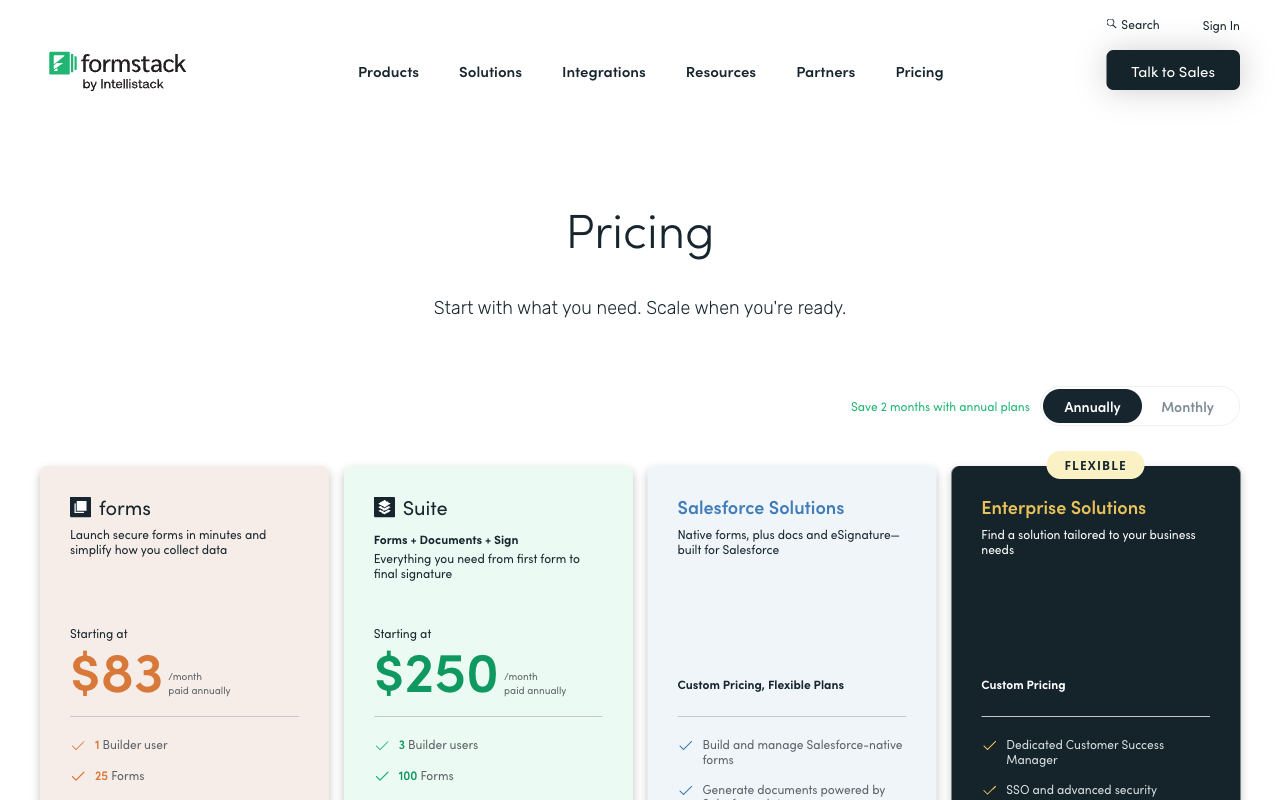
The second difference shows up on the invoice rather than in the builder. Formstack's Forms plan at $99/month, or $83 billed annually, includes one builder user. Suite at $299/$250 includes three. Paperform sells no seats at all: users are unlimited on every tier, and one seat covers forms, eSignatures and workflow automation together. Those two facts, payments and seats, shape most of what follows.
Quick Verdict
Choose Formstack if:
- You handle protected health information and need HIPAA with a BAA
- Salesforce is the centre of your operation and forms must be native to it
- Procurement wants TX-RAMP, a published VPAT or Data Privacy Framework listings
- One or two people build every form and the count will not grow
- Document generation at volume is the primary job, not the form
Choose Paperform if:
- You sell something: products, subscriptions, tickets, deposits or services
- You take money through Square, Braintree or Google Pay, not only Stripe
- Pricing, discounts and tax have to be calculated live inside the form
- More than one person needs to build, and headcount should not raise the bill
- Your best-performing form should not be the one that triggers an upgrade
- Forms, signatures and workflow belong on one subscription
Five Facts That Settle Most of This
Payments
Paperform supports 5 payment gateways (Stripe, PayPal, Square, Braintree and Google Pay) with no transaction fee of its own. Formstack supports 2: Stripe and PayPal, with no product catalogue, subscriptions or tax calculation.
Pricing and seats
Formstack starts at $99/month ($83 annually) for 1 builder user, 25 forms and 1,000 submissions per form. Paperform Pro is $59/month ($49 annually) with unlimited submissions and unlimited users within fair use.
Integrations and API
Paperform reaches 4,000+ integrations via native connectors, Zapier, Make, webhooks and a REST API. Formstack advertises 300+ integrations and has no Make connector, but its Salesforce tooling is deeper.
Conditional logic
Both branch on answers and both do calculating fields. Paperform's calculations use Excel-style syntax and drive question and page visibility, conditional emails, integration triggers and success page content, not just a field total.
Compliance
Formstack is HIPAA, GDPR, CCPA and SOC 2 compliant, with PCI DSS attestations, TX-RAMP Level 2 and EU-US, UK-US and Swiss-US Data Privacy Framework listings, though HIPAA is a paid add-on on the Forms and Suite plans. Paperform is SOC 2 Type II, GDPR and CCPA compliant and is not HIPAA compliant and signs no BAAs. Neither vendor is ISO 27001 certified.
Feature Comparison
Formstack covers more ground on paper because it is three acquired products wearing one name. The table below is more useful for what it shows about depth: where each capability actually sits, and what tier you have to reach to use it.
| Feature | Paperform | Formstack |
|---|---|---|
| Form Building | ||
| Document-style editor | Yes | No |
| AI form creation | Yes | Yes forms |
| Field types | 26+ | 15 |
| File uploads | Yes | No |
| Multi-page forms | Yes | Yes forms |
| Guided mode (one question at a time) | Yes | Yes forms |
| Conditional logic | Yes | Yes forms |
| Calculations field | Yes pro | Yes forms |
| AI calculations assistant | Yes pro | No |
| Scoring | Yes pro | No |
| Answer piping | Yes | Yes forms |
| Pre-filling and hidden fields | Yes pro | Yes forms |
| Save and resume | Yes | Yes forms |
| Auto-close by number | Yes pro | No |
| Auto-close by date | Yes pro | No |
| Appointment/booking field | Yes | No |
| Signature field | Yes | Yes suite |
| Color picker field | Yes | No |
| API-powered dropdowns | Yes business | Yes forms |
| Google address search | Yes business | No |
| Drag-and-drop builder | No | Yes forms |
| Payments | ||
| Stripe payments | Yes | Yes forms |
| PayPal payments | Yes | Yes forms |
| Square payments | Yes | No |
| Braintree payments | Yes | No |
| Google Pay | Yes | No |
| Product sales (eCommerce) | Yes pro | No |
| Subscriptions | Yes pro | No |
| Coupons and discounts | Yes pro | Yes forms |
| Custom pricing rules | Yes pro | Yes forms |
| Tax calculations | Yes | No |
| Quotes/invoices | Yes | No |
| Refunds | Yes | No |
| 3D Secure | Yes | No |
| Design & Customization | ||
| Template gallery | 30,000+ | Yes forms |
| Rich media (images, GIFs, videos) | Yes | Yes forms |
| Unsplash and Giphy integration | Yes | No |
| Image editor | Yes | No |
| Adobe Creative Cloud | Yes | No |
| Language translation | Yes | No |
| Advanced theming | Yes pro | Yes forms |
| Custom form URL | Yes pro | Yes forms |
| Custom domains | Yes pro | Yes forms |
| Custom HTML & CSS | Yes pro | Yes forms |
| Remove branding | Yes pro | Yes forms |
| Custom email domains | Yes business | No |
| Analytics | ||
| Submission results and reports | Yes | Yes forms |
| AI report insights | Yes pro | No |
| Paperform analytics | Yes pro | Yes forms |
| Drop-off analysis | Yes pro | No |
| Google Analytics & Facebook Pixel | Yes pro | Yes forms |
| Custom analytics scripts | Yes pro | No |
| Partial submissions | Yes pro | Yes forms |
| Collaboration | ||
| Multi-user accounts | Yes pro | Yes forms |
| User permissions and management | Yes pro | Yes forms |
| Advanced permissions & admin | Yes enterprise | Yes enterprise |
| Form sharing (templates) | Yes | Yes forms |
| Spaces and tag management | Yes | Yes forms |
| Security | ||
| SOC 2 Type II | Yes | No |
| GDPR compliant | Yes | Yes forms |
| SSL encryption | Yes | Yes forms |
| Two-factor authentication | Yes | Yes forms |
| Enforce 2FA for all users | Yes business | Yes enterprise |
| SSO (SAML) | Yes business | Yes enterprise |
| reCAPTCHA | Yes | Yes forms |
| Local data residency | Yes enterprise | No |
| Custom S3 storage (BYO) | Yes business | No |
| Integrations & API | ||
| Native integrations | 4,000+ | No |
| Zapier | Yes | Yes forms |
| Make (Integromat) | Yes | No |
| Webhooks | Yes pro | Yes forms |
| Standard API | Yes pro | Yes forms |
| Business API | Yes business | Yes enterprise |
| WordPress plugin | Yes | Yes forms |
| oEmbed support | Yes | No |
| 4000+ integrations | No | No |
Where Formstack Wins
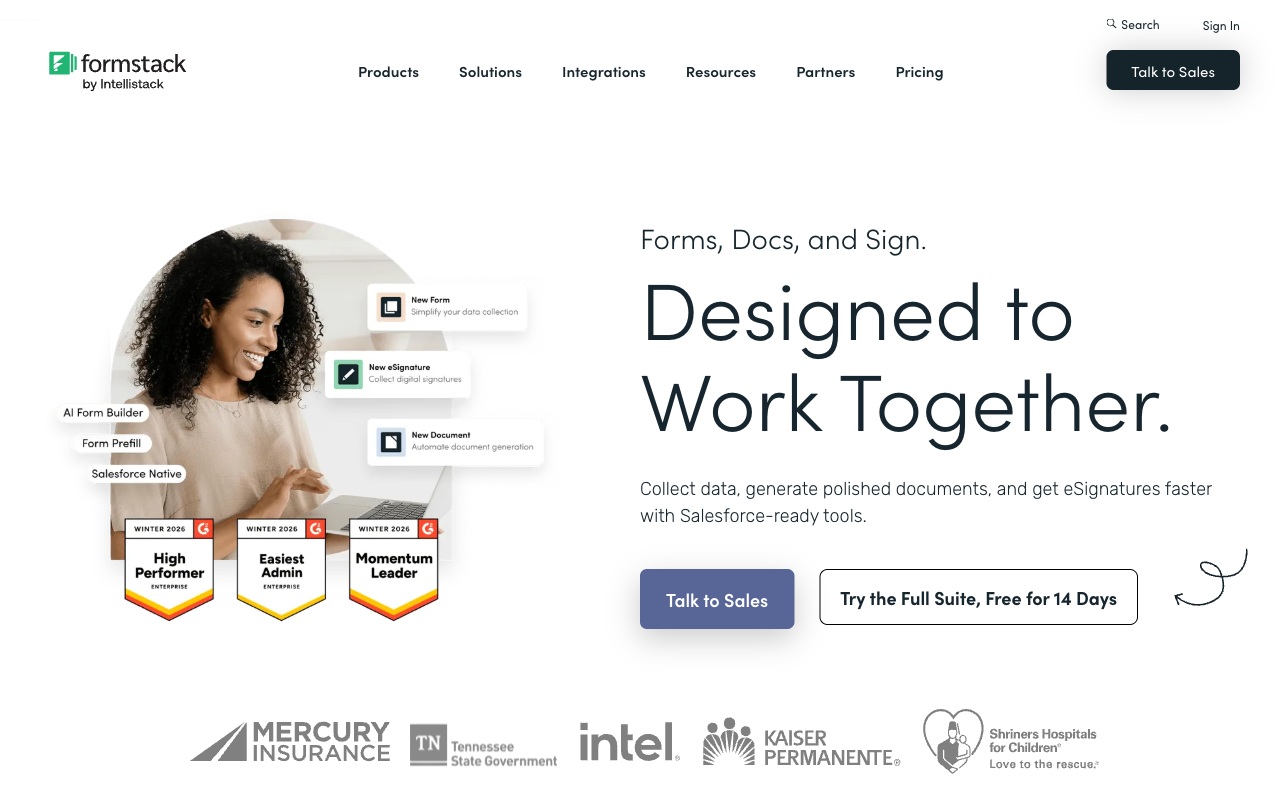
HIPAA compliance, which Paperform cannot offer
Formstack will support HIPAA-compliant forms and Paperform will not. Personal health data is encrypted with AES-256 on AWS S3, and Cleveland Clinic is a published customer. The caveat is commercial rather than technical: HIPAA is marked as a paid add-on on the Forms and Suite plans with no published price, and it is included by default only on the Salesforce and Enterprise solutions. Even so, if PHI passes through your intake, this page ends here and Formstack is your answer.
Salesforce-native forms and documents
Formstack for Salesforce is a genuinely separate product rather than a connector, with Experience Cloud integration and Salesforce Shield compatibility. For a revenue operations team whose objects, validation rules and approval processes all live in Salesforce, a form that writes natively into that model removes an entire class of sync problem. Paperform integrates with Salesforce; it does not live inside it.
A longer compliance paper trail
Nineteen years in market buys documentation. The Intellistack Trust Center publishes SOC 2 Type II, PCI DSS attestations for Formstack Forms and Forms for Salesforce, TX-RAMP Level 2, EU-US, UK-US and Swiss-US Data Privacy Framework listings, and a Section 508 and WCAG 2.2 VPAT dated June 2026. If your procurement questionnaire has more than ten rows, Formstack answers more of them. Worth noting on both sides: neither company holds ISO 27001, and Formstack's Trust Center publishes only an engagement summary letter for it.
Document generation at volume, and a bigger footprint
Formstack Documents is a mature merge engine that populates contracts, invoices and reports from submission data. It is the capability the product is most often praised for, and a No Code Collab tutorial on connecting forms to docs remains one of the more watched Formstack walkthroughs. Formstack also reports 32,000+ customers and carries 471 G2 reviews at 4.3 against Paperform's 78, so the reassurance of a crowd is on its side.
Where Paperform Wins

A payments layer that behaves like a store
Paperform supports five gateways and Formstack supports two, and the count is the least interesting part. Formstack's payment fields are PCI-compliant and they hand a charge to Stripe or PayPal. There is no product catalogue, no inventory, no coupon engine, no automated tax and no subscription billing, so the moment your form does anything commercially normal, the commerce logic moves to another system and someone becomes the integration between the two.
Paperform ships that logic in the form. Products with stock levels, subscriptions and recurring billing, coupons and custom pricing rules, tax calculation, quoting and refunds, across Stripe, PayPal, Square, Braintree and Google Pay. Over $173M has been processed through Paperform forms, and Paperform takes no transaction fee of its own on top of your processor's rate. A conference registration that prices by ticket type, applies an early-bird discount until a date, adds the right tax by region, charges the card and emails a receipt is one form, not a form plus a payments tool plus a spreadsheet.
Calculations that reach past the total
Formstack has calculating fields and they work. Paperform's calculation engine uses Excel-style syntax and its output is not confined to a number on the page: a formula can decide which questions and pages appear, which conditional email fires, what an integration receives and what the success page says. That is why the payments story holds together. The price a buyer sees updates live as they choose options, and the same expression that produced it can route the submission, trigger the contract and set the confirmation. For a quoting form or a configurator, this is configuration rather than a development project.
Adding the team costs nothing
Paperform has no per-seat pricing on any paid tier. Formstack's Forms plan includes one builder user and Suite includes three, which is a pricing model that charges you for involving colleagues. The predictable outcome is that one ops lead builds everyone else's forms to keep the seat count down and becomes the queue that the rest of the business waits in. On Paperform the events coordinator, the recruiter and the finance manager each build their own from the 30,000+ template library, and the bill does not notice. Business at $124/month annually adds admin and user roles with per-member, per-product access, so more people can be in without more invoice.
Nothing is metered except automation credits
Formstack caps submissions at 1,000 per form on the Forms plan and 5,000 per form on Suite, and caps form count at 25 and 100. Applied per form, that cap means the campaign that works is the one that breaks the plan. Paperform meters neither submissions nor forms on paid plans, and there is no overage invoice. The honest exception: Stepper automation runs are metered in credits at 20,000 per month on Pro and 100,000 on Business, with overflow at $10 per additional 10,000 on Pro. Custom domains are $20/month each on Pro. A heavy automation user should size that up front rather than discover it.
Three products, one subscription, one roadmap
Getting forms, signatures and workflow from Formstack means Suite at $250/month annually, and that plan still caps document deliveries at 250 a month. Documents and Sign arrived largely through acquisition, and the 2026 engineering attention has gone to the separate Intellistack Streamline stack rather than to Formstack Forms, which is a reasonable thing to weigh when you are choosing who owns your intake process for the next five years. Paperform Pro at $49/month annually covers forms, Papersign and Stepper from one account, built by one company that has been in the same codebase since 2016, bootstrapped and profitable, with no investor clock deciding where the engineering goes.
Where Formstack Falls Short
- Two payment gateways and no commerce layer: Stripe and PayPal only, with no products, inventory, subscriptions, coupons, tax calculation or refund handling.
- Per-seat pricing on builders: 1 user on the $83/month annual plan, 3 on the $250 plan.
- Submission and form caps: 25 forms and 1,000 submissions per form on Forms, 100 and 5,000 on Suite.
- HIPAA sold as an add-on: a paid extra on Forms and Suite with no published price, included only on Salesforce and Enterprise.
- A high floor to get started: the cheapest way in is $996 a year after a 14-day trial.
- 300+ integrations and no Make support: the routing you need often ends up on a separate automation subscription.
- Missing field types: no appointment booking, colour picker, quiz scoring or Google address autocomplete.
- Support reputation: Trustpilot sits at 1.6/5 from 24 reviews with 88% one-star, and Capterra rates support 3.6 and value for money 3.7.
- Dated builder: reviewers repeatedly describe the interface as clunky, and Website Planet notes a generally less modern look and feel.
- Small template library: 41 pages of templates against dedicated form builders offering tens of thousands.
- Product attention has moved: 2026 release notes are dominated by the separate Streamline stack rather than Formstack Forms.
Where Paperform Falls Short
- No HIPAA compliance and no BAAs: a hard stop for protected health information, and the single best reason to buy Formstack instead.
- No Salesforce-native product: Paperform integrates with Salesforce but does not build inside it.
- Thinner procurement paperwork: no TX-RAMP, no published VPAT, and no ISO 27001, though Formstack lacks that certification too.
- No mobile editor: forms are fully responsive for respondents, but building is desktop work.
- Automation credits are metered: 20,000/month on Pro, then $10 per additional 10,000.
- Smaller review footprint: around 78 G2 reviews against Formstack's 471, and a much smaller brand.
- Overkill for a three-question form: if all you need is a contact form and a thank-you page, use the simple tool.
See Both Builders in Action
Independent walkthroughs are the fastest way to judge a builder before a card goes in.
Pricing Comparison
Formstack meters builder users, forms, submissions per form and document deliveries. Paperform meters automation credits. Everything below follows from that.
| Tier | Paperform | Formstack | What actually differs |
|---|---|---|---|
| Entry | Pro: $59/mo, $49 annually. Unlimited submissions and users, 5 payment gateways | Forms: $99/mo, $83 annually. 1 user, 25 forms, 1,000 submissions per form | Paperform is $34/month cheaper and removes the caps at the same time |
| Forms plus signatures | Pro, unchanged. Papersign included, 25 signed docs/mo | Suite: $299/mo, $250 annually. 3 users, 100 forms, 250 document deliveries/mo | Signatures cost $201/month more on Formstack and stay metered |
| Business | Business: $149/mo, $124 annually. 10 workspaces, SSO, Business API, 100 signed docs/mo | Suite, or Enterprise on a custom quote for SSO and unlimited users | Paperform publishes the price of SSO; Formstack routes it to sales |
| HIPAA | Not available at any price | Paid add-on on Forms and Suite; included on Salesforce and Enterprise | Formstack wins outright, and the add-on price is unpublished |
| Trial | 7 days, no credit card | 14 days, no credit card | Formstack gives you longer to evaluate |
Paperform
Formstack
| Product | Plan | Monthly Price | Annual Price (per month) | Free Plan | Free Trial | Limits |
|---|---|---|---|---|---|---|
| Paperform | Free | Free | Free | Yes | 7 days | forms: Unlimited, submissions: 30/month, storage: Unlimited, users: Unlimited, file uploads: 100 MB |
| Paperform | Pro | $59/mo | $49/mo billed annually | forms: Unlimited, submissions: Unlimited, storage: Unlimited, users: Unlimited, file uploads: 10 GB | ||
| Paperform | Business | $149/mo | $124/mo billed annually | forms: Unlimited, submissions: Unlimited, storage: Unlimited, users: Unlimited, file uploads: 100 GB | ||
| Formstack | Forms | $99/mo | $83/mo billed annually | No | 14 days | forms: 25, submissions: 1,000/form, storage: 2 GB, users: 1, file uploads: 2 GB |
| Formstack | Suite | $299/mo | $250/mo billed annually | forms: 100, submissions: 5,000/form, storage: 10 GB, users: 3, file uploads: 10 GB |
One more thing worth knowing before you compare the headline numbers: Formstack's cheapest commitment is $996 for a year. Paperform's add-ons sit above the plan price rather than beside it, at $10/month per extra 10,000 automation credits on Pro and $20/month per custom domain, and those are published. Formstack's HIPAA add-on price is not.
What Users Say
Formstack Forms rates 4.3 on G2 across 471 reviews and 4.0 on Capterra across roughly 126, with value for money at 3.7 and support at 3.6. Trustpilot is the outlier at 1.6 from 24 reviews, 88% of them one-star, and the low volume means it should be read as a signal rather than a measurement. The recurring complaints are billing, cancellation and getting a human on the line. Paperform has a much smaller sample, at 78 G2 reviews and 104 on Capterra, but rates 4.8 on both and 4.8 across 212 Trustpilot reviews, with support at 4.7 on Capterra and 4.9 on GetApp. Support at Paperform is answered by the people who build the product and is part of the seat price rather than a tier you buy into.
The Verdict
Buy Formstack if you are in healthcare, if Salesforce is the system everything must write into, or if your procurement process needs the longer certification list. Those are real reasons and no pricing argument answers them.
Buy Paperform if money moves through your forms. Five gateways instead of two, an order engine instead of a charge, live pricing driven by Excel-style calculations, and no transaction fee stacked on top of your processor. Then add the seat maths. Formstack charges $83/month for one builder and $250 for three; Paperform charges $49/month annually for as many as you like, and that seat covers eSignatures and workflow automation as well. For a team that sells things and has more than one person building forms, the gap is not close.
If you want to see how both stack up against the wider field, start with the overall form builder ranking or our list of Formstack alternatives. Teams weighing a design-led option instead should read Paperform vs Typeform.
Frequently Asked Questions
Can I sell products and take subscription payments directly in a Formstack form?
You can charge a card, but you cannot run an order. Formstack connects to Stripe and PayPal and stops there: no product catalogue, no inventory, no coupon engine, no automated tax and no subscription billing, so recurring revenue and discounting live in a second system that someone reconciles by hand. Paperform connects five gateways (Stripe, PayPal, Square, Braintree and Google Pay), adds products, subscriptions, coupons, custom pricing rules, tax and refunds inside the form, and charges no transaction fee of its own on top of what your processor takes.
How many people can build forms on the $83/month Formstack plan?
One. The Forms plan at $99/month, or $83 billed annually, includes a single builder user; Suite at $299/$250 includes three. Every additional builder is a line on the invoice, which is why Formstack teams often funnel all form requests through one ops person. Paperform has no per-seat pricing on any tier. Users are unlimited on Pro at $59/month ($49 annually) and on Business at $149/month ($124 annually), and one seat covers forms, Papersign and Stepper together, so a person using all three counts once.
Is Formstack HIPAA compliant out of the box?
Not on the published plans. Formstack is HIPAA compliant, but on the Forms and Suite tiers HIPAA appears as a paid add-on with an unpublished price; it is included by default only on the Salesforce and Enterprise solutions. That still makes Formstack the right answer for protected health information, because Paperform is not HIPAA compliant and does not sign Business Associate Agreements. If PHI touches your intake process, buy Formstack and budget for the add-on.
What happens when one Formstack form passes 1,000 submissions?
You upgrade. The Forms plan caps at 25 forms and 1,000 submissions per form; Suite raises that to 100 forms and 5,000 per form and adds a 250 document-deliveries-per-month ceiling. The cap is applied per form, so a single campaign that performs well can trigger the upgrade while the rest of your account sits idle. Paperform does not meter submissions or forms on paid plans at all. Fair use is a conversation about plan fit if volume gets extreme, not an overage invoice.
Do I need the $250/month Suite plan to send contracts for signature?
Yes. Formstack Sign is bundled only with Suite at $299/month, or $250 billed annually, and that plan still meters document deliveries at 250 per month. Workflow automation has moved into the separate Intellistack Streamline stack rather than Formstack Forms. Paperform Pro at $49/month annually includes Papersign eSignatures (25 signed documents per month, 100 on Business) and Stepper workflow automation on the same account, with unlimited workflow steps from Pro up.
Does Formstack integrate with Make, and how big is its connector library?
Formstack advertises 300+ integrations and has no Make connector, though its native Salesforce tooling is deeper than anything Paperform offers. Paperform reaches 4,000+ destinations through native connectors, Zapier, Make, webhooks and a REST API, with a separate Business API on the $124/month annual tier. Stepper handles multi-step routing and approvals inside the subscription, metered by automation credits at 20,000 per month on Pro.
Sources & References
- Formstack Pricing — Formstack, September 2026
- Formstack Review 2026: Features, Pricing, Pros, and Cons — Signeasy, 2026
- Formstack Review: Pros, Cons, Features, and Pricing — The CX Lead, 2026
- Formstack Review 2025: Could It Be Right for You? — Website Planet, 2025
- Formstack Forms Reviews — G2, September 2026
- Formstack Reviews — Trustpilot, September 2026
Updates
We re-audit the form builders we compare on a regular cadence and log every change here — a public record of what changed and when.
- Updated September 22, 2026 — First publication against the September 2026 data re-audit. Formstack pricing read live: Forms $99/mo or $83 annually with 1 builder user, Suite $299/mo or $250 annually with 3 users and a 250 document-delivery cap, HIPAA as a paid add-on on both, 300+ integrations. Paperform pricing reflects the September 2026 platform lineup: Pro $59/$49 and Business $149/$124 with unlimited submissions and seats, Papersign and Stepper included. Ratings refreshed: Formstack G2 4.3/471, Capterra 4.0/126, Trustpilot 1.6/24.
Last updated September 22, 2026
Ready to try Paperform?
Create beautiful forms, payment pages, and workflows — no code required.