Paperform vs Google Forms vs Jotform: Which Form Builder Wins in 2026?
Google Forms wins on price for simple data collection: free, unlimited responses, no meter. Jotform wins on breadth and regulated work, with 40+ payment processors and HIPAA on Gold at $99/month annually. Paperform wins when the form starts a process, covering forms, eSignatures and workflows in one subscription from $49/month annually.
These three products are not really competing for the same purchase, which is why the comparison is worth making carefully. Google Forms is free, has been part of Google Workspace since 2008, and is already sitting in the account of anyone with a Gmail address. Jotform has been building forms since 2006, is bootstrapped, serves over 40 million users, and has accumulated more features than any rival in the category. Paperform, founded in 2016 and also bootstrapped and profitable, sells something structurally different: one subscription that covers forms, Papersign eSignatures and Stepper workflow automation on every plan.
The clean way to decide is to ask where your work stops. If it stops when the response lands in a spreadsheet, Google Forms is the correct answer and paying for anything else is waste. If it stops at a payment or a signed consent form in a clinic, Jotform's breadth and its BAA are hard to argue with. If it keeps going into approvals, contracts and handoffs between teams, you are buying a platform rather than a form builder, and the pricing model matters as much as the feature list.
Quick Verdict
Paperform
Best for: operators whose forms trigger signatures, approvals and multi-step work, and who want the bill to stay still while volume and headcount grow.
Google Forms
Best for: internal surveys, class quizzes and RSVPs inside a Google Workspace organisation, where free and unlimited beats every other consideration.
Jotform
Best for: one-person teams and regulated work that need an unusual payment gateway, a HIPAA BAA or offline mobile capture, and can live inside monthly quotas.
| Feature | Paperform | Google Forms | Jotform |
|---|---|---|---|
| Form Building | |||
| Document-style editor | Yes | No | No |
| Field types | 26+ | 11 | 30+ (starter) |
| Guided mode (one question at a time) | Yes | No | Yes starter |
| Calculations field | Yes pro | No | Yes starter |
| AI calculations assistant | Yes pro | No | No |
| Payments | |||
| Stripe payments | Yes | No | Yes starter |
| PayPal payments | Yes | No | Yes starter |
| Square payments | Yes | No | Yes starter |
| Braintree payments | Yes | No | Yes starter |
| Google Pay | Yes | No | Yes starter |
| Design & Customization | |||
| Template gallery | 30,000+ | 20+ | 20,000+ (starter) |
| Unsplash and Giphy integration | Yes | No | No |
| Image editor | Yes | No | No |
| Adobe Creative Cloud | Yes | No | No |
| Language translation | Yes | No | Yes starter |
| Analytics | |||
| AI report insights | Yes pro | Yes Business Standard | No |
| Paperform analytics | Yes pro | No | No |
| Drop-off analysis | Yes pro | No | No |
| Google Analytics & Facebook Pixel | Yes pro | No | No |
| Custom analytics scripts | Yes pro | No | No |
| Collaboration | |||
| Form sharing (templates) | Yes | Yes | No |
| Spaces and tag management | Yes | No | No |
| Form sharing | No | No | Yes starter |
| Assign forms | No | No | Yes enterprise |
| Multi-user accounts | Yes pro | Yes | Yes bronze |
| Security | |||
| Enforce 2FA for all users | Yes business | Yes Business Starter | No |
| reCAPTCHA | Yes | No | Yes starter |
| Local data residency | Yes enterprise | Yes Business Plus | No |
| Custom S3 storage (BYO) | Yes business | No | No |
| HIPAA compliant | No | No | Yes gold |
| Integrations & API | |||
| Native integrations | 4,000+ | No | 150+ (starter) |
| Webhooks | Yes pro | No | Yes starter |
| Standard API | Yes pro | Yes | No |
| Business API | Yes business | No | No |
| WordPress plugin | Yes | No | Yes starter |
The Five Dimensions That Decide It
Each of the three leads on at least one of these, and each loses at least one badly. The numbers below come from pricing pages read on 22 September 2026.
Pricing
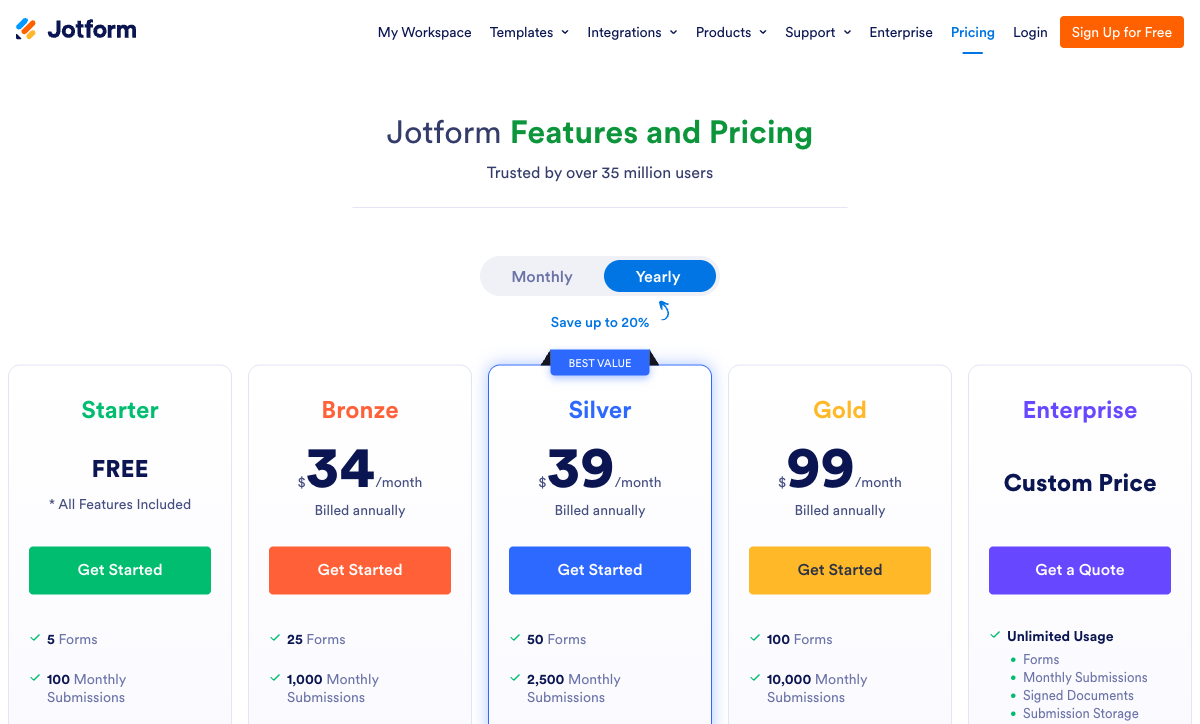
Google Forms costs nothing and never meters responses; Jotform starts at $34/month billed annually for 1,000 submissions; Paperform starts at $49/month billed annually with submissions and seats unlimited under fair use. Paperform has the highest floor of the three and should be judged on what it replaces rather than on the sticker. Jotform's number moves as you grow: Bronze at $34 annual covers 1,000 submissions, Silver at $39 covers 2,500, Gold at $99 covers 10,000, and forms, form views, storage and fields per form are each metered on their own axis. Google Workspace itself is billed per user per month, from $7 on Business Starter with an annual commitment, though Forms features are identical on the free tier.
Integrations & API
Paperform counts 4000+ integrations, Jotform lists 150+ native connectors, and Google Forms has roughly 20, nearly all of them Google's own. Google Sheets, Drive, Calendar, Gmail and Classroom are excellent and tightly wired; everything beyond that boundary is an Apps Script or a Zapier task. Jotform's native list is the practical one for business software, with Salesforce on AppExchange and HubSpot, Slack and the usual CRMs covered, though its deeper automation still leaves through a connector platform. Paperform reaches its count through native connectors, Stepper, Zapier, Make, webhooks and a documented REST API, and Stepper is in the subscription rather than rented separately.
Conditional logic
Google Forms branches at the section level only, Jotform branches at the field level through a conditions panel, and Paperform branches at question and page level driven by Excel-style calculations. Section jumps handle a quiz that forks two ways and nothing more demanding: no showing or hiding an individual question, no chained conditions. Jotform clears that bar comfortably, at the cost of a panel that reviewers describe as crowded once a form carries real complexity. Paperform's calculations are not arithmetic fields bolted to the side. The same formula governs question and page visibility, which conditional email fires, what an integration receives and what the success page shows, and an AI assistant writes them for non-technical users.
Payments
Jotform supports 40+ payment processors, Paperform supports 5 (Stripe, PayPal, Square, Braintree, Google Pay) and Google Forms supports none at any tier. Jotform's count is genuinely unmatched and the reason to pick it if your business runs on a regional gateway nobody else bothered to integrate, but payment submissions are metered separately: 100 a month on Bronze, 250 on Silver, 1,000 on Gold. Paperform covers the five gateways most businesses actually use and puts a full commerce engine behind them, with products, subscriptions, coupons, pricing rules driven by calculations, tax, invoicing and refunds, no transaction fee of its own and no cap on payment submissions. Google Forms leaves you with a form link and a manual invoice.
Compliance (HIPAA / GDPR / SOC 2)
Google Forms and Jotform are both HIPAA, GDPR and SOC 2 compliant; Paperform is SOC 2 Type II, GDPR and CCPA compliant but is not HIPAA compliant and signs no BAAs. That is the one dimension where Paperform is simply out of the running, and it should be checked first rather than last. Google Forms inherits SOC 2, ISO 27001, ISO 27701 and FedRAMP from Google Cloud and is covered by a Workspace BAA. Jotform adds PCI DSS Level 1, FERPA and StateRAMP, with HIPAA features unlocking on Gold at $99/month annually rather than on the cheaper tiers. Paperform brings SAML SSO and enforced 2FA on Business at $124/month annually, plus EU and Australian data residency on Enterprise.
 Paperform — When the Form Is Step One of a Process

The argument for Paperform in this particular three-way is about what the bill does over time, not about the entry price, which is the highest here. Google Forms bills you per Workspace seat. Jotform bills you per submission, per form, per form view, per stored record and, above one person, through a sales conversation. Paperform meters neither submissions nor seats on paid plans: Pro at $49/month annually and Business at $124/month annually both carry unlimited responses and unlimited team members under fair use, and fair use means a conversation about plan fit rather than a shut-off or an overage invoice. A campaign that works does not produce a surprise.
The second argument is consolidation. A team running Google Forms or Jotform for anything past data collection usually ends up holding three vendors together: the form tool, a signature tool, and an automation platform charging by the run. Paperform includes Papersign and Stepper in the same subscription, so a submission can generate a contract, collect a signature, route an approval and update a CRM on one account with one invoice. The editor is the other genuine difference. Forms are written like a document, with prose, images, GIFs and video placed wherever the page needs them, which matters when the form is the first thing a customer sees rather than an internal request queue.
Be clear about the trade-offs. No HIPAA and no BAA rules out clinical intake. Stepper's automation credits are metered at 20,000 a month on Pro, with overflow at $10 per additional 10,000, so a heavy automation user pays above the headline. Custom domains are $20/month each on Pro. And for a single administrator running one internal survey, $49/month buys capability that will sit unused. Our Paperform vs Jotform page covers the head-to-head in more depth.
 Google Forms — The Free Default That Is Often the Right Answer
Nothing on this page is as easy to justify as Google Forms. It is free with unlimited responses, requires no procurement, and anyone who has used Google Docs can build a working survey in five minutes. Multiple people can edit the same form at once on the same real-time engine that powers Docs and Sheets, which no paid competitor here matches for collaboration. Responses sync to a spreadsheet automatically, and in education the Classroom integration has made it the default for a generation of teachers. Google Forms rates 4.7 on Capterra across more than 11,000 reviews, and ease of use is its highest sub-score everywhere it is rated.
Its limits are structural rather than incidental, and they arrive together. Around 11 question types, no signature field, no appointment booking, no scoring beyond quiz marks. Customisation stops at a header image, a theme colour and four fonts, with Google branding fixed in place and no custom domain at any tier including paid Workspace. There is no save and resume without a Google sign-in, which is both a drop-off problem and an access problem on a public form. Because forms are hosted on docs.google.com, you cannot add Google Analytics, a Facebook Pixel or any tracking script, so a funnel is unmeasurable by design. And payments do not exist.
The honest framing: Google Forms is excellent at collecting answers and ends there. Everything downstream becomes a stack you assemble yourself, priced per user in Workspace and per run in Zapier. For the upgrade paths, see our Google Forms alternatives roundup.
 Jotform — Twenty Years of Breadth, Sold by the Meter

Jotform's feature list is the longest in this comparison and it is not close. Forty-plus payment gateways on every plan including the free one, 20,000+ templates, 150+ native integrations, HIPAA with a BAA, PCI DSS Level 1, FERPA, StateRAMP, native iOS and Android apps that capture responses offline, plus Tables, Approvals, Sign, Apps, Report Builder and AI Agents built on top. Every feature is available on the free Starter tier, which is unusual and genuinely customer-friendly: what changes as you pay is the size of the limits, not the shape of the product. Bootstrapped since 2006 and rated 4.7 on G2 across more than 5,500 reviews, it is the most reviewed and the oldest product here.
The catch is the pricing model, and it sits on top of everything. Submissions, forms, form views, submission storage, fields per form, payment submissions and signed documents are each metered on their own axis, and the failure mode when a quota runs out is not a surcharge. The form stops accepting responses. Bronze at $34/month annually is 1,000 submissions and 25 forms; the month a campaign lands, that becomes Silver, then Gold at $99. Every self-serve tier is single-user, so the second person who needs edit access is an Enterprise quote rather than an upgrade button. Reviewers also consistently flag slow support and an interface that grows cluttered as conditions accumulate, which is the visible cost of two decades of accumulation. Our Jotform alternatives page works through the quota structure tier by tier.
See Them in Action
Two independent walkthroughs worth watching before you commit: the most-viewed Google Forms tutorial on YouTube, and a beginner's tour of what Paperform's editor actually feels like. Jotform's own channel dominates its search results, so there is no comparably independent video to include for it.
Pricing Compared
Read this table for the limits rather than the prices. Google Forms has no meaningful price to compare; Jotform's number rises with your volume; Paperform's does not move with submissions or headcount at all.
Paperform
Google Forms
| Product | Plan | Monthly Price | Annual Price (per month) | Free Plan | Free Trial | Limits |
|---|---|---|---|---|---|---|
| Paperform | Free | Free | Free | Yes | 7 days | forms: Unlimited, submissions: 30/month, storage: Unlimited, users: Unlimited, file uploads: 100 MB |
| Paperform | Pro | $59/mo | $49/mo billed annually | forms: Unlimited, submissions: Unlimited, storage: Unlimited, users: Unlimited, file uploads: 10 GB | ||
| Paperform | Business | $149/mo | $124/mo billed annually | forms: Unlimited, submissions: Unlimited, storage: Unlimited, users: Unlimited, file uploads: 100 GB | ||
| Google Forms | Free (Personal) | Free | Free | Yes | 14 days | forms: Unlimited, submissions: Unlimited, storage: 15 GB (shared across Google Drive), users: 1, file uploads: Included in 15 GB storage |
| Google Forms | Business Starter | $8.4/mo | $7/mo billed annually | forms: Unlimited, submissions: Unlimited, storage: 30 GB per user, users: Up to 300, file uploads: Included in storage | ||
| Google Forms | Business Standard | $16.8/mo | $14/mo billed annually | forms: Unlimited, submissions: Unlimited, storage: 2 TB per user, users: Up to 300, file uploads: Included in storage | ||
| Google Forms | Business Plus | $26.4/mo | $22/mo billed annually | forms: Unlimited, submissions: Unlimited, storage: 5 TB per user, users: Up to 300, file uploads: Included in storage | ||
| Jotform | Starter | Free | Free | Yes | No | forms: 5, submissions: 100/month, storage: 100 MB, users: 1 |
| Jotform | Bronze | $39/mo | $34/mo billed annually | forms: 25, submissions: 1,000/month, storage: 1 GB, users: 1 | ||
| Jotform | Silver | $49/mo | $39/mo billed annually | forms: 50, submissions: 2,500/month, storage: 10 GB, users: 1 | ||
| Jotform | Gold | $129/mo | $99/mo billed annually | forms: 100, submissions: 10,000/month, storage: 100 GB, users: 1 |
Full Feature Comparison
The payments, logic, workflow and compliance rows are where these three products stop resembling each other.
| Feature | Paperform | Google Forms | Jotform |
|---|---|---|---|
| Form Building | |||
| Document-style editor | Yes | No | No |
| AI form creation | Yes | Yes paid | Yes starter |
| Field types | 26+ | 11 | 30+ (starter) |
| File uploads | Yes | Yes | Yes starter |
| Multi-page forms | Yes | Yes | Yes starter |
| Guided mode (one question at a time) | Yes | No | Yes starter |
| Conditional logic | Yes | Yes | Yes starter |
| Calculations field | Yes pro | No | Yes starter |
| AI calculations assistant | Yes pro | No | No |
| Scoring | Yes pro | Yes | Yes starter |
| Answer piping | Yes | No | Yes starter |
| Pre-filling and hidden fields | Yes pro | Yes | Yes starter |
| Save and resume | Yes | No | Yes starter |
| Auto-close by number | Yes pro | Yes | Yes starter |
| Auto-close by date | Yes pro | Yes | Yes starter |
| Appointment/booking field | Yes | No | Yes starter |
| Signature field | Yes | No | Yes starter |
| Color picker field | Yes | No | No |
| API-powered dropdowns | Yes business | No | No |
| Google address search | Yes business | No | No |
| AI quiz generation | No | Yes paid | No |
| Drag-and-drop builder | No | No | Yes starter |
| Form widgets | No | No | Yes starter |
| Template gallery | No | No | 20,000+ (starter) |
| Payments | |||
| Stripe payments | Yes | No | Yes starter |
| PayPal payments | Yes | No | Yes starter |
| Square payments | Yes | No | Yes starter |
| Braintree payments | Yes | No | Yes starter |
| Google Pay | Yes | No | Yes starter |
| Product sales (eCommerce) | Yes pro | No | Yes starter |
| Subscriptions | Yes pro | No | Yes starter |
| Coupons and discounts | Yes pro | No | Yes starter |
| Custom pricing rules | Yes pro | No | Yes starter |
| Tax calculations | Yes | No | Yes starter |
| Quotes/invoices | Yes | No | No |
| Refunds | Yes | No | No |
| 3D Secure | Yes | No | No |
| 40+ payment gateways | No | No | Yes starter |
| No transaction fees | No | No | Yes starter |
| Design & Customization | |||
| Template gallery | 30,000+ | 20+ | 20,000+ (starter) |
| Rich media (images, GIFs, videos) | Yes | Yes | Yes starter |
| Unsplash and Giphy integration | Yes | No | No |
| Image editor | Yes | No | No |
| Adobe Creative Cloud | Yes | No | No |
| Language translation | Yes | No | Yes starter |
| Advanced theming | Yes pro | No | Yes starter |
| Custom form URL | Yes pro | No | No |
| Custom domains | Yes pro | No | Yes enterprise |
| Custom HTML & CSS | Yes pro | No | Yes starter |
| Remove branding | Yes pro | No | Yes bronze |
| Custom email domains | Yes business | Yes Business Starter | No |
| Form themes | No | No | Yes starter |
| Analytics | |||
| Submission results and reports | Yes | Yes | Yes starter |
| AI report insights | Yes pro | Yes Business Standard | No |
| Paperform analytics | Yes pro | No | No |
| Drop-off analysis | Yes pro | No | No |
| Google Analytics & Facebook Pixel | Yes pro | No | No |
| Custom analytics scripts | Yes pro | No | No |
| Partial submissions | Yes pro | No | No |
| Form analytics | No | No | Yes starter |
| Google Analytics integration | No | No | Yes starter |
| Collaboration | |||
| Multi-user accounts | Yes pro | Yes | Yes bronze |
| User permissions and management | Yes pro | Yes | Yes enterprise |
| Advanced permissions & admin | Yes enterprise | Yes Business Starter | Yes enterprise |
| Form sharing (templates) | Yes | Yes | No |
| Spaces and tag management | Yes | No | No |
| Form sharing | No | No | Yes starter |
| Assign forms | No | No | Yes enterprise |
| Security | |||
| SOC 2 Type II | Yes | Yes | Yes enterprise |
| GDPR compliant | Yes | Yes | Yes starter |
| SSL encryption | Yes | Yes | Yes starter |
| Two-factor authentication | Yes | Yes | Yes starter |
| Enforce 2FA for all users | Yes business | Yes Business Starter | No |
| SSO (SAML) | Yes business | Yes Business Plus | Yes enterprise |
| reCAPTCHA | Yes | No | Yes starter |
| Local data residency | Yes enterprise | Yes Business Plus | No |
| Custom S3 storage (BYO) | Yes business | No | No |
| HIPAA compliant | No | No | Yes gold |
| 256-bit SSL | No | No | Yes starter |
| Data residency | No | No | Yes enterprise |
| Form encryption | No | No | Yes starter |
| PCI DSS | No | No | Yes starter |
| Integrations & API | |||
| Native integrations | 4,000+ | No | 150+ (starter) |
| Zapier | Yes | Yes | Yes starter |
| Make (Integromat) | Yes | Yes | Yes starter |
| Webhooks | Yes pro | No | Yes starter |
| Standard API | Yes pro | Yes | No |
| Business API | Yes business | No | No |
| WordPress plugin | Yes | No | Yes starter |
| oEmbed support | Yes | No | No |
| API | No | No | Yes starter |
| Smartsheet integration | No | No | Yes starter |
| Canvas LMS integration | No | No | Yes enterprise |
| Salesforce AppExchange | No | No | Yes starter |
| Embed options | No | No | Yes starter |
| Mobile apps | No | No | Yes starter |
Review Ratings Across Platforms
Jotform holds 4.7 on G2 across 5,595 reviews and Google Forms 4.6 across roughly 42,000, both on a scale of feedback Paperform cannot match with 78 G2 reviews. Paperform's averages are the highest of the three (4.8 on G2 and Capterra, 4.9 on GetApp) with customer support its strongest sub-score at 4.7 to 4.9, against the slow support times reviewers regularly report for Jotform.
Verdict: A Decision Tree
Work down these in order. The first one that describes you is your answer.
- Choose Google Forms if the job ends when the answers reach a spreadsheet. Internal surveys, class quizzes, event RSVPs, sign-up sheets, anything where presentation does not matter and volume might be enormous. It is free, unlimited and already in your account, and paying for one of the others would buy capability you will never open. This is a large share of all form use and there is no shame in it.
- Choose Jotform if protected health information is in scope and you need a BAA, or your payments run through a gateway outside the mainstream five, or your field staff collect responses offline on a phone. It is also the pick for a single operator who wants the widest possible feature surface at $34/month annually and whose volume genuinely fits inside 1,000 submissions. Budget for the quota ladder above that, and for the fact that adding a colleague means talking to sales.
- Choose Paperform if the form is the first step of something longer. Contracts that need signing and filing against the submission, approval chains with a person at each step, order forms with pricing logic behind them, client onboarding run across several brands, or a security questionnaire asking about SOC 2 and SSO. One subscription covers forms, eSignatures and workflow automation, submissions and seats are not billing levers, and support is in the seat price rather than quoted as an enablement fee at signing. It is the most expensive door of the three at $49/month annually, and it replaces more than one product.
- If two of these apply, compliance decides it. HIPAA removes Paperform from the shortlist outright, whatever else is true, and the choice narrows to Jotform for a commercial workflow or Google Forms for an internal one.
A last point on longevity, since all three are long-term bets rather than experiments. Google Forms is safe as long as Alphabet keeps it, and Google does retire products. Jotform has been bootstrapped and independent for twenty years. Paperform has been bootstrapped and profitable for ten, which is worth weighing against the venture-funded and recently-acquired vendors elsewhere in this category. For a wider field, our best form builders roundup ranks the full set, and Paperform's 7-day trial needs no card.
Frequently Asked Questions
Is Jotform worth paying for when Google Forms is free and unlimited?
Only if you need something Google Forms structurally cannot do. Google Forms takes unlimited responses at no cost and never meters them; Jotform Bronze is $34/month billed annually and stops accepting responses after 1,000 in a month. What the $34 buys is payments through 40+ processors, real question-level logic, branding removal and a form library of 20,000+ templates. If none of those appear on your list, Jotform is a downgrade with an invoice attached. If payments are on the list, Google Forms has no answer at any Workspace tier.
Which of the three can take payments, and how many processors does each support?
Jotform supports 40+ payment processors on every plan including the free Starter tier, which is more than any other form builder. Paperform supports five: Stripe, PayPal, Square, Braintree and Google Pay, with products, subscriptions, coupons, custom pricing rules, tax, invoicing and refunds behind them and no transaction fee of its own. Google Forms supports none, at any price. The processor count matters less than what happens after the number is chosen: Jotform meters payment submissions separately (100/month on Bronze, 1,000 on Gold), while Paperform does not cap payment or appointment submissions on any plan.
Google Forms and Jotform are both HIPAA compliant. Is Paperform?
No. Paperform is SOC 2 Type II, GDPR and CCPA compliant, and it is not HIPAA compliant and does not sign Business Associate Agreements. If protected health information is in scope, Paperform is out and the choice is between the other two. Google Forms is covered by a Workspace BAA and carries SOC 2, ISO 27001 and FedRAMP through Google Cloud. Jotform offers HIPAA features with a BAA from the Gold tier at $99/month billed annually, alongside SOC 2, ISO 27001, PCI DSS Level 1, FERPA and StateRAMP.
How does conditional logic differ between Google Forms, Jotform and Paperform?
Google Forms branches at the section level only: a multiple-choice or dropdown answer can send someone to a different section, and that is the whole of it. Jotform branches at the field level with a full conditions panel, which handles far more but becomes hard to read once a form carries dozens of stacked rules. Paperform branches at the question and page level and puts Excel-style calculations underneath, so one formula can decide which questions appear, which conditional email fires, what reaches an integration and what the success page says. An AI assistant writes those formulas for people who do not want to.
Can I add a team to Jotform without moving to Enterprise, and how does that compare to Paperform?
No. Every Jotform self-serve tier from Starter to Gold is single-user, and genuine multi-user access means an Enterprise quote you cannot see before you ask. Sub-users exist (3 on Bronze, 10 on Silver, 100 on Gold) but the plan owner is always one seat. Paperform charges nothing per seat on any plan, and one seat covers forms, Papersign eSignatures and Stepper workflows together, so the person who uses all three counts once. Google Forms is included with a Google account, but the Workspace seats underneath it are billed per user per month from $7 annually.
What does each tool do after the form is submitted?
Google Forms writes a row to a spreadsheet and sends an email. Jotform adds Tables, Approvals, Sign and a workflow builder, though the automation most teams end up running still leaves through Zapier or Make, and signed documents are metered (100/month on Bronze, 1,000 on Gold). Paperform includes Papersign for eSignatures and Stepper for multi-step workflow automation in the same subscription on every plan, with 25 signed documents a month on Pro and 100 on Business. Stepper runs on automation credits: 20,000/month on Pro, 100,000 on Business, with paid overflow, so heavy automation is still a line worth checking.
Who has more integrations, Jotform or Paperform, and does Google Forms come close?
Paperform counts 4000+ integrations across native connectors, Stepper, Zapier, Make, webhooks and a REST API. Jotform lists 150+ native integrations, including a Salesforce app on AppExchange, plus the same connector platforms. Google Forms has roughly 20, effectively all of them inside Google's own ecosystem: Sheets, Drive, Calendar, Gmail, Classroom. Anything outside that boundary becomes an Apps Script somebody maintains or a Zapier line item. The raw counts flatter everyone, so the useful question is whether your CRM is on the native list or whether you are paying a third vendor to carry the data there.
Sources & References
- The 6 best Google Forms alternatives in 2026 — Zapier, 2026
- Google Forms Review: Is This the Best Free Survey Tool? — TechRadar, 2025
- Jotform Review 2026: Pricing, Features, Pros & Cons, Ratings & More — Research.com, 2026
- Best Online Form Builder to use in 2026 | Top 20 Tools — Email Tool Tester, 2026
Last updated September 22, 2026
Ready to try Paperform?
Create beautiful forms, payment pages, and workflows — no code required.