Paperform vs Jotform: Which Is Better in 2026?
Jotform is the better choice for healthcare teams needing HIPAA with a BAA, for unusual payment processors, and for anyone building on a phone. Paperform is the better choice for teams running a process, because one $49/month annual subscription covers forms, eSignatures and workflow automation with no cap on forms, submissions or seats.
Jotform has been building forms since 2006 and it shows in the catalogue: 20,000+ templates, 150+ native integrations, 40+ payment gateways, native iOS and Android apps, and a product suite covering Tables, Sign, Apps, Workflows, Report Builder, AI Agents and Store Builder. Very little is missing. What matters is how that catalogue is sold. Almost every part of it is metered, and the meters are separate, so the same account can be comfortably inside its submission allowance and out of signed documents.
Paperform sells the opposite arrangement. Three products travel together on every plan, forms (Paperform), eSignatures (Papersign) and workflow automation (Stepper), and the growth dials that usually generate upgrades are simply off. It costs more at the door and it stops moving after that. This page works through where each approach is the right one, and it concedes the places where Jotform plainly wins.
Quick Verdict
Choose Jotform if:
- You collect protected health information and need a signed BAA
- Your processor is outside the mainstream five gateways
- Field staff build or fill forms on phones and tablets, offline
- You want the cheapest paid rung, at $34/month billed annually
- Your form count, submission volume and team size are all steady
- You are a nonprofit or school and can take the 50% discount
Choose Paperform if:
- You would otherwise pay a form builder, DocuSign and Zapier separately
- You run a form per client, per site or per campaign, and the count keeps climbing
- Contracts follow submissions often enough that a signing quota worries you
- Selling through the form means catalogue, coupons, tax and quoting
- More than one person needs to own and edit forms as an equal
- A campaign month should not shut the form or change the invoice
Five Facts Worth Quoting
Pricing
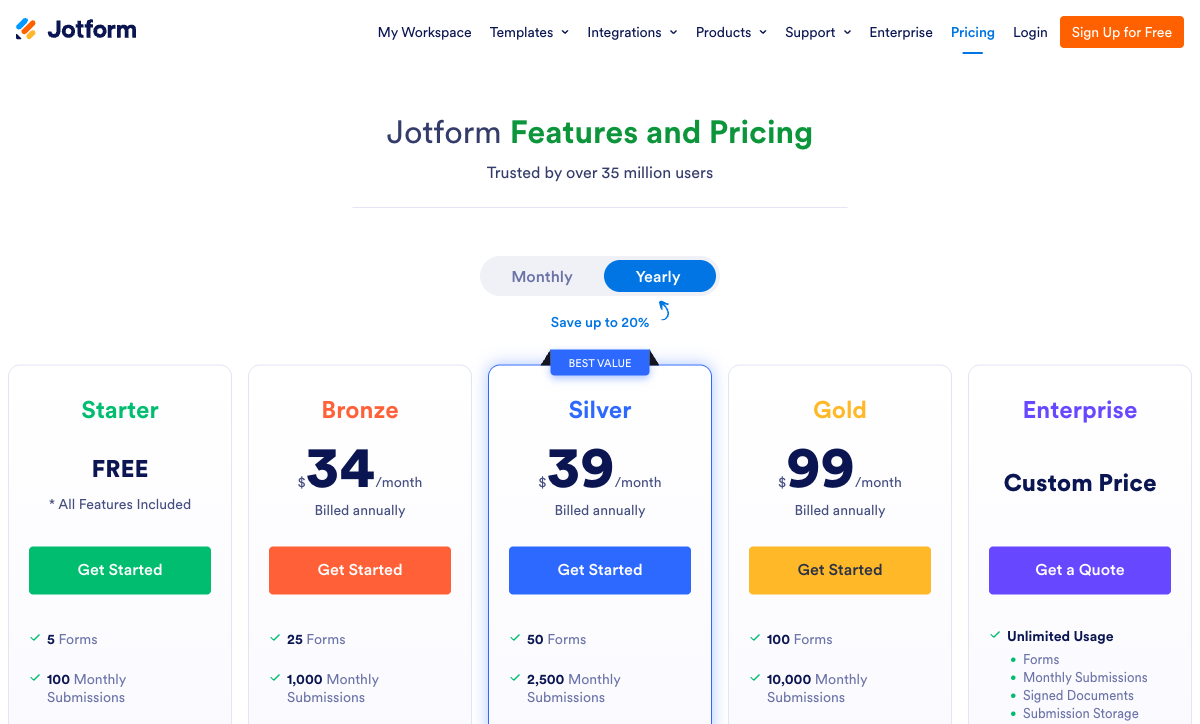
Jotform runs four public tiers: Bronze $39/month ($34 annually), Silver $49/month ($39), Gold $129/month ($99), plus Enterprise on quote. Paperform Pro is $59/month ($49 annually) and Business $149/month ($124), both with unlimited submissions, seats and forms within fair use.
Integrations and API
Jotform offers 150+ native integrations and a REST API rate-limited by tier, from 10,000 calls a day on Starter and Bronze to 100,000 on Gold. Paperform reaches 4,000+ integrations through native connectors, Stepper, Zapier, Make, webhooks and a REST API on every paid plan, with a separate Business API on the $124/month annual tier.
Conditional logic
Both include conditional logic on every plan, with no paywall on either side. Jotform expresses it as stacked show/hide rules in a conditions panel. Paperform expresses it as Excel-style formulas that drive question and page visibility, conditional emails, integration payloads and success page content from one place.
Payments
Jotform supports 40+ payment gateways; Paperform supports 5 (Stripe, PayPal, Square, Braintree, Google Pay). Neither adds a transaction fee on top of the processor. Jotform meters paid submissions separately, at 100/month on Bronze, 250 on Silver and 1,000 on Gold; Paperform does not meter them at all.
Compliance
Jotform is HIPAA, GDPR, CCPA, SOC 2, PCI DSS Level 1 and ISO 27001 compliant, with FERPA, StateRAMP and HECVAT coverage, though HIPAA requires Gold or Enterprise. Paperform is SOC 2 Type II, GDPR and CCPA compliant, and is not HIPAA compliant and signs no BAAs. On regulated health data, Jotform wins outright.
Feature Comparison
On a feature-by-feature reading Jotform covers more ground, which two decades of building will do. The gaps that matter are narrower and more specific: a document-style editor, partial submission tracking, unlimited seats, and what an automation layer costs to own.
| Feature | Paperform | Jotform |
|---|---|---|
| Form Building | ||
| Document-style editor | Yes | No |
| AI form creation | Yes | Yes starter |
| Field types | 26+ | 30+ (starter) |
| File uploads | Yes | Yes starter |
| Multi-page forms | Yes | Yes starter |
| Guided mode (one question at a time) | Yes | Yes starter |
| Conditional logic | Yes | Yes starter |
| Calculations field | Yes pro | Yes starter |
| AI calculations assistant | Yes pro | No |
| Scoring | Yes pro | Yes starter |
| Answer piping | Yes | Yes starter |
| Pre-filling and hidden fields | Yes pro | Yes starter |
| Save and resume | Yes | Yes starter |
| Auto-close by number | Yes pro | Yes starter |
| Auto-close by date | Yes pro | Yes starter |
| Appointment/booking field | Yes | Yes starter |
| Signature field | Yes | Yes starter |
| Color picker field | Yes | No |
| API-powered dropdowns | Yes business | No |
| Google address search | Yes business | No |
| Drag-and-drop builder | No | Yes starter |
| Form widgets | No | Yes starter |
| Template gallery | No | 20,000+ (starter) |
| Payments | ||
| Stripe payments | Yes | Yes starter |
| PayPal payments | Yes | Yes starter |
| Square payments | Yes | Yes starter |
| Braintree payments | Yes | Yes starter |
| Google Pay | Yes | Yes starter |
| Product sales (eCommerce) | Yes pro | Yes starter |
| Subscriptions | Yes pro | Yes starter |
| Coupons and discounts | Yes pro | Yes starter |
| Custom pricing rules | Yes pro | Yes starter |
| Tax calculations | Yes | Yes starter |
| Quotes/invoices | Yes | No |
| Refunds | Yes | No |
| 3D Secure | Yes | No |
| 40+ payment gateways | No | Yes starter |
| No transaction fees | No | Yes starter |
| Design & Customization | ||
| Template gallery | 30,000+ | 20,000+ (starter) |
| Rich media (images, GIFs, videos) | Yes | Yes starter |
| Unsplash and Giphy integration | Yes | No |
| Image editor | Yes | No |
| Adobe Creative Cloud | Yes | No |
| Language translation | Yes | Yes starter |
| Advanced theming | Yes pro | Yes starter |
| Custom form URL | Yes pro | No |
| Custom domains | Yes pro | Yes enterprise |
| Custom HTML & CSS | Yes pro | Yes starter |
| Remove branding | Yes pro | Yes bronze |
| Custom email domains | Yes business | No |
| Form themes | No | Yes starter |
| Analytics | ||
| Submission results and reports | Yes | Yes starter |
| AI report insights | Yes pro | No |
| Paperform analytics | Yes pro | No |
| Drop-off analysis | Yes pro | No |
| Google Analytics & Facebook Pixel | Yes pro | No |
| Custom analytics scripts | Yes pro | No |
| Partial submissions | Yes pro | No |
| Form analytics | No | Yes starter |
| Google Analytics integration | No | Yes starter |
| Collaboration | ||
| Multi-user accounts | Yes pro | Yes bronze |
| User permissions and management | Yes pro | Yes enterprise |
| Advanced permissions & admin | Yes enterprise | Yes enterprise |
| Form sharing (templates) | Yes | No |
| Spaces and tag management | Yes | No |
| Form sharing | No | Yes starter |
| Assign forms | No | Yes enterprise |
| Security | ||
| SOC 2 Type II | Yes | Yes enterprise |
| GDPR compliant | Yes | Yes starter |
| SSL encryption | Yes | Yes starter |
| Two-factor authentication | Yes | Yes starter |
| Enforce 2FA for all users | Yes business | No |
| SSO (SAML) | Yes business | Yes enterprise |
| reCAPTCHA | Yes | Yes starter |
| Local data residency | Yes enterprise | No |
| Custom S3 storage (BYO) | Yes business | No |
| HIPAA compliant | No | Yes gold |
| 256-bit SSL | No | Yes starter |
| Data residency | No | Yes enterprise |
| Form encryption | No | Yes starter |
| PCI DSS | No | Yes starter |
| Integrations & API | ||
| Native integrations | 4,000+ | 150+ (starter) |
| Zapier | Yes | Yes starter |
| Make (Integromat) | Yes | Yes starter |
| Webhooks | Yes pro | Yes starter |
| Standard API | Yes pro | No |
| Business API | Yes business | No |
| WordPress plugin | Yes | Yes starter |
| oEmbed support | Yes | No |
| API | No | Yes starter |
| Smartsheet integration | No | Yes starter |
| Canvas LMS integration | No | Yes enterprise |
| Salesforce AppExchange | No | Yes starter |
| Embed options | No | Yes starter |
| Mobile apps | No | Yes starter |
Where Jotform Wins

HIPAA compliance with a signed BAA
Jotform is HIPAA compliant and will sign a Business Associate Agreement. Paperform will not. That single fact settles the comparison for clinics, practice groups, insurers and anyone handling patient records, and no argument about bundling changes it. The caveat is the price of entry: HIPAA features live on Gold at $129/month, or $99 billed annually, and Enterprise. A two-person practice that needs compliance is paying Gold whether or not it needs Gold's 10,000 submissions.
Payment gateway coverage nobody matches
Over 40 processors, including Authorize.net, Mollie, PayJunction, BlueSnap, Paysafe and Echeck alongside the usual names, with no Jotform transaction fee layered on top. For a business already banked with a regional acquirer, this is the deciding feature and it is a long way clear of the field. Paperform's five gateways cover most of the market by volume, not by name.
Native mobile apps and a mobile editor
Jotform ships iOS and Android apps that both build forms and collect data offline. Paperform has no mobile editor at all. Forms are fully responsive for respondents, and Guided Mode is good on a phone, but building happens at a desktop. Inspectors, field researchers and event staff working away from signal should take Jotform on this alone.
Scale, review volume and a bootstrapped track record
Jotform reports 40+ million users and $144.9M in 2024 revenue, rates 4.7 on G2 across 5,595 reviews and 4.7 on Capterra across 2,926, and took the #1 Online Form Builder spot in the G2 2026 Best Software Awards at #59 overall. Paperform carries roughly 498 reviews in total. Jotform is also bootstrapped, so the longevity argument that Paperform makes against venture-funded rivals does not apply here. Both companies own themselves. Jotform has simply been doing it for twenty years to Paperform's ten.
A cheaper first rung, and real discounts
Bronze is $39/month, or $34 billed annually, against Paperform Pro at $59/month, or $49 annually. Paperform sells nothing below Pro, so the gap is real and worth $15/month to a solo operator with a steady form. Nonprofits and educational institutions take 50% off Bronze, Silver and Gold, which no Paperform discount matches.
Where Paperform Wins

One subscription where the usual stack is three
A single Paperform subscription covers forms, Papersign for eSignatures and Stepper for workflow automation, on every plan, from one account and one renewal date. The stack it displaces is the common one: a form builder, DocuSign or similar for contracts, and Zapier or Make for everything that happens after a submission. Three vendors, three admin consoles, three renewal dates, and your team holding the joins together.
Jotform's answer to the same problem is better than most, and it deserves the credit. Jotform Sign and Jotform Workflows are inside the plan, not add-ons. The difference is the meter. Signed documents run at 10 a month on Starter, 100 on Bronze, 250 on Silver and 1,000 on Gold, draining separately from your submissions, so a quarter with more contracts than usual moves the bill even if traffic did not. Automation still leans on Zapier and Make as connector platforms, which means a third account and someone else's runs quota. Paperform's equivalent numbers are 25 signed documents a month on Pro and 100 on Business, and Stepper runs on automation credits, 20,000/month on Pro and 100,000 on Business. That last one is Paperform's only real meter and we would rather name it here than have you find it later.
Nothing counted that grows on its own
Paperform caps forms on no plan and meters submissions on none of its paid plans. Jotform caps both on all of them: 5 forms and 100 submissions a month on Starter, 25 and 1,000 on Bronze, 50 and 2,500 on Silver, 100 and 10,000 on Gold. Form views, submission storage and fields per form are counted separately again. Charging for the number of forms is the odd one. A form built last year and left running costs nothing to keep alive, yet an agency with an intake form per client, or an ops team with one per location, tidies itself straight into an upgrade. Exceed submissions and the consequence is worse than a surcharge: the form stops accepting responses, usually during the campaign that caused it.
An eCommerce engine, not a payment field
Jotform wins the gateway count and Paperform wins the order. Paperform's commerce layer holds a product catalogue with inventory, subscriptions, coupon codes, conditional pricing rules, tax calculation, quoting and refunds, with more than $173M processed and no Paperform transaction fee. Pricing recalculates live as the respondent configures the order, because the same Excel-style calculations that drive logic also drive the total. A fabricator quoting by linear metre, a caterer pricing per head with dietary surcharges, an event running early-bird rates until a date: that is configuration inside the form rather than a payment field plus a spreadsheet somewhere else. Jotform's Store Builder and order forms handle products and coupons capably. They are separate surfaces rather than one calculation engine reaching everything.
Seats that do not trigger a sales call
Paperform includes unlimited seats on every plan, and a seat covers all three products, so one person using forms, signatures and workflows counts once. Jotform's self-serve tiers are single-owner accounts with sub-users attached: 3 on Bronze, 10 on Silver, 100 on Gold, with genuine multi-user management sitting in Enterprise. Gold at $99/month annually is still one plan owner. The second person who needs equal standing is a quote request rather than a checkbox.
Logic you can read six months later
Both products branch on answers on every plan, so this is not a feature gap. It is a readability gap. Jotform's conditions panel accumulates rules, and reviewers consistently flag that configuring logic is where the interface gets crowded. Paperform writes the same behaviour as spreadsheet formulas, and one calculation can decide which questions appear, which page follows, which conditional email fires, what an integration receives and what the success page says. Paperform also records partial submissions from Pro up, so you can see the exact question where a long application dies. Jotform does not track partial submissions at all, which means the people who abandoned, the ones most worth a phone call, are invisible.
Where Jotform Falls Short
- Forms capped on every plan: 5 on Starter, 25 on Bronze, 50 on Silver, 100 on Gold. The 101st form is an Enterprise conversation.
- Submissions capped too: 1,000/month on Bronze and 2,500 on Silver, after which forms stop accepting responses.
- Payment submissions metered separately: 100/month on Bronze, 250 on Silver, 1,000 on Gold, independent of your general quota.
- Signed documents metered separately again: 100/month on Bronze, 250 on Silver, 1,000 on Gold.
- Single plan owner until Enterprise: sub-users are capped and full multi-user needs custom pricing.
- HIPAA gated to Gold: compliance costs $99/month annually minimum, whatever your volume.
- No document-style editor: the builder stacks fields, which suits a support request more than an application or a quote.
- No partial submission tracking: abandoned responses are not retained or viewable.
- Feature reliability varies: G2 and Capterra reviewers report broken widgets and advanced features behaving inconsistently.
- Support response times: customer support rates 4.4 on G2, the lowest of Jotform's sub-scores, with reviewers citing multi-day email waits.
- No custom form subdomain on individual plans: custom domains are Enterprise-only.
Where Paperform Falls Short
- No HIPAA compliance and no BAAs: a hard stop for protected health information, and Jotform's clearest win.
- Higher entry price: $49/month annually against Bronze at $34, with nothing sold below Pro.
- Five payment gateways against 40+: no Authorize.net, Mollie or regional acquirers.
- No mobile editor and no native apps: Jotform builds and collects offline on iOS and Android.
- Automation credits are metered: 20,000/month on Pro, then $10 per additional 10,000.
- Custom domains cost extra: $20/month per domain on Pro, with one included on Business.
- Far smaller review footprint: around 498 reviews in total against Jotform's 5,595 on G2 alone.
- Fewer native integrations than the 4,000+ headline suggests: much of that reach comes through Zapier, Make and Stepper rather than first-party connectors.
- Wrong tool for a one-off simple form: for three questions and a thank-you page, use the simple tool.
See Paperform in Action
Jotform's own product tours are easy to find. An independent walkthrough of the less familiar product is more useful before you commit a card.
Pricing Comparison
Jotform's four tiers each raise a set of ceilings; Paperform's two paid tiers mostly remove them. Read the table below as a comparison of what triggers the next invoice, not of headline prices.
| Tier | Paperform | Jotform | What moves you up |
|---|---|---|---|
| Entry paid | Pro: $59/mo, $49 annually. Unlimited forms, submissions and seats | Bronze: $39/mo, $34 annually. 25 forms, 1,000 submissions, 100 payments, 100 signed docs | Jotform is $15 cheaper until any one of four counters runs out |
| Mid | Pro, unchanged | Silver: $49/mo, $39 annually. 50 forms, 2,500 submissions, 250 signed docs | Silver buys 2.5x the volume, not new capability |
| Upper | Business: $149/mo, $124 annually. 10 workspaces, SSO, Business API, 100 signed docs/mo, 100,000 automation credits | Gold: $129/mo, $99 annually. 100 forms, 10,000 submissions, 1,000 signed docs, HIPAA | Gold is where HIPAA starts; Paperform Business is where governance does |
| Above that | Enterprise: custom quote | Enterprise: custom quote. Unlimited usage, multi-user, SSO, SLA, data residency | Jotform's Enterprise is also where a second full user lives |
Paperform
Jotform
| Product | Plan | Monthly Price | Annual Price (per month) | Free Plan | Free Trial | Limits |
|---|---|---|---|---|---|---|
| Paperform | Free | Free | Free | Yes | 7 days | forms: Unlimited, submissions: 30/month, storage: Unlimited, users: Unlimited, file uploads: 100 MB |
| Paperform | Pro | $59/mo | $49/mo billed annually | forms: Unlimited, submissions: Unlimited, storage: Unlimited, users: Unlimited, file uploads: 10 GB | ||
| Paperform | Business | $149/mo | $124/mo billed annually | forms: Unlimited, submissions: Unlimited, storage: Unlimited, users: Unlimited, file uploads: 100 GB | ||
| Jotform | Starter | Free | Free | Yes | No | forms: 5, submissions: 100/month, storage: 100 MB, users: 1 |
| Jotform | Bronze | $39/mo | $34/mo billed annually | forms: 25, submissions: 1,000/month, storage: 1 GB, users: 1 | ||
| Jotform | Silver | $49/mo | $39/mo billed annually | forms: 50, submissions: 2,500/month, storage: 10 GB, users: 1 | ||
| Jotform | Gold | $129/mo | $99/mo billed annually | forms: 100, submissions: 10,000/month, storage: 100 GB, users: 1 |
Two details the tiers hide. Jotform has no free trial on paid plans, offering a 30-day money-back guarantee instead, while Paperform runs a 7-day trial with no card required. And Jotform's 50% nonprofit and education discount applies across Bronze, Silver and Gold, with 30% off Enterprise, which can make Gold cheaper than Paperform Pro for a school or a charity.
What Users Say
Jotform rates 4.7 on G2 across 5,595 reviews, 4.7 on Capterra and GetApp across 2,926, and 4.3 on Trustpilot across 1,833. Those are strong scores on a very large sample, and the praise clusters where you would expect: ease of use, template breadth, payment options. The complaint pattern is just as consistent, and it maps to this page. Reviewers cite the form caps, single-user plans, slow support, mobile app bugs and a conditions panel that gets crowded. Customer support at 4.4 is Jotform's weakest sub-score. Paperform's sample is far smaller at roughly 498 reviews, rating 4.8 on G2 and Capterra and 4.8 across 212 Trustpilot reviews, with support rated 4.7 on Capterra and 4.9 on GetApp. Smaller evidence base, higher scores, and support that is included in the seat price rather than sold as an enablement package.
The Verdict
Choose Jotform when a specific requirement makes the decision for you. PHI and a BAA, a processor outside the mainstream, offline collection on a phone, or a nonprofit budget meeting a 50% discount. Those are real constraints and Jotform answers all four better than Paperform does. A solo operator with one steady form and no contracts to send will also spend less on Bronze, and should.
Choose Paperform when the form is one step in a process that keeps going. The argument is arithmetic rather than taste: Jotform sells you forms, signatures and workflows and then counts each of them separately, while Paperform sells all three once and counts almost nothing. Add the outside connector subscription that Jotform's automation usually assumes, and the comparison shifts again. For an operator standing up forms per client, sending contracts behind them and routing what follows, one bill that stays still beats a cheaper bill with five ways to move.
For a wider field, see our full list of Jotform alternatives or the overall form builder ranking. If you are also weighing the conversational approach, read Paperform vs Typeform.
Frequently Asked Questions
How many separate Jotform meters can I run out of in a single month?
Five, and they empty independently. A Bronze plan at $34/month billed annually gives you 25 forms, 1,000 submissions, 100,000 form views, 100 payment submissions and 100 signed documents through Jotform Sign. A busy month can exhaust the payment submissions while submissions are still fine, or burn the signed documents while everything else has headroom. Each one that runs dry is its own reason to upgrade. Paperform Pro at $49/month annually caps neither forms nor submissions, includes 25 signed documents through Papersign, and meters only automation credits at 20,000/month.
Is Jotform Sign a real replacement for DocuSign, and how does Papersign compare?
Jotform Sign is a genuine eSignature product with legally binding signatures, and it is bundled into the plan rather than sold separately. What it is not is unmetered: 10 signed documents a month on Starter, 100 on Bronze, 250 on Silver and 1,000 on Gold, consumed alongside your submission quota. Papersign works the same way in one respect, with 25 signed documents a month on Pro and 100 on Business, and unlimited on Enterprise. The difference is what sits beside it. A Paperform subscription also carries Stepper for workflow automation, so forms, signatures and the steps between them come from one account rather than a form vendor plus a signing vendor plus a connector.
Why does Jotform still charge for a second person on the $99/month Gold plan?
Because every self-serve Jotform tier is built around a single plan owner. Bronze adds 3 sub-users, Silver 10 and Gold 100, but the account itself remains one user and full multi-user management sits in Enterprise behind custom pricing. If two people need to own and edit forms as equals, that is a sales conversation rather than a plan change. Paperform includes unlimited seats on every paid plan, and one seat covers forms, Papersign and Stepper together, so a person using all three products counts once.
Does Paperform match Jotform on payment gateways?
No. Jotform supports 40+ payment gateways; Paperform supports 5: Stripe, PayPal, Square, Braintree and Google Pay. If you process through Mollie, PayJunction, BlueSnap or a regional acquirer, Jotform is the correct answer and nothing here changes that. For the mainstream five, the comparison turns on what happens after the card is charged. Paperform runs a full eCommerce layer with products, inventory, subscriptions, coupons, conditional pricing rules, tax and refunds, priced live by Excel-style calculations as the respondent picks options, and takes no transaction fee of its own. Jotform charges no platform fee either. Both sit on top of your processor's rates.
Should a healthcare team pick Jotform or Paperform for patient forms?
Jotform, without hesitation. Jotform is HIPAA compliant and signs Business Associate Agreements, though only on Gold at $99/month billed annually or Enterprise. Paperform is not HIPAA compliant and does not sign BAAs. Paperform holds SOC 2 Type II and is GDPR and CCPA compliant, with SSO via SAML, enforced two-factor authentication and BYO S3 storage on Business, which answers most procurement checklists but not a PHI one. If protected health information touches the form, buy Jotform Gold.
How does the total bill compare once I add eSignatures and automation to Jotform?
Jotform bundles Sign and Workflows, so the honest version is that the second and third products are inside the plan on both sides. Where the numbers separate is volume. To sign 300 documents a month through Jotform you need Gold at $99/month annually, which also raises the submission ceiling you may not have needed. Paperform Business at $124/month annually covers 100 signed documents, 100,000 automation credits, 10 workspaces, SSO and the Business API, with submissions, seats and forms all uncapped. Teams that also run a separate connector subscription should count that too, since Stepper replaces it.
Sources & References
- Jotform Pricing — Jotform, 2026
- Jotform Review 2026: Pricing, Features, Pros & Cons, Ratings & More — Research.com, 2026
- Jotform Pricing 2026: Costs, Features & Better Alternatives — Supatool, 2026
- Jotform Reviews and Ratings: Plans and Features 2026 — Signeasy, 2026
- Jotform Reviews — G2, September 2026
- Jotform API Documentation — Jotform, 2026
Updates
We re-audit the form builders we compare on a regular cadence and log every change here — a public record of what changed and when.
- Updated September 22, 2026 — Written against the September 2026 data re-audit. Paperform pricing reflects the current Free/Pro/Business/Enterprise lineup (Pro $59/$49, Business $149/$124, unlimited submissions, seats and forms) with the retired mid-tier removed. Jotform pricing verified live at Bronze $39/$34, Silver $49/$39 and Gold $129/$99, with per-tier form, submission, payment-submission and signed-document quotas, API rate limits and the Gold-only HIPAA gate documented. Review counts updated to G2 5,595 and Trustpilot 1,833.
Last updated September 22, 2026
Ready to try Paperform?
Create beautiful forms, payment pages, and workflows — no code required.