Fillout vs Formsite: Which Is Better in 2026?
Fillout is the better product for most teams: a modern builder, 50+ native integrations and unlimited seats on every tier, starting at $19/month. Formsite wins on payment choice with four processors and on HIPAA compliance, which it offers with a BAA on its $209/month Enterprise plan. Both cap submissions.
Twenty-four years separate these two products, and you can see every one of them in the builders. Formsite launched in 1998, has processed more than $500 million in payments and still runs a field-list editor that reviewers politely call aging. Fillout launched in 2022 with the opposite instinct: a polished canvas, deep Airtable and Notion connections, scheduling and PDF generation bundled in, and an AI agent inside the editor that will write page logic and calculations from a chat instruction.
The odd thing about this matchup is what the two companies now have in common. Neither is independent. Formsite was bought by Formstack in December 2023 and is sold today under Intellistack, the name Formstack took in June 2025. Fillout trades as "Fillout (by Zite)", with its help docs, security pages, changelog and AI credit pool moved onto the Zite app and database platform. One of them stopped publishing and the other publishes under someone else's brand. Whichever you pick, you are buying a form builder that sits inside a bigger company's plans.
Quick verdict
Choose Fillout if:
- More than one or two people need a login
- Submissions land in Airtable, Notion or Google Sheets
- The form is public-facing and has to look current
- You want scheduling, PDFs and signatures in the same product
Choose Formsite if:
- You handle health data and need HIPAA with a BAA
- Finance is on PayPal, Braintree or Authorize.Net rather than Stripe
- You want 24/7 support included on the cheapest paid plan
- You run a handful of forms with steady, predictable volume
Feature comparison
Both products audited in September 2026, category by category.
| Feature | Fillout | Formsite |
|---|---|---|
| Form Building | ||
| Document-style editor | No | No |
| AI form creation | Yes | Yes professional |
| AI agent in the form editor (Form Agent) | Yes | No |
| Field types | 50+ | Yes |
| Multi-page forms | Yes | Yes |
| Guided mode (one question at a time) | No | No |
| Conditional logic | Yes | Yes |
| Calculations field | Yes | Yes |
| AI calculations assistant | No | No |
| Scoring | Yes | Yes |
| Answer piping | Yes | Yes |
| Pre-filling and hidden fields | Yes | Yes |
| Save and resume | Yes | Yes professional |
| Auto-close by number | Yes | Yes |
| Auto-close by date | Yes | Yes |
| Appointment/booking field | Yes starter | No |
| Signature field | Yes starter | Yes professional |
| Color picker field | No | No |
| API-powered dropdowns | No | No |
| Google address search | Yes conversion-kit | No |
| File uploads | Yes | No |
| Payments | ||
| Stripe payments | Yes | Yes professional |
| PayPal payments | No | Yes professional |
| Square payments | No | No |
| Braintree payments | No | Yes professional |
| Google Pay | No | No |
| Product sales (eCommerce) | Yes | No |
| Subscriptions | Yes | No |
| Coupons and discounts | Yes | No |
| Custom pricing rules | Yes | Yes |
| Tax calculations | No | No |
| Quotes/invoices | No | No |
| Refunds | No | No |
| 3D Secure | No | No |
| Design & Customization | ||
| Template gallery | Yes | Yes |
| Rich media (images, GIFs, videos) | Yes | Yes professional |
| Unsplash and Giphy integration | No | No |
| Image editor | No | No |
| Adobe Creative Cloud | No | No |
| Language translation | No | No |
| Advanced theming | Yes starter | Yes |
| Custom form URL | Yes pro | No |
| Custom domains | Yes business | No |
| Custom HTML & CSS | Yes pro | Yes |
| Remove branding | Yes pro | Yes professional |
| Custom email domains | Yes pro | No |
| Analytics | ||
| Submission results and reports | Yes | Yes |
| AI report insights | No | No |
| Paperform analytics | Yes business | No |
| Google Analytics & Facebook Pixel | Yes | No |
| Custom analytics scripts | Yes business | No |
| Partial submissions | Yes business | No |
| Collaboration | ||
| Multi-user accounts | Yes | Yes business |
| User permissions and management | Yes | Yes business |
| Advanced permissions & admin | Yes team | No |
| Form sharing (templates) | Yes | Yes |
| Spaces and tag management | Yes | No |
| Security | ||
| SOC 2 Type II | Yes | No |
| HIPAA compliance / BAA | No | No |
| ISO 27001 | No | No |
| Audit logs | Yes enterprise | No |
| GDPR compliant | Yes | Yes |
| SSL encryption | Yes | Yes |
| Two-factor authentication | Yes | Yes enterprise |
| Enforce 2FA for all users | Yes team | No |
| SSO (SAML) | Yes enterprise | No |
| reCAPTCHA | Yes starter | Yes professional |
| Local data residency | Yes enterprise | No |
| Custom S3 storage (BYO) | Yes | No |
| Custom S3 storage | No | No |
| HIPAA compliance | No | Yes enterprise |
| Integrations & API | ||
| Native integrations | 50+ | No |
| Zapier | Yes | Yes professional |
| Make (Integromat) | Yes | No |
| Webhooks | Yes | Yes professional |
| Standard API | Yes | Yes professional |
| Business API | No | No |
| WordPress plugin | Yes | Yes |
| oEmbed support | Yes | No |
| 2000+ integrations | No | Yes professional |
Pricing: one meter against four
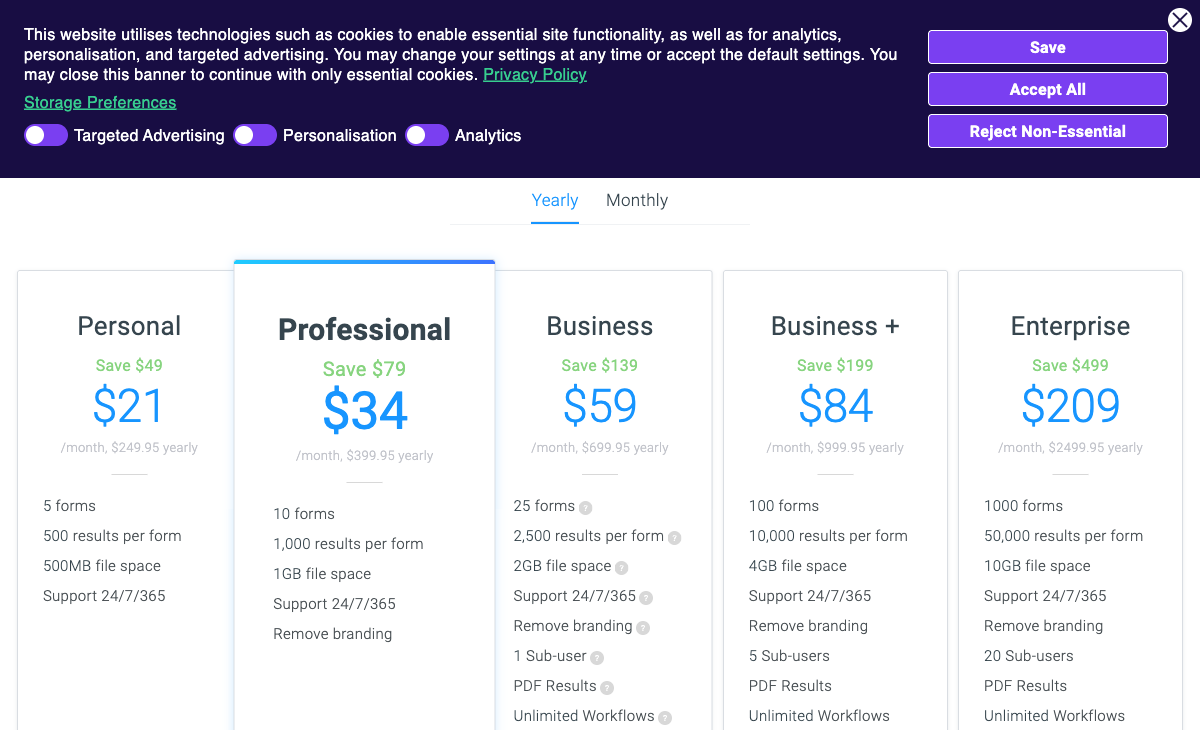
Entry prices are almost identical: Fillout Starter is $19/month ($15 billed annually) and Formsite Personal is $21/month ($249.95 a year, or $20.83 a month). What you get for the money is not comparable at all.
Formsite meters four things at once. Personal gives you 5 forms, 500 results per form, 500MB of storage and a single user. Professional at $34/month raises that to 10 forms and 1,000 results per form, and is the tier where integrations, payments, the API and branding removal first appear. Business at $59/month brings 25 forms, 2,500 results per form and one sub-user. Extra sub-users are $10/month each, extra storage is $10/month per gigabyte, and Word and PDF output as an add-on is $50/month. A Business+ plan at $84/month carrying that add-on is $134/month before anyone has hired.
Fillout meters one thing and gives the rest away. Seats are unlimited on all five tiers, including free. Starter covers 2,000 responses a month, Pro at $49/month ($40 annually) covers 5,000, and Business at $89/month ($75 annually) makes responses unlimited. The catch is where that jump sits: Business is an 87% increase over Pro, and it is also the tier that unlocks form analytics, partial submissions and custom domains, so you cannot diagnose a leaking form until you are already paying for volume you may not need. Fillout's lead-generation tooling, including abandonment recovery, enrichment, routing and ad conversion tracking, sits outside the tiers in a $100/month Conversion Kit.
The practical test is where your volume concentrates. Ten forms taking 400 results each is 4,000 submissions a month and sits comfortably on Formsite Professional at $34. One form taking those same 4,000 results breaks Professional's per-form cap and pushes you to Business+ at $84, while Fillout handles it on Pro at $40. Formsite prices the shape of your traffic; Fillout prices the total.
Fillout
Formsite
| Product | Plan | Monthly Price | Annual Price (per month) | Free Plan | Free Trial | Limits |
|---|---|---|---|---|---|---|
| Fillout | Free | Free | Free | Yes | No | forms: Unlimited, submissions: 1,000/month, storage: N/A, users: Unlimited, file uploads: 20 MB per file |
| Fillout | Starter | $19/mo | $15/mo billed annually | forms: Unlimited, submissions: 2,000/month, storage: N/A, users: Unlimited, file uploads: 20 MB per file | ||
| Fillout | Pro | $49/mo | $40/mo billed annually | forms: Unlimited, submissions: 5,000/month, storage: N/A, users: Unlimited, file uploads: 20 MB per file | ||
| Fillout | Business | $89/mo | $75/mo billed annually | forms: Unlimited, submissions: Unlimited, storage: N/A, users: Unlimited, file uploads: 1 GB+ | ||
| Fillout | Team bundle | $300/mo | $250/mo billed annually | forms: Unlimited, submissions: Unlimited, storage: 1,000,000 records, users: Unlimited, file uploads: 1 GB+ | ||
| Formsite | Free | Free | Free | Yes | 14 days | forms: 5, submissions: 10 per form, storage: 50 MB, users: 1 |
| Formsite | Personal | $21/mo | $20.83/mo billed annually | forms: 5, submissions: 500 per form, storage: 500 MB, users: 1 | ||
| Formsite | Professional | $34/mo | $33.33/mo billed annually | forms: 10, submissions: 1,000 per form, storage: 1 GB, users: 1 | ||
| Formsite | Business | $59/mo | $58.33/mo billed annually | forms: 25, submissions: 2,500 per form, storage: 2 GB, users: 2 | ||
| Formsite | Business + | $84/mo | $83.33/mo billed annually | forms: 100, submissions: 10,000 per form, storage: 4 GB, users: 6 | ||
| Formsite | Enterprise | $209/mo | $208.33/mo billed annually | forms: 1000, submissions: 50,000 per form, storage: 10 GB, users: 21 |
The five dimensions that decide it
Integrations and API
Fillout publishes 50+ native integrations available from its free plan; Formsite lists roughly 14 native connectors and reaches its advertised 2000+ only through Zapier, with integrations of any kind locked to the Professional plan at $34/month. Formsite's native list is the enterprise-storage sort: Salesforce (Enterprise tier only), Google Sheets, Google Drive, Dropbox, Box, Amazon S3, DocuSign, Mailchimp and Slack. Fillout's is built for modern operations stacks, spanning HubSpot, Salesforce and Pipedrive on the CRM side, Airtable, Notion and Google Sheets on the data side, and Calendly and Cal.com for scheduling. The APIs are not equivalent either: Fillout's is a working REST API with webhooks, while Formsite's was last confirmed as read-only, limited to 50 calls a minute and 10,000 a day, so it can pull results but cannot create or edit anything.
Conditional logic and calculations
Both products include conditional logic and calculations on their free plans, and neither ships an AI assistant that writes formulas for you. Formsite's logic is genuinely capable for a tool of its age, handling field-level show and hide plus multi-page branching, and reviewers consistently name it among the reasons they stay. Fillout matches that and adds answer piping, pre-fill and its Form Agent, a chat agent in the editor that can create fields, pages, page logic, calculations and dynamic values, though it cannot yet configure payments, calendars or integrations, and it draws on a shared monthly pool of Zite AI credits that stops working when the pool empties. Neither calculation engine drives things beyond the form itself.
Payments
Formsite supports four payment processors and Fillout supports one. Formsite's Stripe, PayPal, Braintree and Authorize.Net options all require the Professional plan at $34/month, and the company's $500 million in processed payments is a real signal of reliability at volume. Fillout is Stripe-only, but the Stripe integration is available on the free plan and covers cards, ACH, Affirm and Stripe Link along with discount codes, free trials and recurring subscriptions, which Formsite does not offer. Gateway choice goes to Formsite; billing sophistication goes to Fillout.
Compliance
Formsite is HIPAA, GDPR and CCPA compliant but holds no SOC 2 attestation; Fillout is SOC 2 Type 2 and GDPR compliant but not HIPAA and not CCPA. Read the detail on both. Formsite's HIPAA coverage and signed BAA exist only on Enterprise at $209/month, and the ISO and SOC references on its security page describe its AWS host rather than Formsite itself; its own claim is PCI DSS 4.0. Fillout counters at the top of its range with data residency, letting Enterprise customers host in the US, EU, UK, Australia or Canada and optionally store submissions only in external storage. Formsite publishes no data residency option and no SSO at any tier, while Fillout offers SAML SSO on Enterprise.
Seats and support
Fillout includes unlimited seats on every plan; Formsite includes one user on Personal and Professional, two on Business, six on Business+ and 21 on Enterprise, with extra sub-users at $10/month. Formsite's answer is support: 24/7 coverage is included on every paid plan, which is unusual at $21/month and something Fillout does not match until its Business tier's priority support. Per-seat limits change behaviour before they change budgets. On a single-user Formsite plan, the second person who needs the results gets a spreadsheet emailed to them rather than a login, and the reporting becomes whatever one person had time to export.
Where Fillout is the better product

Scope is Fillout's strongest card against a pure form builder. Scheduling, PDF generation, signature questions and workflows live in the same product, so a booking flow that produces a signed confirmation document does not need three vendors. Formsite has workflows for approval routing and a DocuSign integration for signatures, which is the same set of jobs solved by buying more software. Hackceleration's hands-on review rates that all-in-one economics highly while flagging a learning curve on the advanced pieces.
The second advantage is how the finished form looks, which matters more than it sounds on a public-facing page. Formsite's output reads as functional and dated, and independent reviews return to that point repeatedly. Fillout's themes, custom fonts, favicon and CSS controls arrive on Pro and produce something built this decade without anyone touching a stylesheet.
Fillout also carries procurement-grade references for a company of its age, including Fairfax County, Domino's, Bombas, Wayfair, Harvard and The Athletic. Against a competitor whose own blog has been silent since 2024, an active customer list and a visible release cadence are worth something.
Where Formsite is the better product
Twenty-eight years of uptime is not nothing. Formsite has been running order forms, registrations and surveys since 1998, and its reviews reflect that: 4.5 on Capterra across 44 reviews and 4.4 on G2, with reliability and ease of building the most common praise. When the job is a payment form that has to work every day for years, an unglamorous product with that history is a defensible choice.
The compliance and payments combination is the concrete win. Formsite is the only one of the two that can take protected health information, and it is the only one that lets your finance team keep the processor it already uses. FirstSales' 2026 review credits the conditional logic and the AI survey generation while still calling out the interface, which is a fair summary: the engine underneath is better than the paint on top.
Support belongs in the plus column too. 24/7 help on a $21/month plan is genuinely rare, and for a small team with no internal owner for the forms it can matter more than the feature list.
See Fillout in action
"Fillout Full Tutorial for Beginners 2026" by Toolysto, a step-by-step walkthrough of the builder. Useful for judging the editing experience against Formsite's field-list approach.
Where Fillout falls short in this matchup
Stripe-only payments is the disqualifier for a large share of the buyers Formsite serves. If your merchant account is with Authorize.Net or your business takes PayPal, Fillout asks you to change processors to use a form field, and no amount of editor polish compensates for that.
The track record is thin, and the recent direction is not reassuring. Fillout has 30 G2 reviews at 4.6 and five stars on Product Hunt across 13 reviews, but only four Capterra reviews, and its Trustpilot average has fallen from 4.7 to 3.5 across 48 reviews, with recent complaints about automated systems flagging and blocking accounts. Add the Zite absorption, where the security docs, changelog and AI credits now belong to a platform you did not buy, and a four-year-old company starts to look like the riskier of the two bets despite being the better product today.
Where Formsite falls short in this matchup
Per-form result caps punish exactly the forms that are working. One registration page that goes well takes you from Professional at $34 to Business at $59 to Business+ at $84, while the other nine forms on the account sit almost empty. The upgrade buys headroom you only need in one place.
Everything modern costs extra or does not exist. Integrations, payments, the API and branding removal all start at Professional. Word and PDF output is a $50/month add-on. There is no SOC 2, no SSO at any price, no custom domain story, no mobile app and no meaningful analytics beyond basic charts, so drop-off and partial submissions stay invisible. The API cannot write. The 100-template library is small enough that most builds start from blank. And the quiet worry underneath all of it is the 28-month silence on the blog: Supatool and Jotform both point at the acquisition when explaining why buyers leave, and a product with no public roadmap inside a rebranded parent is a difficult three-year bet.
What users say
Formsite has the deeper record and Fillout the more enthusiastic one. Formsite sits at 4.4 on G2 across 31 reviews and 4.5 on both Capterra and GetApp across 44, with praise for reliability, 24/7 support and no-code logic, and complaints that cluster tightly around the aging interface, weak reporting and an awkward Excel export. Fillout scores higher where it is reviewed at all, at 4.6 on G2 and 5.0 on Product Hunt, but the Capterra sample is four reviews and the Trustpilot trend is downward. Read the recent Trustpilot entries before you put a business-critical intake flow on it.
Consider Paperform
Both products charge you more as your forms do better, and neither comparison escapes that. Formsite counts results per form, forms per plan, gigabytes and sub-users, and bills each separately. Fillout counts responses, workflow runs and AI credits, then sells its lead-generation features as a $100/month add-on on top. Paperform takes the meter off: submissions and seats are unlimited on every paid plan within fair use, so the twelfth colleague and the 90,000th submission cost the same as the first. Pro is $59/month, or $49/month billed annually. Business is $149/month, or $124/month annually, adding ten workspaces, SSO and the Business API.
Say the obvious thing plainly: both of these start cheaper. Fillout's entry is $15/month billed annually and Formsite's is roughly $21, and Paperform has nothing below $49. For one steady form at modest volume, the cheaper tool is the correct purchase. The $49 earns its place when the work is a multi-step process with money, documents and a compliance checklist attached.
What the extra buys is everything that currently sits in separate contracts. One Paperform subscription covers forms, Papersign for eSignatures at 25 signed documents a month on Pro and 100 on Business, and Stepper for AI-native workflow automation with 20,000 automation credits on Pro and 100,000 on Business. Formsite users reach the same outcome by adding DocuSign and Zapier to the bill, at which point they own three renewal dates and three support queues and become the integration between them. Paperform's calculations are Excel-style and reach past the form: they decide which questions and pages appear, what a confirmation email says, what gets pushed into an integration and what the success page shows, with an AI assistant that writes the formula from a plain-English description. Payments run through five gateways (Stripe, PayPal, Square, Braintree and Google Pay) with subscriptions, coupons, tax and refunds, against Formsite's four and Fillout's one. There are 4000+ integrations and a 7-day trial that takes no card.
Two caveats stated straight. Paperform is SOC 2 Type II, GDPR and CCPA compliant but is not HIPAA compliant and signs no BAAs, so health data belongs with Formsite Enterprise. And Stepper's automation credits are metered even though submissions and seats are not. On the vendor question, Paperform has been building since 2016, bootstrapped and profitable, with no acquirer deciding which product line survives the next reorganisation and no parent brand to be renamed into. For more, see Fillout alternatives, Formsite alternatives, or the full best form builders ranking.
The verdict
Pick Fillout if the form faces the public and the team is bigger than one person. Unlimited seats at every price, 50+ native integrations from the free plan, an editor that produces something worth linking to, and scheduling and PDFs in the box make it the stronger day-to-day tool. Accept a Stripe-only checkout, a young company now operating inside Zite, and a response cap that jumps 87% when you outgrow Pro.
Pick Formsite if compliance or payment routing decides it. HIPAA with a BAA, four processors, 24/7 support on every paid plan and 28 years of uptime are real reasons to choose a plainer product. Accept a dated interface, a read-only API, no SOC 2, $10 per extra person, and a roadmap nobody has published since 2024.
Pick Paperform if the shape of both bills is the actual problem. Unlimited submissions and unlimited seats, forms plus signatures plus workflow automation on one subscription, and a price that does not move in the quarter your forms finally start working.
Frequently Asked Questions
Is Fillout or Formsite better for high-volume forms?
Fillout, because its cap is account-wide rather than per form. Fillout Business at $89/month ($75 billed annually) removes the response limit entirely. Formsite never removes it: the ceiling rises from 1,000 results per form on Professional to 2,500 on Business, 10,000 on Business+ and 50,000 on Enterprise at $209/month. If one popular form carries most of your volume, Formsite's per-form maths works against you, because the plan you need is set by your single busiest form rather than your total.
Does Formsite accept more payment methods than Fillout?
Yes. Formsite supports four processors (Stripe, PayPal, Braintree and Authorize.Net) from the Professional plan at $34/month, while Fillout is Stripe-only on every tier. Fillout's Stripe connection is the better-built one, covering cards, ACH, Affirm and Stripe Link plus discount codes, free trials and recurring billing, and it is available on the free plan. Neither product manages products, tax or refunds the way a real order form needs.
Which of Fillout and Formsite is HIPAA compliant?
Formsite, on its Enterprise plan at $209/month, where a signed BAA is available. Formsite is also GDPR and CCPA compliant and states PCI DSS 4.0 compliance, but it holds no SOC 2 attestation of its own; the ISO and SOC references on its security page belong to its AWS host. Fillout is SOC 2 Type 2 and GDPR compliant but is not HIPAA compliant and signs no BAAs. For protected health information there is one answer here, and it costs $209/month.
How many integrations do Fillout and Formsite have?
Fillout publishes 50+ native integrations, available from the free plan. Formsite advertises 2000+ once Zapier is counted, but its native list runs to roughly 14 connectors (Salesforce, Google Sheets, Google Drive, Dropbox, Box, DocuSign, Mailchimp, Slack, Amazon S3 and similar) and integrations of any kind require the Professional plan at $34/month. Salesforce is Enterprise-only. Fillout's Airtable connection can update existing records rather than only appending them, which few competitors manage.
Is Formsite still actively developed after the Formstack acquisition?
That is a fair thing to ask before committing. Formsite was acquired by Formstack in December 2023, and Formstack rebranded as Intellistack in June 2025, so Formsite is now sold under a parent brand. The Formsite blog's most recent post is dated May 2024 and there is no public changelog, which is roughly 28 months without product communication. Independent 2026 roundups from Supatool and Jotform both cite that uncertainty as a reason buyers look elsewhere. Fillout has the opposite problem in the same shape: it ships constantly, but its changelog now belongs to Zite, the parent platform it was folded into.
Can Fillout or Formsite collect signatures without a second tool?
Fillout can, with limits. Signatures are a question type on Fillout from the Starter plan upward, so a contract-style form can be signed in place. Formsite routes signatures through a DocuSign integration, which means a second subscription and a second renewal date. Neither gives you a real document-signing product with templates, sending and audit trails, so teams doing regular signing work usually end up paying a signature vendor alongside whichever form builder they chose.
Sources & References
- Fillout Review 2026: We Tested Everything (Builder, Integrations, Automations & Real ROI) — Hackceleration, 2026
- Formsite Review: Features, Pricing, Pros & Cons — FirstSales.io, 2026
- 7 Best Formsite Alternatives (2026) — Supatool, 2026
- Fillout Reviews: Is This Form Builder Actually Worth Paying For? — Filip Konecny, 2026
Last updated September 22, 2026
Ready to try Paperform?
Create beautiful forms, payment pages, and workflows — no code required.