Best Formsite Alternatives for 2026
The best Formsite alternative for most teams is Paperform at $49/month billed annually, because it replaces Formsite's dated field-list builder with a document-style editor that produces landing-page-quality forms, and removes the per-form result caps and $10/month sub-user charges that make Formsite's bill climb. For HIPAA data, Formsite Enterprise or Jotform remain the safer picks.
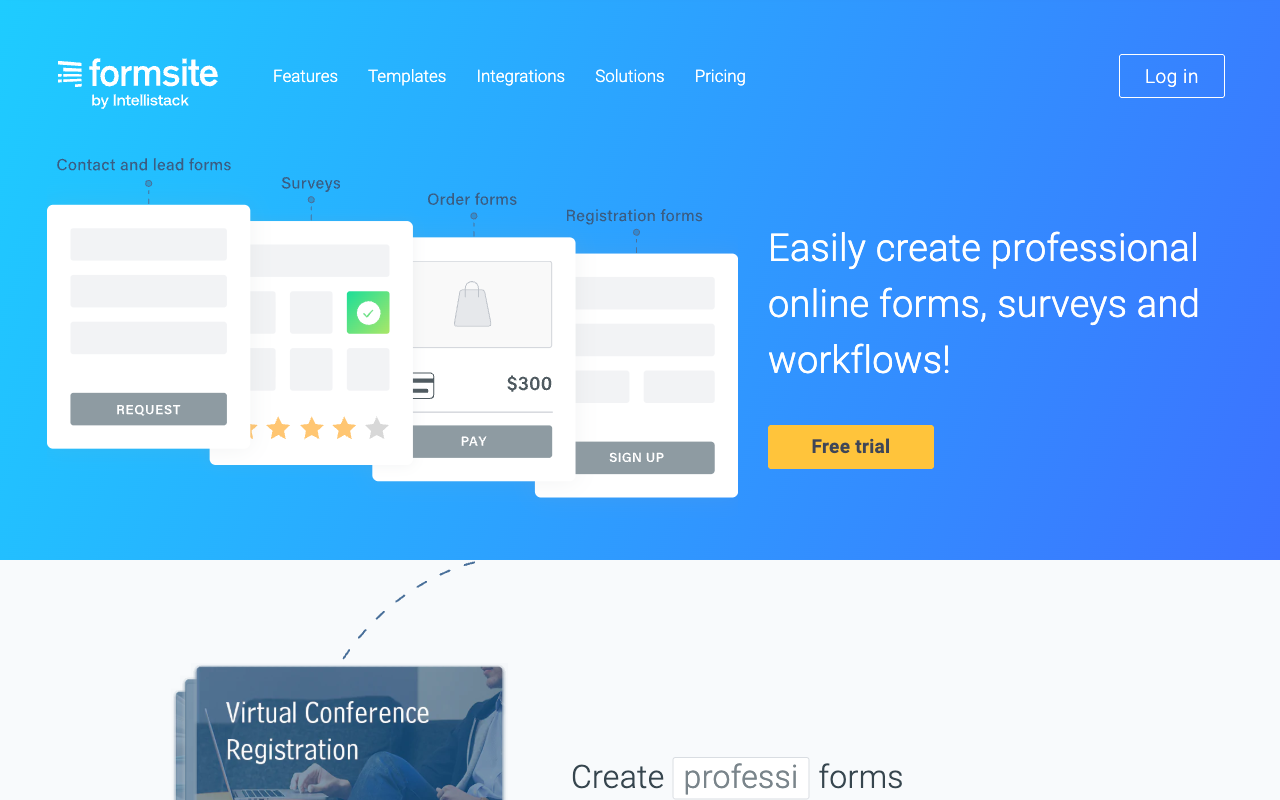
Formsite has been online since 1998 and has the scars and the receipts to show for it: billions of submissions, more than $500 million in payments processed, conditional logic and calculations that work, save-and-return, and 24/7 support on every paid plan including the $21/month Personal tier. Very little of what people dislike about Formsite is about whether it functions. It functions.
The complaint that shows up in review after review is what the forms look like when a customer opens one. The builder is a list of labelled fields with themes bolted on top, and the output announces its age. G2's own alternatives roundup frames Formsite as a dated veteran and steers readers toward more modern options; the CompareCamp review calls the offering robust and the interface aging in the same breath. For an internal expense claim that hardly matters. For an application form, a paid registration or a lead-capture page carrying a campaign, the form is the last thing a prospect sees before deciding whether to finish, and design is a conversion lever rather than a decoration.
The second pressure is arithmetic. Formsite meters results per form, forms per plan, storage per gigabyte and people per login, and every one of those meters moves in the same direction as your success. One form crossing 1,000 results moves Professional at $34/month to Business at $59/month. A third colleague needing access is $10/month, or another jump. Word and PDF output as an add-on is $50/month, which puts Business+ at $134/month before anyone has grown. Below we rank the alternatives that fix one or both of those problems, and say plainly where Formsite still wins.
| Feature | Formsite | Paperform | Typeform | Jotform | Google Forms | SurveyMonkey | Cognito Forms |
|---|---|---|---|---|---|---|---|
| Form Building | |||||||
| Document-style editor | No | Yes | No | No | No | No | No |
| Field types | Yes | 26+ | 20+ | 30+ (starter) | 11 | 15+ | 20+ |
| Guided mode (one question at a time) | No | Yes | Yes | Yes starter | No | Yes | No |
| Calculations field | Yes | Yes pro | Yes plus | Yes starter | No | No | Yes |
| AI calculations assistant | No | Yes pro | No | No | No | No | No |
| Payments | |||||||
| Stripe payments | Yes professional | Yes | Yes basic | Yes starter | No | Yes Individual Advantage | Yes |
| PayPal payments | Yes professional | Yes | No | Yes starter | No | Yes Individual Advantage | Yes team |
| Square payments | No | Yes | No | Yes starter | No | No | Yes team |
| Braintree payments | Yes professional | Yes | No | Yes starter | No | No | No |
| Google Pay | No | Yes | No | Yes starter | No | No | Yes |
| Design & Customization | |||||||
| Template gallery | Yes | 30,000+ | 1,500+ | 20,000+ (starter) | 20+ | 400+ | Yes |
| Unsplash and Giphy integration | No | Yes | Yes | No | No | No | No |
| Image editor | No | Yes | No | No | No | No | No |
| Adobe Creative Cloud | No | Yes | No | No | No | No | No |
| Language translation | No | Yes | Yes basic | Yes starter | No | Yes Individual Premier | Yes pro |
| Analytics | |||||||
| AI report insights | No | Yes pro | Yes business | No | Yes Business Standard | Yes Individual Advantage | No |
| Paperform analytics | No | Yes pro | No | No | No | No | No |
| Google Analytics & Facebook Pixel | No | Yes pro | Yes basic | No | No | No | Yes pro |
| Custom analytics scripts | No | Yes pro | Yes basic | No | No | No | No |
| Partial submissions | No | Yes pro | Yes plus | No | No | Yes Individual Advantage | No |
| Collaboration | |||||||
| Advanced permissions & admin | No | Yes enterprise | Yes enterprise | Yes enterprise | Yes Business Starter | Yes enterprise | Yes enterprise |
| Form sharing (templates) | Yes | Yes | Yes | No | Yes | Yes Team Advantage | Yes |
| Spaces and tag management | No | Yes | No | No | No | No | No |
| Workspace organization | No | No | Yes | No | No | No | No |
| Form sharing | No | No | No | Yes starter | No | No | No |
| Security | |||||||
| SOC 2 Type II | No | Yes | Yes | Yes enterprise | Yes | Yes | No |
| Enforce 2FA for all users | No | Yes business | No | No | Yes Business Starter | Yes enterprise | No |
| SSO (SAML) | No | Yes business | Yes enterprise | Yes enterprise | Yes Business Plus | Yes enterprise | Yes enterprise |
| reCAPTCHA | Yes professional | Yes | Yes business | Yes starter | No | Yes | Yes |
| Local data residency | No | Yes enterprise | No | No | Yes Business Plus | Yes enterprise | No |
| Integrations & API | |||||||
| 2000+ integrations | Yes professional | No | No | No | No | No | No |
| Make (Integromat) | No | Yes | Yes basic | Yes starter | Yes | Yes | Yes |
| Webhooks | Yes professional | Yes pro | Yes basic | Yes starter | No | Yes Individual Advantage | Yes |
| Standard API | Yes professional | Yes pro | No | No | Yes | Yes Individual Advantage | Yes |
| Business API | No | Yes business | No | No | No | Yes enterprise | No |
The five dimensions that decide it
Formsite holds its own on two of these and is beaten on three. Here is where it lands against every alternative on this page.
Pricing
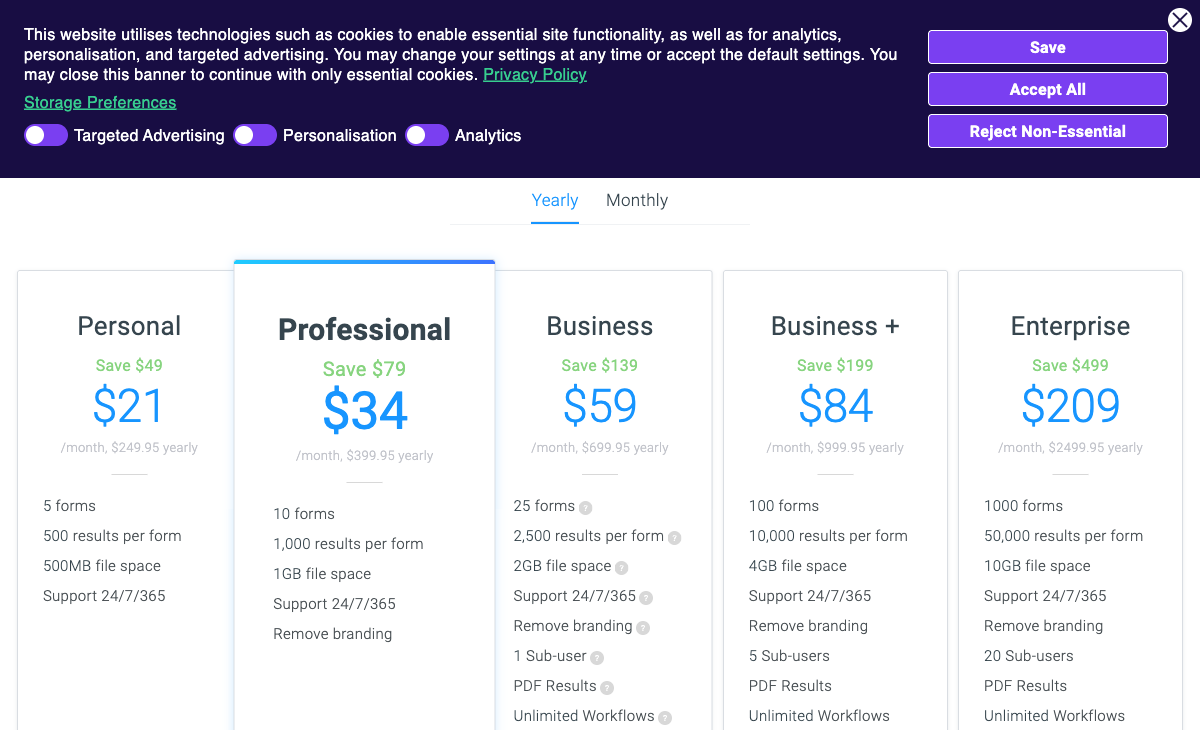
Formsite runs six tiers from $21/month Personal to $209/month Enterprise, and every one of them caps results per form: 500 on Personal, 1,000 on Professional at $34, 2,500 on Business at $59, 10,000 on Business+ at $84 and 50,000 on Enterprise. Sub-users are $10/month each above the seats included, extra storage is $10/month per gigabyte, and the Results Docs add-on for Word and PDF is $50/month. Paperform Pro is $59/month, or $49/month billed annually, with unlimited submissions, unlimited forms and unlimited seats within fair use. Cognito Forms Pro is $19/month annually with 2,000 entries and 2 users, Jotform Bronze is $34/month annually with 1,000 submissions and one user, and Typeform Basic is $28/month annually with 100 responses. Formsite is the cheaper door; Paperform is the flatter bill behind it.
Integrations & API
Formsite lists 17 native integrations plus Zapier's 2,000+ apps, and its REST API is read-only, limited to 50 calls per minute and 10,000 per day, and available from the Professional tier. The natives are the sensible ones: Salesforce (Enterprise only), Google Sheets, Drive and Calendar, Dropbox, Box, OneDrive, Excel, Amazon S3, Mailchimp, Constant Contact, Slack and DocuSign. There is no Make support. Paperform counts 4,000+ integrations with a read-write API, SurveyMonkey 200+, Jotform 150+ natives, Typeform 120+, Cognito Forms 50+ and Google Forms roughly 20 inside Workspace. An API that cannot create a form is a reporting endpoint rather than an automation surface.
Conditional logic
Formsite includes conditional logic, piping and calculations without coding, and reviewers consistently rate it as one of the product's genuine strengths. Rules show and hide items, skip pages and drive calculated totals, which covers most of what a registration or order form needs. The ceiling is reach rather than syntax: the logic governs the form and stops there. Paperform's calculations are Excel-style and drive question and page visibility, which confirmation email fires, what gets pushed to each integration and what the success page says, with an AI assistant that writes the formula from a description. Cognito Forms is the other strong engine here, handling repeating sections and line-item totals well.
Payments
Formsite supports four payment processors, Stripe, PayPal, Braintree and Authorize.Net, from the Professional tier at $34/month, with more than $500 million processed to date. Authorize.Net in particular is a real advantage for older US merchant accounts that most modern builders ignore. What is missing is everything around the charge: no products catalogue, no subscriptions, no coupons, no tax rules, no quotes or invoices and no refund handling. Paperform supports five gateways (Stripe, PayPal, Square, Braintree, Google Pay) with all of that commercial logic attached and no transaction fee of its own. Jotform supports 40+ processors. Typeform and Google Forms are Stripe-only or worse.
Compliance (HIPAA / GDPR / SOC 2)
Formsite is HIPAA compliant with a BAA on the $209/month Enterprise plan only, is GDPR and CCPA compliant and states PCI DSS 4.0, and holds neither SOC 2 nor ISO 27001; the ISO and SOC attestations on its security page belong to its AWS host, not to Formsite. There is also no SSO on any tier, with two-factor authentication arriving only at Enterprise. Jotform, Typeform, Google Forms, SurveyMonkey and Cognito Forms are all HIPAA, GDPR and SOC 2 compliant. Paperform is SOC 2 Type II, GDPR and CCPA compliant with SAML SSO and enforced 2FA, and is not HIPAA compliant and signs no BAAs. If protected health information is in scope, Paperform is out and the shortlist is Formsite Enterprise, Jotform, Cognito Forms or Google Forms under a Workspace BAA.
 #1 Paperform — Best When the Form Has to Sell Something

The clearest reason to move from Formsite to Paperform is what the respondent sees. Formsite asks you to assemble a list of fields and then dress it; Paperform asks you to write the page. You type headings and paragraphs, place images, GIFs or video where the argument needs them, and drop questions into the flow at the point the reader is ready to answer. Custom HTML and CSS are there if a designer wants them. The output is closer to a landing page that collects answers than a form pasted into one, which is why teams running paid traffic, applications or event registrations tend to notice the difference in completion rates rather than in compliments. Guided Mode takes the same form and serves it one question at a time when that suits the audience better, and one customer reported a 91% conversion increase after making that switch. Plenty of modern builders now offer a document-style editor, so this is not an exclusive capability; against a field-list builder from a different generation of software, it is a large and visible gap.
The second argument is the bill. Formsite charges you more as things go well: another 1,000 results on a form, another person needing a login at $10/month, another gigabyte at $10/month. Paperform does not meter submissions, forms or seats on paid plans within fair use, so the same $49/month covers the campaign that lands and the one that does not, and the colleague who only reads responses costs nothing. One subscription also covers Papersign for eSignatures and Stepper for workflow automation, which is the Formsite stack of DocuSign plus Zapier collapsed into one bill and one login. Be clear about the caveats: Pro includes 25 signed documents a month and 20,000 automation credits, and heavy volume on either belongs on Business at $124/month billed annually.
- Strengths over Formsite: Document-style editor producing landing-page-grade forms, Guided Mode for one-question-at-a-time flows, unlimited submissions, forms and seats, Papersign and Stepper in the same subscription, SOC 2 Type II with SAML SSO and enforced 2FA, full eCommerce logic around five payment gateways, read-write REST API, AI report insights and drop-off analytics, 30,000+ templates
- Limitations: $49/month billed annually against Formsite's $21 entry, no HIPAA compliance and no BAAs where Formsite Enterprise has both, no mobile editor (Formsite has none either), Stepper automation credits are metered, a much smaller review footprint than SurveyMonkey or Typeform
- Best for: Teams whose forms are customer-facing revenue surfaces and whose headcount or volume keeps pushing Formsite up a tier
 #2 Jotform — Best If You Need HIPAA Without the $209 Enterprise Plan

Jotform is the closest thing to a like-for-like replacement with the compliance gap closed. HIPAA with a signed BAA arrives on Gold at $99/month billed annually rather than Formsite's $209 Enterprise, and Jotform additionally holds SOC 2, ISO 27001, PCI DSS Level 1, FERPA and StateRAMP, none of which Formsite has in its own name. Payments jump from four processors to more than forty, native mobile apps exist where Formsite offers none, and 150+ native integrations cover ground Formsite pushes to Zapier. Founded in 2006 and still bootstrapped, Jotform also answers the vendor-stability question that the Intellistack acquisition raises.
What it does not fix is the meter or the aesthetic. Jotform counts submissions, forms, views, storage, fields per form and signed documents, and every self-serve tier from Starter to Gold is single-user, which is arguably worse than Formsite's $10 sub-users. Bronze at $34/month annually buys 1,000 submissions a month across the account. The breadth is real and so is the clutter: two decades of accumulated features sit in nested menus, and a Jotform form looks like a Jotform form unless someone invests in styling it. Our Jotform alternatives page covers the quota structure in detail.
- Strengths over Formsite: HIPAA with a BAA at $99/month rather than $209, SOC 2 and ISO 27001 held directly, 40+ payment processors, 150+ native integrations, read-write API, native mobile apps, approval workflows and PDF generation included
- Limitations: Submissions, forms, views and storage all metered, single-user on every self-serve plan, cluttered editor, design output no more modern than Formsite's without effort
- Best for: Healthcare, education and government teams that need certifications on the record and will trade quotas to get them
 #3 Cognito Forms — Best for Order Forms and Line-Item Maths
If what you value in Formsite is the calculation work, Cognito Forms is the upgrade path. Its engine handles repeating sections, line-item order forms and nested conditional logic more comfortably than Formsite's, it is HIPAA compliant with a BAA and SOC 2 audited, and Pro is $19/month billed annually with 2,000 entries and 2 users included. Cognito Pay adds native card processing alongside Stripe, with PayPal and Square from the Team tier at $39/month annually. For a small operation running quotes and orders on a tight budget, it does more of that specific job for less money than Formsite Business.
It will not solve the design complaint. Cognito's forms are utilitarian in a way that feels familiar to anyone leaving Formsite for aesthetic reasons, and there is no public REST API at all, which is a step down even from a read-only one. The metering also multiplies rather than disappears: entries, users, storage and guest collaborators each carry their own quota and their own overage. Trading result caps for entry caps is not obviously progress. See our Cognito Forms alternatives breakdown for the full picture.
- Strengths over Formsite: Stronger calculation engine with repeating sections, HIPAA with a BAA at a fraction of Enterprise pricing, SOC 2, lower entry price at $19/month annually, 2 users included on Pro rather than one
- Limitations: Dated visual output, no public REST API, four separate meters on entries, users, storage and guests, slower release cadence than the newer players
- Best for: Budget-conscious teams whose Formsite forms are really pricing calculators and who need HIPAA cheaply
 #4 Typeform — Best for Short, High-Value Forms Where Looks Decide

Typeform exists at the opposite end of the spectrum from Formsite. Where Formsite gives you every field type and leaves presentation to you, Typeform gives you one strongly opinionated presentation and makes it excellent. For a short lead qualification flow or a customer feedback survey where the completion rate is the whole metric, it remains the format to beat, and it carries HIPAA on Business plus ISO 27001, 27017, 27018 and ISO/IEC 42001. It is also far more reviewed than Formsite, which matters when you are trying to gauge real-world reliability.
The pricing model will be a shock coming from per-form caps. Typeform meters both responses and seats on every plan: 100 responses and 1 user on Basic at $28/month annually, 1,000 and 3 on Plus, 10,000 and 5 on Business at $91/month annually, and Growth Flow at $266/month annually raises neither. Payments are Stripe-only, a downgrade from Formsite's four processors, and long multi-section forms of the kind Formsite handles routinely become tedious in a one-question format. If you want the conversational option without the response meter, Paperform's Guided Mode covers the same ground inside an unmetered plan.
- Strengths over Formsite: Best-in-class conversational format, modern polished output with no styling work, HIPAA on Business, ISO 27001 and ISO/IEC 42001, 120+ integrations, far larger review base
- Limitations: Responses and seats capped on every plan, Stripe-only payments against Formsite's four processors, advanced logic gated to higher tiers, poor fit for long multi-section forms
- Best for: Marketing teams running short brand-facing forms at low volume where design drives the result
 #5 SurveyMonkey — Best If the Forms Were Really Research
Limited reporting is the second-most-common Formsite criticism after the interface, and SurveyMonkey is where that complaint goes to be resolved. Founded in 1999, it brings methodology-grade question banks, benchmarking, cross-tabulation, AI-assisted analysis and a 335-million-person respondent panel, none of which Formsite attempts. It is HIPAA, GDPR, SOC 2 and ISO 27001 compliant and lists 200+ integrations. If your Formsite account is mostly surveys and you have been exporting to Excel to do the real work, this is the honest upgrade.
It is a poor swap for the rest of a Formsite account. Order forms, application forms with heavy conditional logic and payment collection are not what SurveyMonkey is built for. The pricing is also a commitment: every paid plan is now an annual contract, responses are capped per year with a $0.15 charge for each one beyond the cap, Team plans require a minimum of three paid users and Enterprise five. Individual Advantage is $32/month billed annually for 15,000 responses a year. Coming from a per-form cap to a per-year cap with metered overage is a lateral move on the thing that probably annoyed you.
- Strengths over Formsite: Serious analysis tooling with benchmarking and cross-tabs, AI insights, a global respondent panel, SOC 2 and ISO 27001, 200+ integrations, 25 years of survey-specific expertise
- Limitations: Annual commitment on every paid plan, per-year response caps with $0.15 overage, three-user minimum on Team, weak at order forms and payments, private-equity ownership
- Best for: Research, HR and CX teams whose Formsite forms are surveys and whose real problem is what happens after the data arrives
 #6 Google Forms — Best If You Were Only Ever Collecting Internal Data
Some Formsite accounts are paying $34 or $59 a month for what amounts to a staff availability form and a couple of internal requests. If that describes yours, Google Forms is unlimited and free, HIPAA-eligible under a Workspace BAA, and covered by SOC 2, ISO 27001 and FedRAMP through Google Cloud. For simple work, use the simple tool.
Everything Formsite is actually good at is absent here. No payments of any kind, so the $500 million payment story has no equivalent. Around 20 integrations, all inside the Google ecosystem. No meaningful calculations, no save-and-return, no workflow routing, no custom domains and no design control worth the name. It is a step down, chosen deliberately, and only sensible when the forms never leave the building. Our Google Forms alternatives page covers what to do when they start to.
- Strengths over Formsite: Free and unlimited with no result caps, HIPAA-eligible under a Workspace BAA, SOC 2 and ISO 27001 via Google Cloud, SSO and admin controls through Workspace, zero learning curve
- Limitations: No payments, no serious calculations or workflow, about 20 integrations, no design control or custom domains, visibly generic respondent experience
- Best for: Internal data collection inside a Workspace organisation where nothing is customer-facing
See Them in Action
Two independent walkthroughs worth watching if the editor is what you are shopping for: one showing how a document-style builder differs from a field list, and one on the conversational format Formsite does not offer.
Full Feature Comparison
Every feature across Formsite and its alternatives, grouped by category. The design, workflow and security rows are where a 27-year-old product shows its age most clearly.
| Feature | Formsite | Paperform | Typeform | Jotform | Google Forms | SurveyMonkey | Cognito Forms |
|---|---|---|---|---|---|---|---|
| Form Building | |||||||
| Document-style editor | No | Yes | No | No | No | No | No |
| AI form creation | Yes professional | Yes | Yes | Yes starter | Yes paid | Yes | Yes |
| Field types | Yes | 26+ | 20+ | 30+ (starter) | 11 | 15+ | 20+ |
| Multi-page forms | Yes | Yes | Yes basic | Yes starter | Yes | Yes | Yes |
| Guided mode (one question at a time) | No | Yes | Yes | Yes starter | No | Yes | No |
| Conditional logic | Yes | Yes | Yes basic | Yes starter | Yes | Yes Individual Advantage | Yes |
| Calculations field | Yes | Yes pro | Yes plus | Yes starter | No | No | Yes |
| AI calculations assistant | No | Yes pro | No | No | No | No | No |
| Scoring | Yes | Yes pro | Yes plus | Yes starter | Yes | Yes | Yes |
| Answer piping | Yes | Yes | Yes basic | Yes starter | No | Yes Individual Advantage | Yes |
| Pre-filling and hidden fields | Yes | Yes pro | Yes basic | Yes starter | Yes | Yes Individual Advantage | Yes |
| Save and resume | Yes professional | Yes | No | Yes starter | No | Yes Individual Advantage | Yes pro |
| Auto-close by number | Yes | Yes pro | Yes basic | Yes starter | Yes | Yes Individual Advantage | Yes |
| Auto-close by date | Yes | Yes pro | Yes basic | Yes starter | Yes | Yes Individual Advantage | Yes |
| Appointment/booking field | No | Yes | Yes basic | Yes starter | No | No | No |
| Signature field | Yes professional | Yes | Yes basic | Yes starter | No | No | Yes team |
| Color picker field | No | Yes | No | No | No | No | No |
| API-powered dropdowns | No | Yes business | No | No | No | No | Yes |
| Google address search | No | Yes business | No | No | No | No | Yes |
| File uploads | No | Yes | Yes basic | Yes starter | Yes | Yes | Yes |
| Question display logic | No | No | Yes basic | No | No | No | No |
| AI follow-up questions | No | No | Yes business | No | No | No | No |
| AI extended thinking & memory | No | No | Yes growth | No | No | No | No |
| Typeform AI connectors | No | No | Yes growth | No | No | No | No |
| Workflow / automation builder | No | No | Yes growth | No | No | No | No |
| AI-moderated research (Research Flow) | No | No | Yes enterprise | No | No | No | No |
| Video questions | No | No | Yes basic | No | No | No | No |
| Drag-and-drop builder | No | No | No | Yes starter | No | No | No |
| Form widgets | No | No | No | Yes starter | No | No | No |
| Template gallery | No | No | No | 20,000+ (starter) | No | No | No |
| AI quiz generation | No | No | No | No | Yes paid | No | No |
| AI chat survey editing | No | No | No | No | No | Yes | No |
| Payments | |||||||
| Stripe payments | Yes professional | Yes | Yes basic | Yes starter | No | Yes Individual Advantage | Yes |
| PayPal payments | Yes professional | Yes | No | Yes starter | No | Yes Individual Advantage | Yes team |
| Square payments | No | Yes | No | Yes starter | No | No | Yes team |
| Braintree payments | Yes professional | Yes | No | Yes starter | No | No | No |
| Google Pay | No | Yes | No | Yes starter | No | No | Yes |
| Product sales (eCommerce) | No | Yes pro | No | Yes starter | No | No | Yes |
| Subscriptions | No | Yes pro | Yes basic | Yes starter | No | No | No |
| Coupons and discounts | No | Yes pro | No | Yes starter | No | No | Yes |
| Custom pricing rules | Yes | Yes pro | No | Yes starter | No | No | Yes |
| Tax calculations | No | Yes | No | Yes starter | No | No | Yes |
| Quotes/invoices | No | Yes | No | No | No | No | Yes team |
| Refunds | No | Yes | No | No | No | No | No |
| 3D Secure | No | Yes | Yes basic | No | No | No | No |
| 40+ payment gateways | No | No | No | Yes starter | No | No | No |
| No transaction fees | No | No | No | Yes starter | No | No | No |
| Cognito Pay (native card processing) | No | No | No | No | No | No | Yes |
| Design & Customization | |||||||
| Template gallery | Yes | 30,000+ | 1,500+ | 20,000+ (starter) | 20+ | 400+ | Yes |
| Rich media (images, GIFs, videos) | Yes professional | Yes | Yes | Yes starter | Yes | Yes | Yes |
| Unsplash and Giphy integration | No | Yes | Yes | No | No | No | No |
| Image editor | No | Yes | No | No | No | No | No |
| Adobe Creative Cloud | No | Yes | No | No | No | No | No |
| Language translation | No | Yes | Yes basic | Yes starter | No | Yes Individual Premier | Yes pro |
| Advanced theming | Yes | Yes pro | Yes plus | Yes starter | No | Yes Individual Advantage | Yes pro |
| Custom form URL | No | Yes pro | Yes plus | No | No | Yes Individual Advantage | No |
| Custom domains | No | Yes pro | Yes enterprise | Yes enterprise | No | No | No |
| Custom HTML & CSS | Yes | Yes pro | Yes business | Yes starter | No | No | Yes pro |
| Remove branding | Yes professional | Yes pro | Yes plus | Yes bronze | No | Yes Individual Advantage | Yes pro |
| Custom email domains | No | Yes business | No | No | Yes Business Starter | No | No |
| Form themes | No | No | No | Yes starter | No | No | No |
| Analytics | |||||||
| Submission results and reports | Yes | Yes | Yes | Yes starter | Yes | Yes | Yes |
| AI report insights | No | Yes pro | Yes business | No | Yes Business Standard | Yes Individual Advantage | No |
| Paperform analytics | No | Yes pro | No | No | No | No | No |
| Google Analytics & Facebook Pixel | No | Yes pro | Yes basic | No | No | No | Yes pro |
| Custom analytics scripts | No | Yes pro | Yes basic | No | No | No | No |
| Partial submissions | No | Yes pro | Yes plus | No | No | Yes Individual Advantage | No |
| Drop-off analysis | No | Yes pro | Yes business | No | No | No | No |
| Cross-form Insights dashboard | No | No | Yes business | No | No | No | No |
| Form analytics | No | No | No | Yes starter | No | No | No |
| Google Analytics integration | No | No | No | Yes starter | No | No | No |
| Benchmarks | No | No | No | No | No | No | No |
| Collaboration | |||||||
| Multi-user accounts | Yes business | Yes pro | Yes plus | Yes bronze | Yes | Yes Team Advantage | Yes pro |
| User permissions and management | Yes business | Yes pro | Yes plus | Yes enterprise | Yes | Yes Team Advantage | Yes team |
| Advanced permissions & admin | No | Yes enterprise | Yes enterprise | Yes enterprise | Yes Business Starter | Yes enterprise | Yes enterprise |
| Form sharing (templates) | Yes | Yes | Yes | No | Yes | Yes Team Advantage | Yes |
| Spaces and tag management | No | Yes | No | No | No | No | No |
| Workspace organization | No | No | Yes | No | No | No | No |
| Form sharing | No | No | No | Yes starter | No | No | No |
| Assign forms | No | No | No | Yes enterprise | No | No | No |
| Review Sessions | No | No | No | No | No | Yes Team Advantage | No |
| Persistent Magic Link | No | No | No | No | No | Yes Team Advantage | No |
| Security | |||||||
| SOC 2 Type II | No | Yes | Yes | Yes enterprise | Yes | Yes | No |
| GDPR compliant | Yes | Yes | Yes | Yes starter | Yes | Yes | Yes |
| SSL encryption | Yes | Yes | Yes | Yes starter | Yes | Yes | Yes |
| Two-factor authentication | Yes enterprise | Yes | Yes | Yes starter | Yes | Yes | Yes |
| Enforce 2FA for all users | No | Yes business | No | No | Yes Business Starter | Yes enterprise | No |
| SSO (SAML) | No | Yes business | Yes enterprise | Yes enterprise | Yes Business Plus | Yes enterprise | Yes enterprise |
| reCAPTCHA | Yes professional | Yes | Yes business | Yes starter | No | Yes | Yes |
| Local data residency | No | Yes enterprise | No | No | Yes Business Plus | Yes enterprise | No |
| Custom S3 storage | No | No | No | No | No | No | No |
| HIPAA compliance | Yes enterprise | No | No | No | No | No | No |
| Custom S3 storage (BYO) | No | Yes business | No | No | No | No | No |
| HIPAA compliant | No | No | Yes enterprise | Yes gold | No | No | No |
| ISO 27001 | No | No | Yes | No | No | No | No |
| PCI DSS | No | No | Yes | Yes starter | No | No | No |
| 256-bit SSL | No | No | No | Yes starter | No | No | No |
| Data residency | No | No | No | Yes enterprise | No | No | No |
| Form encryption | No | No | No | Yes starter | No | No | No |
| Integrations & API | |||||||
| 2000+ integrations | Yes professional | No | No | No | No | No | No |
| Zapier | Yes professional | Yes | Yes basic | Yes starter | Yes | Yes | Yes |
| Make (Integromat) | No | Yes | Yes basic | Yes starter | Yes | Yes | Yes |
| Webhooks | Yes professional | Yes pro | Yes basic | Yes starter | No | Yes Individual Advantage | Yes |
| Standard API | Yes professional | Yes pro | No | No | Yes | Yes Individual Advantage | Yes |
| Business API | No | Yes business | No | No | No | Yes enterprise | No |
| WordPress plugin | Yes | Yes | Yes | Yes starter | No | No | Yes |
| oEmbed support | No | Yes | No | No | No | No | Yes |
| Native integrations | No | 4,000+ | 120+ (basic) | 150+ (starter) | No | 200+ | No |
| API | No | No | Yes basic | Yes starter | No | No | No |
| Embed options | No | No | Yes | Yes starter | No | No | No |
| Claude / MCP server | No | No | Yes basic | No | No | No | No |
| AI data enrichment | No | No | Yes growth | No | No | No | No |
| Automations integrations (Contacts & Automations) | No | No | Yes growth | No | No | No | No |
| Smartsheet integration | No | No | No | Yes starter | No | No | No |
| Canvas LMS integration | No | No | No | Yes enterprise | No | No | No |
| Salesforce AppExchange | No | No | No | Yes starter | No | No | No |
| Mobile apps | No | No | No | Yes starter | No | No | No |
| Claude (Anthropic) integration | No | No | No | No | No | Yes Individual Advantage | No |
| ChatGPT integration | No | No | No | No | No | Yes | No |
| Gemini integration | No | No | No | No | No | No | No |
| HRIS integrations (Workday, BambooHR) | No | No | No | No | No | Yes | No |
| MCP connector (AI app access) | No | No | No | No | No | No | Yes pro |
Pricing Comparison
Formsite's entry price of $21/month is genuinely low, and the number to watch is not the entry price but the slope above it. Read the table for what each tier caps rather than what it costs.
Paperform
Formsite
| Product | Plan | Monthly Price | Annual Price (per month) | Free Plan | Free Trial | Limits |
|---|---|---|---|---|---|---|
| Formsite | Free | Free | Free | Yes | 14 days | forms: 5, submissions: 10 per form, storage: 50 MB, users: 1 |
| Formsite | Personal | $21/mo | $20.83/mo billed annually | forms: 5, submissions: 500 per form, storage: 500 MB, users: 1 | ||
| Formsite | Professional | $34/mo | $33.33/mo billed annually | forms: 10, submissions: 1,000 per form, storage: 1 GB, users: 1 | ||
| Formsite | Business | $59/mo | $58.33/mo billed annually | forms: 25, submissions: 2,500 per form, storage: 2 GB, users: 2 | ||
| Formsite | Business + | $84/mo | $83.33/mo billed annually | forms: 100, submissions: 10,000 per form, storage: 4 GB, users: 6 | ||
| Formsite | Enterprise | $209/mo | $208.33/mo billed annually | forms: 1000, submissions: 50,000 per form, storage: 10 GB, users: 21 | ||
| Paperform | Free | Free | Free | Yes | 7 days | forms: Unlimited, submissions: 30/month, storage: Unlimited, users: Unlimited, file uploads: 100 MB |
| Paperform | Pro | $59/mo | $49/mo billed annually | forms: Unlimited, submissions: Unlimited, storage: Unlimited, users: Unlimited, file uploads: 10 GB | ||
| Paperform | Business | $149/mo | $124/mo billed annually | forms: Unlimited, submissions: Unlimited, storage: Unlimited, users: Unlimited, file uploads: 100 GB | ||
| Typeform | Free | Free | Free | Yes | No | forms: 10, submissions: 10/month, users: 1 |
| Typeform | Basic | $39/mo | $28/mo billed annually | forms: Unlimited, submissions: 100/month, users: 1 | ||
| Typeform | Plus | $79/mo | $56/mo billed annually | forms: Unlimited, submissions: 1,000/month, users: 3 | ||
| Typeform | Business | $129/mo | $91/mo billed annually | forms: Unlimited, submissions: 10,000/month, users: 5 | ||
| Typeform | Growth Flow | $379/mo | $266/mo billed annually | forms: Unlimited, submissions: 10,000/month, users: 5 | ||
| Typeform | Talent | $169/mo | $119/mo billed annually | forms: Unlimited, users: HR teams | ||
| Jotform | Starter | Free | Free | Yes | No | forms: 5, submissions: 100/month, storage: 100 MB, users: 1 |
| Jotform | Bronze | $39/mo | $34/mo billed annually | forms: 25, submissions: 1,000/month, storage: 1 GB, users: 1 | ||
| Jotform | Silver | $49/mo | $39/mo billed annually | forms: 50, submissions: 2,500/month, storage: 10 GB, users: 1 | ||
| Jotform | Gold | $129/mo | $99/mo billed annually | forms: 100, submissions: 10,000/month, storage: 100 GB, users: 1 | ||
| Google Forms | Free (Personal) | Free | Free | Yes | 14 days | forms: Unlimited, submissions: Unlimited, storage: 15 GB (shared across Google Drive), users: 1, file uploads: Included in 15 GB storage |
| Google Forms | Business Starter | $8.4/mo | $7/mo billed annually | forms: Unlimited, submissions: Unlimited, storage: 30 GB per user, users: Up to 300, file uploads: Included in storage | ||
| Google Forms | Business Standard | $16.8/mo | $14/mo billed annually | forms: Unlimited, submissions: Unlimited, storage: 2 TB per user, users: Up to 300, file uploads: Included in storage | ||
| Google Forms | Business Plus | $26.4/mo | $22/mo billed annually | forms: Unlimited, submissions: Unlimited, storage: 5 TB per user, users: Up to 300, file uploads: Included in storage | ||
| SurveyMonkey | Basic (Free) | Free | Free | Yes | No | forms: Unlimited, submissions: Limited per survey (exact number now only shown after sign-up/login), storage: N/A, users: 1 |
| SurveyMonkey | Individual Advantage | Free | $32/mo billed annually | forms: Unlimited, submissions: 15,000 per year, storage: N/A, users: 1 | ||
| SurveyMonkey | Individual Premier | Free | $99/mo billed annually | forms: Unlimited, submissions: 40,000 per year, storage: N/A, users: 1 | ||
| SurveyMonkey | Team Advantage | Free | $30/mo billed annually | forms: Unlimited, submissions: 50,000 per year (shared), storage: N/A, users: 3 minimum | ||
| SurveyMonkey | Team Premier | Free | $92/mo billed annually | forms: Unlimited, submissions: 100,000 per year (shared), storage: N/A, users: 3 minimum | ||
| Cognito Forms | Individual (Free) | Free | Free | Yes | 14 days | forms: Unlimited, submissions: 100 entries/month, storage: 100 MB, users: 1 |
| Cognito Forms | Pro | $24/mo | $19/mo billed annually | forms: Unlimited, submissions: 2,000 entries/month, storage: 1 GB, users: 2 | ||
| Cognito Forms | Team | $49/mo | $39/mo billed annually | forms: Unlimited, submissions: 10,000 entries/month, storage: 10 GB, users: 5 | ||
| Cognito Forms | Enterprise | $174/mo | $129/mo billed annually | forms: Unlimited, submissions: Unlimited, storage: 100 GB, users: 20 |
Review Ratings Across Platforms
Formsite rates 4.4 on G2 across 31 reviews and 4.5 on Capterra across 44, with value for money at 4.1 and customer support at 4.2 its weakest sub-scores. The review base is small for a product of its age, which itself says something about momentum.
Verdict: Which Formsite Alternative Should You Choose?
Formsite is not broken. It is a capable 1998 product inside a 2026 market, now owned by a parent company that renamed itself and has published nothing about the roadmap since May 2024. The question is which of its limits you have actually hit.
If the forms face customers and the way they look affects whether people finish them, Paperform is the recommendation. Writing a form as a document rather than assembling a field list produces a page you would put behind a campaign, Guided Mode gives you the conversational option without a second product, and nothing on the plan meters submissions, forms or seats, so the bill stops tracking your growth. It costs more at the door than Formsite Personal, and against Formsite Business+ with the Results Docs add-on at $134/month it costs considerably less.
If the blocker is narrower, take the tool that removes it. Jotform for HIPAA and certifications at a third of Formsite Enterprise's price. Cognito Forms for heavier calculation work on a small budget. Typeform for short, low-volume forms where presentation is the product. SurveyMonkey if the reporting was always the real complaint. Google Forms if none of it was ever customer-facing.
And stay on Formsite if you collect protected health information and cannot move to another BAA provider, if Authorize.Net is your merchant account, or if your volumes sit comfortably inside a tier and nobody minds how the forms look. Otherwise the 7-day Paperform trial needs no card, and rebuilding a form in a document editor takes less time than the export you have been putting off.
Frequently Asked Questions
Why does Formsite cap results per form instead of per account?
It is how Formsite has priced since the 1990s, and it is the single biggest reason people start shopping. Personal at $21/month allows 500 results per form, Professional at $34/month allows 1,000, Business at $59/month allows 2,500 and Business+ at $84/month allows 10,000. The cap applies to each form, so one popular registration page can push the whole account up a tier while nine quiet forms sit unused underneath it. Paperform Pro at $49/month billed annually carries unlimited submissions and unlimited forms within fair use, so the form that works costs the same as the form that does not.
Can I make a Formsite form look like part of my website?
Only up to a point. Formsite gives you themes, a style editor and custom CSS, and a competent designer can get a respectable result, but the underlying structure is still a stacked list of labelled fields. Reviewers have called the interface aging for years, and the FirstSales review singles out the field terminology as a learning curve of its own. Paperform approaches it from the other end: you write a page, with headings, paragraphs, images, GIFs and video, and drop questions into the flow where they belong. The result reads as a landing page that happens to collect answers, which is a different conversion proposition from a form embedded in one.
Is Formsite still being developed after the Formstack acquisition?
That is the question most buyers cannot answer, and it deserves a straight description of the facts. Formsite was acquired by Formstack in December 2023, and Formstack rebranded as Intellistack in June 2025, so the product is now sold under a parent brand most people have not heard of. The Formsite blog's most recent post is dated May 2024 and there is no public changelog, which is roughly 28 months without product communication. Independent 2026 roundups from Supatool and G2 both flag the uncertainty. Paperform is independent, bootstrapped and profitable, founded in 2016, with a public changelog.
How much does it cost to give three colleagues access to Formsite?
More than the plan price suggests. Personal and Professional are single-user, Business at $59/month includes one sub-user and Business+ at $84/month includes five, and additional sub-users are $10/month each on top. A three-person team on Professional is therefore a jump to Business plus a sub-user charge, or a jump to Business+. Add the Results Docs add-on for Word and PDF output at $50/month and Business+ lands at $134/month. Paperform Pro at $49/month billed annually has unlimited seats, and one seat covers forms, Papersign and Stepper, so the person who only reviews submissions costs nothing to add.
Does Formsite have a conversational, one-question-at-a-time mode?
No. Formsite builds traditional multi-field pages and nothing else, so a guided flow means building it in a second product. Typeform is the reference implementation of that format and worth a look if presentation is the whole requirement, though it meters responses hard. Paperform includes Guided Mode, which turns an existing form into a one-question-at-a-time experience without a rebuild or a separate subscription, and one Paperform customer reported a 91% lift in conversion rate after switching a form to it.
Is there a cheaper HIPAA option than Formsite Enterprise?
Yes. Formsite gates HIPAA and the BAA to Enterprise at $209/month, which is a steep price for a compliance checkbox. Cognito Forms offers HIPAA with a BAA well below that, Jotform includes it on Gold at $99/month billed annually, and Google Forms is HIPAA-eligible under a Workspace BAA. Being plain about it: Paperform is not HIPAA compliant and does not sign BAAs, so protected health information is one requirement where Formsite genuinely beats us and where our answer is one of the three above.
Can Formsite handle an order form with coupons, tax and subscriptions?
It can take the money and little else. Formsite supports Stripe, PayPal, Braintree and Authorize.Net, four processors, and has processed over $500 million, which is a real track record. What it does not have is product management, subscriptions, coupon codes, tax rules, quotes, invoices or refund handling, so the commercial logic around the payment lives in a spreadsheet or a second system. Paperform supports five gateways and wraps products, subscriptions, coupons, tax and refunds around them with no transaction fee of its own, and its Excel-style calculations drive the price, the questions that appear, the confirmation email that fires and the payload sent to integrations.
What can I actually do with the Formsite API?
Read results. The Formsite API retrieves data and cannot create, edit or delete forms, and it is capped at 50 calls per minute and 10,000 per day on Professional and above. Marketing copy now describes it as extensive, though the read-only behaviour was last confirmed against the documentation in March 2026, so verify it against your own use case before committing. Paperform's REST API reads and manages forms, submissions and partial submissions, Business adds the Business API and bring-your-own S3, and Stepper handles the automation that would otherwise be the reason to write against an API at all.
Is a 1998 form builder a safer bet than a newer one?
Age normally is a trust signal, and Formsite earned its: 27 years of operation and billions of submissions is not nothing. The signal weakens when the company stops being independent. Formsite is now a two-to-ten person product line inside Intellistack, and old plus quiet is a different risk profile from old plus shipping. Among the alternatives here, Jotform has been bootstrapped since 2006, SurveyMonkey dates to 1999 but is owned by private equity, and Paperform has been independent, bootstrapped and profitable since 2016. Longevity matters most when it comes with a roadmap you can see.
How do I move my forms and results off Formsite?
Results come out cleanly and forms do not. Formsite exports results as CSV, PDF and Word, and the read API can pull them programmatically, though reviewers have long complained the Excel export is fiddly. No competing builder imports a Formsite form definition, so rebuilding is the realistic path. That is less painful than it sounds when the form was overdue for a redesign anyway. Paperform offers a 7-day trial with no card and 30,000+ templates to start from rather than a blank page, and if you want to widen the field first, our best form builders roundup covers the rest of the market.
Sources & References
- Formsite Review: Pricing, Pros, Cons & Features — CompareCamp, 2026
- Formsite Review: Features, Pricing, Pros & Cons — FirstSales.io, 2026
- 7 Best Formsite Alternatives (2026) — Supatool, 2026
- Top 10 Formsite Alternatives & Competitors — G2, 2026
Last updated September 22, 2026
Ready to try Paperform?
Create beautiful forms, payment pages, and workflows — no code required.