Fillout vs Typeform: Which Is Better in 2026?
Fillout is far cheaper per response and includes unlimited seats on every plan, starting at $19/month. Typeform costs more at every tier but owns the conversational respondent experience and is HIPAA compliant with a BAA, which Fillout is not. Both meter responses, so both bills rise as your forms succeed.
This matchup is a value argument against a brand argument. Typeform, founded in 2012 in Barcelona and funded to $193M through a Series C, sells an experience: one question at a time, beautifully typeset, with data showing respondents finish more often. Fillout, founded in 2022 and now trading as "Fillout (by Zite)", sells scope for the money: forms, scheduling, PDF generation, payments, workflows and signatures in one product, with a free tier that carries 1,000 responses a month.
Neither company disputes the other's ground. Typeform does not claim to be cheap, and Fillout does not claim its forms feel like a conversation. The interesting question is which constraint bites you first: Typeform's response and seat ceilings, or Fillout's shorter track record and narrower payment support.
Quick verdict
Choose Fillout if:
- More than three people need to build or edit forms
- Airtable or Notion is where submissions have to land
- You want scheduling, PDFs and payments without extra vendors
- Your volume is real and your budget is not
Choose Typeform if:
- The form is public-facing and completion rate is the metric
- You handle health data and need HIPAA plus a signed BAA
- Procurement wants ISO 27001 and a long audit history
- Volume is modest and the team using it is under five people
Feature comparison
Both products audited in September 2026, category by category.
| Feature | Fillout | Typeform |
|---|---|---|
| Form Building | ||
| Document-style editor | No | No |
| AI form creation | Yes | Yes |
| AI agent in the form editor (Form Agent) | Yes | No |
| Field types | 50+ | 20+ |
| Multi-page forms | Yes | Yes basic |
| Guided mode (one question at a time) | No | Yes |
| Conditional logic | Yes | Yes basic |
| Calculations field | Yes | Yes plus |
| AI calculations assistant | No | No |
| Scoring | Yes | Yes plus |
| Answer piping | Yes | Yes basic |
| Pre-filling and hidden fields | Yes | Yes basic |
| Save and resume | Yes | No |
| Auto-close by number | Yes | Yes basic |
| Auto-close by date | Yes | Yes basic |
| Appointment/booking field | Yes starter | Yes basic |
| Signature field | Yes starter | Yes basic |
| Color picker field | No | No |
| API-powered dropdowns | No | No |
| Google address search | Yes conversion-kit | No |
| File uploads | Yes | Yes basic |
| Question display logic | No | Yes basic |
| AI follow-up questions | No | Yes business |
| AI extended thinking & memory | No | Yes growth |
| Typeform AI connectors | No | Yes growth |
| Workflow / automation builder | No | Yes growth |
| AI-moderated research (Research Flow) | No | Yes enterprise |
| Video questions | No | Yes basic |
| Payments | ||
| Stripe payments | Yes | Yes basic |
| PayPal payments | No | No |
| Square payments | No | No |
| Braintree payments | No | No |
| Google Pay | No | No |
| Product sales (eCommerce) | Yes | No |
| Subscriptions | Yes | Yes basic |
| Coupons and discounts | Yes | No |
| Custom pricing rules | Yes | No |
| Tax calculations | No | No |
| Quotes/invoices | No | No |
| Refunds | No | No |
| 3D Secure | No | Yes basic |
| Design & Customization | ||
| Template gallery | Yes | 1,500+ |
| Rich media (images, GIFs, videos) | Yes | Yes |
| Unsplash and Giphy integration | No | Yes |
| Image editor | No | No |
| Adobe Creative Cloud | No | No |
| Language translation | No | Yes basic |
| Advanced theming | Yes starter | Yes plus |
| Custom form URL | Yes pro | Yes plus |
| Custom domains | Yes business | Yes enterprise |
| Custom HTML & CSS | Yes pro | Yes business |
| Remove branding | Yes pro | Yes plus |
| Custom email domains | Yes pro | No |
| Analytics | ||
| Submission results and reports | Yes | Yes |
| AI report insights | No | Yes business |
| Paperform analytics | Yes business | No |
| Google Analytics & Facebook Pixel | Yes | Yes basic |
| Custom analytics scripts | Yes business | Yes basic |
| Partial submissions | Yes business | Yes plus |
| Drop-off analysis | No | Yes business |
| Cross-form Insights dashboard | No | Yes business |
| Collaboration | ||
| Multi-user accounts | Yes | Yes plus |
| User permissions and management | Yes | Yes plus |
| Advanced permissions & admin | Yes team | Yes enterprise |
| Form sharing (templates) | Yes | Yes |
| Spaces and tag management | Yes | No |
| Workspace organization | No | Yes |
| Security | ||
| SOC 2 Type II | Yes | Yes |
| HIPAA compliance / BAA | No | No |
| ISO 27001 | No | Yes |
| Audit logs | Yes enterprise | No |
| GDPR compliant | Yes | Yes |
| SSL encryption | Yes | Yes |
| Two-factor authentication | Yes | Yes |
| Enforce 2FA for all users | Yes team | No |
| SSO (SAML) | Yes enterprise | Yes enterprise |
| reCAPTCHA | Yes starter | Yes business |
| Local data residency | Yes enterprise | No |
| Custom S3 storage (BYO) | Yes | No |
| HIPAA compliant | No | Yes enterprise |
| PCI DSS | No | Yes |
| Integrations & API | ||
| Native integrations | 50+ | 120+ (basic) |
| Zapier | Yes | Yes basic |
| Make (Integromat) | Yes | Yes basic |
| Webhooks | Yes | Yes basic |
| Standard API | Yes | No |
| Business API | No | No |
| WordPress plugin | Yes | Yes |
| oEmbed support | Yes | No |
| API | No | Yes basic |
| Embed options | No | Yes |
| Claude / MCP server | No | Yes basic |
| AI data enrichment | No | Yes growth |
| Automations integrations (Contacts & Automations) | No | Yes growth |
Pricing: the same meter, very different rates
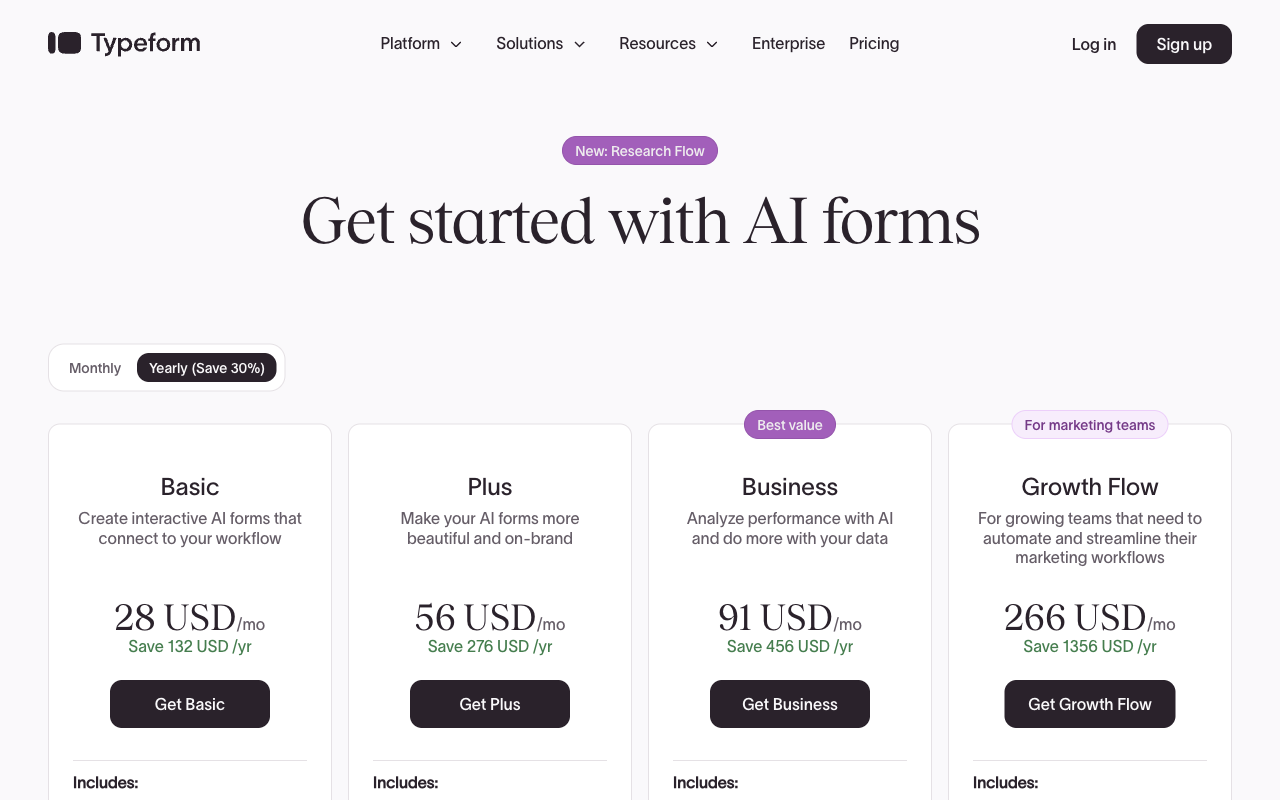
Fillout's paid range runs $19 to $89 per month ($15 to $75 billed annually); Typeform's runs $39 to $379 ($28 to $266 annually). Both count responses, and Typeform counts seats as well.
Track a growing form through both ladders and the gap compounds. At 2,000 responses a month Fillout wants $19 (Starter) and Typeform wants $129 (Business), because Typeform's $79 Plus tier stops at 1,000. At 5,000 responses Fillout is $49 on Pro and Typeform is still $129. Past 10,000, Fillout sells unlimited responses on Business at $89/month ($75 annually) while Typeform has no published tier above 10,000 at all: Growth Flow at $379/month ($266 annually) keeps the same 10,000-response and 5-seat ceiling and spends the extra money on enrichment, Smart Insights and automations. The route past 10,000 responses on Typeform is a contact-sales conversation.
Each product also keeps basics back for an upgrade, and the choices are revealing. Typeform gates reCAPTCHA, drop-off analysis and conversion tracking to Business at $91/month annual, so spam protection and the ability to diagnose a failing form both arrive at the same fairly high rung. Fillout gates analytics, partial submissions and custom domains to Business at $75/month annual, which is also the tier that removes the response cap. Fillout then sells its lead-generation layer outside the tiers entirely: abandonment recovery, Clearbit enrichment, lead routing, email validation, OTP verification and ad conversion tracking are a $100/month Conversion Kit add-on. Typeform's equivalent is Contacts & Automations at $25/month for 2,400 actions or $75/month for 12,000.
Fillout
Typeform
| Product | Plan | Monthly Price | Annual Price (per month) | Free Plan | Free Trial | Limits |
|---|---|---|---|---|---|---|
| Fillout | Free | Free | Free | Yes | No | forms: Unlimited, submissions: 1,000/month, storage: N/A, users: Unlimited, file uploads: 20 MB per file |
| Fillout | Starter | $19/mo | $15/mo billed annually | forms: Unlimited, submissions: 2,000/month, storage: N/A, users: Unlimited, file uploads: 20 MB per file | ||
| Fillout | Pro | $49/mo | $40/mo billed annually | forms: Unlimited, submissions: 5,000/month, storage: N/A, users: Unlimited, file uploads: 20 MB per file | ||
| Fillout | Business | $89/mo | $75/mo billed annually | forms: Unlimited, submissions: Unlimited, storage: N/A, users: Unlimited, file uploads: 1 GB+ | ||
| Fillout | Team bundle | $300/mo | $250/mo billed annually | forms: Unlimited, submissions: Unlimited, storage: 1,000,000 records, users: Unlimited, file uploads: 1 GB+ | ||
| Typeform | Free | Free | Free | Yes | No | forms: 10, submissions: 10/month, users: 1 |
| Typeform | Basic | $39/mo | $28/mo billed annually | forms: Unlimited, submissions: 100/month, users: 1 | ||
| Typeform | Plus | $79/mo | $56/mo billed annually | forms: Unlimited, submissions: 1,000/month, users: 3 | ||
| Typeform | Business | $129/mo | $91/mo billed annually | forms: Unlimited, submissions: 10,000/month, users: 5 | ||
| Typeform | Growth Flow | $379/mo | $266/mo billed annually | forms: Unlimited, submissions: 10,000/month, users: 5 | ||
| Typeform | Talent | $169/mo | $119/mo billed annually | forms: Unlimited, users: HR teams |
The five dimensions that decide it
Pricing
Fillout's entry plan is $19/month ($15 annually) for 2,000 responses and unlimited seats; Typeform's is $39/month ($28 annually) for 100 responses and one seat. That is a 20x difference in included volume at roughly half the price, and it is the single most lopsided number in this comparison.
Integrations and API
Typeform lists 120+ native integrations and Fillout lists 50+, with both exposing a REST API and webhooks. Typeform's are broader across the marketing stack, Fillout's go deeper into databases: its Airtable integration updates existing records, which matters when the form is an editing interface for data you already hold rather than a new-lead capture.
Conditional logic and calculations
Fillout includes conditional logic, calculations, answer piping and pre-fill on its free plan; Typeform puts advanced logic and calculations behind Plus at $79/month ($56 annually). Fillout's Form Agent, a chat assistant inside the editor, will write page logic, calculations and dynamic values for you, though it cannot yet configure payments, calendars or integrations, and it draws on a shared monthly Zite credit pool that stops when it runs out. Neither product ships a dedicated AI calculations assistant, and G2 reviewers say Fillout's calculations take time to master.
Payments
Both support exactly one payment processor: Stripe. Fillout does more with it, covering card, ACH, Affirm and Stripe Link plus discount codes, free trials and recurring billing from the Starter tier. Typeform gained native Stripe recurring payments in August 2026 but has no product catalogue, inventory, coupon engine, pricing rules or tax calculation, which caps what a Typeform checkout can honestly be asked to do.
Compliance
Typeform is HIPAA, GDPR, CCPA, SOC 2 Type II, ISO 27001 and PCI DSS compliant and signs BAAs; Fillout is SOC 2 Type 2 and GDPR compliant only, with no HIPAA and no BAA. Typeform added ISO 27017, ISO 27018 and ISO/IEC 42001 for AI management systems, certified in June 2026. Fillout's counter is placement rather than paperwork: Enterprise customers pick a hosting region across the US, EU, UK, Australia and Canada, and can configure submissions to live only in external storage so nothing rests on Fillout's servers.
Where Fillout is the better product

Scope for the price is the whole case, and it holds up. A booking flow that generates a PDF confirmation and takes a deposit is one product on Fillout and three on Typeform, where scheduling routes through Calendly, document generation does not exist, and signing is a question type rather than an executed agreement. Free Form Builders' hands-on review calls Fillout one of the most polished free builders available, singling out the modern editor and the 1,000-response tier.
Unlimited seats change how a team actually works. On Typeform Plus, three people hold the keys and the fourth sends a Slack message asking someone to change a question. Fillout gives edit access to everyone on every tier, including the free one, which removes a recurring source of friction that never appears on a feature comparison.
The customer list is doing real work for a company this young: Fairfax County, Domino's, Bombas, Wayfair, Harvard, Airbnb and The Athletic have all gone through procurement with it. For a county government or a mid-market operations team wiring intake into Airtable, Fillout has answered those questions before.
Where Typeform is the better product

Typeform invented the conversational form and still executes it better than anyone, including Fillout. The one-question-at-a-time flow, with its typography and pacing, is the reason Typeform claims 3.5x the response rate of a standard form. Multi-question pages arrived in the builder in July 2026, so the format is less rigid than it used to be. If your form sits on a paid landing page and every abandoned session has a cost attached, the experience gap is worth money.
The compliance and trust position is the second real advantage, and it is not close. HIPAA with a BAA, ISO 27001, ISO 27017, ISO 27018, ISO/IEC 42001, PCI DSS and fourteen years of operating history give a security reviewer everything they are going to ask for. Fillout, four years old and SOC 2 with GDPR, will clear many procurement processes but not a healthcare one.
Evidence volume counts too. Typeform carries roughly 1,002 G2 reviews at 4.5 and 979 Capterra reviews at 4.7, against Fillout's 30 on G2 and four on Capterra. Typeform's AI layer is genuinely deep as well: Creator AI builds forms from a prompt, Interaction AI asks adaptive follow-ups mid-form, and Insights AI summarises what came back.
See them in action
"Fillout Full Tutorial for Beginners 2026" by Toolysto, a step-by-step pass through the builder.
"Typeform 2026 Review: Features, Pricing & Alternatives" by Serin AI, a short overview weighing the price against the product.
Where Fillout falls short in this matchup
The company behind the product is the risk, not the product. Fillout is four years old, seed-funded, and has been folded into Zite: the security documentation is titled for Zite, the footer reads Restly, Inc. DBA Zite, the changelog covers Zite releases, AI features draw on a Zite credit pool, and the top tier is a $300/month Team bundle of both ($250 annually). Anyone buying a form builder is being enrolled in a wider platform. The review record is thin and moving the wrong way, with Trustpilot down from 4.7 to 3.5 across 48 reviews and recent complaints about automated systems flagging and blocking accounts.
On the product itself, the design ceiling is lower than Typeform's. There is no document-style editor, no conversational mode, no stock image browsing or built-in image editor, and the template library is small next to the 1,500 Typeform ships. The Conversion Kit is the other sore point: for a lead-gen team, $100/month on top of a $75 plan puts Fillout at $175 before signatures enter the picture, which erodes the price advantage exactly where it was supposed to matter most.
Where Typeform falls short in this matchup
Typeform meters both of the things that grow. Responses and seats are capped on every single plan, and the ceiling does not lift with price: Growth Flow at $266/month annual holds the same 10,000 responses and 5 users as Business at $91. A good quarter, or a colleague who needs edit access, sends you shopping tiers for reasons that have nothing to do with the software improving. Trustpilot sits at 2.6 from 775 reviews, and the complaints cluster on exactly this: plan limits, billing and unexpected paywalls.
Custom domains are gated to Enterprise and Growth Custom, both contact-sales, so putting your own URL on your own form requires a procurement cycle; Fillout ships one on its $75 Business tier. Reviewers also report lag and slow loading, and the feature surface is narrower than Fillout's: no scheduling without Calendly, no PDF generation, no ecommerce logic, no product or inventory management, and no tax calculation.
What users say
Read these two records differently, because they are not the same kind of evidence. Typeform's B2B scores are strong and deeply sampled: 4.5 across ~1,002 G2 reviews, 4.7 across 979 on Capterra and the same on GetApp, with ease of use its top dimension and value for money its weakest at 4.3. The 2.6 on Trustpilot from 775 reviews is a consumer-side verdict on pricing rather than on the builder. Fillout's numbers are too sparse to carry much weight in either direction: 4.6 from 30 G2 reviews, 4.0 from four on Capterra, 5.0 from 13 on Product Hunt, and a 3.5 Trustpilot average that has been falling.
Consider Paperform
The thing both products have in common is the thing this comparison cannot fix. Fillout counts responses, workflow runs and AI credits; Typeform counts responses and seats, and raises neither at its highest published tier. Either way the bill tracks how well your forms are working. Paperform does not sell on that model: submissions and seats are unlimited within fair use on every paid plan, so the fourth editor and the 40,000th response change nothing. Pro is $59/month, or $49/month billed annually. Business is $149/month, or $124/month annually, adding 10 workspaces, SSO and the Business API.
The price needs stating plainly. Fillout starts at $15/month annually and Typeform at $28, both under Paperform's $49 floor, and Paperform sells nothing below it. If the job is one short survey at low volume, the cheaper tool is the correct purchase. The $49 earns its keep when the work is a process rather than a single form.
What it covers is the part where the customer usually becomes the integration. One Paperform subscription includes Papersign for eSignatures, at 25 signed documents a month on Pro and 100 on Business, and Stepper for AI-native workflow automation, with 20,000 automation credits on Pro and 100,000 on Business. That replaces the Typeform-plus-signature-vendor-plus-Zapier arrangement and the Fillout-plus-Conversion-Kit one with a single account and a single renewal date. Payments run through five gateways rather than one (Stripe, PayPal, Square, Braintree and Google Pay) with subscriptions, coupons, tax and refunds, so finance keeps the processor it already uses. The calculation engine is Excel-style and reaches beyond scoring a field: it decides which questions and pages appear, what conditional emails say, what gets pushed to any of the 4000+ integrations, and what the success page shows, with an AI assistant that writes the formula from a plain description. Building happens in a document-style editor, and the same form flips into a guided one-question-at-a-time mode without a rebuild, which is the format Typeform charges for. There is a 7-day trial and no card required.
Two caveats, stated rather than buried. Paperform is SOC 2 Type II, GDPR and CCPA compliant but is not HIPAA compliant and signs no BAAs, so health data belongs with Typeform. And Stepper automation credits are metered even though submissions and seats are not. On vendor risk, Paperform has been shipping since 2016, bootstrapped and profitable, with no investors waiting on a revenue curve and no parent brand to be absorbed into. For more, see Typeform alternatives, Fillout alternatives, the head-to-head Paperform vs Typeform breakdown, or the full best form builders ranking.
The verdict
Choose Fillout when the maths decides it. Unlimited seats on every tier, 1,000 free responses, 2,000 for $15 a month, and scheduling, PDFs and payments included make it the better-value product by a wide margin for internal operations, intake and anything Airtable-shaped. Accept a four-year-old vendor now operating under a parent brand, a thin review history, Stripe-only checkout, and a $100 add-on standing between you and the lead-gen tooling.
Choose Typeform when the respondent is a stranger you are trying to persuade, or when a compliance reviewer is holding the pen. Nobody makes a better-feeling public form, and the HIPAA, ISO and PCI stack answers questions Fillout cannot. Budget for it honestly: 100 responses on the entry plan, 10,000 at the ceiling, five seats at most, and an upgrade waiting behind spam protection and analytics.
Choose Paperform when the problem is that both bills grow with your success and the work does not stop at the form. Unlimited submissions and seats, signatures and workflow automation in the same subscription, and a price that holds steady through the quarter your forms finally take off.
Frequently Asked Questions
Is Fillout really free compared to Typeform?
The gap is enormous at the bottom of both ranges. Fillout's free plan carries 1,000 responses a month, unlimited forms, unlimited seats, conditional logic, calculations, Stripe payments and 50+ native integrations. Typeform's free plan is 10 responses a month across 10 forms, with 10 questions per form and a single user. For anyone testing an idea before committing budget, those are not the same offer, and Fillout wins the comparison outright.
Does Typeform or Fillout charge per seat?
Typeform does, Fillout does not. Typeform allows 1 user on Basic at $39/month ($28 billed annually), 3 on Plus at $79/$56, and 5 on Business at $129/$91; a sixth editor means Enterprise and a sales conversation. Fillout includes unlimited seats on every tier, free plan included. If the deciding factor is how many colleagues need edit access rather than how many responses you collect, this single line settles it.
Can Fillout match Typeform on HIPAA compliance?
No. Typeform is HIPAA compliant and will sign a BAA, and it also holds SOC 2 Type II, ISO 27001, ISO 27017, ISO 27018, ISO/IEC 42001, GDPR, CCPA and PCI DSS. Fillout holds SOC 2 Type 2 and GDPR but is not HIPAA compliant and signs no BAAs. For patient intake or anything else touching protected health information, Typeform is the only one of the two that can take the work, and Paperform cannot take it either.
Which one handles payments better, Fillout or Typeform?
Both are Stripe-only, so neither gives you a choice of processor. Fillout has the better implementation: card, ACH, Affirm and Stripe Link, with discount codes, free trials and recurring billing, available as a question type from the $19/month Starter tier. Typeform added native recurring payments through Stripe in August 2026 but has no product management, inventory, coupons, pricing rules or tax calculation behind it, so anything resembling a real order still gets reconciled elsewhere.
Is Typeform worth nearly three times Fillout at the same volume?
At 5,000 responses a month, Fillout Pro costs $49/month ($40 annually) and Typeform needs Business at $129/month ($91 annually) for its 10,000-response tier, since Plus stops at 1,000. That is roughly a 2.3x difference for the same collection job. What the premium buys is the conversational respondent experience, the compliance certificate stack, and roughly 2,000 B2B reviews to read before you commit. Whether those are worth $51 a month is a question about your audience, not your form.
Which has better integrations, Fillout or Typeform?
Typeform publishes 120+ native integrations against Fillout's 50+, but the raw count understates Fillout in one important place. Fillout's Airtable connection can update existing records rather than only appending new ones, and its Notion and Google Sheets links are similarly deep, which is why teams running an internal database pick it. Typeform's catalogue is weighted toward marketing and revenue tooling: HubSpot, Salesforce, Klaviyo, Google Analytics and Tag Manager. Both expose a REST API and both work through Zapier and Make.
Sources & References
- Typeform Review 2026: We Tested Everything (Features, Pricing, Integrations & Real Results) — Hackceleration, 2026
- Fillout Review (2026): A Modern Free Form Builder Tested — Free Form Builders, 2026
- Typeform Achieves ISO/IEC 42001 Certification for Responsible AI Management — Typeform, 2026-06-24
- Fillout Reviews: Is This Form Builder Actually Worth Paying For? — Filip Konecny, 2026
Last updated September 22, 2026
Ready to try Paperform?
Create beautiful forms, payment pages, and workflows — no code required.