Google Forms vs Jotform vs Microsoft Forms: Which Form Builder Wins in 2026?
Jotform wins for any form that takes money, branches on answers or faces a customer, starting at $34/month billed annually. Google Forms wins for free unlimited surveys inside Google Workspace. Microsoft Forms wins only inside a Microsoft 365 tenant, where it is already paid for and lives in Teams.
Two of these three are not really products. Google Forms ships with a Google account and Microsoft Forms ships with a Microsoft 365 licence, and both exist to make their parent suite stickier rather than to win a form-builder evaluation. Jotform is the only one of the three that has to earn its money every month, and it shows in both directions: twenty years of accumulated capability, and a price list that meters almost everything that grows.
So the comparison splits along an unusual line. The question is rarely which tool builds a better survey, because for a survey all three are adequate and two of them are free. The question is what happens when the form stops being a survey. When it has to charge someone, ask a contractor different questions than an employee, carry a client's branding, or pass a security review that somebody else wrote. That is where the three separate sharply, and where the honest answer for some readers is none of them.
| Feature | Google Forms | Jotform | Microsoft Forms |
|---|---|---|---|
| Form Building | |||
| Field types | 11 | 30+ (starter) | No |
| Guided mode (one question at a time) | No | Yes starter | No |
| Calculations field | No | Yes starter | No |
| AI quiz generation | Yes paid | No | No |
| Answer piping | No | Yes starter | No |
| Payments | |||
| Stripe payments | No | Yes starter | No |
| PayPal payments | No | Yes starter | No |
| Square payments | No | Yes starter | No |
| Braintree payments | No | Yes starter | No |
| Google Pay | No | Yes starter | No |
| Design & Customization | |||
| Template gallery | 20+ | 20,000+ (starter) | Yes |
| Language translation | No | Yes starter | Yes |
| Advanced theming | No | Yes starter | No |
| Custom domains | No | Yes enterprise | No |
| Custom HTML & CSS | No | Yes starter | No |
| Analytics | |||
| AI report insights | Yes Business Standard | No | Yes |
| Form analytics | No | Yes starter | No |
| Google Analytics integration | No | Yes starter | No |
| Submission results and reports | Yes | Yes starter | Yes |
| Paperform analytics | No | No | No |
| Collaboration | |||
| Form sharing (templates) | Yes | No | Yes |
| Form sharing | No | Yes starter | No |
| Assign forms | No | Yes enterprise | No |
| Multi-user accounts | Yes | Yes bronze | Yes |
| User permissions and management | Yes | Yes enterprise | Yes |
| Security | |||
| Enforce 2FA for all users | Yes Business Starter | No | Yes enterprise |
| reCAPTCHA | No | Yes starter | No |
| Local data residency | Yes Business Plus | No | Yes enterprise |
| HIPAA compliant | No | Yes gold | No |
| 256-bit SSL | No | Yes starter | No |
| Integrations & API | |||
| Native integrations | No | 150+ (starter) | No |
| Zapier | Yes | Yes starter | No |
| Make (Integromat) | Yes | Yes starter | No |
| Webhooks | No | Yes starter | No |
| Standard API | Yes | No | No |
Quick verdict: which one is for you
Google Forms
Best for: free, unlimited surveys, quizzes and RSVPs where the answers belong in a spreadsheet and nobody outside the organisation is judging the design.
Jotform
Best for: one person building payment forms, registrations and HIPAA intakes who can work inside monthly submission quotas.
Microsoft Forms
Best for: internal feedback, polls and assessments in an organisation that already runs on Teams, Excel and SharePoint.
The five dimensions that decide it
Each of these is a self-contained answer. Read the one that matches your blocker.
Pricing
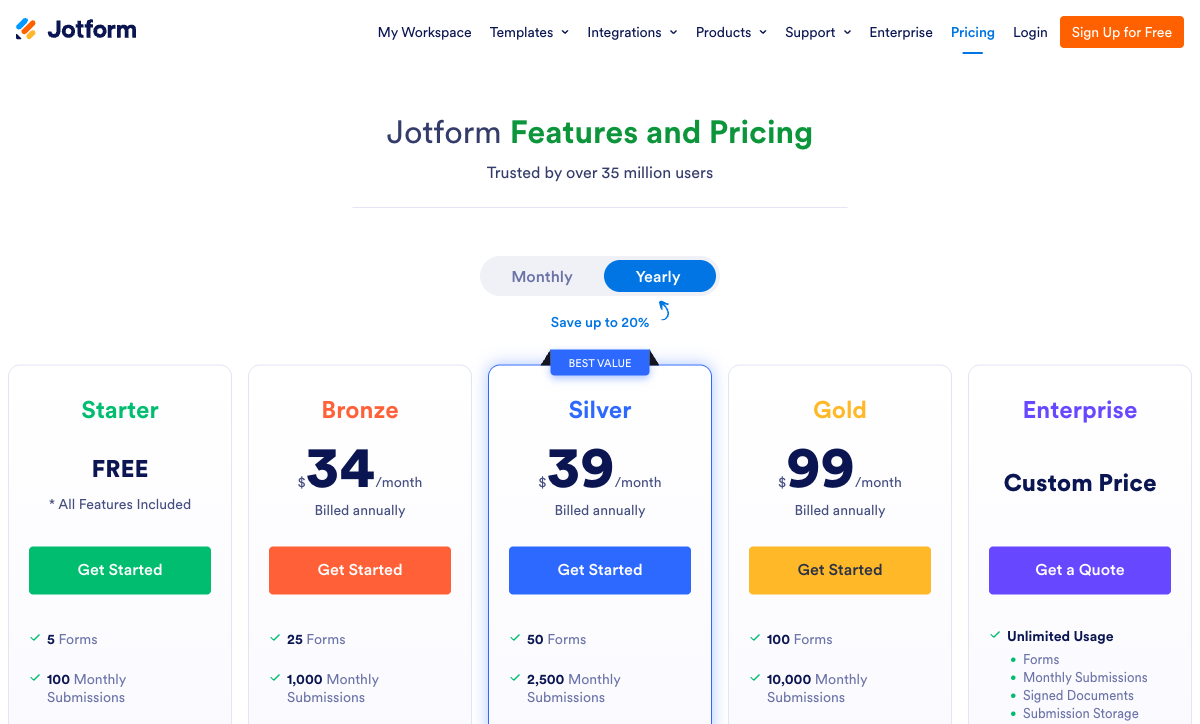
Google Forms is free with unlimited forms and unlimited responses, Microsoft Forms is free for personal accounts at 200 responses per form and included with every Microsoft 365 licence, and Jotform charges $34/month billed annually for 1,000 submissions a month on Bronze. The two free tools are only free in isolation: Google Workspace runs $7, $14 or $22 per user per month billed annually, and Microsoft 365 Business runs the same three numbers after the July 2026 increase, with the Copilot experience in Forms sitting behind a further $21/user/month. Jotform's ladder continues at $39/month annually for 2,500 submissions on Silver and $99/month annually for 10,000 on Gold, each tier single-user.
Integrations & API
Jotform lists 150+ native integrations with a REST API and webhooks, Google Forms has roughly 20 confined to Google's own products with a documented Forms REST API but no webhooks, and Microsoft Forms has around 20 Microsoft surfaces with no public API, no webhooks and no Zapier or Make support. Getting data out of Microsoft Forms means Power Automate, licensed per user, with premium connectors gated above that. Getting it out of Google Forms means Apps Script or a Zapier line item that someone has to maintain. Jotform is the only one of the three where the integration is a setting rather than a project.
Conditional logic
Jotform has field-level conditional logic and calculation fields on every plan including the free one; Google Forms only jumps between sections based on a multiple-choice or dropdown answer; Microsoft Forms has simple branching and no calculation field at all. Neither Google nor Microsoft can show or hide an individual question, so an intake that asks a contractor one set of questions and an employee another has to be two forms. Jotform's reviewers do report that heavy logic becomes hard to follow inside its crowded editor, but it is the only one here that can do the work.
Payments
Jotform supports 40+ payment processors including Stripe, PayPal, Square and Authorize.net with no added transaction fee; Google Forms supports zero; Microsoft Forms supports zero. This is the cleanest split on the page. Neither free tool has a payment field at any tier, so the usual workaround is a form link followed by a manual invoice, or a second checkout tool and a reconciliation job nobody owns. Jotform does cap payment submissions by plan: 10/month on the free Starter tier, 100 on Bronze, 250 on Silver, 1,000 on Gold.
Compliance (HIPAA / GDPR / SOC 2)
All three are GDPR, SOC 2 and ISO 27001 compliant and all three have a HIPAA route: Jotform from Gold at $99/month annually with a signed BAA, Google Forms under a Google Workspace BAA, Microsoft Forms under the Microsoft 365 BAA. Google and Microsoft add FedRAMP and FERPA through their platforms; Jotform adds PCI DSS Level 1, FERPA, StateRAMP and HECVAT. One caution on Microsoft: its HIPAA/HITECH offering page does not name Forms as an in-scope service, so verify coverage before putting protected health information through it.
 Google Forms: free, unlimited and deliberately shallow
Google Forms is the most widely used form tool in existence and the easiest to start with by a comfortable margin. It rates 4.7 on Capterra across more than 11,500 reviews with ease of use at 4.7 and value for money at 4.8, which is what happens when a competent product costs nothing. Real-time co-editing works exactly as it does in Docs, responses land in Sheets with one click, and Google Classroom makes it the default assessment tool for a large share of the world's schools. Launched in 2008, it is also the oldest of the three.
The ceiling arrives quickly and it is low. Around 11 question types, no signature field, no booking, no scoring, no calculations. Customisation stops at a header image, a theme colour and four fonts, with Google branding fixed in place and every form served from docs.google.com, since custom domains do not exist at any tier including paid Workspace. There is no save and resume unless the respondent signs into Google, no partial submission capture, and no way to run Google Analytics or a Facebook Pixel on the page, because Google's hosting blocks scripts. The Gemini features added through 2026, including "Help me create" and text-response insights, need a paid Workspace plan and do not change the shape of the product. Our Google Forms alternatives breakdown covers the upgrade paths in more depth.
 Jotform: the only real form builder of the three, sold by the meter

Against Google Forms and Microsoft Forms, Jotform is not an incremental upgrade. It is a different category of product: 40+ payment gateways, field-level logic and calculations, over 20,000 templates against Google's roughly 20 and Microsoft's 22, native iOS and Android apps that collect data offline, approval workflows, PDF generation, and a HIPAA option with a signed BAA. It rates 4.7 on G2 across 5,595 reviews and holds the #1 Online Form Builder position there. Founded in 2006 and still bootstrapped and profitable with 40+ million users, it is the only one of the three whose roadmap answers to form buyers.
The cost of that breadth comes in two forms. The first is the interface, which carries two decades of features at once and draws consistent complaints about clutter and buried settings; a reader coming from the four-click simplicity of Google Forms should expect a genuine adjustment. The second is the price list, which meters submissions, forms, form views, storage, fields per form, payment submissions and signed documents, and makes every self-serve tier single-user. The month a campaign works, Bronze's 1,000 submissions run out and the forms stop accepting responses. The month you hire, there is no seat to hand over. Our Jotform alternatives page goes through that quota structure line by line.
 Microsoft Forms: excellent inside the tenant, invisible outside it
Microsoft Forms does a narrow job well. A poll can be launched inside a Teams meeting and answered without anyone leaving the call, results sync to Excel automatically, forms embed in SharePoint and PowerPoint, and co-authoring works across the tenant. The scale numbers are the largest here: 400 forms per user and up to 5,000,000 responses per form on a paid Microsoft 365 plan. For an HR pulse survey or a compliance knowledge check in a Microsoft shop, nothing else on this page is a better fit, and it costs nothing extra.
Outside the tenant it barely exists as a product. No payments, no calculations, no save and resume, no pre-fill, no answer piping, no signatures, 22 templates, and customisation limited to a header image and a colour. There is no public API, no webhooks, and no Zapier or Make connector, so Power Automate is the only supported way data leaves, licensed per user with premium connectors gated above that. Its ratings are the lowest of the three at 4.4 on G2 across 436 reviews, with customer support at 4.0. The roadmap risk is worth naming too: the July 2026 Copilot chat pane in Forms requires a commercial Copilot licence at $21/user/month annually, and the long-promised public API has slipped again to CY26H1. See our Microsoft Forms alternatives page if that is the wall you have hit.
See them in action
Two independent walkthroughs worth watching before you commit, one for each of the free options, since those are the ones people usually inherit rather than choose.
Full feature comparison
Every tracked feature across the three, grouped by category. The payments, logic and platform rows are where the two free tools stop competing.
| Feature | Google Forms | Jotform | Microsoft Forms |
|---|---|---|---|
| Form Building | |||
| Document-style editor | No | No | No |
| AI form creation | Yes paid | Yes starter | Yes copilot |
| Field types | 11 | 30+ (starter) | No |
| Multi-page forms | Yes | Yes starter | Yes |
| Guided mode (one question at a time) | No | Yes starter | No |
| Conditional logic | Yes | Yes starter | Yes |
| Calculations field | No | Yes starter | No |
| AI calculations assistant | No | No | No |
| Scoring | Yes | Yes starter | Yes |
| AI quiz generation | Yes paid | No | No |
| Answer piping | No | Yes starter | No |
| Pre-filling and hidden fields | Yes | Yes starter | No |
| Save and resume | No | Yes starter | No |
| Auto-close by number | Yes | Yes starter | Yes |
| Auto-close by date | Yes | Yes starter | Yes |
| Appointment/booking field | No | Yes starter | No |
| Signature field | No | Yes starter | No |
| Color picker field | No | No | No |
| API-powered dropdowns | No | No | No |
| Google address search | No | No | No |
| File uploads | Yes | Yes starter | No |
| Drag-and-drop builder | No | Yes starter | No |
| Form widgets | No | Yes starter | No |
| Template gallery | No | 20,000+ (starter) | No |
| AI agent (Surveys Agent) | No | No | Yes copilot |
| Payments | |||
| Stripe payments | No | Yes starter | No |
| PayPal payments | No | Yes starter | No |
| Square payments | No | Yes starter | No |
| Braintree payments | No | Yes starter | No |
| Google Pay | No | Yes starter | No |
| Product sales (eCommerce) | No | Yes starter | No |
| Subscriptions | No | Yes starter | No |
| Coupons and discounts | No | Yes starter | No |
| Custom pricing rules | No | Yes starter | No |
| Tax calculations | No | Yes starter | No |
| Quotes/invoices | No | No | No |
| Refunds | No | No | No |
| 3D Secure | No | No | No |
| 40+ payment gateways | No | Yes starter | No |
| No transaction fees | No | Yes starter | No |
| Design & Customization | |||
| Template gallery | 20+ | 20,000+ (starter) | Yes |
| Rich media (images, GIFs, videos) | Yes | Yes starter | Yes |
| Unsplash and Giphy integration | No | No | No |
| Image editor | No | No | No |
| Adobe Creative Cloud | No | No | No |
| Language translation | No | Yes starter | Yes |
| Advanced theming | No | Yes starter | No |
| Custom form URL | No | No | No |
| Custom domains | No | Yes enterprise | No |
| Custom HTML & CSS | No | Yes starter | No |
| Remove branding | No | Yes bronze | No |
| Custom email domains | Yes Business Starter | No | No |
| Form themes | No | Yes starter | No |
| Analytics | |||
| Submission results and reports | Yes | Yes starter | Yes |
| AI report insights | Yes Business Standard | No | Yes |
| Paperform analytics | No | No | No |
| Google Analytics & Facebook Pixel | No | No | No |
| Custom analytics scripts | No | No | No |
| Partial submissions | No | No | No |
| Form analytics | No | Yes starter | No |
| Google Analytics integration | No | Yes starter | No |
| Collaboration | |||
| Multi-user accounts | Yes | Yes bronze | Yes |
| User permissions and management | Yes | Yes enterprise | Yes |
| Advanced permissions & admin | Yes Business Starter | Yes enterprise | Yes enterprise |
| Form sharing (templates) | Yes | No | Yes |
| Spaces and tag management | No | No | No |
| Form sharing | No | Yes starter | No |
| Assign forms | No | Yes enterprise | No |
| Security | |||
| SOC 2 Type II | Yes | Yes enterprise | Yes |
| GDPR compliant | Yes | Yes starter | Yes |
| SSL encryption | Yes | Yes starter | Yes |
| Two-factor authentication | Yes | Yes starter | Yes |
| Enforce 2FA for all users | Yes Business Starter | No | Yes enterprise |
| SSO (SAML) | Yes Business Plus | Yes enterprise | Yes |
| reCAPTCHA | No | Yes starter | No |
| Local data residency | Yes Business Plus | No | Yes enterprise |
| Custom S3 storage (BYO) | No | No | No |
| HIPAA compliant | No | Yes gold | No |
| 256-bit SSL | No | Yes starter | No |
| Data residency | No | Yes enterprise | No |
| Form encryption | No | Yes starter | No |
| PCI DSS | No | Yes starter | No |
| Integrations & API | |||
| Native integrations | No | 150+ (starter) | No |
| Zapier | Yes | Yes starter | No |
| Make (Integromat) | Yes | Yes starter | No |
| Webhooks | No | Yes starter | No |
| Standard API | Yes | No | No |
| Business API | No | No | No |
| WordPress plugin | No | Yes starter | No |
| oEmbed support | No | No | Yes |
| API | No | Yes starter | No |
| Smartsheet integration | No | Yes starter | No |
| Canvas LMS integration | No | Yes enterprise | No |
| Salesforce AppExchange | No | Yes starter | No |
| Embed options | No | Yes starter | No |
| Mobile apps | No | Yes starter | No |
| 4000+ integrations | No | No | No |
Pricing comparison
Only one of these three has a price list for the form builder itself. The other two are priced as suite licences, so the honest comparison is what the whole account costs per person per month.
Google Forms
Jotform
| Product | Plan | Monthly Price | Annual Price (per month) | Free Plan | Free Trial | Limits |
|---|---|---|---|---|---|---|
| Google Forms | Free (Personal) | Free | Free | Yes | 14 days | forms: Unlimited, submissions: Unlimited, storage: 15 GB (shared across Google Drive), users: 1, file uploads: Included in 15 GB storage |
| Google Forms | Business Starter | $8.4/mo | $7/mo billed annually | forms: Unlimited, submissions: Unlimited, storage: 30 GB per user, users: Up to 300, file uploads: Included in storage | ||
| Google Forms | Business Standard | $16.8/mo | $14/mo billed annually | forms: Unlimited, submissions: Unlimited, storage: 2 TB per user, users: Up to 300, file uploads: Included in storage | ||
| Google Forms | Business Plus | $26.4/mo | $22/mo billed annually | forms: Unlimited, submissions: Unlimited, storage: 5 TB per user, users: Up to 300, file uploads: Included in storage | ||
| Jotform | Starter | Free | Free | Yes | No | forms: 5, submissions: 100/month, storage: 100 MB, users: 1 |
| Jotform | Bronze | $39/mo | $34/mo billed annually | forms: 25, submissions: 1,000/month, storage: 1 GB, users: 1 | ||
| Jotform | Silver | $49/mo | $39/mo billed annually | forms: 50, submissions: 2,500/month, storage: 10 GB, users: 1 | ||
| Jotform | Gold | $129/mo | $99/mo billed annually | forms: 100, submissions: 10,000/month, storage: 100 GB, users: 1 | ||
| Microsoft Forms | Free (Personal Microsoft Account) | Free | Free | Yes | 1 month | forms: 400, submissions: 200/form, storage: N/A, users: 1 |
| Microsoft Forms | Microsoft 365 Business Basic | $8.4/mo | $7/mo billed annually | forms: 400, submissions: 5,000,000/form, storage: 1 TB OneDrive per user, users: Per user (1-300 employees) | ||
| Microsoft Forms | Microsoft 365 Business Standard | $16.8/mo | $14/mo billed annually | forms: 400, submissions: 5,000,000/form, storage: 1 TB OneDrive per user, users: Per user (1-300 employees) | ||
| Microsoft Forms | Microsoft 365 Business Premium | $26.4/mo | $22/mo billed annually | forms: 400, submissions: 5,000,000/form, storage: 1 TB OneDrive per user, users: Per user (1-300 employees) | ||
| Microsoft Forms | Microsoft 365 Business Standard with Copilot | Not listed | $23.5/mo billed annually | forms: 400, submissions: 5,000,000/form, storage: 1 TB OneDrive per user, users: Per user (1-300 employees) | ||
| Microsoft Forms | Microsoft 365 Business Premium with Copilot | Not listed | $32/mo billed annually | forms: 400, submissions: 5,000,000/form, storage: 1 TB OneDrive per user, users: Per user (1-300 employees) | ||
| Microsoft Forms | Microsoft 365 Apps for business | Not listed | $10/mo billed annually | forms: 400, submissions: 5,000,000/form, storage: 1 TB OneDrive per user, users: Per user |
Review ratings across platforms
Jotform rates 4.7 on G2 across 5,595 reviews and 4.7 on Capterra across 2,926. Google Forms rates 4.7 on Capterra across 11,572 reviews and 4.6 on G2 under the Google Workspace listing. Microsoft Forms is the lowest rated and the least reviewed of the three at 4.4 on G2 across 436 reviews.
Verdict: a decision tree
Work down this list and stop at the first line that describes you.
- Choose Jotform if the form takes money, needs field-level logic or calculations, has to look like something other than a Google or Microsoft page, or must collect PHI under a signed BAA. Budget $34/month annually at 1,000 submissions, $99/month at 10,000 with HIPAA, and accept that one person holds the account until you reach Enterprise.
- Choose Google Forms if you need unlimited free surveys, quizzes or RSVPs, the answers belong in a spreadsheet, several colleagues will co-edit the form, and the audience is internal or educational. It is the best free general-purpose option of the three and the one with the fewest strings.
- Choose Microsoft Forms if your organisation runs on Microsoft 365 and the form is internal: a pulse survey, a Teams poll, a knowledge check, an event RSVP. You already own it, the Excel and SharePoint plumbing is done, and the response ceiling is effectively unlimited.
- Choose none of the three if the form is the first step of a process rather than the whole job. That case is covered below.
When none of the three fits: the tradeoff they all share
Look at what the decision tree above actually asks you to trade. Google Forms and Microsoft Forms cost nothing and stop at the response. Jotform goes much further and charges for each unit of your own growth: another thousand submissions, another form, another gigabyte, and a second person is not purchasable at all below Enterprise. Both shapes leave the same gap. The moment a submission has to trigger a signed agreement, an approval with a person at each step, or a handoff into another system, all three answer with a link to somebody else's product. Power Automate here, Zapier there, DocuSign or Adobe Sign for the contract. Three renewals, three admin consoles, and you maintaining the joins between them.

Paperform is built on the opposite premise. One subscription covers forms, Papersign eSignatures and Stepper workflow automation from one account, with nothing sold separately, so the signed contract links back to the submission that created it instead of living in a fourth vendor's dashboard. Submissions and seats are both unlimited on paid plans within fair use, which removes the two levers Jotform prices on: a campaign that lands does not produce a bill, and the sixth person on the account costs nothing. Support is in the seat price rather than an enablement fee produced at signing.
The capability gap against the two free tools is the whole product. Paperform's document-style editor mixes headings, copy, images, video and fields in any order with custom CSS and custom domains, so the page reads as yours rather than as Google's or Microsoft's. It takes Stripe, PayPal, Square, Braintree and Google Pay with products, subscriptions, coupons, tax and refunds, and charges no transaction fee of its own. Its calculations are Excel-style and drive question and page visibility, conditional emails, integration payloads and success page content, not just a total at the end. There are 4000+ integrations, 30,000+ templates and a 7-day trial with no card.
Two things to weigh against it honestly. Paperform Pro is $59/month, or $49/month billed annually, and Business is $149/month or $124/month annually, which is a real number next to two tools that cost nothing extra and above Jotform Bronze at $34. And Paperform is not HIPAA compliant and signs no BAAs today, so for protected health information all three tools on this page beat it and Jotform Gold is the pick. Paperform has been building forms since 2016, bootstrapped and profitable throughout, with SOC 2 Type II, GDPR and CCPA compliance and SAML SSO on Business. For a wider field, see our best form builders roundup, or the head-to-head Paperform vs Google Forms vs Jotform comparison.
Frequently Asked Questions
Google Forms or Microsoft Forms: which is better if my company uses both Google and Microsoft?
Pick the one that owns your identity provider and your spreadsheets, because that is where the responses have to land. Google Forms writes straight into Sheets and supports real-time co-editing; Microsoft Forms writes into Excel and can be launched inside a Teams meeting. Google Forms is the stronger builder of the two on the small things: it has around 11 question types against a shorter Microsoft list, section branching that Microsoft matches only partly, and a documented Forms REST API. Microsoft Forms has no public API at all, and the Graph endpoints have slipped again to CY26H1. Microsoft's advantage is response ceiling and reach inside the tenant: 400 forms per user and up to 5,000,000 responses per form on a paid Microsoft 365 licence, against a Google free tier that is unlimited but built for one owner at a time.
Is Jotform worth paying for when Google Forms and Microsoft Forms come free with accounts I already have?
It is worth paying for when you need something neither free tool has at any price. Jotform is the only one of the three that takes payments (40+ processors on every plan, including the free Starter tier), and the only one with field-level conditional logic and calculation fields. Google Forms and Microsoft Forms both collect zero dollars, permanently. What you pay for that is a meter: Bronze is $34/month billed annually for 1,000 submissions a month and 25 forms, Silver $39/month annually for 2,500, Gold $99/month annually for 10,000. Every one of those tiers is single-user. If the form is an internal survey, paying $34/month to replace something already in your tenant makes no sense. If the form takes an order, Jotform is the only real option here.
Which of Google Forms, Jotform and Microsoft Forms is HIPAA compliant?
All three can be, with different paperwork. Jotform enables HIPAA features and signs a BAA from the Gold tier at $99/month billed annually; Google Forms is covered under a Google Workspace BAA; Microsoft Forms sits inside Microsoft 365's BAA. The caveat matters on the Microsoft side: Microsoft's HIPAA/HITECH offering page does not enumerate Forms as a named in-scope service, so confirm coverage with your account team before it holds PHI. All three also carry GDPR, SOC 2 and ISO 27001, Google and Microsoft add FedRAMP, and Jotform adds PCI DSS Level 1, FERPA and StateRAMP. For a healthcare intake that has to be branded and take a deposit, Jotform Gold is the only one of the three that does all of it.
Can Microsoft Forms or Google Forms do the calculations Jotform does?
No. Microsoft Forms has no calculation field of any kind, Google Forms has none either, and Jotform has genuine calculation fields available from its free plan. Google Forms can branch to a different section based on a multiple-choice answer, which handles a quiz that forks two ways and nothing more; it cannot show or hide an individual question. Microsoft Forms added basic branching through the July 2026 Copilot chat pane, which needs a commercial Copilot licence at $21/user/month annually on Copilot Business. Jotform users do report that logic gets fiddly once a form carries a lot of it, which several reviews flag alongside the crowded editor. Still, for anything that has to price, score or route, Jotform is the only one of these three in the conversation.
How many integrations do Google Forms, Jotform and Microsoft Forms actually have?
Jotform lists 150+ native integrations with a REST API and webhooks, Google Forms has roughly 20 and they are almost all Google's own, and Microsoft Forms has around 20 Microsoft-only surfaces with no API, no webhooks and no Zapier or Make connector. Google Forms at least has an escape hatch: Apps Script, Zapier and Make will get data out, even if someone has to own that script. Microsoft's only supported route off the platform is Power Automate, licensed per user with premium connectors gated above that, so reaching a CRM gets more expensive as more people need it. Jotform is the only one of the three you can integrate without either writing script or buying another licence.
Which of the three is the safest long-term bet for a form that becomes a business process?
Jotform, of the three, for one structural reason: forms are its business. Jotform has been building them since 2006, bootstrapped and profitable with 40+ million users, while Google Forms and Microsoft Forms are bundled features inside suites sold on other merits. Neither Alphabet nor Microsoft will disappear, but a bundled feature has no customers of its own to answer to. Google Forms has seen little meaningful change for years outside Gemini additions on paid Workspace tiers, and the Microsoft Forms public API has slipped repeatedly with nobody to escalate to. If the form is going to sit underneath a real process, weigh who owns the roadmap, not only who owns the logo.
What does moving from Google Forms or Microsoft Forms to Jotform actually cost per person?
More than the sticker price, because of how the seats work. Jotform's Starter, Bronze, Silver and Gold tiers are all single-user, so a second form builder means an Enterprise quote. Google Forms and Microsoft Forms both come with unlimited collaborators inside the accounts you already pay for: Google Workspace runs $7, $14 or $22 per user per month billed annually, and Microsoft 365 Business runs the same $7, $14 and $22 after the July 2026 increase. Teams that spread form building across marketing, ops and finance often find the Jotform seat model is the thing that stops the migration, not the submission cap.
Sources & References
- Microsoft Forms review — TechRadar, 2026
- Google Forms Review: Is This the Best Free Survey Tool? — TechRadar, 2025
- Jotform Review 2026: Pricing, Features, Pros & Cons, Ratings & More — Research.com, 2026
- Microsoft Forms vs Google Forms (2026): Which Is Better? — Stackby, 2026
Last updated September 22, 2026
Ready to try Paperform?
Create beautiful forms, payment pages, and workflows — no code required.