Paperform vs Jotform vs Typeform: Which Form Builder Wins in 2026?
Jotform wins on payment processors and HIPAA, Typeform wins on conversational presentation, and Paperform wins for teams whose forms run a process. Jotform and Typeform meter submissions and seats on every self-serve plan; Paperform charges $49/month billed annually with both unlimited, plus eSignatures and workflow automation included.
These three products are not competing for the same purchase, which is why the comparison is usually harder than it looks. Jotform has spent twenty bootstrapped years accumulating surface area: more than 40 payment gateways, HIPAA with a BAA, native mobile apps, tables, approvals, AI agents and a store builder. Typeform spent its twelve years on one idea executed better than anyone else, turning a survey into a paced, designed conversation that people finish. Paperform spent its ten on the work that starts when the form is submitted: a document-style editor, Excel-style calculations, five payment gateways, Papersign for eSignatures and Stepper for workflow automation, all under one subscription.
Where the three converge is the price sheet, and it is the most useful place to start. Jotform meters submissions, forms, form views, storage and fields per form, and every self-serve tier is single-user. Typeform meters responses and seats, and Growth Flow at $266/month annually raises neither. Paperform meters neither submissions nor seats on paid plans. That is one structural argument and two very good products, so the rest of this page puts real numbers against all five buying dimensions and ends with a decision tree.
Quick verdict: who each one is for
 Paperform
Best for: operators running a genuine multi-step process, where the submission triggers a signature, an approval and a handoff, and the bill should not move when the volume or the headcount does.
 Jotform
Best for: one person who needs an unusual payment gateway, a HIPAA BAA or offline mobile capture, and can work inside a submission quota and a form count.
 Typeform
Best for: low-volume, high-value customer-facing forms where the paced format is what lifts completion, and the response count stays comfortably inside the tier you bought.
Three products, three respondent experiences
Ask each one to collect the same ten answers and the respondent gets three different things: a page, a stack of fields, or a sequence of screens.



Feature comparison
All three side by side by category. Read the payments, platform-products and collaboration rows closely, because that is where the three philosophies separate.
| Feature | Paperform | Jotform | Typeform |
|---|---|---|---|
| Form Building | |||
| Document-style editor | Yes | No | No |
| AI form creation | Yes | Yes starter | Yes |
| Field types | 26+ | 30+ (starter) | 20+ |
| File uploads | Yes | Yes starter | Yes basic |
| Multi-page forms | Yes | Yes starter | Yes basic |
| Guided mode (one question at a time) | Yes | Yes starter | Yes |
| Conditional logic | Yes | Yes starter | Yes basic |
| Calculations field | Yes pro | Yes starter | Yes plus |
| AI calculations assistant | Yes pro | No | No |
| Scoring | Yes pro | Yes starter | Yes plus |
| Answer piping | Yes | Yes starter | Yes basic |
| Pre-filling and hidden fields | Yes pro | Yes starter | Yes basic |
| Save and resume | Yes | Yes starter | No |
| Auto-close by number | Yes pro | Yes starter | Yes basic |
| Auto-close by date | Yes pro | Yes starter | Yes basic |
| Appointment/booking field | Yes | Yes starter | Yes basic |
| Signature field | Yes | Yes starter | Yes basic |
| Color picker field | Yes | No | No |
| API-powered dropdowns | Yes business | No | No |
| Google address search | Yes business | No | No |
| Drag-and-drop builder | No | Yes starter | No |
| Form widgets | No | Yes starter | No |
| Template gallery | No | 20,000+ (starter) | No |
| Question display logic | No | No | Yes basic |
| AI follow-up questions | No | No | Yes business |
| AI extended thinking & memory | No | No | Yes growth |
| Typeform AI connectors | No | No | Yes growth |
| Workflow / automation builder | No | No | Yes growth |
| AI-moderated research (Research Flow) | No | No | Yes enterprise |
| Video questions | No | No | Yes basic |
| Payments | |||
| Stripe payments | Yes | Yes starter | Yes basic |
| PayPal payments | Yes | Yes starter | No |
| Square payments | Yes | Yes starter | No |
| Braintree payments | Yes | Yes starter | No |
| Google Pay | Yes | Yes starter | No |
| Product sales (eCommerce) | Yes pro | Yes starter | No |
| Subscriptions | Yes pro | Yes starter | Yes basic |
| Coupons and discounts | Yes pro | Yes starter | No |
| Custom pricing rules | Yes pro | Yes starter | No |
| Tax calculations | Yes | Yes starter | No |
| Quotes/invoices | Yes | No | No |
| Refunds | Yes | No | No |
| 3D Secure | Yes | No | Yes basic |
| 40+ payment gateways | No | Yes starter | No |
| No transaction fees | No | Yes starter | No |
| Design & Customization | |||
| Template gallery | 30,000+ | 20,000+ (starter) | 1,500+ |
| Rich media (images, GIFs, videos) | Yes | Yes starter | Yes |
| Unsplash and Giphy integration | Yes | No | Yes |
| Image editor | Yes | No | No |
| Adobe Creative Cloud | Yes | No | No |
| Language translation | Yes | Yes starter | Yes basic |
| Advanced theming | Yes pro | Yes starter | Yes plus |
| Custom form URL | Yes pro | No | Yes plus |
| Custom domains | Yes pro | Yes enterprise | Yes enterprise |
| Custom HTML & CSS | Yes pro | Yes starter | Yes business |
| Remove branding | Yes pro | Yes bronze | Yes plus |
| Custom email domains | Yes business | No | No |
| Form themes | No | Yes starter | No |
| Analytics | |||
| Submission results and reports | Yes | Yes starter | Yes |
| AI report insights | Yes pro | No | Yes business |
| Paperform analytics | Yes pro | No | No |
| Drop-off analysis | Yes pro | No | Yes business |
| Google Analytics & Facebook Pixel | Yes pro | No | Yes basic |
| Custom analytics scripts | Yes pro | No | Yes basic |
| Partial submissions | Yes pro | No | Yes plus |
| Form analytics | No | Yes starter | No |
| Google Analytics integration | No | Yes starter | No |
| Cross-form Insights dashboard | No | No | Yes business |
| Collaboration | |||
| Multi-user accounts | Yes pro | Yes bronze | Yes plus |
| User permissions and management | Yes pro | Yes enterprise | Yes plus |
| Advanced permissions & admin | Yes enterprise | Yes enterprise | Yes enterprise |
| Form sharing (templates) | Yes | No | Yes |
| Spaces and tag management | Yes | No | No |
| Form sharing | No | Yes starter | No |
| Assign forms | No | Yes enterprise | No |
| Workspace organization | No | No | Yes |
| Security | |||
| SOC 2 Type II | Yes | Yes enterprise | Yes |
| GDPR compliant | Yes | Yes starter | Yes |
| SSL encryption | Yes | Yes starter | Yes |
| Two-factor authentication | Yes | Yes starter | Yes |
| Enforce 2FA for all users | Yes business | No | No |
| SSO (SAML) | Yes business | Yes enterprise | Yes enterprise |
| reCAPTCHA | Yes | Yes starter | Yes business |
| Local data residency | Yes enterprise | No | No |
| Custom S3 storage (BYO) | Yes business | No | No |
| HIPAA compliant | No | Yes gold | Yes enterprise |
| 256-bit SSL | No | Yes starter | No |
| Data residency | No | Yes enterprise | No |
| Form encryption | No | Yes starter | No |
| PCI DSS | No | Yes starter | Yes |
| ISO 27001 | No | No | Yes |
| Integrations & API | |||
| Native integrations | 4,000+ | 150+ (starter) | 120+ (basic) |
| Zapier | Yes | Yes starter | Yes basic |
| Make (Integromat) | Yes | Yes starter | Yes basic |
| Webhooks | Yes pro | Yes starter | Yes basic |
| Standard API | Yes pro | No | No |
| Business API | Yes business | No | No |
| WordPress plugin | Yes | Yes starter | Yes |
| oEmbed support | Yes | No | No |
| API | No | Yes starter | Yes basic |
| Smartsheet integration | No | Yes starter | No |
| Canvas LMS integration | No | Yes enterprise | No |
| Salesforce AppExchange | No | Yes starter | No |
| Embed options | No | Yes starter | Yes |
| Mobile apps | No | Yes starter | No |
| Claude / MCP server | No | No | Yes basic |
| AI data enrichment | No | No | Yes growth |
| Automations integrations (Contacts & Automations) | No | No | Yes growth |
The five dimensions that decide it
Each of these opens with the number, because the number is usually the whole argument.
Pricing
Jotform starts at $34/month billed annually for 1,000 submissions and 1 user, Typeform at $28/month for 100 responses and 1 user, and Paperform at $49/month for unlimited submissions and unlimited users. Paperform has the highest floor of the three and no cheaper rung beneath it. What the extra $15 to $21 buys is the absence of a meter: Jotform climbs to Silver at $39 and Gold at $99 as submissions grow, and Typeform climbs to Plus at $56 and Business at $91 on the same logic. Paperform Business is $124/month annually for 10 workspaces, SSO and the Business API. All three sell an Enterprise tier by quote.
Integrations & API
Paperform counts 4,000+ integrations, Jotform 150+ native connectors and Typeform 120+, and all three ship a documented REST API and webhooks. Jotform's list is the strongest at the enterprise end, with a Salesforce AppExchange listing behind it. Typeform's is deliberately marketing-shaped: HubSpot, Salesforce, Klaviyo, Pipedrive. The distinction worth noting is what happens after the handoff. Jotform and Typeform pass the response to Zapier or Make and stop, so the runs quota is someone else's product; Paperform's Stepper executes the steps on the same account and the same invoice.
Conditional logic
Jotform includes conditional logic on every plan including the free Starter tier, Typeform includes branching on Basic but gates advanced logic and calculations to Plus at $56/month annually, and Paperform includes Excel-style calculations on Pro at $49/month. Jotform's is the broadest by rule count and the hardest to audit later, with the conditions panel filling up quickly on a complex form. Paperform's formulas are the ones that travel furthest: a single calculation drives question and page visibility, conditional emails, integration payloads and the success page, and an AI assistant will write the formula.
Payments
Jotform supports 40+ payment processors on every plan, Paperform supports 5 (Stripe, PayPal, Square, Braintree and Google Pay) and Typeform supports 1 (Stripe). On raw count Jotform wins this outright and nothing else is close. Jotform does meter the transactions, at 100 payment submissions a month on Bronze, 250 on Silver and 1,000 on Gold. Paperform's five come with products, inventory, subscriptions, coupons, tax rules, quotes and refunds, and no transaction fee of its own. Typeform has no eCommerce layer at all, so pricing logic lives in another system and someone reconciles the two.
Compliance (HIPAA / GDPR / SOC 2)
Jotform and Typeform are both HIPAA, GDPR and SOC 2 compliant and sign BAAs; Paperform is GDPR, CCPA and SOC 2 Type II compliant but is not HIPAA compliant and signs no BAAs. Jotform puts HIPAA on Gold at $99/month annually and adds ISO 27001, PCI DSS Level 1, FERPA and StateRAMP. Typeform puts it on Enterprise and adds ISO 27001, 27017, 27018 and ISO/IEC 42001 for AI management systems, certified June 2026. Paperform answers most other questionnaires with SOC 2 Type II, SAML SSO, enforced 2FA and data residency controls, and it is the wrong choice for protected health information.
Paperform: the form as the front end of a process
Paperform's argument is structural rather than feature-by-feature. One subscription covers three products on every plan: Paperform for forms, Papersign for eSignatures, Stepper for workflow automation. For a team currently running a form builder plus DocuSign plus Zapier, the comparison is not $49 against $34 or $28, it is one renewal and one admin console against three, with nobody left holding the joins between them. Submissions and seats are unlimited on paid plans within fair use, which means a campaign that lands does not produce a bill and the fourth person who needs edit access does not produce a sales call. Support sits in the seat price rather than arriving as a separate enablement fee at signing, and reviewers rate it 4.7 to 4.9 across platforms.
The catch is the entry price and the compliance gap. Pro at $49/month billed annually is the highest floor in this group and there is nothing below it, so a solo user who needs one branded form is overpaying against Jotform Bronze. Paperform is not HIPAA compliant, which removes it from healthcare intake entirely. Stepper runs on metered automation credits, 20,000 a month on Pro and 100,000 on Business, with overflow at $10/month per extra 10,000, so a heavy automation workload costs more than the sticker. There is no mobile editor, and the review footprint is a fraction of Jotform's. Founded in Sydney in 2016, bootstrapped and profitable, with no investor clock pushing the pricing page in a direction customers will not like.
Jotform: the widest catalogue in the category
There are requirements that only Jotform satisfies, and it is worth naming them before anything else. More than 40 payment processors, available even on the free Starter plan, covers regional gateways nobody else in this comparison touches. HIPAA with a signed BAA arrives on Gold at $99/month annually. Native iOS and Android apps handle offline collection in the field. Add ISO 27001, PCI DSS Level 1, FERPA and StateRAMP, and the compliance shelf is deeper than either rival's. Jotform has been bootstrapped since 2006 and reports $144.9M in revenue for 2024, so this is the safest vendor bet of the three on longevity alone. If one of those specifics is a hard requirement, the comparison is already over.
What you accept in exchange is a meter on almost everything that grows. Submissions run at 1,000 a month on Bronze, 2,500 on Silver and 10,000 on Gold, and exceeding the quota stops the form accepting responses rather than adding a line to the invoice. Forms themselves are counted too, at 25, 50 and 100, which is a strange thing to charge an agency for when each client wants an intake form. Form views, submission storage and fields per form each have their own ceiling, and every self-serve tier is one user. Jotform Sign is allocated separately again at 100, 250 and 1,000 signed documents. Reviewers also flag reliability across the wide widget surface and support waits that can run to a week; our Jotform alternatives page covers the quota structure in detail.
Typeform: the best-executed single idea
Nobody does the paced format better, and for short customer-facing forms the presentation genuinely moves the completion rate. Typeform claims 3.5x the responses of a standard form and counts 95% of the Fortune 500 among its users, with roughly ten times Paperform's review volume behind it at 4.5 on G2 and 4.7 on Capterra. Its AI work is serious rather than decorative: Creator AI builds the form, Interaction AI asks adaptive follow-ups, Insights AI reads the responses, and the ISO/IEC 42001 certification in June 2026 puts governance around all of it. For a brand-led feedback survey or a short qualification flow, this is the reference implementation.
The price sheet is where evaluations end. Basic at $28/month annually buys 100 responses and one seat, Plus at $56 buys 1,000 and three, Business at $91 buys 10,000 and five, and Growth Flow at $266 raises neither of those ceilings. Advanced logic and calculations start at Plus, drop-off analysis and reCAPTCHA start at Business, and custom domains are Enterprise only, so basic hygiene keeps arriving as an upgrade trigger. Payments are Stripe and nothing else, with no products, coupons or tax rules behind them. Typeform has raised $193M of venture capital, and its Trustpilot average of 2.6 across 775 reviews sits against 4.7 on Capterra, a gap driven almost entirely by billing and plan limits. See our Typeform alternatives breakdown for the full ladder.
See them in action
Two independent videos worth twenty minutes before you commit: a full walkthrough of Paperform's builder, and a short review of Typeform's current pricing and feature set.
Pricing comparison
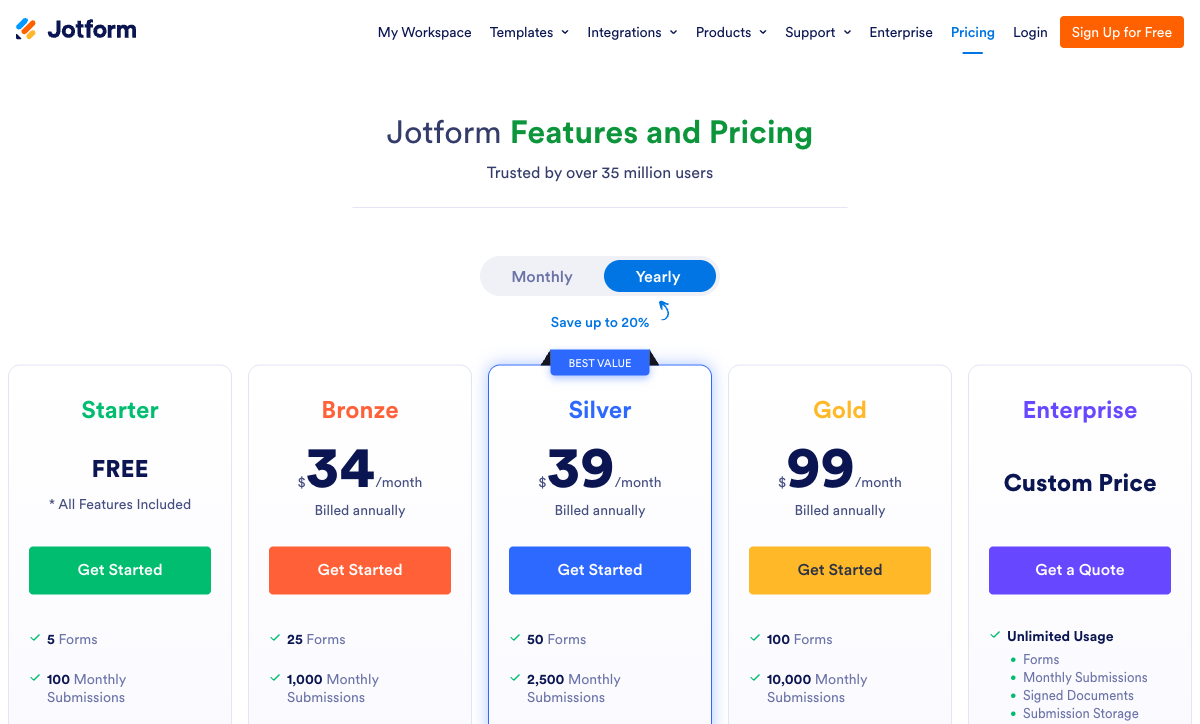
Compare the meters as carefully as the headline prices. Jotform counts submissions, forms, views, storage, fields and payment transactions; Typeform counts responses and seats; Paperform counts neither submissions nor seats on paid plans, and counts automation credits instead.
Paperform
Jotform
| Product | Plan | Monthly Price | Annual Price (per month) | Free Plan | Free Trial | Limits |
|---|---|---|---|---|---|---|
| Paperform | Free | Free | Free | Yes | 7 days | forms: Unlimited, submissions: 30/month, storage: Unlimited, users: Unlimited, file uploads: 100 MB |
| Paperform | Pro | $59/mo | $49/mo billed annually | forms: Unlimited, submissions: Unlimited, storage: Unlimited, users: Unlimited, file uploads: 10 GB | ||
| Paperform | Business | $149/mo | $124/mo billed annually | forms: Unlimited, submissions: Unlimited, storage: Unlimited, users: Unlimited, file uploads: 100 GB | ||
| Jotform | Starter | Free | Free | Yes | No | forms: 5, submissions: 100/month, storage: 100 MB, users: 1 |
| Jotform | Bronze | $39/mo | $34/mo billed annually | forms: 25, submissions: 1,000/month, storage: 1 GB, users: 1 | ||
| Jotform | Silver | $49/mo | $39/mo billed annually | forms: 50, submissions: 2,500/month, storage: 10 GB, users: 1 | ||
| Jotform | Gold | $129/mo | $99/mo billed annually | forms: 100, submissions: 10,000/month, storage: 100 GB, users: 1 | ||
| Typeform | Free | Free | Free | Yes | No | forms: 10, submissions: 10/month, users: 1 |
| Typeform | Basic | $39/mo | $28/mo billed annually | forms: Unlimited, submissions: 100/month, users: 1 | ||
| Typeform | Plus | $79/mo | $56/mo billed annually | forms: Unlimited, submissions: 1,000/month, users: 3 | ||
| Typeform | Business | $129/mo | $91/mo billed annually | forms: Unlimited, submissions: 10,000/month, users: 5 | ||
| Typeform | Growth Flow | $379/mo | $266/mo billed annually | forms: Unlimited, submissions: 10,000/month, users: 5 | ||
| Typeform | Talent | $169/mo | $119/mo billed annually | forms: Unlimited, users: HR teams |
One number is easy to miss. Jotform and Typeform both discount nothing for team size, because there is no team: Gold at $99/month annually and Business at $91/month are a single user and five users respectively. Paperform Pro at $49/month annually covers everyone who touches the process, and the same seat reaches Papersign and Stepper.
What users say
Jotform has by far the most evidence: 5,500+ G2 reviews at 4.7, matched at 4.7 on Capterra and GetApp and 4.3 on Trustpilot. Paperform rates highest across a much smaller pool of roughly 498 reviews, at 4.8 on G2 and Capterra, 4.9 on GetApp and 4.8 on Trustpilot, with support its strongest dimension. Typeform is the split decision: 4.5 on G2 across about 1,002 reviews and 4.7 on Capterra across 979, against 2.6 on Trustpilot from 775. That gap is not about the form builder. It is about what people are charged when the form works.
The verdict: a decision tree
- Choose Jotform if you need a payment processor outside the big five, a HIPAA BAA at $99/month annually rather than an enterprise negotiation, offline capture from a native mobile app, or ISO 27001 and FERPA on the compliance shelf, and you are one person working inside a submission quota and a form count.
- Choose Typeform if the form is short, customer-facing and low volume, the paced format is what lifts your completion rate, Stripe is your only processor, and the response and seat ceilings on your chosen tier are comfortably above what you actually expect.
- Choose Paperform if the submission is the beginning of the work rather than the end of it: a contract to sign, an approval to route, a price to calculate, a team that all needs access, and a volume you would rather not have to forecast before buying.
- Rule Paperform out if you collect protected health information. It is not HIPAA compliant and signs no BAAs, so Jotform Gold or Typeform Enterprise is the answer instead.
The honest summary is that all three are good at what they chose. Jotform chose breadth and sells it back one quota at a time. Typeform chose a format and prices access to it by how many people respond. Paperform chose the process after the submit button, and charges a flat price to cover it. For simple one-off forms, use the simple tool. For a form that carries revenue, a signature and a handoff, the metered options get expensive in a way the pricing page does not show you on the day you sign up.
For deeper head-to-head detail, see Paperform vs Jotform and Paperform vs Typeform. If Paperform is not in your shortlist, Jotform vs Typeform covers the other two directly, and the best form builders ranking covers the wider field.
Frequently Asked Questions
Is Jotform or Typeform cheaper than Paperform once the form is actually being used?
At the door, both are cheaper. Jotform Bronze is $34/month billed annually and Typeform Basic is $28/month; Paperform's lowest paid plan is Pro at $59/month, or $49/month billed annually. The picture changes with volume. Bronze buys 1,000 submissions a month and Basic buys 100 responses, so a campaign that performs moves you to Jotform Silver ($39) or Gold ($99), or to Typeform Plus ($56) then Business ($91). Paperform's Pro price covers the 200th submission and the 200,000th identically, because submissions are unlimited within fair use. The crossover point is roughly the moment either of the other two forces an upgrade you did not plan for.
Which of the three can a whole team use without buying more seats?
Only Paperform. Every Jotform self-serve tier from Starter through Gold at $99/month annually is a single user, and genuine multi-user access means an Enterprise quote. Typeform meters seats on every plan: 1 user on Basic, 3 on Plus, 5 on Business, and Growth Flow at $266/month annually still stops at 5. Paperform does not price seats at all, on any plan, and one seat covers forms, Papersign eSignatures and Stepper workflow automation rather than counting a person three times. If the form will be inherited by whoever owns the process next quarter, that difference compounds.
Do I have to use Stripe with Typeform, and how many processors do Jotform and Paperform support?
Yes, Typeform is Stripe-only, with native recurring payments added in August 2026 but still no PayPal, Square or Braintree. Jotform is the outright winner on this dimension with more than 40 processors available on every plan including the free one, which is why regional gateways usually decide the choice. Paperform supports five natively (Stripe, PayPal, Square, Braintree and Google Pay) and adds the commerce logic around them: products, inventory, subscriptions, coupons, tax rules, quotes and refunds, with no Paperform transaction fee. Count processors and Jotform wins; count what happens to the order after payment and it does not.
Are Jotform and Typeform HIPAA compliant, and is Paperform?
Jotform and Typeform are both HIPAA compliant and will sign a BAA. Jotform gates it to Gold at $99/month annually and above; Typeform puts it on Enterprise. Paperform is not HIPAA compliant and signs no BAAs today, so if protected health information is in scope, Paperform is out of the running and you should buy one of the other two. On everything else Paperform holds SOC 2 Type II, GDPR and CCPA with SAML SSO and enforced 2FA. Jotform adds ISO 27001, PCI DSS Level 1, FERPA and StateRAMP; Typeform adds ISO 27001, 27017, 27018 and ISO/IEC 42001 for AI management, certified in June 2026.
Which one handles complex conditional logic and pricing calculations best?
Paperform, and the gap is in reach rather than in whether the feature exists. All three do conditional logic. Typeform includes branching on Basic but parks advanced logic and calculations behind Plus at $56/month annually. Jotform includes logic on every plan including free, though reviewers regularly describe the conditions panel as hard to read once a form carries dozens of stacked rules. Paperform's calculations are Excel-style formulas, and one formula can decide which questions and pages appear, which conditional email fires, what an integration receives and what the success page says. That makes a quote calculator or a tiered registration form configuration work rather than a rebuild.
Jotform and Typeform both have signature and workflow features. How is Paperform different?
The difference is whether the extra product is a second meter. Jotform Sign is allocated separately from your submission quota at 100 signed documents on Bronze, 250 on Silver and 1,000 on Gold, and Jotform Workflows sits alongside it. Typeform has a Signature question type rather than a document eSignature product at all, and its automation tier is Growth Flow at $266/month annually, which raises neither the 10,000-response nor the 5-seat ceiling. Paperform includes Papersign and Stepper in the one subscription on every plan: 25 signed documents a month and 20,000 automation credits on Pro, 100 documents and 100,000 credits on Business. Credits are the one thing Paperform meters, at $10/month per extra 10,000 on Pro.
Jotform has far more reviews than Paperform. Should that decide it?
It is worth weighing, and it favours Jotform. Jotform carries 5,500+ G2 reviews at 4.7 and claims 40 million users; Typeform has roughly 1,002 G2 reviews at 4.5 and 979 on Capterra at 4.7; Paperform's pool is around 498 reviews in total, at 4.8 on G2 and Capterra and 4.9 on GetApp. Read what the outliers are about, though. Typeform's Trustpilot score of 2.6 across 775 reviews is driven by billing, plan limits and unexpected paywalls rather than by the product. Jotform is bootstrapped and 20 years old, Paperform bootstrapped and profitable since 2016, while Typeform has raised $193M of venture capital and eventually answers for the revenue curve.
Sources & References
- Jotform Review 2026: Pricing, Features, Pros & Cons, Ratings & More — Research.com, 2026
- Typeform Review 2026: We Tested Everything (Features, Pricing, Integrations & Real Results) — Hackceleration, 2026
- Typeform Achieves ISO/IEC 42001 Certification for Responsible AI Management — Typeform, 2026
- The 13 best online form builder apps — Zapier, 2026
Last updated September 22, 2026
Ready to try Paperform?
Create beautiful forms, payment pages, and workflows — no code required.