Fillout vs Jotform: Which Is Better in 2026?
Fillout wins on team access and form volume: unlimited seats and unlimited forms on every tier, starting free at 1,000 responses a month. Jotform wins on breadth and compliance, with 40+ payment gateways, 150+ integrations and HIPAA with a BAA from $99/month. If you need unlimited submissions and seats together, Paperform beats both.
This matchup puts four years of product against twenty. Fillout, founded in 2022 and now operating under the Zite brand, sells one polished surface covering forms, scheduling, PDF generation, payments, workflows and signatures, with an editor that looks built this decade and unlimited seats on every plan. Jotform, shipping since 2006 and bootstrapped to $144.9M in 2024 revenue, sells accumulation: more gateways, more integrations, more templates, more compliance certifications and more standalone products than anyone else in the category, with a review count that no younger competitor can approach.
The tension is in how each one decides what you owe. Fillout meters responses and gives away people. Jotform meters almost everything that moves, including people, and hands you capability in return. Which model hurts less depends on whether your constraint next year is headcount or the length of your compliance checklist.
Quick verdict
Choose Fillout if:
- More than one person needs to build and edit forms
- You run many forms: one per client, campaign or location
- Airtable or Notion is where submissions have to land
- The form is public-facing and has to look current
Choose Jotform if:
- You handle protected health information and need a BAA
- Payments must run through PayPal, Square or a regional gateway
- Field teams collect data offline on phones and tablets
- Procurement wants ISO 27001, PCI DSS and a long audit history
Feature comparison
Every category side by side, from the September 2026 audit of both products.
| Feature | Fillout | Jotform |
|---|---|---|
| Form Building | ||
| Document-style editor | No | No |
| AI form creation | Yes | Yes starter |
| AI agent in the form editor (Form Agent) | Yes | No |
| Field types | 50+ | 30+ (starter) |
| Multi-page forms | Yes | Yes starter |
| Guided mode (one question at a time) | No | Yes starter |
| Conditional logic | Yes | Yes starter |
| Calculations field | Yes | Yes starter |
| AI calculations assistant | No | No |
| Scoring | Yes | Yes starter |
| Answer piping | Yes | Yes starter |
| Pre-filling and hidden fields | Yes | Yes starter |
| Save and resume | Yes | Yes starter |
| Auto-close by number | Yes | Yes starter |
| Auto-close by date | Yes | Yes starter |
| Appointment/booking field | Yes starter | Yes starter |
| Signature field | Yes starter | Yes starter |
| Color picker field | No | No |
| API-powered dropdowns | No | No |
| Google address search | Yes conversion-kit | No |
| File uploads | Yes | Yes starter |
| Drag-and-drop builder | No | Yes starter |
| Form widgets | No | Yes starter |
| Template gallery | No | 20,000+ (starter) |
| Payments | ||
| Stripe payments | Yes | Yes starter |
| PayPal payments | No | Yes starter |
| Square payments | No | Yes starter |
| Braintree payments | No | Yes starter |
| Google Pay | No | Yes starter |
| Product sales (eCommerce) | Yes | Yes starter |
| Subscriptions | Yes | Yes starter |
| Coupons and discounts | Yes | Yes starter |
| Custom pricing rules | Yes | Yes starter |
| Tax calculations | No | Yes starter |
| Quotes/invoices | No | No |
| Refunds | No | No |
| 3D Secure | No | No |
| 40+ payment gateways | No | Yes starter |
| No transaction fees | No | Yes starter |
| Design & Customization | ||
| Template gallery | Yes | 20,000+ (starter) |
| Rich media (images, GIFs, videos) | Yes | Yes starter |
| Unsplash and Giphy integration | No | No |
| Image editor | No | No |
| Adobe Creative Cloud | No | No |
| Language translation | No | Yes starter |
| Advanced theming | Yes starter | Yes starter |
| Custom form URL | Yes pro | No |
| Custom domains | Yes business | Yes enterprise |
| Custom HTML & CSS | Yes pro | Yes starter |
| Remove branding | Yes pro | Yes bronze |
| Custom email domains | Yes pro | No |
| Form themes | No | Yes starter |
| Analytics | ||
| Submission results and reports | Yes | Yes starter |
| AI report insights | No | No |
| Paperform analytics | Yes business | No |
| Google Analytics & Facebook Pixel | Yes | No |
| Custom analytics scripts | Yes business | No |
| Partial submissions | Yes business | No |
| Form analytics | No | Yes starter |
| Google Analytics integration | No | Yes starter |
| Collaboration | ||
| Multi-user accounts | Yes | Yes bronze |
| User permissions and management | Yes | Yes enterprise |
| Advanced permissions & admin | Yes team | Yes enterprise |
| Form sharing (templates) | Yes | No |
| Spaces and tag management | Yes | No |
| Form sharing | No | Yes starter |
| Assign forms | No | Yes enterprise |
| Security | ||
| SOC 2 Type II | Yes | Yes enterprise |
| HIPAA compliance / BAA | No | No |
| ISO 27001 | No | No |
| Audit logs | Yes enterprise | No |
| GDPR compliant | Yes | Yes starter |
| SSL encryption | Yes | Yes starter |
| Two-factor authentication | Yes | Yes starter |
| Enforce 2FA for all users | Yes team | No |
| SSO (SAML) | Yes enterprise | Yes enterprise |
| reCAPTCHA | Yes starter | Yes starter |
| Local data residency | Yes enterprise | No |
| Custom S3 storage (BYO) | Yes | No |
| HIPAA compliant | No | Yes gold |
| 256-bit SSL | No | Yes starter |
| Data residency | No | Yes enterprise |
| Form encryption | No | Yes starter |
| PCI DSS | No | Yes starter |
| Integrations & API | ||
| Native integrations | 50+ | 150+ (starter) |
| Zapier | Yes | Yes starter |
| Make (Integromat) | Yes | Yes starter |
| Webhooks | Yes | Yes starter |
| Standard API | Yes | No |
| Business API | No | No |
| WordPress plugin | Yes | Yes starter |
| oEmbed support | Yes | No |
| API | No | Yes starter |
| Smartsheet integration | No | Yes starter |
| Canvas LMS integration | No | Yes enterprise |
| Salesforce AppExchange | No | Yes starter |
| Embed options | No | Yes starter |
| Mobile apps | No | Yes starter |
The five dimensions that decide it
Pricing
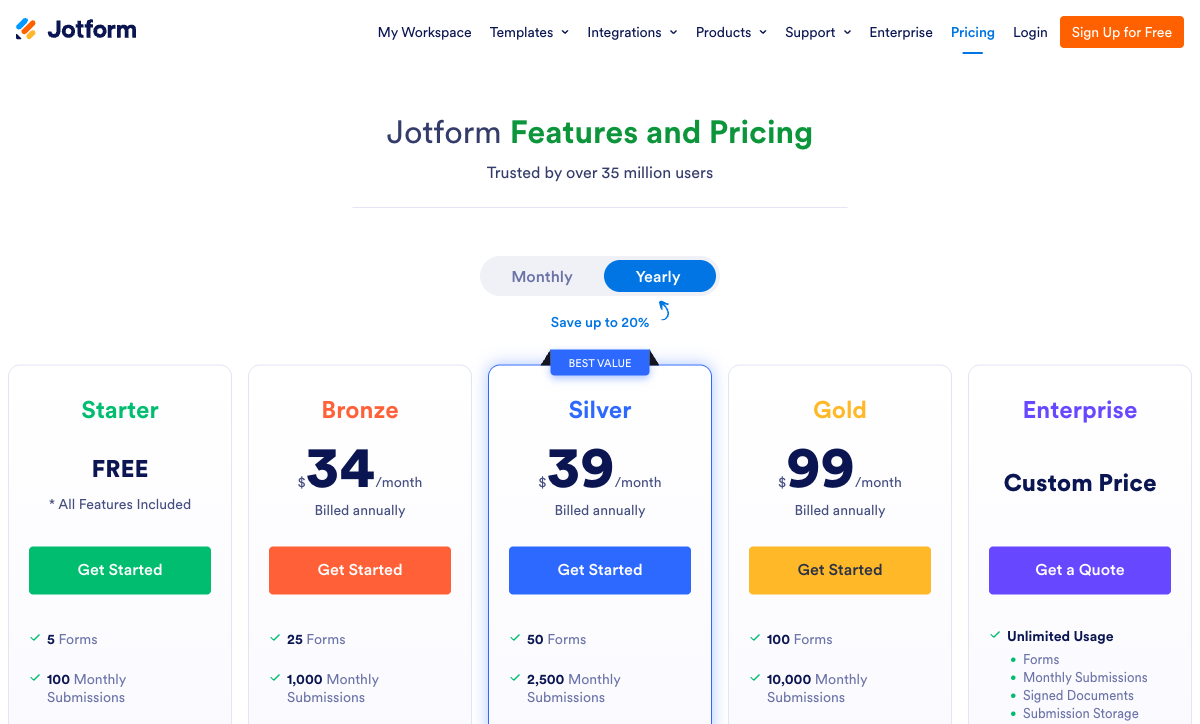
Fillout's paid range runs $15 to $75 a month billed annually; Jotform's runs $34 to $99. Fillout charges $19/month for Starter at 2,000 responses ($15 annually), $49 for Pro at 5,000 ($40), and $89 for Business with unlimited responses ($75). Jotform charges $39/month for Bronze at 1,000 submissions ($34 annually), $49 for Silver at 2,500 ($39), and $129 for Gold at 10,000 submissions plus HIPAA ($99). Compare the same $49 sticker and the gap is stark: Fillout Pro gives you 5,000 responses, unlimited forms and unlimited seats, while Jotform Silver gives you 2,500 submissions, 50 forms and one user.
Both hold things back for the upgrade, and the shapes differ. Jotform's gate is compliance and volume: HIPAA does not exist below Gold, so a small clinic pays $99/month annually regardless of how few submissions it takes. Fillout's gate is measurement: form analytics, conversion tracking and partial submissions all sit on Business, the same tier that lifts the response cap, so you cannot diagnose a leaking form until you are already paying for volume you may not need. Fillout also keeps its lead-generation tooling outside the tiers entirely, in a $100/month Conversion Kit covering abandonment recovery, Clearbit enrichment, lead routing, email validation and ad conversion tracking. Jotform's nonprofit and education discounts of 50% have no equivalent at Fillout beyond case-by-case reductions.
Fillout
Jotform
| Product | Plan | Monthly Price | Annual Price (per month) | Free Plan | Free Trial | Limits |
|---|---|---|---|---|---|---|
| Fillout | Free | Free | Free | Yes | No | forms: Unlimited, submissions: 1,000/month, storage: N/A, users: Unlimited, file uploads: 20 MB per file |
| Fillout | Starter | $19/mo | $15/mo billed annually | forms: Unlimited, submissions: 2,000/month, storage: N/A, users: Unlimited, file uploads: 20 MB per file | ||
| Fillout | Pro | $49/mo | $40/mo billed annually | forms: Unlimited, submissions: 5,000/month, storage: N/A, users: Unlimited, file uploads: 20 MB per file | ||
| Fillout | Business | $89/mo | $75/mo billed annually | forms: Unlimited, submissions: Unlimited, storage: N/A, users: Unlimited, file uploads: 1 GB+ | ||
| Fillout | Team bundle | $300/mo | $250/mo billed annually | forms: Unlimited, submissions: Unlimited, storage: 1,000,000 records, users: Unlimited, file uploads: 1 GB+ | ||
| Jotform | Starter | Free | Free | Yes | No | forms: 5, submissions: 100/month, storage: 100 MB, users: 1 |
| Jotform | Bronze | $39/mo | $34/mo billed annually | forms: 25, submissions: 1,000/month, storage: 1 GB, users: 1 | ||
| Jotform | Silver | $49/mo | $39/mo billed annually | forms: 50, submissions: 2,500/month, storage: 10 GB, users: 1 | ||
| Jotform | Gold | $129/mo | $99/mo billed annually | forms: 100, submissions: 10,000/month, storage: 100 GB, users: 1 |
Integrations and API
Jotform publishes 150+ native integrations against Fillout's 50+, and both expose a REST API, webhooks, Zapier and Make on their free tiers. Jotform's catalogue is wider in the enterprise directions that matter to procurement, including a Salesforce app on the AppExchange. Fillout's is narrower but deeper where modern stacks live: its Airtable connection updates existing records rather than only appending rows, and its Notion, Google Sheets, HubSpot, Pipedrive, Slack and Cal.com connections are first-party rather than routed through middleware. Fillout also ships a native Amazon S3 integration that pushes uploaded files straight into your own bucket. Neither product automates much past the handoff on its own, so most teams still end up renting a connector platform and paying a second meter for task runs.
Conditional logic and calculations
Both include conditional logic, calculations, scoring, answer piping and pre-fill on their free plans, so the split is in authoring rather than capability. Fillout's Form Agent is a chat assistant inside the editor that adds fields and pages, writes page logic, builds calculations and sets dynamic values from an instruction, though it cannot yet configure payments, calendars, integrations or form-level settings, and it draws on a shared monthly pool of Zite AI credits that stops when the pool empties. Jotform's calculation widget and conditions panel are more established and more crowded; reviewers regularly describe the logic setup as visually dense once a form carries more than a handful of rules. Neither ships an AI assistant dedicated to writing calculations, and G2 reviewers of Fillout say mastering calculations there takes time.
Payments
Jotform supports more than 40 payment processors; Fillout supports one. Jotform's list covers Stripe, PayPal, Square, Authorize.net and dozens of regional gateways with no added platform fee, which is more choice than any other form builder offers, but paid submissions are capped separately at 100, 250 and 1,000 a month across Bronze, Silver and Gold. Fillout runs everything through Stripe as an official partner with 0% added fees, and that single integration still delivers cards, ACH, Affirm, Stripe Link, subscriptions, discount codes and free trials on the free plan. Neither offers automated tax calculation, native invoicing or refund processing inside the form.
Compliance
Jotform is HIPAA, GDPR, CCPA, SOC 2, ISO 27001 and PCI DSS Level 1 compliant, with FERPA, StateRAMP and HECVAT coverage as well; Fillout is SOC 2 Type 2 and GDPR compliant and is neither HIPAA nor CCPA nor ISO 27001. HIPAA and a BAA require Jotform Gold at $99/month annually or Enterprise. Fillout's counter-argument sits at the top of its range: Enterprise customers pick a hosting region across the United States, EU, UK, Australia and Canada, and can configure submissions to live only in external storage so nothing rests on Fillout servers. Both offer SSO via SAML at the enterprise level, and both offer two-factor authentication, with Fillout allowing enforced 2FA from the Team bundle.
Where Fillout is the better product

Seats are the headline and they deserve to be. Every Fillout tier from free upward includes unlimited team members with workspaces for organising forms and permission controls on the higher plans. On Jotform, the second person who needs to own a form is not a checkbox, it is a conversation with sales. Per-seat scarcity changes behaviour before it changes budgets: logins get shared, the colleague who should review submissions gets a screenshot instead, and the audit trail stops matching who actually did the work.
Unlimited forms is the quieter advantage and it compounds with the first. Jotform's Gold plan stops at 100 forms, which sounds generous until you are an agency with a client intake form, a brief form and a feedback form for each of forty accounts. Fillout charges nothing for inventory, so the form you built once in March and left running costs the same as no form at all.
The customer list carries weight for a company this young: Fairfax County, Domino's, Bombas, Wayfair, Airbnb, Harvard and The Athletic are procurement-grade references, and the SOC 2 Type 2 attestation plus 256-bit AES encryption were in place early. Hackceleration's hands-on review rates the integration layer and the all-in-one economics highly while flagging a learning curve on the advanced pieces. The free plan at 1,000 responses a month with conditional logic, calculations, Stripe payments, PDF generation and 50+ integrations is the most capable entry point in this comparison by a distance, and Jotform's 100 submissions and 5 forms cannot answer it.
Where Jotform is the better product

Twenty years of building has produced a catalogue Fillout cannot match on any axis of breadth. Forty-plus payment gateways, 150+ integrations, 20,000+ templates, 30+ field types, native iOS and Android apps for offline data collection, WCAG AA accessibility, and a compliance shelf that answers almost any security questionnaire put in front of it. For a field team collecting inspection data on tablets without signal, or a clinic taking patient intake, Jotform is not merely the better option here. It is the only option here.
Every feature is available on the free Starter plan, with only the limits rising as you pay. That is an unusual and honest structure, and it means you can evaluate conditional logic, payments, signatures and approvals properly before committing a cent. Fillout gates payment, scheduling and signature question types above its free tier.
The evidence base is the other thing Jotform has that money cannot buy quickly. 5,595 G2 reviews at 4.7, including the #1 Online Form Builder position and a top-100 finish in the 2026 Best Software Awards, 2,926 Capterra reviews at 4.7 with value for money at 4.5, and 1,833 Trustpilot reviews at 4.3. Whatever complaint you might have about the product, several thousand people have already documented whether it is real. As Research.com's review notes, the platform's reach across 40 million users is itself part of what you are buying, because integrations, templates and third-party tutorials follow scale.
See Fillout's builder in action
"Fillout Full Tutorial for Beginners 2026" by Toolysto, a step-by-step walkthrough of the editor. Worth watching against Jotform's denser conditions panel before you choose.
Where Fillout falls short in this matchup
The response cap is placed badly. Pro at $40/month annual stops at 5,000, and the published route past it is Business at $75, an 87% increase; bulk submission packs exist but Fillout does not publish a price for them. Against Jotform Gold's 10,000 submissions the mid-range looks better than Jotform's, but the jump itself is triggered by your campaign working, which is a strange thing to be billed for.
Stripe-only payments will disqualify Fillout outright for any finance team standing on Square, PayPal or a regional processor, and there is no HIPAA path at all, so healthcare intake ends the evaluation immediately. The template library is small next to Jotform's 20,000+, there is no native mobile app, and there is no built-in multi-language translation of form content where Jotform has long supported it.
Then there is the identity question, which matters more here than in most comparisons because Jotform's twenty-year record is the thing on the other side of the table. Fillout now trades as "Fillout (by Zite)": the security documentation is titled for Zite, the footer reads Restly, Inc. DBA Zite, the changelog at /help/whats-new is entirely Zite product news, AI features draw on a shared Zite credit pool, and the top tier is a $300/month Team bundle of both products ($250 annually). Buyers who came for a form builder are being sold into a platform. Recent Trustpilot complaints about automated systems flagging and blocking accounts are worth reading before you route business-critical intake through it.
Where Jotform falls short in this matchup
Jotform meters seven things that grow: forms, submissions, form views, submission storage, fields per form, payment submissions and signed documents. Plus users, which it meters by refusing to sell them. A single-user ceiling on a $99/month plan in 2026 is difficult to defend when the competitor across the table gives seats away on its free tier, and the escape hatch is an Enterprise quote you cannot see before you ask for it.
The interface carries its history. Reviewers describe it as visually crowded, with conditional logic setup becoming hard to read once a form has real complexity, and the mobile apps drawing bug and crash reports. Support response times are a recurring complaint on both G2 and Capterra, which is a predictable consequence of staffing a queue for 40 million users across Tables, Sign, Apps, Workflows, AI Agents and Store Builder. Jotform also has no partial submission capture, so on a long application form the people who abandoned halfway, the ones actually worth calling, leave no record at all. Fillout captures those from its Business plan.
What users say
Read the volume as well as the scores. Jotform's 4.7 average holds across 5,595 G2 reviews and 2,926 Capterra reviews, with ease of use its strongest dimension and support speed, form limits and interface density its most common criticisms. Fillout's 4.6 on G2 rests on 30 reviews, its Capterra 4.0 on four, and its Trustpilot average has fallen from 4.7 to 3.5 across 48 reviews. A high score on a thin sample tells you less than a slightly lower score on thousands, and the trend line at Fillout is going the wrong way.
Consider Paperform
Both of these products charge you more as you succeed, which is the one thing neither can solve for the other. Fillout counts responses, workflow runs and AI credits, then sells lead-generation tooling as a $100/month add-on. Jotform counts submissions, forms, views, storage, fields, payment submissions, signed documents and people. Paperform counts none of those: submissions and seats are unlimited on every paid plan within fair use, and forms are not capped, so the eighth colleague and the 90,000th response cost the same as the first. Pro is $59/month, or $49/month billed annually. Business is $149/month, or $124/month annually, adding 10 workspaces, SSO and the Business API.
Be straight about the money. Fillout starts at $15/month billed annually and Jotform at $34, both under Paperform's $49 floor, and Fillout's free plan carries 1,000 responses a month. For one straightforward form at low volume the cheaper tool is the correct purchase, and we would rather say so than argue otherwise. Paperform earns the difference when the work is a real multi-step process rather than an intake box.
What the $49 buys is scope on one invoice. One subscription covers Paperform for forms, Papersign for eSignatures at 25 signed documents a month on Pro and 100 on Business, and Stepper for AI-native workflow automation with 20,000 automation credits on Pro and 100,000 on Business. That replaces the arrangement both products here push you toward, where you hold a form vendor, a connector platform and usually a signing tool together and pay all three to meter you. Calculations are Excel-style and are not confined to scoring a field: one formula can drive question and page visibility, decide which conditional email fires, shape what gets sent to an integration and rewrite the success page, with an AI assistant that writes it from a plain-English description. Payments run through five gateways (Stripe, PayPal, Square, Braintree and Google Pay) with subscriptions, coupons, tax, quotes and refunds, against Fillout's single processor. There are 4000+ integrations, 30,000+ templates, and a 7-day trial with no card.
Two honest caveats. Paperform is SOC 2 Type II, GDPR and CCPA compliant, but it is not HIPAA compliant and signs no BAAs, so protected health information stays with Jotform Gold. And Stepper automation credits are metered even though submissions and seats are not. On the vendor question, Paperform has been building since 2016, bootstrapped and profitable, with no investor setting the roadmap and no parent brand it might be folded into. For deeper reading, see Fillout alternatives, Jotform alternatives, the head-to-head Paperform vs Fillout and Paperform vs Jotform breakdowns, or the full best form builders ranking.
The verdict
Pick Jotform if a requirement on your list has no substitute. HIPAA with a BAA, PayPal or Square at checkout, offline mobile collection, ISO 27001 and PCI DSS on a security questionnaire, or a 20,000-template head start are all things Fillout simply does not sell. Accept in exchange that you are buying a single-user account below Enterprise, a form ceiling of 100 on the top self-serve tier, and a support queue serving 40 million users.
Pick Fillout if the constraint is your team rather than your compliance checklist. Unlimited seats and unlimited forms on every plan, a modern editor, scheduling and PDF generation in the box, and an Airtable integration that writes back to existing records make it the better fit for marketing and operations teams under 5,000 responses a month. Weigh that against Stripe-only payments, no HIPAA path, and a four-year-old company now operating inside someone else's platform with a review record too thin to lean on.
Pick Paperform if the real objection is the meter itself: unlimited submissions and seats, uncapped forms, and forms plus eSignatures plus workflow automation on one subscription whose price does not move in the quarter your campaign lands.
Frequently Asked Questions
How many people can edit forms on Fillout compared with Jotform?
Fillout includes unlimited seats on every tier, including the free plan. Jotform's self-serve tiers (Starter, Bronze, Silver and Gold) are all single-user for the plan owner, with sub-user allowances of 3, 10 and 100 on the paid tiers and genuine multi-user accounts only on Enterprise, which is custom-priced. For a two-person marketing team this is the difference between $0 and a sales call, and it is the single sharpest split between the two products.
Is Fillout HIPAA compliant the way Jotform is?
No. Jotform offers HIPAA-compliant forms with a signed BAA on its Gold plan at $129/month ($99 billed annually) and on Enterprise, alongside GDPR, CCPA, ISO 27001, PCI DSS Level 1, FERPA and SOC 2. Fillout holds SOC 2 Type 2 and GDPR compliance but does not offer HIPAA and signs no BAAs. If you collect patient data, clinical intake or anything else covered by protected health information, Jotform Gold is the only one of the two that can legally take the work.
Which one takes PayPal, Fillout or Jotform?
Jotform. Its payment layer spans more than 40 processors including PayPal, Square, Authorize.net and a long list of regional gateways, with no added transaction fee. Fillout is Stripe-only. Stripe is a capable single choice, covering cards, ACH, Affirm, Stripe Link, discount codes, free trials and recurring billing, but if your finance team already banks through Square or a local provider, Fillout means opening a Stripe account rather than connecting the one you have. Note that Jotform also meters paid submissions separately: 100 a month on Bronze, 250 on Silver, 1,000 on Gold.
Does Jotform or Fillout cap the number of forms I can build?
Jotform caps forms on every self-serve plan: 5 on the free Starter tier, 25 on Bronze, 50 on Silver and 100 on Gold. Fillout allows unlimited forms on all tiers including free. An agency running one intake form per client, or an operations team with a form per location, will hit Jotform's ceiling long before it hits a submission limit, and the 101st form on Gold means an Enterprise quote rather than an upgrade button.
Is Fillout a safer long-term bet than Jotform?
On vendor stability, no. Jotform has been operating since 2006, is bootstrapped, reports $144.9M in 2024 revenue and carries 5,595 G2 reviews at 4.7 plus 2,926 Capterra reviews at 4.7. Fillout launched in 2022, is seed-funded, and now trades as "Fillout (by Zite)" after being folded into a parent app and database platform whose help docs, security pages, changelog and AI credit pool the form product now shares. Its review footprint is thin and has softened: 30 G2 reviews at 4.6, four Capterra reviews at 4.0, and a Trustpilot average down to 3.5 across 48 reviews. Fillout's builder is the more modern of the two. The company behind it is the less proven.
At 4,000 submissions a month, is Fillout or Jotform cheaper?
Fillout, and by a wide margin at that volume. Fillout Pro covers 5,000 responses at $49/month ($40 billed annually) with unlimited seats and unlimited forms. Jotform Silver covers 2,500 submissions at $49/month ($39 annually), so 4,000 pushes you to Gold at $129/month ($99 annually) for one user. Reverse the requirement and the answer flips: if you need HIPAA, PayPal, 100 GB of storage or native mobile data collection, Fillout has no tier that sells them at any price.
Sources & References
- Fillout Review 2026: We Tested Everything (Builder, Integrations, Automations & Real ROI) — Hackceleration, 2026
- Jotform Review 2026: Pricing, Features, Pros & Cons, Ratings & More — Research.com, 2026
- Jotform Pricing 2026: Costs, Features & Better Alternatives — Supatool, 2026
- Fillout Reviews: Is This Form Builder Actually Worth Paying For? — Filip Konecny, 2026
Last updated September 22, 2026
Ready to try Paperform?
Create beautiful forms, payment pages, and workflows — no code required.