Google Forms vs Jotform vs Typeform: Which Form Builder Wins in 2026?
Google Forms is free and unmetered but cannot take payments or carry your branding. Jotform is the broadest of the three at $34/month annually, with 40+ payment processors and HIPAA on Gold. Typeform is the best-looking at $28/month annually, capped at 100 responses. Pick by what the form has to do after someone hits submit.
These three get shortlisted together constantly, and they are not really competing for the same job. Google Forms is what you already have. Jotform is what twenty years of adding features looks like. Typeform is what happens when a form is treated as a piece of brand design. Each one is genuinely the right answer for a specific shape of work, and each becomes expensive or awkward the moment you ask it to do something outside that shape.
What follows compares all three on the five things that decide purchases: price and how it scales, integrations and API access, conditional logic, payment processors, and compliance. The figures are current as of September 2026. The verdict at the end is a decision tree rather than a winner, because on this shortlist there genuinely is not one.
Quick verdict: who each one is for
 Google Forms
Best for: anything internal that ends in a spreadsheet, at any volume, with no budget line and nobody outside the organisation looking at it.
 Jotform
Best for: one person running operational forms that take money, need an unusual payment gateway, or must be HIPAA compliant on Gold.
 Typeform
Best for: short, low-volume, customer-facing forms where completion rate is the metric and the response count stays predictable.
Three products, three respondent experiences
The philosophy difference is visible before you read a feature table. Google Forms shows a list of questions, Jotform shows a dense builder with a widget for everything, and Typeform shows one question filling the screen.


Feature comparison
Every category side by side. The payments, customisation and integrations rows are where the three separate.
| Feature | Google Forms | Jotform | Typeform |
|---|---|---|---|
| Form Building | |||
| Document-style editor | No | No | No |
| AI form creation | Yes paid | Yes starter | Yes |
| Field types | 11 | 30+ (starter) | 20+ |
| Multi-page forms | Yes | Yes starter | Yes basic |
| Guided mode (one question at a time) | No | Yes starter | Yes |
| Conditional logic | Yes | Yes starter | Yes basic |
| Calculations field | No | Yes starter | Yes plus |
| AI calculations assistant | No | No | No |
| Scoring | Yes | Yes starter | Yes plus |
| AI quiz generation | Yes paid | No | No |
| Answer piping | No | Yes starter | Yes basic |
| Pre-filling and hidden fields | Yes | Yes starter | Yes basic |
| Save and resume | No | Yes starter | No |
| Auto-close by number | Yes | Yes starter | Yes basic |
| Auto-close by date | Yes | Yes starter | Yes basic |
| Appointment/booking field | No | Yes starter | Yes basic |
| Signature field | No | Yes starter | Yes basic |
| Color picker field | No | No | No |
| API-powered dropdowns | No | No | No |
| Google address search | No | No | No |
| File uploads | Yes | Yes starter | Yes basic |
| Drag-and-drop builder | No | Yes starter | No |
| Form widgets | No | Yes starter | No |
| Template gallery | No | 20,000+ (starter) | No |
| Question display logic | No | No | Yes basic |
| AI follow-up questions | No | No | Yes business |
| AI extended thinking & memory | No | No | Yes growth |
| Typeform AI connectors | No | No | Yes growth |
| Workflow / automation builder | No | No | Yes growth |
| AI-moderated research (Research Flow) | No | No | Yes enterprise |
| Video questions | No | No | Yes basic |
| Payments | |||
| Stripe payments | No | Yes starter | Yes basic |
| PayPal payments | No | Yes starter | No |
| Square payments | No | Yes starter | No |
| Braintree payments | No | Yes starter | No |
| Google Pay | No | Yes starter | No |
| Product sales (eCommerce) | No | Yes starter | No |
| Subscriptions | No | Yes starter | Yes basic |
| Coupons and discounts | No | Yes starter | No |
| Custom pricing rules | No | Yes starter | No |
| Tax calculations | No | Yes starter | No |
| Quotes/invoices | No | No | No |
| Refunds | No | No | No |
| 3D Secure | No | No | Yes basic |
| 40+ payment gateways | No | Yes starter | No |
| No transaction fees | No | Yes starter | No |
| Design & Customization | |||
| Template gallery | 20+ | 20,000+ (starter) | 1,500+ |
| Rich media (images, GIFs, videos) | Yes | Yes starter | Yes |
| Unsplash and Giphy integration | No | No | Yes |
| Image editor | No | No | No |
| Adobe Creative Cloud | No | No | No |
| Language translation | No | Yes starter | Yes basic |
| Advanced theming | No | Yes starter | Yes plus |
| Custom form URL | No | No | Yes plus |
| Custom domains | No | Yes enterprise | Yes enterprise |
| Custom HTML & CSS | No | Yes starter | Yes business |
| Remove branding | No | Yes bronze | Yes plus |
| Custom email domains | Yes Business Starter | No | No |
| Form themes | No | Yes starter | No |
| Analytics | |||
| Submission results and reports | Yes | Yes starter | Yes |
| AI report insights | Yes Business Standard | No | Yes business |
| Paperform analytics | No | No | No |
| Google Analytics & Facebook Pixel | No | No | Yes basic |
| Custom analytics scripts | No | No | Yes basic |
| Partial submissions | No | No | Yes plus |
| Form analytics | No | Yes starter | No |
| Google Analytics integration | No | Yes starter | No |
| Drop-off analysis | No | No | Yes business |
| Cross-form Insights dashboard | No | No | Yes business |
| Collaboration | |||
| Multi-user accounts | Yes | Yes bronze | Yes plus |
| User permissions and management | Yes | Yes enterprise | Yes plus |
| Advanced permissions & admin | Yes Business Starter | Yes enterprise | Yes enterprise |
| Form sharing (templates) | Yes | No | Yes |
| Spaces and tag management | No | No | No |
| Form sharing | No | Yes starter | No |
| Assign forms | No | Yes enterprise | No |
| Workspace organization | No | No | Yes |
| Security | |||
| SOC 2 Type II | Yes | Yes enterprise | Yes |
| GDPR compliant | Yes | Yes starter | Yes |
| SSL encryption | Yes | Yes starter | Yes |
| Two-factor authentication | Yes | Yes starter | Yes |
| Enforce 2FA for all users | Yes Business Starter | No | No |
| SSO (SAML) | Yes Business Plus | Yes enterprise | Yes enterprise |
| reCAPTCHA | No | Yes starter | Yes business |
| Local data residency | Yes Business Plus | No | No |
| Custom S3 storage (BYO) | No | No | No |
| HIPAA compliant | No | Yes gold | Yes enterprise |
| 256-bit SSL | No | Yes starter | No |
| Data residency | No | Yes enterprise | No |
| Form encryption | No | Yes starter | No |
| PCI DSS | No | Yes starter | Yes |
| ISO 27001 | No | No | Yes |
| Integrations & API | |||
| Native integrations | No | 150+ (starter) | 120+ (basic) |
| Zapier | Yes | Yes starter | Yes basic |
| Make (Integromat) | Yes | Yes starter | Yes basic |
| Webhooks | No | Yes starter | Yes basic |
| Standard API | Yes | No | No |
| Business API | No | No | No |
| WordPress plugin | No | Yes starter | Yes |
| oEmbed support | No | No | No |
| API | No | Yes starter | Yes basic |
| Smartsheet integration | No | Yes starter | No |
| Canvas LMS integration | No | Yes enterprise | No |
| Salesforce AppExchange | No | Yes starter | No |
| Embed options | No | Yes starter | Yes |
| Mobile apps | No | Yes starter | No |
| Claude / MCP server | No | No | Yes basic |
| AI data enrichment | No | No | Yes growth |
| Automations integrations (Contacts & Automations) | No | No | Yes growth |
The five dimensions that decide it
Each of these is a self-contained answer. If you only read one section, read the one that matches your blocker.
Pricing
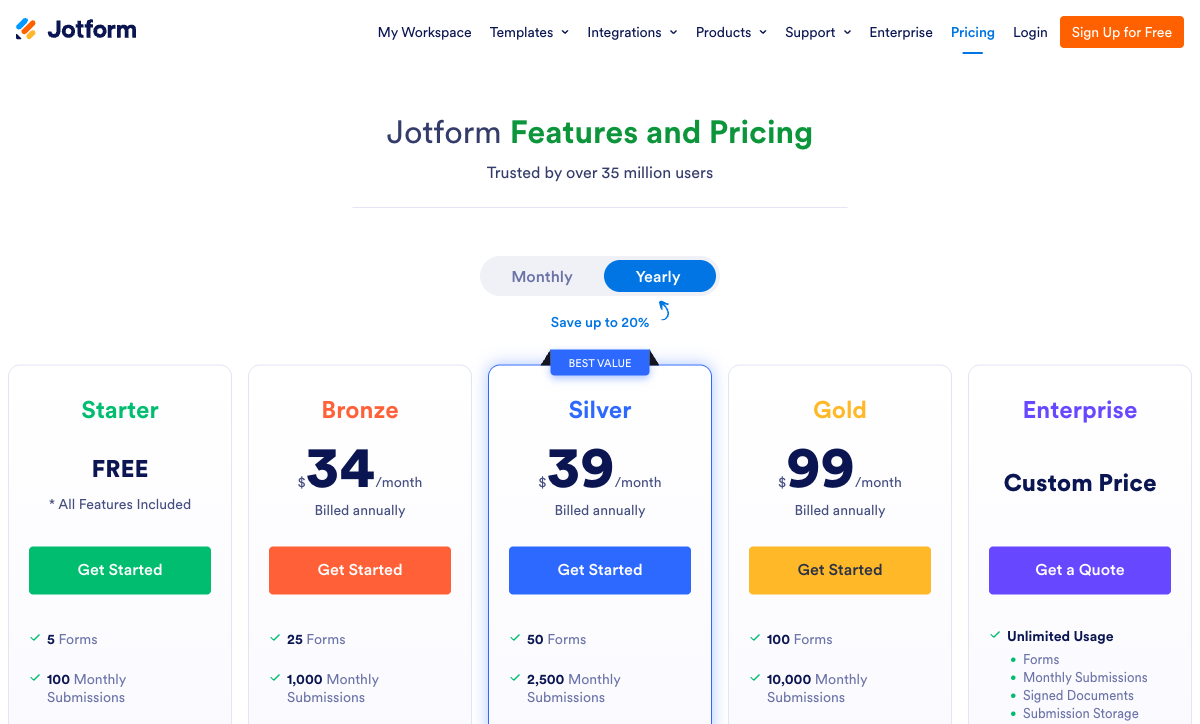
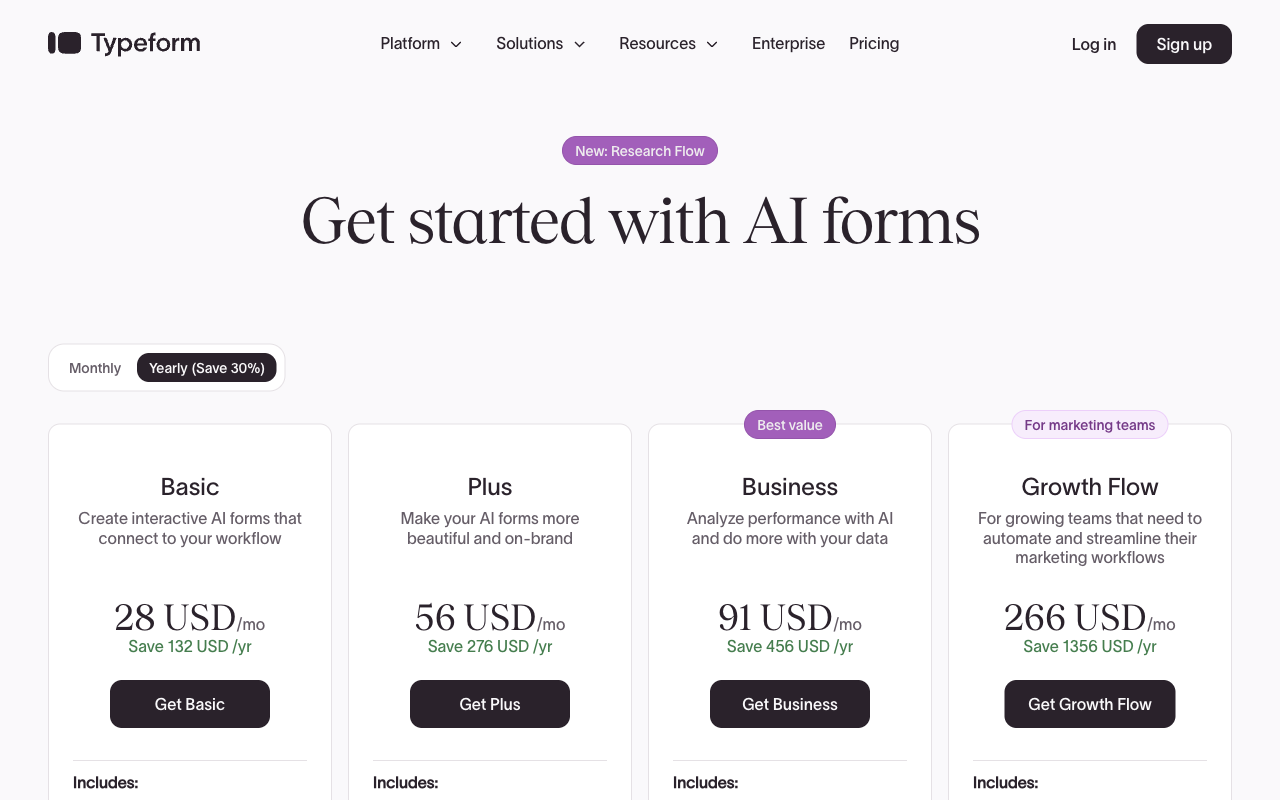
Google Forms is free with unlimited responses, Jotform's cheapest paid plan is $34/month billed annually for 1,000 submissions, and Typeform's is $28/month annually for 100 responses. Google Workspace at $7/user/month annually adds storage and admin controls, not form features. Jotform's ladder runs Bronze $34, Silver $39, Gold $99, and meters submissions, forms, form views, stored submissions and fields per form separately. Typeform's runs Basic $28, Plus $56, Business $91, and Growth Flow at $266 raises neither the 10,000-response nor the 5-seat ceiling. At roughly the same entry price, Jotform sells ten times Typeform's monthly volume.
Integrations & API
Jotform lists 150+ native integrations, Typeform 120+, and Google Forms has essentially none outside Google. All three expose a REST API. Jotform and Typeform support webhooks; Google Forms does not, so event-driven work there goes through Apps Script. Inside Workspace, Google Forms is excellent and Sheets is one click away. Outside it, every connection becomes a Zapier line item or somebody's script, which is the walled garden in practice rather than in theory.
Conditional logic
Jotform includes question-level logic and a calculation widget on the free Starter plan, Typeform gates advanced logic and calculations to Plus at $56/month annually, and Google Forms offers section-level branching only with no calculations at all. Google Forms can send someone to a different section based on a multiple choice answer, which covers a forking quiz and nothing resembling eligibility rules or tiered pricing. Jotform is the most capable and the hardest to audit later; reviewers cite the conditions panel as the point where the interface stops being readable.
Payments
Jotform supports 40+ payment processors, Typeform supports one (Stripe), and Google Forms supports zero. Jotform's coverage includes Stripe, PayPal, Square, Authorize.net and a long tail of regional gateways with no transaction fee of its own, though payment submissions are capped at 100/month on Bronze and 1,000/month on Gold. Typeform added native Stripe recurring payments in August 2026. Google Forms has no payment field at any tier, so a paid order means a Forms link followed by an invoice somebody sends by hand.
Compliance (HIPAA / GDPR / SOC 2)
All three are GDPR, SOC 2 and ISO 27001 compliant, and all three carry HIPAA, but Jotform requires Gold at $99/month annually for HIPAA forms with a BAA. Typeform is HIPAA compliant with a BAA and adds ISO 27017, ISO 27018 and ISO/IEC 42001 for AI management systems, certified June 2026. Google Forms inherits Workspace certifications including FedRAMP, SOC 1 and SOC 3, but the Forms product gives you little of the audit and access control tooling a health or public sector review will ask about. Jotform and Typeform both hold PCI DSS.
Google Forms: the right tool until the work stops being a form
Google Forms is free, unmetered and instantly familiar, and those three facts win most of the decisions it wins. Unlimited forms, unlimited responses, storage counted against the 15 GB you already share with Drive, and real-time co-editing on the same engine that runs Docs. Capterra has 11,572 reviews at 4.7 with value for money at 4.8, and that score is honest: for a feedback survey, a quiz with automatic marking, an RSVP or an internal request queue, nothing else here is worth paying for. Response charts are generated automatically, and since January 2026 forms can close themselves on a date or a response count without a third-party add-on.
The wall arrives at a specific point, which is when the work stops being a form and becomes a process. There are about 11 question types, no signature, no booking, no payments, no hidden fields, and no save and resume unless the respondent signs in to Google. Branding cannot be removed, the URL stays on docs.google.com, and no script can run on the page, so there is no drop-off analysis, no pixel and no partial submissions. The Gemini features that write a form or summarise open-text answers require a paid Workspace plan at Business Standard or above, so the free tier does not include them. None of that is a criticism of a product that costs nothing. It is a description of where it ends.
Jotform: the widest toolkit, bought back one meter at a time
Jotform has been at this since 2006, is bootstrapped and profitable, and has more surface area than anything else on this shortlist: 40+ payment gateways, 150+ integrations, native iOS and Android apps that collect offline, Jotform Sign, Tables, Approvals, AI Agents and 20,000+ templates. Every feature is switched on for free accounts, with only the limits moving as you pay. It holds 4.7 on G2 from 5,595 reviews and the #1 Online Form Builder position there, which is a lot of public evidence pointing the same way.
Two things are worth knowing before committing. The first is metering: submissions, forms, form views, stored submissions, fields per form and signed documents all have their own ceilings, and the month a campaign works is the month Bronze's 1,000 submissions run out and the form stops accepting responses. The second is seats. Starter through Gold are single-user plans, sub-users aside, so the second person who needs edit access is an Enterprise conversation rather than an upgrade button. Reliability is the recurring theme in the review text too, with widgets and advanced logic that do not always behave as documented, and support queues that reviewers describe as slow. That is the price of a very large surface maintained for 40 million users.
Typeform: the best presentation on the shortlist, sold by the response
Nobody here makes a better-looking form. Typeform's paged, one-question-at-a-time flow, its typography and its transitions produce something respondents finish, and the company sells it on exactly that: 3.5x more responses than a standard form, 95% of the Fortune 500 as customers, 1,500+ templates, and an AI layer covering generation, adaptive follow-ups and response analysis. Multi-question pages arrived in the builder in July 2026, which softens the format slightly. For a short lead capture or an NPS survey attached to a brand that people will judge, Typeform earns its price.
The price is where the reviews turn. Every plan caps responses and seats: 100 responses and one user on Basic, 1,000 and three on Plus, 10,000 and five on Business, and Growth Flow at $266/month annually raises neither. Payments are Stripe only. reCAPTCHA and drop-off analysis sit on Business at $91/month annually, so spam protection and the data that explains a failing form are both upgrade triggers. Capterra and GetApp sit at 4.7 while Trustpilot sits at 2.6 from 775 reviews, and reading the complaints, the gap is almost entirely about billing, limits and paywalls hit mid-use rather than about the software.
See them in action
Two independent walkthroughs, at the two ends of the shortlist. The Google Forms tutorial is a fair baseline for how much you actually get for free, which is the number to hold the other two against.
Pricing comparison
Read the caps before the headline numbers. Google Forms never meters, Jotform meters six things at once, and Typeform meters the two that grow fastest in a healthy business: responses and people.
Google Forms
Jotform
| Product | Plan | Monthly Price | Annual Price (per month) | Free Plan | Free Trial | Limits |
|---|---|---|---|---|---|---|
| Google Forms | Free (Personal) | Free | Free | Yes | 14 days | forms: Unlimited, submissions: Unlimited, storage: 15 GB (shared across Google Drive), users: 1, file uploads: Included in 15 GB storage |
| Google Forms | Business Starter | $8.4/mo | $7/mo billed annually | forms: Unlimited, submissions: Unlimited, storage: 30 GB per user, users: Up to 300, file uploads: Included in storage | ||
| Google Forms | Business Standard | $16.8/mo | $14/mo billed annually | forms: Unlimited, submissions: Unlimited, storage: 2 TB per user, users: Up to 300, file uploads: Included in storage | ||
| Google Forms | Business Plus | $26.4/mo | $22/mo billed annually | forms: Unlimited, submissions: Unlimited, storage: 5 TB per user, users: Up to 300, file uploads: Included in storage | ||
| Jotform | Starter | Free | Free | Yes | No | forms: 5, submissions: 100/month, storage: 100 MB, users: 1 |
| Jotform | Bronze | $39/mo | $34/mo billed annually | forms: 25, submissions: 1,000/month, storage: 1 GB, users: 1 | ||
| Jotform | Silver | $49/mo | $39/mo billed annually | forms: 50, submissions: 2,500/month, storage: 10 GB, users: 1 | ||
| Jotform | Gold | $129/mo | $99/mo billed annually | forms: 100, submissions: 10,000/month, storage: 100 GB, users: 1 | ||
| Typeform | Free | Free | Free | Yes | No | forms: 10, submissions: 10/month, users: 1 |
| Typeform | Basic | $39/mo | $28/mo billed annually | forms: Unlimited, submissions: 100/month, users: 1 | ||
| Typeform | Plus | $79/mo | $56/mo billed annually | forms: Unlimited, submissions: 1,000/month, users: 3 | ||
| Typeform | Business | $129/mo | $91/mo billed annually | forms: Unlimited, submissions: 10,000/month, users: 5 | ||
| Typeform | Growth Flow | $379/mo | $266/mo billed annually | forms: Unlimited, submissions: 10,000/month, users: 5 | ||
| Typeform | Talent | $169/mo | $119/mo billed annually | forms: Unlimited, users: HR teams |
What users say
The B2B platforms put all three in a tight band, and the volumes tell you more than the averages. Google Forms carries 11,572 Capterra reviews at 4.7 with its highest sub-score on value, which is what a free product should look like. Jotform's 5,595 G2 reviews at 4.7 praise breadth and complain about support speed and inconsistent widgets. Typeform holds 4.5 on G2 from around 1,002 reviews and 4.7 on Capterra from 979, then drops to 2.6 on Trustpilot, a split worth reading rather than averaging: business buyers rate the product, consumers rate the bill.
The verdict: a decision tree
- Choose Google Forms if the form is internal or educational, the answers belong in a spreadsheet, and nothing has to be paid for, branded, signed or routed. Volume is irrelevant to this choice because Google Forms does not meter. Anyone telling you to pay for a staff survey is selling something.
- Choose Jotform if one person owns the forms and the requirement is capability: an unusual payment gateway, offline collection on a phone, HIPAA with a BAA on Gold at $99/month annually, or a Salesforce connection. Budget for the tier above the one you think you need, because the meters move before the features do.
- Choose Typeform if the form is short, customer-facing and revenue-attached, presentation is doing measurable work, Stripe is your processor, and the monthly response count is predictable enough that you will not be shopping tiers in the middle of a campaign.
- Choose none of them if you need two of those strengths at once, or if the form is the first step of a process that continues after submission. That case is the rest of this page.
Most teams end up running two of these at once, usually Google Forms internally and a paid tool for customer work, and that is a reasonable arrangement. The failure mode is forcing one past its shape: a 40-field procurement questionnaire in Typeform's paged flow, client onboarding on a docs.google.com link, or a single high-traffic lead form on a Jotform tier that closes mid-month.
Resolving the tradeoff: where Paperform fits
The tradeoff on this shortlist is structural. Typeform's design comes with a response meter, Jotform's capability comes with six meters and a single seat, and Google Forms avoids meters entirely by not doing the work. Paperform takes the opposite position on pricing: submissions and seats are unlimited within fair use on paid plans, so a campaign that lands and a team that grows both cost the same as the month before. Pro is $59/month, or $49/month billed annually, which is above Typeform Basic and Jotform Bronze at the door. What the difference buys is a bill that stops moving.
The second argument is consolidation. A real process needs a form, then a signed document, then a handoff, and on this shortlist that means three vendors and you in the middle holding the joins. One Paperform subscription covers forms, Papersign for eSignatures and Stepper for workflow automation on every plan, from one account. Pro includes 25 signed documents a month, unlimited workflow steps and 20,000 automation credits; Business at $124/month annually includes 100 signed documents, 100,000 credits, SSO and 10 workspaces. Automation credits are the one thing Paperform meters, at $10/month per additional 10,000 on Pro, which is worth checking against your volume rather than discovering later.
On capability, the document-style editor mixes prose, images, video and questions in one flow so the page reads as yours, and Guided Mode renders the same form one question at a time when the Typeform effect is what you want. Excel-style calculations sit underneath, deciding which questions and pages appear, which conditional emails fire, what reaches an integration and what the success page says. Payments run through Stripe, PayPal, Square, Braintree and Google Pay with products, subscriptions, coupons, tax and refunds. There are 4000+ integrations, 30,000+ templates, SOC 2 Type II, GDPR and CCPA, and a company that has been bootstrapped and profitable since 2016. Two honest concessions: Paperform is not HIPAA compliant and signs no BAAs, so PHI belongs on Jotform Gold or Typeform; and for a genuinely simple internal survey, Google Forms is free and you should use it.
Head-to-head detail lives in Paperform vs Google Forms, Paperform vs Jotform and Paperform vs Typeform. Narrowing to two of these three? Read Google Forms vs Jotform, Jotform vs Typeform or Google Forms vs Typeform. For the wider field, see the best form builders ranking.
Frequently Asked Questions
Is Jotform or Typeform worth paying for if Google Forms is free?
Only when the form has a job Google Forms structurally cannot do. Google Forms takes unlimited responses at no cost and never meters you, so for surveys, quizzes, RSVPs and internal feedback it is the correct answer and paying anything is waste. The line is payments, branding on your own domain, question-level logic and anything that has to happen after submission. Jotform Bronze at $34/month billed annually buys 1,000 submissions a month and 40+ payment processors. Typeform Basic at $28/month annually buys presentation and 100 responses a month. Both are metered, which is the cost of leaving the free tool.
Which of Google Forms, Jotform and Typeform can actually take payments?
Jotform takes payments through more than 40 processors, Typeform takes them through Stripe and nothing else, and Google Forms has no payment capability on any plan, paid Google Workspace included. Jotform also meters the payment itself: 100 payment submissions a month on Bronze, 250 on Silver, 1,000 on Gold at $99/month annually. Typeform added native recurring payments through Stripe in August 2026, but if finance settles through PayPal or Square that does not help. Paperform supports Stripe, PayPal, Square, Braintree and Google Pay with products, coupons, tax and refunds, and does not meter the orders.
Does Typeform or Jotform have better conditional logic?
Jotform, on availability; Typeform, on legibility. Jotform gives you question-level show and hide plus a calculation widget from the free Starter plan, where Typeform holds advanced logic and calculations back until Plus at $56/month annually. The tradeoff is that Jotform's conditions panel grows into dozens of stacked rules that nobody can read six months later, and reviewers on G2 and Capterra report that complex logic and widgets behave inconsistently. Google Forms is not in this conversation: it can jump to a different section based on a multiple choice answer and that is the whole feature set, with no calculations anywhere.
Can I put my own domain and branding on a Google Forms, Jotform or Typeform form?
Jotform removes its branding from Bronze at $34/month annually and offers a custom domain on Enterprise. Typeform removes branding on Plus at $56/month annually and gives you a subdomain there, with real custom domains sitting on Enterprise and Growth Custom, both contact-sales. Google Forms cannot do either at any price: every form lives on a docs.google.com URL with Google branding attached, and Workspace does not change that. For an internal poll none of this matters. For a client-facing intake it decides the question.
Which is HIPAA compliant: Google Forms, Jotform or Typeform?
All three carry HIPAA, at different prices. Jotform enables HIPAA forms with a signed BAA on Gold at $99/month annually and on Enterprise, so Bronze and Silver cannot hold protected health information. Typeform is HIPAA compliant and signs BAAs, and it also holds ISO 27001, ISO 27017, ISO 27018 and ISO/IEC 42001 for AI management, certified in June 2026. Google Forms inherits Google Workspace coverage, which includes HIPAA, SOC 2, ISO 27001 and FedRAMP, though Forms itself gives you little of the audit and access tooling a healthcare team will be asked for. All three are GDPR and SOC 2 compliant. Paperform is not HIPAA compliant and signs no BAAs, so for PHI the answer on this page is Jotform or Typeform.
Is Google Forms, Jotform or Typeform the safer company to standardise on?
Jotform and Google Forms are the structurally safer bets, for opposite reasons. Jotform has been building since 2006, is bootstrapped, profitable and serves 40+ million users with no investor clock. Google Forms sits inside Alphabet and is not going anywhere, although Google's history with smaller products is a record of long quiet periods rather than steady investment. Typeform has taken $193M through Series C, and venture capital eventually has to be repaid out of the pricing page, which is the most plausible reading of a free tier cut to 10 responses a month and a Trustpilot score of 2.6 from 775 reviews against 4.7 on Capterra.
What do I use if I need Typeform polish and Jotform payments in one form?
None of these three sells that combination, which is the honest conclusion of the comparison. Typeform's presentation stops at one processor and a response cap; Jotform's breadth arrives in a builder that produces a stack of fields; Google Forms does neither. Paperform is the consolidation play: a document-style editor and a Guided Mode that renders one question at a time, five payment gateways with real pricing logic behind them, and Papersign eSignatures plus Stepper workflow automation in the same $49/month subscription. See Paperform vs Jotform and Paperform vs Typeform for the head-to-head numbers.
Sources & References
- Google Forms Review: Is This the Best Free Survey Tool? — TechRadar, 2025
- Jotform Review 2026: Pricing, Features, Pros & Cons, Ratings & More — Research.com, 2026
- Typeform Review 2026: We Tested Everything (Features, Pricing, Integrations & Real Results) — Hackceleration, 2026
- Typeform Achieves ISO/IEC 42001 Certification for Responsible AI Management — Typeform, June 2026
- The 6 best Google Forms alternatives — Zapier, 2026
Last updated September 22, 2026
Ready to try Paperform?
Create beautiful forms, payment pages, and workflows — no code required.