You can add and manage connected payment accounts in Payment accounts. To get there, go to Forms > More > Payment accounts in the sidebar.
Add a new payment account:
- Click Connect account at the top right, choose your payment provider (Stripe, Square, PayPal Business or Braintree), then click Continue.
- Follow the prompts to authorise Paperform to have access to your payment account. Stripe opens in a new tab straight away. For Square and PayPal Business, choose Live mode or Sandbox mode first. For Braintree, enter your keys, choose Live mode or Sandbox account, then click Connect.
- After authorizing Paperform, you will be returned to Payment accounts and your selected payment account will be in the list of connected services.
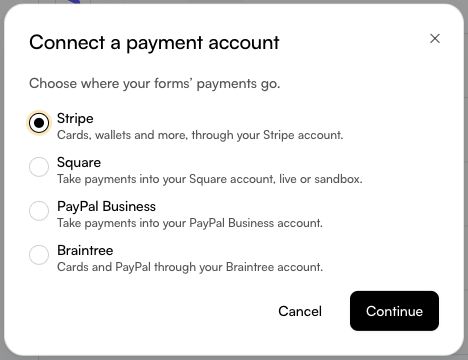
Note that you'll need to have a payment account set up with a supported payment provider in order to connect it to your Paperform account. So the first thing you need to have in place is a registered account with either Stripe, Braintree, PayPal Business, or Square.
Manage existing payment accounts:
- Delete a connected payment account.
- Restrict the account by a tag (you can attribute tags to forms in the main Dashboard).
- View the main details of the connected account, including whether it's Live or Sandbox.
Once connected to your account, payment accounts can then be added to select forms in the form editor so you can start collecting payments from your customers.
Number of payment accounts allowed
You might like to have a Stripe account and a PayPal Business account connected to your Paperform account, or you may even have more.
Unlimited payment accounts are supported on specific pricing plans.
Gotchas
You can only have one payment account connected to an individual form, but you can connect multiple payment accounts from the same platform.
This means you could connect two Stripe accounts to Paperform, if both are connected to different forms.