Paperform vs Google Forms vs Typeform: Which Form Builder Wins in 2026?
Google Forms is the right answer for free internal collection, Typeform for short customer-facing forms where presentation drives completion, and Paperform for a form that also has to charge, calculate, get signed and trigger a workflow. Paperform costs $49/month billed annually with unlimited submissions and seats. Typeform starts at $28 and meters both.
These three products are usually shortlisted together, and they are not really competing for the same job. Google Forms is free, ubiquitous and deliberately narrow. Typeform sells a format: one polished screen at a time, priced per response and per seat on every tier it offers. Paperform sells the process around the form, with eSignatures and workflow automation in the same subscription and no meter on volume or headcount. Picking between them is mostly a question of where your work sits on that scale.
Below, all three go side by side on the five things that decide a purchase: pricing, integrations and API, conditional logic, payments and compliance. Every figure comes from each vendor's live pricing and documentation as of September 2026.
Quick verdict matrix
 Paperform
Best for: operators whose form is the front door to a process, where the response has to turn into a payment, a signed document or an approval, and where the bill should not rise every time the form works.
 Google Forms
Best for: answers that need to land in a spreadsheet and nothing more. Classroom quizzes, staff surveys, RSVPs and internal requests, built in ten minutes by someone who already has a Google account.
 Typeform
Best for: short, brand-led research and lead capture with predictable monthly volume, where the paged experience earns its keep in completion rate and Stripe is already the processor.


Feature comparison
Every feature category across the three products. The payments, platform and customization rows are where the distance opens up.
| Feature | Paperform | Google Forms | Typeform |
|---|---|---|---|
| Form Building | |||
| Document-style editor | Yes | No | No |
| AI form creation | Yes | Yes paid | Yes |
| Field types | 26+ | 11 | 20+ |
| File uploads | Yes | Yes | Yes basic |
| Multi-page forms | Yes | Yes | Yes basic |
| Guided mode (one question at a time) | Yes | No | Yes |
| Conditional logic | Yes | Yes | Yes basic |
| Calculations field | Yes pro | No | Yes plus |
| AI calculations assistant | Yes pro | No | No |
| Scoring | Yes pro | Yes | Yes plus |
| Answer piping | Yes | No | Yes basic |
| Pre-filling and hidden fields | Yes pro | Yes | Yes basic |
| Save and resume | Yes | No | No |
| Auto-close by number | Yes pro | Yes | Yes basic |
| Auto-close by date | Yes pro | Yes | Yes basic |
| Appointment/booking field | Yes | No | Yes basic |
| Signature field | Yes | No | Yes basic |
| Color picker field | Yes | No | No |
| API-powered dropdowns | Yes business | No | No |
| Google address search | Yes business | No | No |
| AI quiz generation | No | Yes paid | No |
| Question display logic | No | No | Yes basic |
| AI follow-up questions | No | No | Yes business |
| AI extended thinking & memory | No | No | Yes growth |
| Typeform AI connectors | No | No | Yes growth |
| Workflow / automation builder | No | No | Yes growth |
| AI-moderated research (Research Flow) | No | No | Yes enterprise |
| Video questions | No | No | Yes basic |
| Payments | |||
| Stripe payments | Yes | No | Yes basic |
| PayPal payments | Yes | No | No |
| Square payments | Yes | No | No |
| Braintree payments | Yes | No | No |
| Google Pay | Yes | No | No |
| Product sales (eCommerce) | Yes pro | No | No |
| Subscriptions | Yes pro | No | Yes basic |
| Coupons and discounts | Yes pro | No | No |
| Custom pricing rules | Yes pro | No | No |
| Tax calculations | Yes | No | No |
| Quotes/invoices | Yes | No | No |
| Refunds | Yes | No | No |
| 3D Secure | Yes | No | Yes basic |
| Design & Customization | |||
| Template gallery | 30,000+ | 20+ | 1,500+ |
| Rich media (images, GIFs, videos) | Yes | Yes | Yes |
| Unsplash and Giphy integration | Yes | No | Yes |
| Image editor | Yes | No | No |
| Adobe Creative Cloud | Yes | No | No |
| Language translation | Yes | No | Yes basic |
| Advanced theming | Yes pro | No | Yes plus |
| Custom form URL | Yes pro | No | Yes plus |
| Custom domains | Yes pro | No | Yes enterprise |
| Custom HTML & CSS | Yes pro | No | Yes business |
| Remove branding | Yes pro | No | Yes plus |
| Custom email domains | Yes business | Yes Business Starter | No |
| Analytics | |||
| Submission results and reports | Yes | Yes | Yes |
| AI report insights | Yes pro | Yes Business Standard | Yes business |
| Paperform analytics | Yes pro | No | No |
| Drop-off analysis | Yes pro | No | Yes business |
| Google Analytics & Facebook Pixel | Yes pro | No | Yes basic |
| Custom analytics scripts | Yes pro | No | Yes basic |
| Partial submissions | Yes pro | No | Yes plus |
| Cross-form Insights dashboard | No | No | Yes business |
| Collaboration | |||
| Multi-user accounts | Yes pro | Yes | Yes plus |
| User permissions and management | Yes pro | Yes | Yes plus |
| Advanced permissions & admin | Yes enterprise | Yes Business Starter | Yes enterprise |
| Form sharing (templates) | Yes | Yes | Yes |
| Spaces and tag management | Yes | No | No |
| Workspace organization | No | No | Yes |
| Security | |||
| SOC 2 Type II | Yes | Yes | Yes |
| GDPR compliant | Yes | Yes | Yes |
| SSL encryption | Yes | Yes | Yes |
| Two-factor authentication | Yes | Yes | Yes |
| Enforce 2FA for all users | Yes business | Yes Business Starter | No |
| SSO (SAML) | Yes business | Yes Business Plus | Yes enterprise |
| reCAPTCHA | Yes | No | Yes business |
| Local data residency | Yes enterprise | Yes Business Plus | No |
| Custom S3 storage (BYO) | Yes business | No | No |
| HIPAA compliant | No | No | Yes enterprise |
| ISO 27001 | No | No | Yes |
| PCI DSS | No | No | Yes |
| Integrations & API | |||
| Native integrations | 4,000+ | No | 120+ (basic) |
| Zapier | Yes | Yes | Yes basic |
| Make (Integromat) | Yes | Yes | Yes basic |
| Webhooks | Yes pro | No | Yes basic |
| Standard API | Yes pro | Yes | No |
| Business API | Yes business | No | No |
| WordPress plugin | Yes | No | Yes |
| oEmbed support | Yes | No | No |
| API | No | No | Yes basic |
| Embed options | No | No | Yes |
| Claude / MCP server | No | No | Yes basic |
| AI data enrichment | No | No | Yes growth |
| Automations integrations (Contacts & Automations) | No | No | Yes growth |
The five dimensions that decide it
Pricing
Google Forms is free with unlimited responses, Typeform starts at $39/month ($28 billed annually) for 100 responses and one user, and Paperform starts at $59/month ($49 billed annually) with unlimited submissions and unlimited seats. Typeform is the cheaper paid entry point by $21 a month, and we are not going to argue otherwise. What differs is the shape of the curve. Typeform's ladder climbs to $56 at 1,000 responses, $91 at 10,000, and a sales call at a sixth teammate; Growth Flow at $266/month annual raises neither ceiling. Paperform's Pro price is the same at 200 submissions and at 20,000, and the same with two people on the account or twelve. Google Workspace adds storage and admin controls from $7/user/month annual, and none of it changes what Forms can do.
Integrations & API
Paperform reaches 4000+ integrations, Typeform lists 120+ native connectors, and Google Forms roughly 20, nearly all inside Google's own ecosystem. All three expose a REST API. Paperform and Typeform both send webhooks; Google Forms does not, so event-driven work there means writing Apps Script. Typeform's native list is genuinely strong where it counts for marketers, with HubSpot, Salesforce and Klaviyo well covered. Paperform's advantage is that Stepper, the automation layer most Google Forms and Typeform stacks rent from Zapier, is already in the subscription.
Conditional logic
Google Forms offers section-level jumps only, Typeform puts branching on Basic and advanced logic with calculations on Plus at $56/month annual, and Paperform runs question-level and page-level logic driven by Excel-style calculations on Pro at $49/month annual. The Google Forms limit is structural: an answer can send someone to a different section, but no rule can hide a single question and there is no arithmetic anywhere in the product. Typeform's visual logic map is one of the nicest ways to draw a branch that exists. Paperform's calculations carry further than logic alone, deciding which conditional emails send, what payload reaches an integration and what the success page shows.
Payments
Paperform supports five payment gateways, Typeform supports one, and Google Forms supports none. Paperform takes Stripe, PayPal, Square, Braintree and Google Pay, with products, inventory, subscriptions, coupons, pricing rules, tax and refunds around them, and adds no transaction fee of its own. Typeform is Stripe or nothing, with native recurring payments added in August 2026 and no eCommerce logic on top. Google Forms cannot take money at all, which is the single most common reason a team leaves it.
Compliance (HIPAA / GDPR / SOC 2)
All three are GDPR and SOC 2 compliant. Typeform and Google Forms are both HIPAA compliant with BAAs available; Paperform is not HIPAA compliant and signs no BAAs. Typeform also holds ISO 27001, 27017, 27018, ISO/IEC 42001 for AI management systems and PCI DSS. Google Forms inherits Workspace's certification stack, which adds FedRAMP, SOC 1, SOC 3 and ISO 27701, though Forms itself gives you less granular audit control than a purpose-built healthcare tool. Paperform holds SOC 2 Type II, GDPR and CCPA with SAML SSO and enforced 2FA on Business at $124/month annual, and publishes a Trust Center. For protected health information, Paperform is the wrong choice of the three.
Paperform: the form is the start of the process, not the end of it
Paperform's argument is about what the subscription contains. One plan covers three products: Paperform for the form, Papersign for eSignatures and Stepper for workflow automation, on every paid tier, from one account and one dashboard. Against this pair of rivals that matters because both of them stop at the response. A Google Forms process that collects a request, gets a contract signed and routes an approval is Forms plus an eSignature vendor plus Zapier plus Workspace seats billed per person. A Typeform version of the same thing is Typeform plus a signature vendor plus Growth Flow at $266/month annual. In both cases the customer ends up being the integration between tools that were never designed to meet.
The other half of the argument is the price sheet. Submissions and seats are unlimited within fair use on Pro at $49/month annual and Business at $124/month annual, so a campaign that performs well and a team that grows both cost exactly what they cost today. Support sits inside that price as live chat rather than a separate enablement fee at signing, and it is consistently Paperform's highest-rated dimension at 4.7 on Capterra and 4.9 on GetApp. The document-style editor builds a form the way you would write a page, mixing headings, copy, images and questions in any order, and Guided Mode gives you the one-at-a-time flow when you want it. Two honest caveats. Paperform is not HIPAA compliant. And the entry price is the highest of the three by some distance: Pro at $49/month annual is the first paid step, and there is no cheaper tier beneath it.
Google Forms: the honest default for simple work
For simple work, use Google Forms. If the job is to collect responses, look presentable and land the answers in a spreadsheet, nothing here beats free with unlimited responses, real-time co-editing on the same engine that runs Google Docs, and a learning curve of roughly zero. Its 4.7 Capterra rating from more than 11,000 reviews is a verdict on exactly that fitness. Schools, clubs, internal ops teams and anyone already inside Workspace should stop reading and open a new form. Google is also not going anywhere, and the compliance stack underneath it is the strongest of the three.
The ceiling arrives all at once. Customization stops at a header image, a theme colour and four fonts, Google branding cannot be removed, and every form lives at a docs.google.com URL with no custom domain at any tier. There are about 11 question types, no payments, no webhooks, no drop-off analytics because Google's hosting blocks custom scripts, no save and resume without a Google sign-in, and about 20 templates. Recent Gemini features summarize open-text answers on paid Workspace plans, which is useful and does not move the ceiling. Everything past the response is a tool you buy separately, which is where the free price stops being the real price.
Typeform: a very good product sold by the response
Typeform makes the best-looking respondent experience of the three and has the market position to match, with 95% of the Fortune 500 among its users and roughly ten times Paperform's review volume. The paged flow, careful typography and animation genuinely lift completion on short forms, multi-question pages arrived in the builder in July 2026 to soften the one-question-at-a-time constraint, and its AI features cover form generation, adaptive follow-ups and response analysis. It beats Paperform on compliance breadth, it is HIPAA compliant where Paperform is not, and at $28/month annual it is the cheaper way to start. Those are real advantages.
What to weigh against them is the meter. Every plan caps responses and seats: 100 and one user on Basic, 1,000 and three on Plus, 10,000 and five on Business, and Growth Flow at $266/month annual raises neither. reCAPTCHA spam protection waits until Business at $91/month annual, drop-off analysis and conversion tracking with it, and custom domains sit on contact-sales tiers. That design shows up in the consumer reviews: Trustpilot reads 2.6/5 across 775 reviews, with the complaints about limits, paywalls and billing rather than the software. Typeform has raised $193M in venture funding, and pricing pressure of that kind tends to point one way. If your volume is steady and modest, none of this may ever bite. If the form is meant to grow, price the third year rather than the first.
See them in action
Two independent walkthroughs, at opposite ends of the range. The first is a beginner's tour of Paperform's builder, useful for judging how much the document canvas and its logic actually give you over a simple form. The second is the most-watched Google Forms tutorial on YouTube, which doubles as a fair demonstration of where the product stops.
Pricing comparison
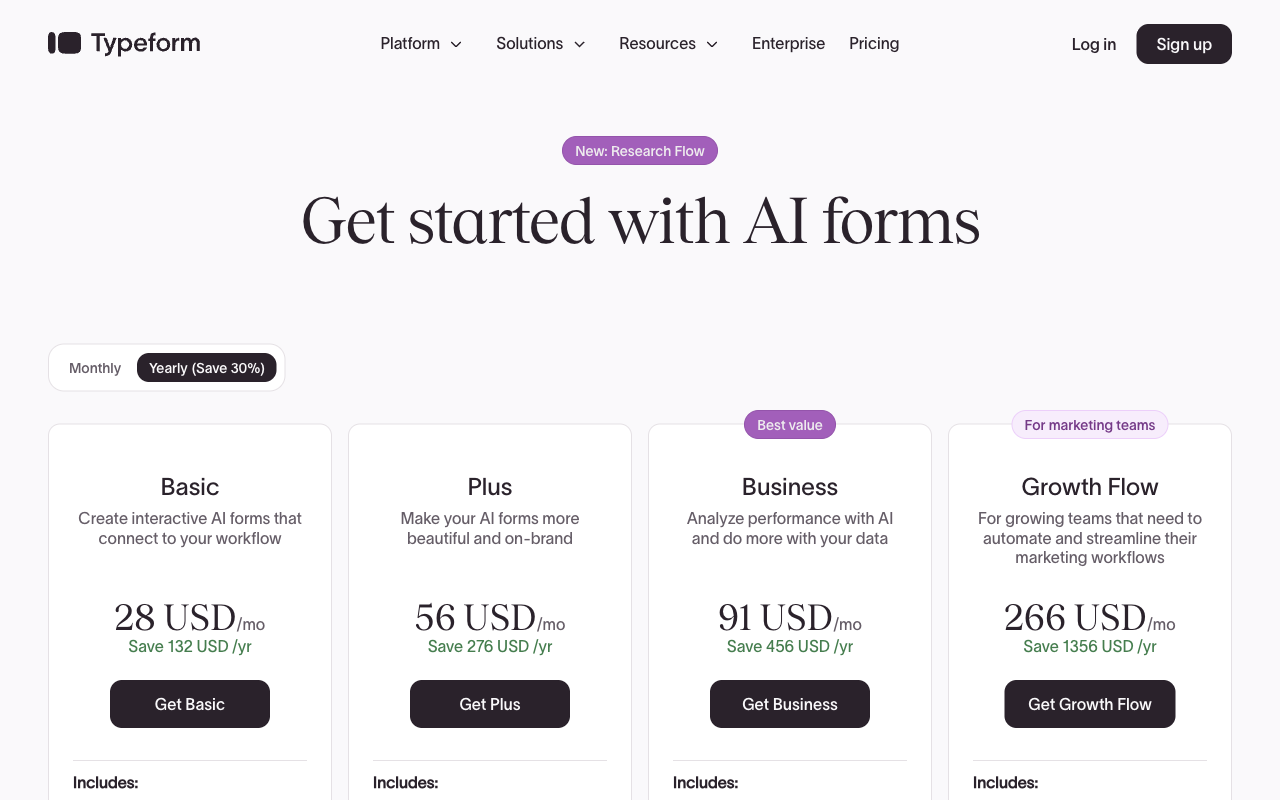
Read the meter alongside the headline. Google Forms never meters, and its paid Workspace tiers sell storage and admin rather than form features. Typeform meters responses and seats on every tier, which is why its cheapest plan is also its narrowest. Paperform meters neither on paid plans, though Stepper automation credits are the one thing it does count: 20,000 a month on Pro, 100,000 on Business, with extra blocks at $10 and $25 a month respectively. Custom domains are also a line item at $20/month each on Pro, with one included on Business.
Paperform
Google Forms
| Product | Plan | Monthly Price | Annual Price (per month) | Free Plan | Free Trial | Limits |
|---|---|---|---|---|---|---|
| Paperform | Free | Free | Free | Yes | 7 days | forms: Unlimited, submissions: 30/month, storage: Unlimited, users: Unlimited, file uploads: 100 MB |
| Paperform | Pro | $59/mo | $49/mo billed annually | forms: Unlimited, submissions: Unlimited, storage: Unlimited, users: Unlimited, file uploads: 10 GB | ||
| Paperform | Business | $149/mo | $124/mo billed annually | forms: Unlimited, submissions: Unlimited, storage: Unlimited, users: Unlimited, file uploads: 100 GB | ||
| Google Forms | Free (Personal) | Free | Free | Yes | 14 days | forms: Unlimited, submissions: Unlimited, storage: 15 GB (shared across Google Drive), users: 1, file uploads: Included in 15 GB storage |
| Google Forms | Business Starter | $8.4/mo | $7/mo billed annually | forms: Unlimited, submissions: Unlimited, storage: 30 GB per user, users: Up to 300, file uploads: Included in storage | ||
| Google Forms | Business Standard | $16.8/mo | $14/mo billed annually | forms: Unlimited, submissions: Unlimited, storage: 2 TB per user, users: Up to 300, file uploads: Included in storage | ||
| Google Forms | Business Plus | $26.4/mo | $22/mo billed annually | forms: Unlimited, submissions: Unlimited, storage: 5 TB per user, users: Up to 300, file uploads: Included in storage | ||
| Typeform | Free | Free | Free | Yes | No | forms: 10, submissions: 10/month, users: 1 |
| Typeform | Basic | $39/mo | $28/mo billed annually | forms: Unlimited, submissions: 100/month, users: 1 | ||
| Typeform | Plus | $79/mo | $56/mo billed annually | forms: Unlimited, submissions: 1,000/month, users: 3 | ||
| Typeform | Business | $129/mo | $91/mo billed annually | forms: Unlimited, submissions: 10,000/month, users: 5 | ||
| Typeform | Growth Flow | $379/mo | $266/mo billed annually | forms: Unlimited, submissions: 10,000/month, users: 5 | ||
| Typeform | Talent | $169/mo | $119/mo billed annually | forms: Unlimited, users: HR teams |
What reviewers say
Three very different sample sizes sit behind these numbers. Google Forms is rated by people measuring a free utility against a simple job, and 4.7 on Capterra across 11,000-plus reviews says it does that job well. Typeform's B2B scores of 4.5 to 4.7 come from about a thousand reviews per platform, a footprint Paperform cannot match, while its 2.6 on Trustpilot records what the same product feels like once the plan limits start biting. Paperform's 4.8 average from a few hundred reviews is a smaller pool with a narrower spread, and support is where it separates.
The verdict, as a decision tree
- Choose Google Forms if the form is internal or educational, the answers belong in a spreadsheet, nobody pays anything, and the branding is not going in front of a customer. Free is the correct price for that work and no upgrade here would improve it.
- Choose Typeform if the form is short, customer-facing and brand-led, monthly volume is predictable and comfortably under your tier's cap, three to five people at most need edit access, Stripe is your processor, or you need a HIPAA BAA.
- Choose Paperform if the response is the beginning of something: a payment with real pricing logic, a contract to sign, an approval chain, or a team whose size you would rather not have to budget for. It is the most expensive of the three to start and the only one where growth does not change the invoice.
Put simply, the choice tracks scope rather than quality. All three are good at what they are for, and two of them are honestly better than Paperform in specific situations: Google Forms on simple free collection, Typeform on cheap entry, review depth and HIPAA. Paperform's case is for the third situation, where the form is the front door to a process and the alternative is three vendors and a monthly reconciliation. For the head-to-head detail, see Paperform vs Google Forms and Paperform vs Typeform. If Paperform is not on your list, Google Forms vs Jotform vs Typeform covers the same ground with Jotform in the third seat, and the best form builders ranking covers the wider market.
Frequently Asked Questions
Is it cheaper to run 5,000 responses a month through Typeform or Paperform?
Paperform, and the gap is not close. Five thousand responses a month puts you on Typeform's Business tier at $129/month ($91/month billed annually), because Plus stops at 1,000. The same volume on Paperform costs $59/month ($49/month billed annually) on Pro, where submissions are unlimited within fair use. Google Forms would carry the volume for nothing, but it cannot take a payment, run a calculation or put the form on your own domain, so it is only the cheap answer when the form is doing the simplest possible job. The number that matters is the one at the top of your growth curve, not the one on the first invoice.
Can Google Forms or Typeform collect payments the way Paperform does?
No. Google Forms has no payment capability at any tier, paid Google Workspace included. Typeform collects payments through Stripe and nothing else. Paperform supports five gateways: Stripe, PayPal, Square, Braintree and Google Pay. The gateway count is only half of it. Paperform treats a paid submission as an order, with products, inventory, subscriptions, coupons, custom pricing rules, tax and refunds, and the amount is worked out by Excel-style calculations inside the form. Typeform charges a card. Paperform charges no transaction fee of its own on top of the processor's.
How much conditional logic do Google Forms and Typeform actually give you?
Google Forms branches at the section level only: an answer to a multiple-choice or dropdown question can send someone to a different section, and that is the whole feature. There is no way to show or hide an individual question and no calculation engine at all. Typeform has real branching from Basic at $39/month ($28/month annual), but advanced logic and calculations sit on Plus at $79/month ($56/month annual). Paperform branches at question and page level on Pro, and the Excel-style calculations behind it also decide which conditional emails fire, what reaches an integration and what the success page says. An AI assistant writes the formulas if you would rather describe the rule than build it.
Which of Google Forms, Typeform and Paperform is safe for patient data?
Google Forms and Typeform, not Paperform. Typeform is HIPAA compliant and signs BAAs, with HIPAA coverage sold through its enterprise contract. Google Forms inherits Google Workspace's HIPAA coverage, which a covered entity can put under a BAA. Paperform is not HIPAA compliant and signs no BAAs. We would rather say that plainly than bury it: if the form touches protected health information, Paperform is out, and this page is not the one to read. All three hold SOC 2 and GDPR. Typeform adds ISO 27001, 27017, 27018 and ISO/IEC 42001, Google adds FedRAMP and ISO 27701, and Paperform holds SOC 2 Type II, GDPR and CCPA with a public Trust Center. Our form builders for healthcare guide covers the compliant options properly.
Does Typeform or Paperform handle what happens after someone submits the form?
Paperform, in one subscription. Typeform's automation lives on Growth Flow at $379/month ($266/month billed annually), and that tier does not raise the 10,000-response or five-seat ceiling underneath it. Contact automations are a further add-on at $25/month for 2,400 actions or $75/month for 12,000. Signing is a Signature question type, which captures a scribble in a form rather than producing an executed document, so a real contract means a separate eSignature vendor. Paperform Pro at $49/month annual includes 25 signed documents a month through Papersign, unlimited workflow steps and 20,000 automation credits through Stepper. Automation credits are metered, at $10/month per extra 10,000, and that is worth knowing up front. Google Forms has none of this and expects Zapier and Apps Script to cover it.
Why do so many teams move off Google Forms to Typeform or Paperform?
Because the work stops being a form and becomes a process. Google Forms is excellent at collecting answers into a spreadsheet, and teams stay on it for years doing exactly that. The break comes with a specific requirement: branding that has to be yours, a payment, a contract, an approval chain, or a security questionnaire from someone else's procurement team. Teams whose requirement is presentation on a short customer-facing form usually land on Typeform. Teams whose requirement is the process behind the form usually land on Paperform, because forms, eSignatures and workflow automation arrive on one bill instead of three. See Google Forms alternatives for the wider field.
Typeform has far more reviews than Paperform — should that decide it?
It should count for something, and we will not pretend otherwise: Typeform carries roughly 1,000 G2 reviews and 979 on Capterra against Paperform's few hundred, and rates 4.5 to 4.7 on the B2B platforms. Read the consumer side too. Typeform sits at 2.6/5 across 775 Trustpilot reviews, with the complaints concentrated on plan limits, billing and paywalls rather than the product itself. Paperform averages 4.8 across G2, Capterra and Trustpilot and 4.9 on GetApp, with support its strongest dimension, from a much smaller pool. Google Forms rates 4.7 on Capterra from more than 11,000 reviews, which measures how well a free utility does a simple job.
Sources & References
- The 6 best Google Forms alternatives in 2026 — Zapier, 2026
- Google Forms Review: Is This the Best Free Survey Tool? — TechRadar, 2025
- Typeform Review 2026: We Tested Everything (Features, Pricing, Integrations & Real Results) — Hackceleration, 2026
- Best Online Form Builder to use in 2026 | Top 20 Tools — EmailToolTester, 2026
Last updated September 22, 2026
Ready to try Paperform?
Create beautiful forms, payment pages, and workflows — no code required.