Jotform vs SurveyMonkey vs Typeform: Which Form Builder Wins in 2026?
Jotform is the broadest of the three at $34/month annually, with 40+ payment processors and HIPAA on Gold. SurveyMonkey is the research instrument at $32/month annually, with analytics nothing else here matches. Typeform is the best-looking at $28/month annually. All three meter what you collect.
This shortlist usually appears when someone has been asked to pick one tool for the whole company and has found three products that each solve a different problem. Jotform is an operations toolkit with two decades of accumulated capability. SurveyMonkey is a research platform that also accepts registrations. Typeform is a piece of brand design that happens to collect answers. The overlap is real enough that they show up on the same evaluation spreadsheet, and thin enough that the spreadsheet rarely settles it.
Below, all three are compared on the things that actually decide a purchase: what the plan costs and what it caps, integrations and API access, conditional logic, payment processors, and compliance. Figures were read from the vendors' own pricing pages in September 2026. The verdict is a decision tree rather than a ranking, because the right answer depends entirely on what happens after someone hits submit.
Quick verdict: who each one is for
 Jotform
Best for: a single operator who needs the widest feature surface in one account, especially an unusual payment gateway or offline collection on a phone.
 SurveyMonkey
Best for: research, CX and people teams whose output is a defensible finding, and who need benchmarks, crosstabs or a paid respondent panel.
 Typeform
Best for: short, brand-facing forms where the completion rate is the number being optimised and the monthly volume is predictable.
Three products built around three different outputs
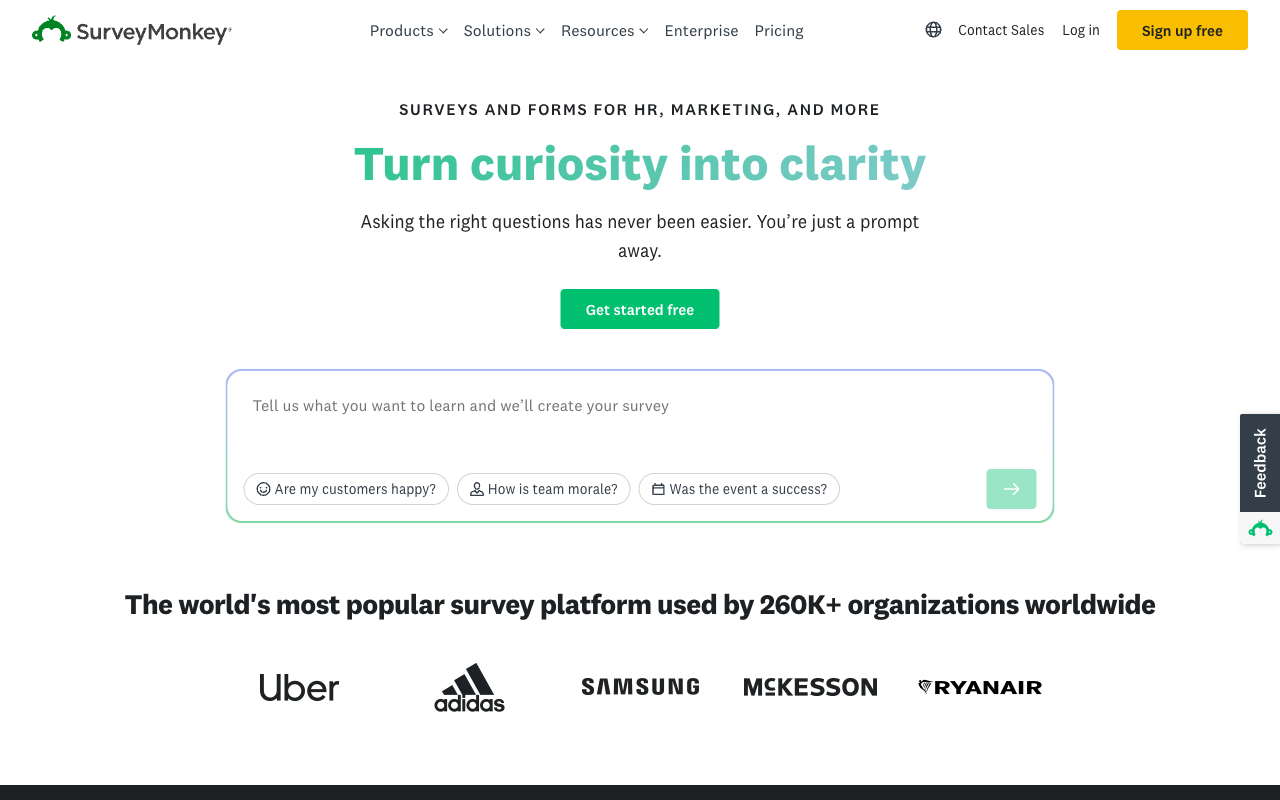
The difference shows up before any feature table. Jotform's homepage sells getting things done, SurveyMonkey's sells turning curiosity into clarity, and Typeform's sells the form itself as the experience. Each promise implies a different buyer and a different bill.


Feature comparison
Read the payments, analytics and customisation rows first. They are where these three stop resembling each other.
| Feature | Jotform | SurveyMonkey | Typeform |
|---|---|---|---|
| Form Building | |||
| Document-style editor | No | No | No |
| AI form creation | Yes starter | Yes | Yes |
| Field types | 30+ (starter) | 15+ | 20+ |
| Multi-page forms | Yes starter | Yes | Yes basic |
| Guided mode (one question at a time) | Yes starter | Yes | Yes |
| Conditional logic | Yes starter | Yes Individual Advantage | Yes basic |
| Calculations field | Yes starter | No | Yes plus |
| Scoring | Yes starter | Yes | Yes plus |
| Answer piping | Yes starter | Yes Individual Advantage | Yes basic |
| Pre-filling and hidden fields | Yes starter | Yes Individual Advantage | Yes basic |
| Save and resume | Yes starter | Yes Individual Advantage | No |
| Auto-close by number | Yes starter | Yes Individual Advantage | Yes basic |
| Auto-close by date | Yes starter | Yes Individual Advantage | Yes basic |
| Appointment/booking field | Yes starter | No | Yes basic |
| Signature field | Yes starter | No | Yes basic |
| Color picker field | No | No | No |
| File uploads | Yes starter | Yes | Yes basic |
| Drag-and-drop builder | Yes starter | No | No |
| Form widgets | Yes starter | No | No |
| Template gallery | 20,000+ (starter) | No | No |
| AI chat survey editing | No | Yes | No |
| AI calculations assistant | No | No | No |
| API-powered dropdowns | No | No | No |
| Google address search | No | No | No |
| Question display logic | No | No | Yes basic |
| AI follow-up questions | No | No | Yes business |
| AI extended thinking & memory | No | No | Yes growth |
| Typeform AI connectors | No | No | Yes growth |
| Workflow / automation builder | No | No | Yes growth |
| AI-moderated research (Research Flow) | No | No | Yes enterprise |
| Video questions | No | No | Yes basic |
| Payments | |||
| Stripe payments | Yes starter | Yes Individual Advantage | Yes basic |
| PayPal payments | Yes starter | Yes Individual Advantage | No |
| Square payments | Yes starter | No | No |
| Braintree payments | Yes starter | No | No |
| Google Pay | Yes starter | No | No |
| 40+ payment gateways | Yes starter | No | No |
| Product sales (eCommerce) | Yes starter | No | No |
| Subscriptions | Yes starter | No | Yes basic |
| Coupons and discounts | Yes starter | No | No |
| Custom pricing rules | Yes starter | No | No |
| Tax calculations | Yes starter | No | No |
| No transaction fees | Yes starter | No | No |
| Quotes/invoices | No | No | No |
| Refunds | No | No | No |
| 3D Secure | No | No | Yes basic |
| Design & Customization | |||
| Template gallery | 20,000+ (starter) | 400+ | 1,500+ |
| Rich media (images, GIFs, videos) | Yes starter | Yes | Yes |
| Form themes | Yes starter | No | No |
| Language translation | Yes starter | Yes Individual Premier | Yes basic |
| Advanced theming | Yes starter | Yes Individual Advantage | Yes plus |
| Custom form URL | No | Yes Individual Advantage | Yes plus |
| Custom domains | Yes enterprise | No | Yes enterprise |
| Custom HTML & CSS | Yes starter | No | Yes business |
| Remove branding | Yes bronze | Yes Individual Advantage | Yes plus |
| Custom email domains | No | No | No |
| Unsplash and Giphy integration | No | No | Yes |
| Image editor | No | No | No |
| Adobe Creative Cloud | No | No | No |
| Analytics | |||
| Submission results and reports | Yes starter | Yes | Yes |
| Form analytics | Yes starter | No | No |
| Google Analytics integration | Yes starter | No | No |
| Partial submissions | No | Yes Individual Advantage | Yes plus |
| AI report insights | No | Yes Individual Advantage | Yes business |
| Paperform analytics | No | No | No |
| Google Analytics & Facebook Pixel | No | No | Yes basic |
| Custom analytics scripts | No | No | Yes basic |
| Benchmarks | No | No | No |
| Drop-off analysis | No | No | Yes business |
| Cross-form Insights dashboard | No | No | Yes business |
| Collaboration | |||
| Multi-user accounts | Yes bronze | Yes Team Advantage | Yes plus |
| User permissions and management | Yes enterprise | Yes Team Advantage | Yes plus |
| Advanced permissions & admin | Yes enterprise | Yes enterprise | Yes enterprise |
| Form sharing | Yes starter | No | No |
| Assign forms | Yes enterprise | No | No |
| Form sharing (templates) | No | Yes Team Advantage | Yes |
| Review Sessions | No | Yes Team Advantage | No |
| Persistent Magic Link | No | Yes Team Advantage | No |
| Spaces and tag management | No | No | No |
| Workspace organization | No | No | Yes |
| Security | |||
| SOC 2 Type II | Yes enterprise | Yes | Yes |
| GDPR compliant | Yes starter | Yes | Yes |
| HIPAA compliant | Yes gold | No | Yes enterprise |
| SSL encryption | Yes starter | Yes | Yes |
| 256-bit SSL | Yes starter | No | No |
| Two-factor authentication | Yes starter | Yes | Yes |
| SSO (SAML) | Yes enterprise | Yes enterprise | Yes enterprise |
| reCAPTCHA | Yes starter | Yes | Yes business |
| Data residency | Yes enterprise | No | No |
| Form encryption | Yes starter | No | No |
| PCI DSS | Yes starter | No | Yes |
| Enforce 2FA for all users | No | Yes enterprise | No |
| Local data residency | No | Yes enterprise | No |
| Custom S3 storage (BYO) | No | No | No |
| ISO 27001 | No | No | Yes |
| Integrations & API | |||
| Native integrations | 150+ (starter) | 200+ | 120+ (basic) |
| Zapier | Yes starter | Yes | Yes basic |
| Make (Integromat) | Yes starter | Yes | Yes basic |
| Webhooks | Yes starter | Yes Individual Advantage | Yes basic |
| API | Yes starter | No | Yes basic |
| WordPress plugin | Yes starter | No | Yes |
| Smartsheet integration | Yes starter | No | No |
| Canvas LMS integration | Yes enterprise | No | No |
| Salesforce AppExchange | Yes starter | No | No |
| Embed options | Yes starter | No | Yes |
| Mobile apps | Yes starter | No | No |
| Claude (Anthropic) integration | No | Yes Individual Advantage | No |
| ChatGPT integration | No | Yes | No |
| Gemini integration | No | No | No |
| HRIS integrations (Workday, BambooHR) | No | Yes | No |
| Standard API | No | Yes Individual Advantage | No |
| Business API | No | Yes enterprise | No |
| oEmbed support | No | No | No |
| Claude / MCP server | No | No | Yes basic |
| AI data enrichment | No | No | Yes growth |
| Automations integrations (Contacts & Automations) | No | No | Yes growth |
The five dimensions that decide it
Each block below stands on its own. Skip to whichever one is blocking your decision.
Pricing
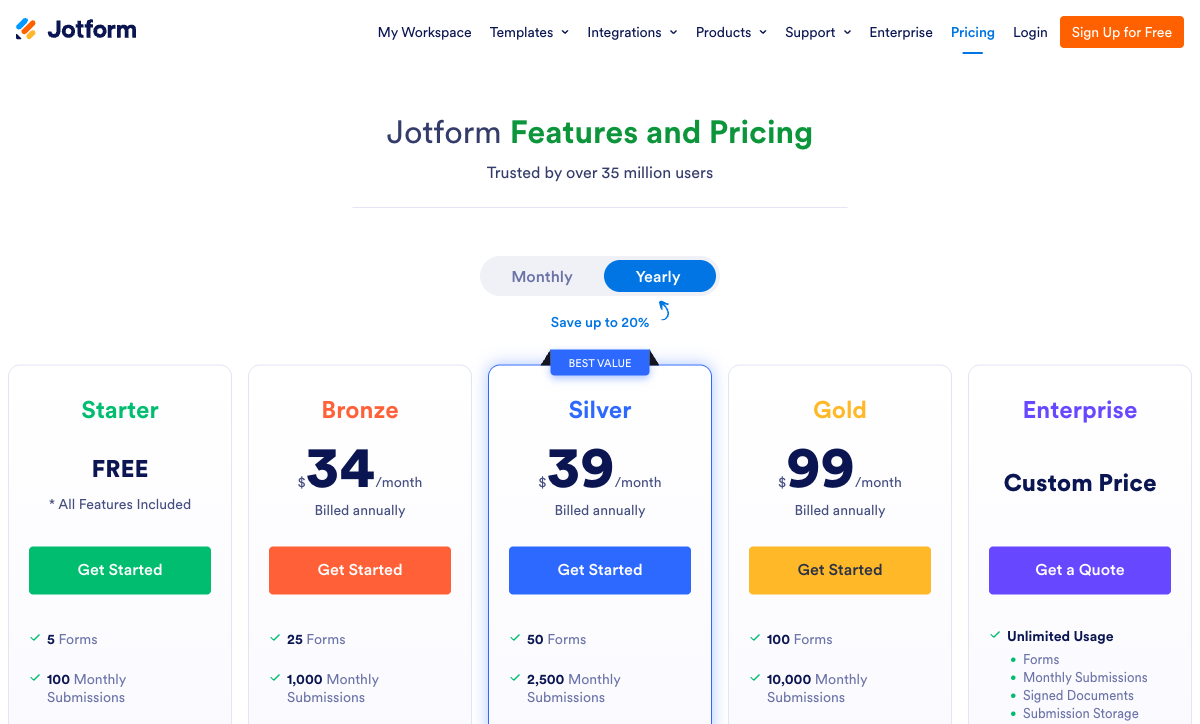
Typeform starts at $28/month billed annually for 100 responses a month, SurveyMonkey at $32/month annually for 15,000 responses a year, and Jotform at $34/month annually for 1,000 submissions a month. The ladders diverge quickly. Jotform runs Bronze $34, Silver $39, Gold $99 and meters submissions, forms, form views, stored submissions, fields per form and signed documents at once. Typeform runs Basic $28, Plus $56, Business $91, and Growth Flow at $266 raises neither the 10,000-response nor the five-seat ceiling. SurveyMonkey runs Advantage $32 and Premier $99 for individuals, with Team plans starting at three users and Enterprise at five. Since September 2026 every paid SurveyMonkey plan is annual commitment only, and responses past the cap bill at $0.15 each.
Integrations & API
SurveyMonkey lists 200+ native integrations, Jotform 150+ and Typeform 120+, and all three ship a REST API with webhooks. SurveyMonkey's catalogue is the most enterprise-shaped, covering Salesforce, Tableau, Power BI, Slack, Teams and, since the September 2026 relaunch, ChatGPT, Workday and BambooHR; its Business API with higher rate limits is an Enterprise line item. Jotform carries a Salesforce AppExchange listing and a long tail of operational connectors. Typeform's list is marketing-weighted around HubSpot, Salesforce and Klaviyo, and its Contacts & Automations capability is an add-on at $25/month for 2,400 actions or $75/month for 12,000. Beyond the native lists, all three depend on Zapier or Make, so the automation meter sits with a fourth vendor.
Conditional logic
Jotform includes question-level logic and a calculation widget on its free Starter plan, SurveyMonkey ships skip, page and advanced branching logic with no calculation engine at all, and Typeform gates advanced logic and calculations to Plus at $56/month annually. The practical split is between routing and computing. All three can send a respondent down a different path. Only Jotform and Typeform can produce a number from the answers, and Jotform's does it through a widget rather than a first-class formula layer. Reviewers consistently name Jotform's conditions panel as the place the interface stops being legible once the rules stack up.
Payments
Jotform supports 40+ payment processors, SurveyMonkey supports two (Stripe and PayPal, on Advantage and above), and Typeform supports one (Stripe). Jotform takes no transaction fee of its own but caps payment submissions at 100/month on Bronze and 1,000/month on Gold, so the payment gets metered twice over. Typeform added native Stripe recurring payments in August 2026. SurveyMonkey treats payment as a field appended to a survey, with no subscriptions, coupons, product catalogue or tax calculation, which means there is no order record to reconcile afterwards. For anything resembling a storefront, all three leave the commerce logic somewhere else.
Compliance (HIPAA / GDPR / SOC 2)
All three are HIPAA, GDPR, CCPA, SOC 2 and ISO 27001 compliant, but the HIPAA entry price differs sharply: Jotform on Gold at $99/month annually, SurveyMonkey on Enterprise with a five-user minimum and a custom quote, Typeform with a BAA on its enterprise agreement. Typeform holds the deepest certification stack, adding ISO 27017, ISO 27018 and ISO/IEC 42001 for AI management systems in June 2026. SurveyMonkey holds PCI DSS 4.0 across SurveyMonkey, Wufoo and SurveyMonkey Apply, covers Section 508, and lists FedRAMP as in progress. Jotform holds PCI DSS Level 1, FERPA, StateRAMP and HECVAT, which is the strongest public-sector and education profile of the three. SSO sits on Enterprise for all three.
Jotform: the most capability per dollar, sold by the meter
Jotform has been building since 2006, is bootstrapped and profitable, and serves more than 40 million users. Nothing else on this shortlist matches its surface area: 40+ payment gateways, 150+ integrations, native iOS and Android apps that collect data offline, Jotform Sign, Tables, Approvals, Report Builder, AI Agents and a library of 20,000+ templates. Every feature is available on the free Starter plan, with only the ceilings moving as you pay, and nonprofits and schools get 50% off. It holds 4.7 on G2 from 5,595 reviews with the #1 Online Form Builder position, which is a large body of evidence pointing the same direction.
Two structural facts deserve attention before you commit. The first is that the metering is unusually wide: submissions, forms, form views, stored submissions, fields per form and signed documents each have their own ceiling, and Gold at $99/month annually still stops at 100 forms. An agency standing up one intake form per client runs out of inventory rather than capability. The second is seats. Starter through Gold are single-user plans, so the second person who needs edit access is an Enterprise conversation rather than an upgrade button. The review text adds a third theme: widgets and advanced logic that behave inconsistently, and support queues that reviewers describe as slow. Supporting 40 million users across a surface that large is a genuinely hard staffing problem, and it shows in the 4.4 customer support sub-score on G2.
SurveyMonkey: the strongest research instrument, on the strictest contract
If the deliverable is a finding rather than a submission, SurveyMonkey is the one to beat. It ships NPS, CSAT and CES out of the box, cross-tabulation, industry benchmarks, sentiment and thematic analysis, MaxDiff, concept testing and Van Westendorp price optimisation, plus an AI Analysis Suite you can query in plain English. The 400+ templates are methodologically sound rather than merely numerous, multilingual surveys cover 70+ languages, and SurveyMonkey Audience sells access to 335M+ respondents in 130+ countries when you need an audience you do not own. The September 2026 relaunch added conversational survey editing, automated insights, and Workday and BambooHR connectors. Founded in 1999, owned by Symphony Technology Group and used by 260,000+ organisations, it is the most established name here.
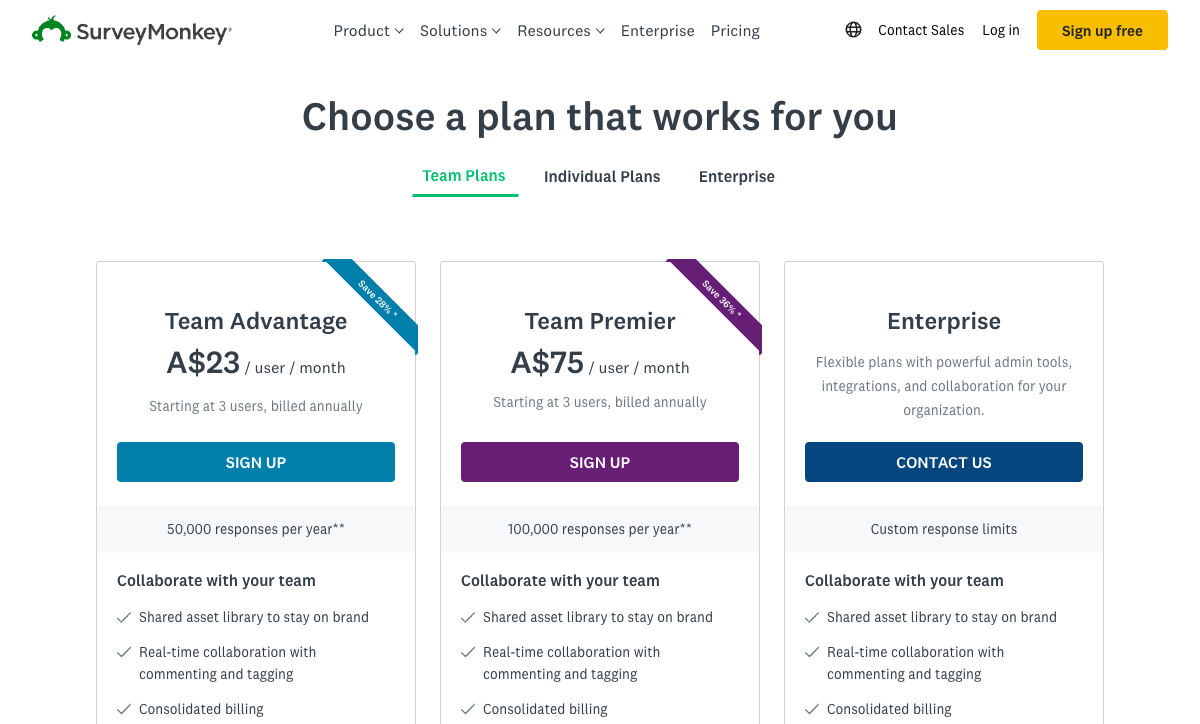
The commercial terms are where buyers hesitate. Every paid plan is now an annual commitment, each carries an annual response cap (Advantage 15,000, Premier 40,000, Team Advantage 50,000, Team Premier 100,000), and anything beyond it bills at $0.15 per response. Team plans require three users minimum, which is $1,080/year on Team Advantage before anyone logs in, and seats are split into Full Access and Analyst types at checkout. Design customisation is thin: no custom CSS or HTML, no custom domains, and no way to build anything that does not look like a SurveyMonkey survey. Form fields that operations teams expect, including signature, booking and address autocomplete, are simply absent. The Trustpilot score of 2.7 from 1,068 reviews, with 63% one-star, is dominated by auto-renewal and cancellation complaints rather than by the product, and it sits beside 4.6 on Capterra from 10,508 reviews. Both numbers are telling you something real about different parts of the experience.
Typeform: the best presentation on the shortlist, priced by the response
Nobody makes a better-looking form. Typeform's paged flow, typography and transitions produce something people finish, and the company sells that directly: 3.5x more responses than a standard form, 95% of the Fortune 500 as customers, 1,500+ templates, and an AI layer covering form generation, adaptive follow-up questions and response analysis. Multi-question pages landed in the builder in July 2026, which loosens the one-question-at-a-time constraint without changing the paged model. For a lead capture or an NPS prompt attached to a brand people will judge, the aesthetics do measurable work.
Then come the ceilings. Every plan caps both responses and seats: 100 responses and one user on Basic, 1,000 and three on Plus, 10,000 and five on Business, and Growth Flow at $266/month annually raises neither. reCAPTCHA sits on Business at $91/month annually, so spam protection is an upgrade trigger and junk submissions burn quota you already paid for. Drop-off analysis and conversion tracking sit on the same tier, which means the data explaining a failing form is behind the same wall as the budget request to fix it. Custom domains arrived in June 2026 but only on Enterprise and Growth Custom, both contact-sales. Capterra and GetApp put Typeform at 4.7 from 979 reviews while Trustpilot sits at 2.6 from 775, and the complaints there are about billing and paywalls encountered mid-use. Worth noting on stability: Typeform has raised $193M through Series C, and venture funding is eventually repaid out of the pricing page.
See it in action
An independent walkthrough of the most polarising product of the three. Typeform's demo value is easy to see in a video and its limits are not, which is the pattern worth keeping in mind while watching.
Pricing comparison
Compare the caps before the headline rates. Jotform meters six things monthly, SurveyMonkey meters responses annually and then charges per overage, and Typeform meters responses and people together.
Jotform
SurveyMonkey
| Product | Plan | Monthly Price | Annual Price (per month) | Free Plan | Free Trial | Limits |
|---|---|---|---|---|---|---|
| Jotform | Starter | Free | Free | Yes | No | forms: 5, submissions: 100/month, storage: 100 MB, users: 1 |
| Jotform | Bronze | $39/mo | $34/mo billed annually | forms: 25, submissions: 1,000/month, storage: 1 GB, users: 1 | ||
| Jotform | Silver | $49/mo | $39/mo billed annually | forms: 50, submissions: 2,500/month, storage: 10 GB, users: 1 | ||
| Jotform | Gold | $129/mo | $99/mo billed annually | forms: 100, submissions: 10,000/month, storage: 100 GB, users: 1 | ||
| SurveyMonkey | Basic (Free) | Free | Free | Yes | No | forms: Unlimited, submissions: Limited per survey (exact number now only shown after sign-up/login), storage: N/A, users: 1 |
| SurveyMonkey | Individual Advantage | Free | $32/mo billed annually | forms: Unlimited, submissions: 15,000 per year, storage: N/A, users: 1 | ||
| SurveyMonkey | Individual Premier | Free | $99/mo billed annually | forms: Unlimited, submissions: 40,000 per year, storage: N/A, users: 1 | ||
| SurveyMonkey | Team Advantage | Free | $30/mo billed annually | forms: Unlimited, submissions: 50,000 per year (shared), storage: N/A, users: 3 minimum | ||
| SurveyMonkey | Team Premier | Free | $92/mo billed annually | forms: Unlimited, submissions: 100,000 per year (shared), storage: N/A, users: 3 minimum | ||
| Typeform | Free | Free | Free | Yes | No | forms: 10, submissions: 10/month, users: 1 |
| Typeform | Basic | $39/mo | $28/mo billed annually | forms: Unlimited, submissions: 100/month, users: 1 | ||
| Typeform | Plus | $79/mo | $56/mo billed annually | forms: Unlimited, submissions: 1,000/month, users: 3 | ||
| Typeform | Business | $129/mo | $91/mo billed annually | forms: Unlimited, submissions: 10,000/month, users: 5 | ||
| Typeform | Growth Flow | $379/mo | $266/mo billed annually | forms: Unlimited, submissions: 10,000/month, users: 5 | ||
| Typeform | Talent | $169/mo | $119/mo billed annually | forms: Unlimited, users: HR teams |
What users say
The B2B averages sit close together and the volumes tell the better story. SurveyMonkey carries 23,525 G2 reviews at 4.4 and 10,508 on Capterra at 4.6, the largest corpus in this category by a wide margin, with value for money at 4.4 trailing ease of use at 4.6. Jotform holds 4.7 on G2 from 5,595 reviews, praised for breadth and marked down on support speed. Typeform sits at 4.5 on G2 from around 1,002 reviews and 4.7 on Capterra from 979. The consumer platforms diverge sharply from all of that: Trustpilot has SurveyMonkey at 2.7 and Typeform at 2.6, and in both cases the one-star text is about renewals, caps and paywalls rather than the software. Buyers rate the product; the people who get the invoice rate the pricing model.
The verdict: a decision tree
- Choose Jotform if one person owns the forms and the requirement is raw capability: a regional payment gateway, offline mobile collection, HIPAA with a BAA on Gold at $99/month annually, FERPA or StateRAMP coverage, or a Salesforce connection you can install rather than build. Budget a tier above your estimate, because the meters move before the features do.
- Choose SurveyMonkey if the work is research, CX or employee engagement, and the output has to survive scrutiny: benchmarks, crosstabs, MaxDiff, multilingual fielding, or a bought panel. Size the annual response cap honestly before signing, since every paid plan is now a year-long commitment and the overage is $0.15 per response.
- Choose Typeform if the form is short, customer-facing and attached to a brand, completion rate is the metric you report on, Stripe is already your processor, and monthly volume is steady enough that you will not be shopping tiers mid-campaign.
- Choose none of them if the form is the first step of a process rather than the whole job, if more than a handful of people need to build, or if you need two of these three strengths at the same time.
The last branch catches more teams than the others combined. A registration form that takes a payment, routes for approval, gets a document signed and files the result is not a survey, a research instrument or a brand asset. It is a workflow, and on this shortlist a workflow means buying two or three vendors and owning every join between them.
Resolving the tradeoff: where Paperform fits
Every product on this page charges more as your work goes better. Typeform prices responses and seats together, SurveyMonkey prices responses annually and then again at $0.15 each, and Jotform prices six separate things at once and keeps the second seat behind a sales call. Paperform rejects that model outright: submissions and users are unlimited within fair use on paid plans, so a campaign that outperforms and a team that doubles both cost what last month cost. Pro is $59/month, or $49/month billed annually, above Typeform Basic, SurveyMonkey Advantage and Jotform Bronze at the door. What the difference buys is a bill that stops moving, sold month to month so nobody signs a year blind.
The second argument is that the customer should not have to be the integration. A collect-price-sign-route process on this shortlist needs a form tool, an eSignature vendor and an automation platform, each with its own admin console, renewal date and meter. One Paperform subscription covers forms, Papersign for eSignatures and Stepper for workflow automation on every plan. Pro includes 25 signed documents a month, unlimited workflow steps and 20,000 automation credits; Business at $124/month annually includes 100 signed documents, 100,000 credits, SSO, the Business API and 10 workspaces. Automation credits are the one thing Paperform meters, at $10/month per additional 10,000, which is worth sizing up front rather than discovering in month three.
On the product itself: the document-style editor mixes prose, images, video and questions on one page, so the form reads as a landing page instead of handing off to one, and Guided Mode renders that same form one question at a time when you want the Typeform effect. Excel-style calculations run underneath, deciding which questions and pages appear, which conditional emails fire, what reaches an integration and what the success page says, which is the layer SurveyMonkey has no equivalent for. Payments run through Stripe, PayPal, Square, Braintree and Google Pay with products, subscriptions, coupons, tax and refunds. There are 4000+ integrations, 30,000+ templates, SOC 2 Type II, GDPR and CCPA, a 7-day trial with no card, and a company that has been bootstrapped and profitable since 2016 with support included in the seat price rather than quoted as an enablement fee. Two concessions worth stating plainly: Paperform is not HIPAA compliant and signs no BAAs, so protected health data belongs on Jotform Gold, SurveyMonkey Enterprise or Typeform; and for formal market research with benchmarks and a panel behind it, SurveyMonkey is the better instrument and Paperform is not trying to replace it.
Head-to-head numbers live in Paperform vs Jotform, Paperform vs SurveyMonkey and Paperform vs Typeform. Narrowing to two of these three? See Jotform vs SurveyMonkey, Jotform vs Typeform or SurveyMonkey vs Typeform. Looking further afield, there are the SurveyMonkey alternatives and the wider best form builders ranking.
Frequently Asked Questions
Is SurveyMonkey or Typeform cheaper once you count the response caps?
Typeform is cheaper to enter and SurveyMonkey is cheaper per response, and both bill you for volume. Typeform Basic is $28/month billed annually for 100 responses a month, which works out at 1,200 responses a year. SurveyMonkey Advantage Annual is $32/month and allows 15,000 responses a year, then charges $0.15 for every response beyond that. Since September 2026 every paid SurveyMonkey plan is an annual commitment, so the money leaves up front and the overage arrives later. Jotform sits between them on price at $34/month annually for 1,000 submissions a month, and it stops collecting rather than billing you when the quota runs out.
Which of Jotform, SurveyMonkey and Typeform can take a payment?
Jotform supports more than 40 payment processors, SurveyMonkey supports two (Stripe and PayPal, on Advantage and above), and Typeform supports one (Stripe). Jotform meters the payments themselves: 100 payment submissions a month on Bronze, 250 on Silver, 1,000 on Gold at $99/month annually. None of the three runs commerce logic behind the payment, so product catalogues, inventory, coupons and tax rules live in another system. Paperform supports five gateways with those things built in, and does not cap the orders.
Does SurveyMonkey have conditional logic as good as Jotform or Typeform?
SurveyMonkey has skip logic, page logic and advanced branching, with the advanced tier arriving on Advantage. What it does not have is a calculation engine, so it can route a respondent but cannot price a quote or score an application. Jotform gives you question-level show and hide plus a calculation widget from the free Starter plan, which is the widest availability of the three, though reviewers on G2 and Capterra describe the conditions panel as the point where the builder becomes hard to read. Typeform holds advanced logic and calculations until Plus at $56/month annually.
Is SurveyMonkey worth it over Typeform for NPS and customer feedback programmes?
For a feedback programme that has to survive a methodology argument, yes. SurveyMonkey ships NPS, CSAT and CES scoring, cross-tabulation, industry benchmarks, MaxDiff, Van Westendorp price testing and an AI Analysis Suite you can question in plain English, plus a panel of 335M+ respondents in 130+ countries if you need an audience you do not already own. Typeform gives you a better-looking survey and a higher completion rate, and its analysis stops at drop-off and Smart Insights on the upper tiers. Pick SurveyMonkey when the output is a research finding and Typeform when the output is a lead.
Which has more integrations: SurveyMonkey, Jotform or Typeform?
SurveyMonkey lists 200+ native integrations, Jotform 150+ and Typeform 120+, and all three expose a REST API with webhook support. The composition matters more than the count. SurveyMonkey's list leans enterprise, with Salesforce, Tableau, Power BI, Workday and BambooHR added in the September 2026 relaunch. Jotform's leans operational, including a Salesforce AppExchange listing. Typeform's leans marketing, with HubSpot, Salesforce and Klaviyo. All three then hand the actual automation work to Zapier or Make, whose run quotas you also pay for.
Can I collect protected health data in Jotform, SurveyMonkey or Typeform?
All three are HIPAA compliant, at three different prices. Jotform enables HIPAA forms with a signed BAA on Gold at $99/month annually, so Bronze and Silver cannot hold PHI. SurveyMonkey puts HIPAA on Enterprise, which now carries a five-user minimum and a custom quote. Typeform is HIPAA compliant with a BAA and adds ISO 27001, ISO 27017, ISO 27018 and ISO/IEC 42001 for AI management systems, certified in June 2026. All three are GDPR, CCPA and SOC 2 compliant. Paperform is not HIPAA compliant and signs no BAAs, so for health data the answer here is one of these three.
What should I use if I need Typeform presentation, SurveyMonkey rigour and Jotform payments?
No product on this shortlist sells all three, and the honest reading is that you would be buying two subscriptions to fake it. If what you actually run is a process rather than a study, Paperform covers the overlap: a document-style editor with a Guided Mode that renders one question at a time, Excel-style calculations driving logic, pricing and routing, five payment gateways, and Papersign eSignatures plus Stepper workflow automation in the same $49/month annual subscription. For genuine market research with a panel behind it, keep SurveyMonkey. See Paperform vs SurveyMonkey for that boundary in detail.
Sources & References
- SurveyMonkey Pricing Guide 2026: Costs, Plans, and Hidden Fees — Featurebase, 2026
- SurveyMonkey Unveils Sweeping Platform Upgrades to Put Real Human Insight at the Center of Every Business Decision — TechEdge AI, September 2026
- Jotform Review 2026: Pricing, Features, Pros & Cons, Ratings & More — Research.com, 2026
- Typeform Review 2026: Honest Verdict + 15 Real User Reviews — Hackceleration, 2026
- Typeform Achieves ISO/IEC 42001 Certification for Responsible AI Management — Typeform, June 2026
Last updated September 22, 2026
Ready to try Paperform?
Create beautiful forms, payment pages, and workflows — no code required.