Sometimes you need to pause a workflow or run for a while, to make changes, troubleshoot it, or just take a break.
Pausing workflows vs runs: what's the difference?
Pausing a workflow stops future runs. Pausing a run affects one that's already in progress.
A paused workflow doesn't run when its trigger happens. It won't listen for new triggers until you turn it back on.
Pausing a run halts a run that's happening now. You can resume it later from where it left off. If you choose to Cancel it instead, the run ends for good. This can't be undone.
Note: you can only pause a workflow or run while it's live.
How do I pause a workflow?
From the dashboard
- Go to All workflows under Workflows in the sidebar.
- Click the ⋯ menu on the workflow (or right-click it).
- Click Pause. It's in the menu when the workflow is live.
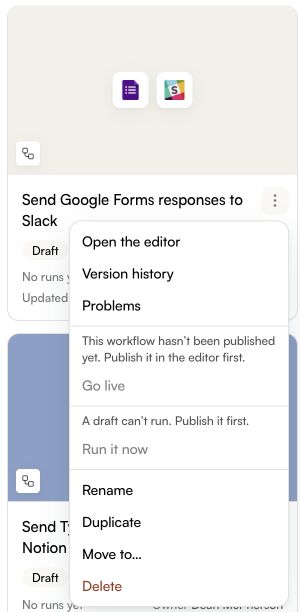
To turn a paused workflow back on, click Go live in the same menu. Drafts can't go live or run from here; publish them in the editor first.
From the workflow's overview page
- Click the workflow in the dashboard to open its overview page.
- Use the switch in the top-right corner to pause it, or to turn it back on. Hover over the switch to see whether the workflow is live or paused.
From the workflow editor
- Open the workflow in the editor.
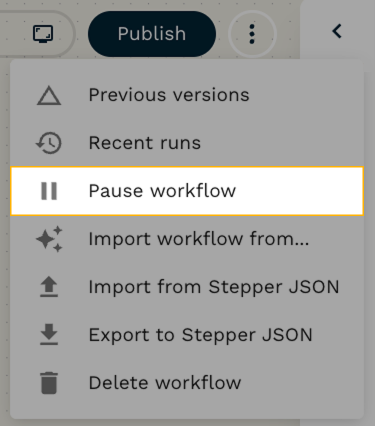
- Click the three-dot menu in the top-right corner.
- Select Pause workflow, then click Pause to confirm.
To turn it back on, select Resume workflow in the same menu.
To see whether a workflow is live or paused, use Filter on the workflows list to show Draft, Live or Paused workflows.
How do I pause or stop a run?
-
Click the workflow in the dashboard to open its overview page, which lists its recent runs.
-
Select the run you want to manage.
-
Click one of the buttons at the top of the run. Hover over each to see its name.
- Pause to stop the run for now.
- Resume to carry on with a paused run.
- Cancel to end the run for good.
-
Confirm your choice.
You can check the run's status at any time from the workflow's overview page.
To learn more about the dashboard, see How do I find my way around the new dashboard?