The Activity page shows recent events on every Papersign document you can see, across all your workspaces. It's a quick way to see what's happened across your documents without opening each one.
It lists when a document is:
- sent
- viewed by a signer
- signed by a signer
- signed by everyone
- declined by a signer
- expired
- cancelled
It also shows when a signer was reminded to sign. Events are grouped by day, newest first. Click Show older activity at the bottom to see more.
Open the Activity page
- In the sidebar, go to Signing > More.
- Click Activity.
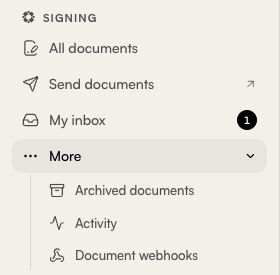
Click a document's name to open it in a new tab.
Activity for one document
To see everything that's happened to a single document, open it from Signing > All documents. Its Actions tab has a time-stamped record of every event on that document, and its Details tab shows each participant's progress.
Learn more about managing documents in the Papersign dashboard and what each document status means.
Send events to another app
If you'd like another app to hear about document events as they happen, use Signing > More > Document webhooks. Learn more about webhooks in Papersign.
To learn more about the dashboard, see How do I find my way around the new dashboard?